
New reel-to-reel audio tape warmer
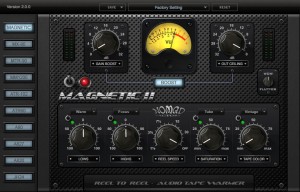
Nomad Factory has released Magnetic 2, a virtual reel-to-reel audio tape warmer effect for Windows and Mac.
The plug-in features pure analog reel-to-reel tape speeds, tape/tube saturation and tape color effects, as well as a dedicated vintage style EQ and a built in Boost mastering section. The result is a creamy, warm sound that can only be achieved by MAGNETIC II.
New in Magnetic 2
- 9 tape models that give you the authentic sound of the famous vintage tape machines:
- Otari MX-80 2-inch 24-track
- Otari MTR-90 2-inch 24-track
- Ampex MM1200 2-inch 24-track
- Ampex ATR-102 half-inch two-track
- Tascam ATR60-16 1-inch 16-track
- Studer A80 Mk II 2-inch 24-track
- Studer A827 2-inch 24-track
- Studer A820 2-inch 24-track
- MCI JH24 2-inch 24-track
- Real Tape Model Mode: To engage the new Real Tape Model mode, simply turn the Reel Speed knob between 1 and 30 and it will activate the selector buttons on the left.
- Wow & Flutter Knob: Turning the Reel Speed knob between 1 and 30 also activates the Wow & Flutter knob which gives you the irregularities in the playback speed of analog recordings.
- Magnetic Tape Color: When the Reel Speed knob is set to DASH, this engages the original Magnetic Tape-Color sound. Any other Reel Speed Knob setting allows you to select between different Tape Model modes, including Magnetic.
Magnetic 2 is available to purchase for the introductory price of $79 USD. The upgrade from Magnetic v1.x is $20 USD for a limited time.
The Story of Reel-to-Reel Tape

Every hit album made before the 1990’s was recorded on some form of Tape… The Beatles, Jimi Hendrix, Led Zeppelin, The Doors, Queen, the list goes on and on. That’s why those songs still sound so good today, because the way they were recorded. Even today, some artists of all genres prefer analog tape’s “musical”, “natural” and especially “warm” sound. Due to harmonic distortion, bass can thicken up, creating the illusion of a fuller-sounding mix. In addition, the high end can be slightly compressed, which is more natural to the human ear. It is common for artists to record to digital and re-record the tracks to analog reels for this effect of “natural” sound. In addition to all of these attributes of tape, tape saturation is a unique form of distortion that many artists find very pleasing.
Before large hard disks became economical enough to make hard disk recorders viable, studio digital recording meant recording on digital tape. Mitsubishi’s ProDigi and Sony’s Digital Audio Stationary Head (DASH) were the primary digital reel-to-reel formats in use in recording studios from the early 1980s through the mid 1990’s. With the MAGNETIC, Nomad Factory has captured the essence of DASH technology and made the sound of high-fidelity digital tape recording available in plug-in format.
Music Studio Guitar Recording
And here are the details:
http://www.xewton.com Music Studio offers a complete music production environment for the iPad/iPhone/iPod touch with features and a sound quality previously only known to desktop applications and expensive audio hardware.
It combines a piano keyboard, 65+60 studio-quality instruments with sustain, a fully fledged 127-track sequencer with audio tracks, extensive note editing, reverb, real-time effects, microphone recording and much more on a user-friendly interface.
Try the free Lite version!
VocaLive for iPad: the first professional vocal processor for iOS!
I guess how professional it is remains to be seen, if you have tried it feel free to leave your comments.
VocaLive for iPad now available in the iTunes App Store! VocaLive for iPad takes an already powerful vocal processing app that has become a favorite on the iPhone® and iPod touch® and makes it even more powerful. The iPad version adds a fourth effect slot to the signal processing chain, and two of those effect slots can hold the specific “vocal effects” compared to just one vocal effect per chain on the iPhone version. The preset browser is also available in the main window of the interface making loading and saving VocaLive presets even easier. The Favorites section has been expanded from 4 to 40 in the iPad version utilizing a new bank button. Favorites put presets right in the bottom panel on large, accessible buttons for immediate loading of the artist’s most-used settings.
VocaLive includes 5 Vocal Effects — Pitch Fix (for tuning correction or stylized quantization FX), Choir (a 3-part harmonizer), Morph (an X-Y pitch and formant shifter that changes the tonal quality of the voice from subtle deepening to radical gender bending) Double (Double effect gets unlocked by registering) and De-Esser — along with 7 Studio Effects — Reverb, Delay, Parametric EQ, Compressor, Chorus, Phazer and Envelope Filter — that together create the perfect vocal processing solution.
VocaLive for iPad features:
- Real time vocal processor + recording app
- 4-processor vocal effects chain
- 12 professional studio quality vocal effects
- Single track recorder expandable to a full 8-track recording studio with master effects section, available for purchase in the in-app Shop
- Import and play songs to be used as backing tracks directly from your music library or computer
- Voice Cancel feature lets you create sing-along backing tracks by removing the vocal track from existing recordings
- 50 presets included with 4 Favorites for fast recall
- Includes metronome and vocal warm-up tools
- Low-latency for real time vocal processing
More information: http://www.ikmultimedia.com/vocaliveipad and http://www.ikmultimedia.com/irigmic
Focus on the The Alterator v1.0 with Max for Live
AVAILABLE: http://designthemedia.com/products/file/11-the-alterator for 4.99€ only!
This Max for Live device is an audio effect combining a pure raw comb filter with a kind of sound degrader.
It can be used for rythmic, but for melody processing too.
Features
– raw comb filter
– LFO modulation of the comb filter
– sound degrader (bit resolution + sample rate)
Requirements
– Max for Live (5.1.9)
– Ableton Live (8.2.6)
New audio processing SW from Roland
Roland is proud to announce R-MIX, a new era in audio processing software, giving recording professionals and those just starting out the tools to visually and intuitively manipulate stereo mix audio easily in real time. Featuring the newly developed proprietary V-Remastering technology and the highly-acclaimed VariPhrase® technology, R-MIX allows you to see the individual components of a stereo mix as color-coded clouds of harmonic matter and to apply effects or center cancel exactly where and as you wish within the mix. R-MIX can also help musicians learn songs by offering focused access to any desired instrument in the mix and the ability to slow down fast or complicated sections.

By graphically breaking down the stereo mix data into three elements (frequency, panning, and level), R-MIX makes it possible to actually see the instruments inside the mix, using the Harmonic Placement. Change the panning and level, erase, extract, and add effects, and independently adjust the pitch and speed of the playback as desired. Lower the level of the vocal or any other instrument within the mix to create minus-one karaoke files or create remixes using two pairs of stereo tracks. Mastering live recording sources is also possible by adjusting the instrument levels and applying noise reduction and effects, and with R-MIX, you can create the highest quality sound and then export your project as an audio file for music player playback.
Since there is only one R-MIX screen to operate, workflow increases, and there is no need to switch screens. Menus are aligned according to the workflow, easing navigation, and a simple help window for each task allows for manual free operation. Windows/Mac compatibility and the intuitive design also makes it accessible to everyone from serious DAW magicians to novice users and easily integrates into education and video production settings.
R-MIX Tab, a simplified version of R-MIX, will be available for the Apple iPad later this year. This iPad application also uses the V-Remastering technology to extract audio elements and easily creates minus-one data from an audio file.
• V-Remastering
Roland’s innovative V-Remastering digital signal-processing technology gives you total control over the elements within a stereo audio file. Built into R-MIX, V-Remastering makes it possible for you to see each stereo mix as color-coded clouds of energy and harmonic matter, and easily isolate the individual instruments or elements within the mix and change their panning positions and levels. V-Remastering also gives you the ability to erase, extract, or add effects to each element within a mix. V-Remastering enables music-editing capabilities never possible before!
• VariPhrase
In conjunction with V-Remastering, R-MIX employs Roland’s acclaimed VariPhrase technology, which can make your audio “elastic.” The secret to elastic audio is the independent control of pitch, time, and formant*. Smoothly adjust pitch without changing tempo, for example, or adjust tempo without changing pitch. Audio is elastic, and freely under your control in real time. Even more amazing is that all of this can be done without changing the sound quality of the original recording.
*Formant parameter not available in R-MIX.
R-MIX availability and MSRP details are being determined now. For more information, please visit http://www.RolandConnect.com.
Realtime Pattern Recording with Numerology
Shows Numerology’s updated Launchpad mapping with realtime pattern recording into the DrumSeq, PolyNote and MonoNote sequencers. The laptop is running Ableton Live with three instances of the Numerology VST, as well as Camel Audio Alchemy for synth lead and NI Massive on pads. The drum sounds are from Numerology’s DrumKit module with a patch designed by Jason Wolf of Tripl3Tone.
Hokusai – the free iOS audio editor
Developer Wooji Juice has introduced Hokusai – a free/commercial multitrack audio editor for iPhone or iPad.
Hokusai comes free with a set of basic tools such as fade in/out, normalise volume levels, reverse time, and basic synthesis. If you need more power, though, additional features are available through in-app upgrades.
Here’s what they have to say about Hokusai:
Record or import a track, and make it sound the way you want it to: not just trimming the ends, but full cut, copy, paste and delete, and a suite of filters and special effects available.
Edit many tracks side-by-side, mix them together, and export to wave or mp4 format — then transfer them to your computer via USB or Dropbox, or send them to another app on your device.
Hokusai is streamlined to give you a clean, clear view of your tracks. Use the familiar pinch and swipe gestures to zoom right in and fiddle with fine detail, or step back to see the big picture. And just like selecting text in other apps, you can select pieces of audio. Live “scrubbing” means you can hear the sound under your fingertip as you make your adjustments. And you needn’t fear a bad edit with our full undo/redo support: as many levels as space allows.
Upgrade options include:
- AudioCopy/AudioPaste
- grain synthesis
- noise gating
- time-stretching
- pitch-bending
- echo
- reverb
- modulation (AM & FM)
- resonance
- distortion
grunge - vocal levelling
- monster voice
- high/low/band-pass/notch-cut filter
Hokusai is a free app, but the app’s more advanced features require in-app upgrades.
Hokusai in the App Store
Propellerhead Unveils Balance Audio Interface – Integrated with Reason Essentials for the perfect music making solution
So it was a hardware piece that they had up their sleeves, just as all the rumors claimed 
Propellerhead Software today unveiled Balance, its first audio interface and foray into hardware. Integrated with Reason Essentials Software, Balance is at the heart of Propellerhead’s complete music making solution.

Balance, a two-in by two-out audio interface for Mac and Windows, is designed for the single person operated home/project studio. Fully USB 2 powered with separate volume controls for monitors and headphones, it contains 8 input connections to keep all instruments, mics and devices connected and ready to record with the press of a button—without software pop-ups or control panels. The included Reason Essentials packs in all the recording editing, effects, instruments and mixing tools needed to create great sounding tracks.
“We looked at recording from our musician users’ perspective. They were spending time concerned with issues other than music making—riddled in installing software, managing cables, setting up control panels, setting gain levels, tweaking recording parameters, and more. It frankly wasn’t as easy and straightforward and it should be,” says Ernst Nathorst-Böös, CEO. “So, we were compelled to create Balance with Reason Essentials to let them focus on creativity and not on technology.”
Works with everyone, perfect integration with Reason and Reason Essentials
Balance’s class compliant drivers on the Mac and ASIO/WMD driver for Windows ensure hassle free installation and compatibility with all applications from iTunes to ProTools. Integration with Propellerhead products goes further. Hardware buttons on Balance bring up a large meter/tuner in Reason and can also enable “Clip Safe,” Propellerhead’s new recording technology that with one click heals clipped recorded audio. Musicians no longer have to worry about losing a great recording because gain levels were too high, and can stay focused on creating that goose bump evoking performance.
Pricing and availability
Reason Essentials with Balance audio interface will be available for purchase worldwide on September 30, 2011 at a suggested retail price of EUR €499 / USD $499.
Any current Reason and Record user who purchases Balance can receive the Reason 6 upgrade for free.
More information on Reason Essentials with Balance can be found here:
www.propellerheads.se/products/balance/ .
Enabling efficient knob recording
This short video shows how to record knob positions for playback, aka controller automation.
This new feature lets you add much more character to your songs by changing values over the length of the track. You can accomplish classic things like filter sweeps and volume fades. Any automation will be saved into your file and exported into output files.
Record sounds, cut and loop them and create rhythms out of them
Jörg Piringer has released RealBeat, a sampler software that enables you to record sounds, cut and loop them and create rhythms out of them.
RealBeat for Mac is not a fully fledged sequencer or sound software it rather offers simple and fast access to sampling and manipulating recorded sounds live or at home. Don’t expect a feature-laden software but lots of fun with your own samples & sounds.
RealBeat features
- Simple interface.
- Sampler (record sounds easily).
- Text to Speech (let your computer speak for you).
- Looping of sounds.
- Modify the sound (pitch, reverse, distortion, reverb, …).
- Sequencer (make rhythms).
- Semi-automatic rhythm creation.
- Patterns (modify the rhythm easily).
- Export sounds.
- Resample sounds.
- Works with internal microphone (or line-in) and external sound interfaces.
RealBeat for Mac is available to purchase for $5.99 USD / 4.99 EUR.
DATAMASKIN

