
New drum machine for the iPad
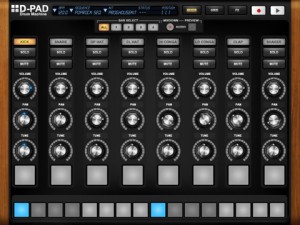
MyElectronica has introduced a new iPad drum machine – D-Pad:
D-Pad is an old-school style Drum Machine exclusively made for the iPad. It brings you a simple and easy to use instrument to create drum rhythms in an instant. With D-Pad, you are able to create new sequences, play with patterns, have a full overview of the drum track and add up to 7 effects in real-time. D-Pad includes many kits, from old machines to new up-to- date styles. D-Pad has a build-in 4 bars sequencer as well as a live mode. Last but not least, D-Pad natively comes with audio export.
Specifications:
- 8 track Sequencer (bpm from 40 to 240)
- 4 bars: sequenced play mode, single bar edit, copy and paste between bars
- Swing feature
- Live pad mode with recording capability (length up to 32 bars or 64 seconds)
- Volume, pan and tune adjustment for each individual track
- Manage your sequence through the sequence menu
- Kit selection menu
- Mixer view, Sequencer Grid view and Effect Rack view
- 7 effects: Reverb, compressor, Filter LPHP, Delay, Bitcrusher, Phaser and 3 band EQ
- Audio Mix-down to reuse your tracks in other audio applications (Wav files)
- Info screen (touch the logo) with parameters modifications (mix-down and swing)
Unfortunately, MIDI support is currently missing in action for D-Pad. The developer says MIDI sync and export are under developement.
D-Pad is $4.99 in the App Store. Details below.
D-Pad comes with 3 different sections: the mixer, the grid and the effect rack.
The Mixer offers you:
- To individually change the Volume, the Pan and the Tune of each track
- To play each track in live mode with dedicated pads, where changes and effects also apply
- To record in live mode with a quantize functionality
The Grid allows you:
- To have a full overview of the rhythm you are creating
- To quickly assign events to each track with the multi-touch enable. Just swipe the pads with your fingers.
- To easily identify when one or more tracks are in solo
The Effect view allows you:
- To control which effect is applied on the whole track
- To set each single parameters of each effect. Here again, the multi -touch enable allows you to modify many parameters at the same time.
D-Pad also comes with the great audio Mix-down feature: create a rhythm (with the sequencer or with the live mode) and record it. The corresponding audio file is stored in the document folder of the D-Pad Application.
Currently under development
- Midi export
- Mid sync
- More effects
Comments
DATAMASKIN

