
Melodyne Tutorial: Making beats with One Shot Samples
Learn how to craft grooves, rhythms and sound variations from single one-shot drum samples with Melodyne.
Human hearing is particularly sensitive when it comes to vocal tracks, which is why producers all over the world are grateful that intonation and timing corrections with Melodyne studio are practically inaudible. Correct the notes quickly and easily with the help of a macro or drag them with the mouse to the correct pitch or position in time. Fine-tune their length, their volume or the intensity of their vibrato. They’ll sound as if they had always been that way. With Melodyne studio, you can see and edit not just one but as many tracks as you like. So you can create with extraordinary ease multi-voice arrangements from a source track with only one voice, taking advantage even of the possibility of outputting each individual voice via a separate channel in the mixer. You can quantize tracks using other tracks for reference and even copy pitches from one audio track to another. Melodyne studio offers the greatest possible degree of flexibility and creative freedom for your arrangements. Multi-tracking adds up to a lot more here than the sum of multiple tracks.
Tutorial videos:
- Making beats with One Shot Samples(see above)
Close to the beat: craft grooves using one-shot samples - Techniques for editing Pop Vocals
Get the most out of your vocals with these techniques
http://www.youtube.com/watch?v=DiW6XVFeFgo - Guitar in the style of Tom Morello
A few right clicks turn simple guitar notes into the solo of a pro
http://www.youtube.com/watch?v=maXKLW69tbo - Creative use of the Amplitude Tool
Crank up or quite down parts of vocals, guitars and drumloops
http://www.youtube.com/watch?v=tY-jX47LB4c - Demixing and Remixing a Vocal Phrase
Relocation service: isolate a vocal phrase and fit it to a new arrangement
http://www.youtube.com/watch?v=9FScFKuXXM0 - Creative use of formants
How to work with the Formant tool for creative editing
http://www.youtube.com/watch?v=nPAINeIGxMc
ADSR – new synth and electronic music production tutorial channel
Background information:
To kick off a new series called ADSR (Attack Decay Sustain Release) we travel to Donny Land Studios to see the meet the man himself, Donny Benét. He shows us around the studio, records an improvised song, give us an exclusive peek at a track off his next album and talks all things music. The ADSR series will bring you interviews with exciting musicians. We will generally discuss music, get insights into their writing process, gear they use and hints and tips for you musicians out there. ADSR’s next episode: Seekae – talking music and their new live setup.
Going through the Maschine Mikro – all you need to know tutorials
This tutorial explains the basics of browsing and programming drums, synths, and plug-ins to make patterns with Maschine Mikro.
This tutorial explains duplicating patterns, note repeat, the step sequencer, and how to use effects in Maschine Mikro.
This tutorial explains the sampling and slicing functions in Maschine Mikro.
Free Ableton Live tutorial videos – percussion, loops and samples
In this video Danny J Lewis (Enzyme Black, Defected) builds the percussion elements of his stripped back deep house track, using congas and bongos as the driving rhythm of the track.
In this video Danny J Lewis (Enzyme Black, Defected) shows you how to manipulate and twist up a percussion loop using the tools in Ableton Live to give them your own unique vibe.
In this video Danny J Lewis (Enzyme Black, Defected) throws together a collection of contrasting samples in Ableton Live. Watch as he begins to develop his idea, moulding the textures and tones together into a cut and paste style house beat similar to the vibe of a Moodymann tune.
Videos from our Deep House in Ableton Live series. It is an exclusive taster of the video content that Point Blank students have access to on the Deep House Pro Producer Course in Ableton Live which launches on 26th September 2011(http://www.pointblankonline.net/make-house-music-ableton.php ).
How to make a basic synth
Here are two tutorials on how to build your own basic synth using Synthmaker. SynthMaker is an audio programming tool that allows anyone to create their own sounds, virtual instruments and effects without having to write any code. These instruments and effects can then be used for playing live via MIDI or as VST plugins for use in making music using any of the popular recording software. SynthMaker allows you to program without writing a single line of code. This is achieved by linking together components. Components are simply building blocks that perform some action. All changes take effect instantly with no build time.
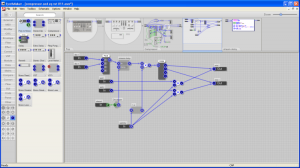
* Build your own instruments and effects without writing any code
* Use them to play live or in your own compositions
* Share them with friends or others
Two new tutorials: LFO Explained and Scale Correction
In this video Danny J Lewis delves into LFO (low-frequency oscillation), a function found on many synthesizers such as Logics ES2. He uses the frequency analyser to explain exactly what is happening to the sound waves when you add LFO.
LFO is the foundation of the classic wobble bass which is very popular with producers of tear-out dubstep (or brostep as it has become known in certain circles!). This video is taken from the brand new Dubstep Pro Producer Course in Logic which covers not only this type of sound, but also all the various offshoots that have evolved since dubstep emerged. You can find out more about the course here: http://www.pointblankonline.net/dubstep-course—logic.php
The dubstep course is also available in Ableton here: http://www.pointblankonline.net/dubstep-course-ableton-live.php
In this video Danny J Lewis demonstrates a free downloadable scale correction tool for Logic which is very useful, especially for those who aren’t musically trained and struggle with the theory side. It allows you to select a specific scale and if you play a note which is not in that scale, it is automatically remapped to one that is. This means you can tinkle away on the ivories with your eyes closed and not hit a bum note… Pretty cool!
You can download it here: http://www.box.net/shared/gz0cu0yqpl
Ableton 101 continues – know it all in one video
Forty minutes of pure Ableton tips and tricks in this Ableton 101. This video packs the gross part of what you need to master Ableton, for more information check out the links below:
http://www.musicsoftwaretraining.com/products
http://www.musicsoftwaretraining.com/blog
http://twitter.com/abletonvids
The most Ableton Live Tips, tricks and shortcuts packed into 1 video!
How to Play Hip Hop Beats for Drums – tutorials
Although I do not personally enjoy hip hop that much, which is a gross understatement by the way, there are some great tutorials on how to create effective drum beats and I guess it is up to you if you prefer to use these tips in any other music genre 
In this video:
Starting on the high hat symbol, then combining bass drum and snare drum rhythms, this drummer demonstrates how to build a hip hop groove in 15 minutes. Create a hip hop groove with the drum beats in this free video on hip hop drumming from a professional drummer.
Expert: Ryan Larson
Bio: Ryan Larson is a young jazz composer whose teaching technique focuses on the basics of music theory in all twelve keys.
Filmmaker: Christian Munoz-Donoso
Ableton Live Tutorials: Audio Interface
This tutorial walks the brand new Live user through the necessary & basic steps of setting up and connecting your Audio Interface to use with Ableton Live.
Part 1 of a new series featuring Ableton’s lead clinician Huston Singletary
Dj Tips: HowTo Create Amazing Build Ups
Today we kick off a two part series on creating amazing build-ups with effects. In the video above I cover four different ways to use the beat roll function – a common effect in most DJ software, for various creative results. Next week we’ll move over to the common echo and explore several ways to introduce it for big build-ups and drama. As with all effects, this one can be seriously overused, but when tastefully applied, well timed beat rolls can add a lot of spice to your live sets.
DATAMASKIN

