
The electronic Swiss army knife for iPad gets a massive upgrade
Audioforge has done a major update on heir app reforge for iPad. Edit the wave form directly just by touching it. Set selections to cut, copy and paste within files or even paste from another file. Set the selection to trim unwanted parts of your audio off and more.
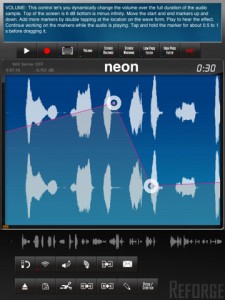
Automate volume changes for fade in effects or remove unwanted clicks. Adjust stereo balance and set it to the far left channel for the beginning of the track continuously transferring over to the right channel for the end. Add stereo widening effects or bring it all to together to make is sound mono. Add high pass and low pass effects to start an intro, simulate a telephone conversation or just distort your sound. Use control markers to automate the effect levels. Add as many markers as you need by double tapping on the waveform. Move them around to generate the changes to the effect you need.
New in Version 2.0
Complete rework of Reforge.
New audio engine
New Audiocopy and paste version (1.2.1)
New design
Stereo recording
Import podcasts and other long (over 3h) audio files for further processing
Portrait mode contains a help screen that explains each function in detail. Start using Reforge in portrait mode and every button you touch will be explained. Once you feel more comfortable with using Reforge, flip to landscape mode where you have more area to view and interact with the wave form.

Import mp3, im4, aif files directly from emails into Reforge. If you receive an email with an attached mp3 file on your iPad, tap and hold the mp3 representation in the email app until the menu appears and then tap “open in Reforge” This feature enables you to receive mp3, aif and im4 files via email directly on your iPad and audiocopy them over into StudioTrack for further mixing. Use the iTunes FileSharing to upload your mp3, im4, aif and wav files. Use the built in wifi server to upload music in mp3, im4, wav, aif format. Use Audiocopy and Audiopaste (V1.2.1 with 12 file history and support for the General Pasteboard) to exchange music with other apps that support it. This enables you to interact with apps like Fourtrack as well as Beatmaker. Import your music directly from your iPod library on your device, that includes podcasts.
Available through itunes. More info and specs at http://www.reforge.info/Site…
Comments
DATAMASKIN

