
How to Record a Song – Recording Guitar and Bass
Have great ideas on your guitar or bass that you want to record? Line 6′s Propellerhead Product Specialist Matt Piper shows you how to get started recording guitar and bass with your computer at home using Propellerhead Record + Reason Duo software. This video also includes a section on microphone placement for recording a guitar amplifier.
This video is the second part in a series. The first video on how to get set up is here: http://youtu.be/gvzS2jS7bRc
Next time, Matt will show you how to program drum and percussion parts!
Audio Interface for iPhone 4
AR-4i is an audio interface for iPhone4 dock connector. The high quality stereo microphone inputs with AD converter improve the audio quality of iPhone4’s video recording, video streaming via Ustream, LiveStream etc. as well as recording of live performance and ENG.

Main Features
- 3 microphone inputs with plug-in power for vertical or horizontal use.
*Input level control and EQ can be done using the dedicated App. - 2 x cardioid plug-in microphones come as standard. Third-party microphones can be used.
- LED Level Meter for input level monitoring. •Microphone gain control. •Headphone jack for input monitoring.
- 2 x AAA batteries for more than 10 hours operation. External power can be fed via USB. •Ergonomic design for secure holding.
- Screw hole provided for optional camera gears such as tripod, grip etc.
Put an end to wow and flutter in your music with Capstan
Hehe, if you can afford it, yikes it retails at 3600€
Here’s what they have to say about it:
For over 100 years, music has been recorded on mechanical storage mediums, and for over 100 years such recordings have been plagued by the same problems: wow and flutter. Who isn’t familiar with the wobbling and warbling, the droning and dragging? Mechanical degradation caused by defective devices or sticking tapes, by aging or defective storage. Furthermore, wow and flutter were for the most part irremediable.
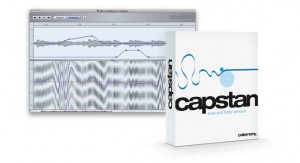
Countless recordings of renowned orchestras, big bands and rock groups are currently slumbering deep in archives because precisely this problem has rendered them unusable. The tapes worthless, the recordings lost to posterity. Until now.
For with Capstan there is now for the first time a program capable of removing wow and flutter from musical recordings — whether on tape, compact cassette, wax, shellac or vinyl. Capstan detects wow and flutter by analyzing the musical material itself, so the medium is of no relevance. In this, Capstan is clearly superior to solutions such as bias tracking, because Capstan still works even if the tape has already been copied several times or digitized only in low resolution.
Being musically intelligent, the Capstan algorithm is capable of recognizing not only the minutest amounts of wow and flutter but also continuous speed variations within the musical material itself and makes possible detailed editing that extends even to drawing in the curve manually. It is based on the patented DNA Direct Note Access technology made famous by the award-winning program Melodyne, which is used worldwide in all major studios for the editing of pitch and timing.
Whilst the precise detection of the wow and flutter represents the actual technological revolution, repairing the recording is easy: the musical material is simply played back with the velocity curve inverted. Pure varispeed — guaranteed free from artifacts.
More info:
http://www.celemony.com/cms/index.php?id=capstan
How to effectively record audio in Ableton
This tutorial walks the brand new Live user through the necessary & basic steps of setting up and Recording Audio with Ableton Live.
Part 2 of a new series featuring Ableton’s lead clinician Huston Singletary
Meteor Multi Track Recorder for the iPad released
Developer 4Pockets has released Meteor – a new digital multi-track recorder for the iPad. The program features up to 12 tracks of digital audio, a built-in mixer and multi-effects processor.
According to the developer, Meteor is ‘ideally suited for creating musical compositions, and also a great tool for journalists and business people who need to splice and piece together voice notes, narration or dictation’.
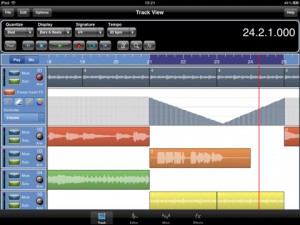
Meteor includes a full-featured sound editor, allowing recordings to be trimmed or spliced together. You can apply various effects to your recordings either directly, as part of the recording process or in real time during playback. Editor features include cut, copy, paste, fade in/out. clear, reverse, gain, normalize, remove DC offset, time stretch and pitch shift. Effects include digital delay, chorus / flanger, reverb, graphic equalizer, tone boost, compressor (with side chaining) and distortion.
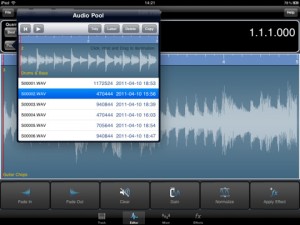
Recordings can be exported to standard file formats.
Features:
- Record up to12 tracks of CD quality audio
- Multi-Effects Processor
- Integrated 12 channel Mixer
- Integrated Sample Editor
- 3 Global Send Effect Busses
- Insert Effects with freeze facility to reduce CPU load.
- Record Effects & Record Monitor
- Mixer and Effect Automation
- Metronome
- Mixdown / Bounce Facility
- Import samples and iPod songs.
- Export to compressed CAF and WAV formats
- Automatic Delay Compensation
- In-App Purchases through the Online Shop found in the Help Menu.
Pricing and Availability
Meteor MultiTrack Recorder is available now for US $19.99.
Link:
Binary Bleeps Sampler

Binary Bleeps Sampler is an audio capture and performance instrument with motion-controlled pitch, filter, delay, and bit crusher effects.Record from the microphone or paste audio from other apps. Play your samples from velocity sensitive pads. Control effects through the motion of your device. Save samples and record performances.
Sampler’s pads are velocity sensitive and trigger samples with very low latency for expressiveness and great playability.
Recording is input sensitive to ensure firm sample start points without further editing. Sensitivity is adjustable to your input source.
The complete effects section is motion controllable. Effect parameters can be assigned to your device’s tilt axes. Sampler comes with a real-time pitch shifter, a resonant lowpass filter, a feedback delay and a lo-fi bit crusher, all of which can be active simultaneously.
Performances can be copied into other apps or transferred to your computer via iTunes file sharing. AudioCopy and AudioPaste are supported.
Sampler comes with quality presets, so you can start making sound instantly.
Get Binary Bleeps Sampler now on iTunes at http://itunes.apple.com/us/a…
Dynamo has been updated

Sinevibes has updated Dynamo to version 1.1.0.
The new version brings the following enhancements:
- New envelope matrix with actual envelope shapes instead of dots.
- XY pad replaced by individual envelope smoothness and effect intensity sliders.
- Command-click or command-drag to set all pattern step levels to the same value.
Dynamo is an AudioUnit effect plug-in that adds complex rhythmic motion to any audio.
At its core is an advanced step sequencer which works as a gate for the incoming signal. The sequencer offers up to 32 steps each with individual level and envelope shape, allowing you to construct modulation patterns of any complexity.
Price: USD 39.00
Visit: Sinevibes
iQ Audio Plug In Demo
EAR MACHINE LAUNCHES iQ
Equalizer plug-in learns the sound you like
Ear Machine today unveiled iQ, an equalizer plug-in designed to learn the user’s preference. iQ recommends equalizer settings by analyzing user ratings of examples. The result is displayed in a traditional equalizer window where users can fine-tune the recommendation.
“The idea for iQ came during a recording session when a client asked me to make the vocal track sound ‘buttery’,” said Andrew Sabin, Ear Machine owner and psychoacoustics researcher. “The client knew what he wanted, but wasn’t able to describe the settings that he was after. We designed iQ to help engineers communicate more easily with their clients, and to help beginning audio engineers figure out the sound they’re looking for.”
With iQ, users indicate how much they like each of a series of example settings by arranging dots from left to right, where each dot represents a different EQ setting. iQ uses a model of auditory perception to gradually hone in on the user’s preference. A meter at the bottom of the window indicates when iQ thinks it has learned what the user wants. The user then clicks “Create EQ” and iQ’s recommendation is displayed in a traditional equalizer window. Users can also double click any dot to display it in the equalizer window.
iQ is the first audio plug-in that is designed to learn a user’s preference. Ear Machine recently launched a related free web app (myMicSound) that is designed to learn a user’s preferred microphone characteristics.
iQ is compatible with AU hosts or VST hosts on the Mac or PC, and is compatible with RTAS wrappers.
See www.ear-machine.com/iQ.html to watch a video, purchase the plug-in, or download a free demo.
AmpliTube Fender apps for iPhone, iPod touch and iPad are now available for download
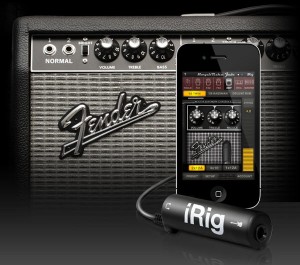
IK Multimedia has announced that its AmpliTube Fender apps for iPhone, iPod touch and iPad are now available for download from the iTunes App store.
Designed and developed in close cooperation with Fender Musical Instruments Corporation, AmpliTube Fender™ is a full featured recording studio, guitar amp and FX rig offering the legendary Fender™ tone.
AmpliTube Fender features
- Real time guitar mobile multiFX + recording and practicing app.
- Full rig with 3 stompboxes (iPhone)/4 (iPad) + amp with effects + cabinet + mic.
- 6 Fender™ Stomps — Fender™ Phaser, Fender™ Blender™, Tape Delay, Overdrive, Compressor (by registering) and Noise Filter.
- 5 Fender™ Amps with matching Cabinets — ’65 Deluxe Reverb™, ’65 Twin Reverb™, ’59 Bassman™ LTD, Super-Sonic™ and Pro Junior™.
- 2 Microphone models, dynamic and condenser.
- Single track recorder (with re-amping) expandable to full 4 track (iPhone)/8 track (iPad) recording studio with master effects through in-app purchase.
- Import and play up to 50 songs/backing tracks directly from your iPod library on your device or from your computer.
- Ultra-realistic tones derived from the AmpliTube Fender Mac/PC studio.
- Slow down or speed up the tempo (-50% to +200%) of imported songswithout affecting their pitch.
- 36 presets can be saved/named/recalled on the fly.
- Includes tuner and metronome.
- Low-latency for real time playing.
- FREE version also available – can be expanded by individual gear model purchases, or bundle purchase via the in-app purchase feature.
- Can be incorporated into the AmpliTube 2 for iPhone/iPad app via in-app purchase.
The AmpliTube Fender apps for iPhone and iPad are currently available from the iTunes App Store, and cost $14.99 USD / 11.99 EUR each. Free versions are also available for iPhone and iPad, both expandable with the individual amps and effects a-la-carte through in-app purchases.
The 4-track recorder and 8-track recorder with master effects’ sections on the iPhone and iPad cost $9.99 USD / 7.99 EUR and $14.99 USD / 11.99 EUR respectively as in-app purchases. AmpliTube 2 for iPhone/iPad users are able to add AmpliTube Fender™ stomp box and amplifier models as individual in-app purchases for only $4.99 USD / 3.99 EUR per amp, $2.99 USD / 2.39 EUR per stomp box, or $14.99 USD / 11.99 EUR for the entire collection of models.
More information: IK Multimedia
SSL Duende Native Plug-in Collection Released
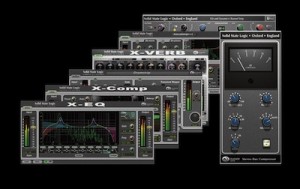
The Duende Native Plug-in suite is a collection of audio processing tools which bring professional audio quality, sophistication and benchmark performance within reach of all DAW users.
Duende plug-ins provide the superior precision, advanced feature set and legendary tonal characteristics of SSL console products in affordable VST/AU/RTAS* plug-in form. They are quite simply the easiest way to get your hands on professional tools that will help you achieve professional mixes that sound like a record.
More info and 30 day demo download here
Via AUB
DATAMASKIN

