
Electrix Tweaker – new controller for Ableton Live and Traktor users
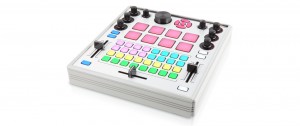
The Electrix Tweaker is a new performance controller for Ableton Live users and Traktor users.
The Tweaker includes a 32-button grid, velocity sensitive pads, push encoders with LED rings, in a 2 channel DJ mixer style interface, with bright multi color LED feedback.
Features:
- 2 Channel DJ mixer style interface
- 32 Button grid with multicolor LED feedback
- 8 Backlit velocity sensitive pads with aftertouch
- 6 Push encoders with LED rings
- Intuitive navigation controls with 5-way selector and large push encoder
- USB bus powered
- MIDI In and Out ports
- Removable height extension legs
- Plug and play on Mac and PC
- Dimensions: 11″ x 10.5″ x 1.75″ (279mm x 267mm x 44.5mm)
The Tweaker is USB Class Compliant in both Mac OS and Windows, and does not require any MIDI drivers for either platform. An additional set MIDI I/O ports are provided to connect other devices.
The Tweaker is available via the Electrix site for $399.99.
DJing With Traktor Pro
Native Instruments 214: DJing With Traktor Pro by Olav Basoski
Video 1 of 28 for Native Instruments 214: DJing With Traktor Pro
Traktor Pro 2.5 gives the modern DJ countless creative alternatives when performing their sets or crafting that perfect remix. Master DJ Olav Basoski turns on the inspiration in this detailed look at Native Instruments’ amazing digital DJ-ing software and hardware.
There is lots to learn here and Olav dives right in with a tour of the interface that will get you comfortable navigating around Traktor Pro. You’ll quickly learn how to cue up your tracks and, using Traktor’s high-quality analysis tools and how to move around the music while staying perfectly in sync between your digital decks. The looping feature gives you even more creative control: you can loop that break and build it up on the fly to make your set as high energy as you want!
Olav also shows you the awesome Traktor Kontrol F1 hardware controllera must for any serious Traktor Pro user! The Kontrol F1 really shines when using the remix decks: it makes creating loops and quantizing or pitch-shifting super intuitive.
When you’ve learned and marveled at what Traktor Pro and Traktor Kontrol F1 has to offer, stick around for a while and dive into our ever-expanding collection of Native Instruments courses!
More info on this title: http://j.mp/PwdAFG
The brand new Traktor Z2 DJ 2+2 Mixer, soundcard and controller from Native Instruments. We had a visit from the NI team on their way to BPM and they gave us the lowdown on their first pro DJ club mixer hardware.
Pricing and Availability:
TRAKTOR KONTROL Z2 will be available at retailers worldwide and at the NI Online Shop from November 1, 2012. Pre-orders are currently being taken.
$899 / 799 € / 83800 ¥
Introducing the Traktor Kontrol Z2: Controllerism
Traktor Kontrol Z2 is the first 2+2 control mixer designed from the ground up for Traktor. Watch it in action in this new 4-deck video — controllist guru Ean Golden performs a chilled-out, downtempo composition, showcasing the all-new Macro FX and Flux Mode in the upcoming Traktor software version, using 2 Traktor Kontrol F1 Remix Deck controllers with the Z2.
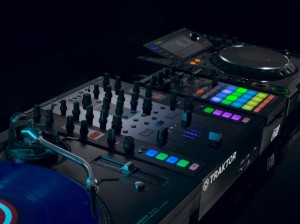
Traktor Kontrol Z2 excels equally as a control hub, or as a standalone mixer, with its aircraft-grade aluminum chassis and rock-solid, ultra-dependable Innofaders™. Step up to the future of mixing — in stores November 1, 2012.
More information: http://www.native-instruments.com/z2-dj-mixer
The features of the Z2:
- Aircraft-grade aluminum – which, by the way, is what we just saw in the DIY Apollo 13 controller yesterday
- Traktor Pro software bundled (and integrated with the controller features).
- Innofader-brand faders, “high-quality” knobs.
- Multi-colored LED buttons, assigned to Remix Decks and cue points. (For those of you who hate the color disco-fication of NI’s hardware, sorry, there’s more.)
- Two standalone mixer channels for external analog inputs – think Pioneer CDJs or turntables.
- Two channels from the soundcard for independent control of the Traktor Remix Decks, cue points, and effects (and, for audio signal, anything you want to route from your computer).
- Dedicated Remix Deck section, and Master section for Traktor file browsing, Sync and Quantize.
- Macro FX, so that you can combine multiple effects on one control. (Also known as “Skrillexing.” Joke. Yes, you can also do classic breakdowns.)
- 24-bit internal soundcard with – at last – XLR balanced outputs.
- Separate booth output, separate mic input. (This is a DJ mixer, after all.)
- Additional aux input, atop the turntable connections. (iPad, perhaps?)
- HID controller implementation.
- USB hub
Traktor Getting Started
For all you Traktor fans out there – a video by Keith McMillen providing a nice tutorial on how to quickly get up to speed with the renowned Traktor
Sneak Preview: Traktor’s 2+2 Control DJ Mixer
Take a look at the world’s first 2+2 channel DJ mixer and controller in this brand new video. Very soon, DJs will mix tracks, blend beats, and work effects in a whole new way. For all the latest Traktor news, stay tuned to www.native-instruments.com/traktor and subscribe to the NI YouTube channel.
Performance by: Eric Goldstein
Tracks being used in chronological order:
Addison Groove – Phantom (Tectonic)
http://www.facebook.com/addisongroove
http://www.facebook.com/TectonicRecordings
Eric Goldstein – Chapter XVII (unreleased)
http://www.facebook.com/GoldsteinMusic
MMM – DEX (MMM)
http://www.zentrale-mmm.de
Special thanks to Funktion-One
http://www.funktion-one.com/
Native Instruments: Traktor HID Integration With Pioneer
More news on Traktor integration with Pioneer. It’s never been easier to set up Traktor in the club. The latest 2.5.1 software update provides plug and play usability with Pioneer’s CDJ Series (2000/900/400) and DJM-900 Nexus Mixer, thanks to advanced HID support. Use the CDJ to access tracks, cue points, loops and more in Traktor, with all relevant information on the CDJ’s display – from track artwork to detailed waveform displays.
This integration gives CDJ users access to powerful features such as Traktor’s Remix Decks, sync, superior cueing and looping, intuitive browsing and world class effects. Traktor memorizes your settings, so every DJ booth becomes your DJ booth, no matter what equipment is installed.
More information:
http://www.native-instruments.com/traktor
Music by:
Technasia – Heart Of Flesh (Cadenza 78)
http://www.facebook.com/Technasia.Official
Ian Tricus – Your Love (Unreleased)
http://www.facebook.com/iantricus
Native Instruments – Luciano in Ibiza with Traktor Kontrol F1
Luciano has been whipping audiences into a frenzy for years, but he’s found a new level of excitement with Traktor Kontrol F1. In this video, the Cadenza boss talks about how he uses the F1 to layer percussion, samples, and acapellas at his Ushuaia and Pacha residencies in Ibiza, creating customized edits on the fly and reinforcing his unique sonic signature.
More info:
http://www.native-instruments.com/f1
http://www.cadenzamusic.net/
http://www.pacha.com/
Filmed and edited by Terry Church: http://terrychurchpr.com/
Native Instruments Traktor Kontrol F1 – The Remix Deck™ In Detail
This video goes into detail about the design, structure, workflow, and capabilities of Traktors’s Remix Deck™.
Remix Set™ taken from DEMI – No1Else
www.facebook.com/demidj
Remix Set™ Preparation: Basics
Native gives a tour of their recently released Remix Set:
Remix Sets are the way to organize your remix content. This tutorial will show you how to get, store and use audio content for your Remix Sets. See how to capture audio on the fly from your DJ set, assign colors on the F1 controller to your samples, and how to export and import a Remix Set.
Understanding the Traktor Remix Deck™
This video is a great introduction to the incredible potential of the new Remix Decks. Get an instant overview of storing and triggering loops and one-shots via the F1, and how to create and use Remix Sets.
DATAMASKIN

