
Closer look at the iMoov – Motion controlled effects in Traktor
New video featuring the iMoov wireless MIDI controller:
After 2 years of research into sensor technology, we are proud to present the iMoov by TangibleFX. To celebrate this release, the app is free for the first 5000 users.
The iMoov is a fully customisable wireless MIDI controller that can be used to control multiple effect parameters within leading softwares like Logic Pro 9, Traktor, Ableton Live, etc, using your movement. The iMoov is also compatible with the Line6 MIDI Mobilizer II.
It’s useful for DJs, live musicians and producers alike. Hold it in your hand, or strap it to your guitar – the possibilities are limited only by your imagination.
We have also developed the TangibleFX School of Moovology to help you get the most out of your iMoov:
http://tangiblefx.com/moovology/
We hope you enjoy this app as much as we do! We’re very excited.
Available now on the App Store – FREE FOR A VERY LIMITED TIME!
Song used:
Royalston – Carnivore (Med School)
www.tangiblefx.com
TRAKTOR KONTROL F1 – Controllerism with Moldover
Matt Moldover takes on Native Instruments’ Traktor Kontrol F1 in a hands-on demo
“We gave two new TRAKTOR KONTROL F1 units to controllerism pioneer Moldover for a weekend test drive. Combining the F1s with his TRAKTOR KONTROL S4, he unlocked the full potential of TRAKTOR’s new Remix Decks™.”
Enjoy
5 Crucial Settings in Traktor Pro 2
Ean’s going through the Traktor Preferences window and taking us on a tour of what the most critical, need-to-know settings are for anyone DJing with Traktor Pro 2.
Read more DJing and Traktor tips, news, and review at the internet’s headquarters for digital DJs: www.DJTechTools.com
Electrix Tweaker – new controller for Ableton
Electrix is back, and their first new product is a control surface with multiple buttons, drum pads, browser, and more.
The Tweaker is a performance controller for Abelton users, Traktor users, and music producers and performers of all genres.
At the heart of Tweaker lies a grid of 32 rubber pads backlit by RGB LEDs, and 8 velocity sensitive drum pads. There is a channel strip on each side of the grid, and a crossfader centered underneath. Each channel trips is comprised of a fader, three backlit rubber pads, an analog knob, and three push encoders with red LED rings. The navigation section at the top of the unit has a large browsing encoder and a four-way selection push grid (left, right, up, down).
Tweaker is fully USB bus powered and also has MIDI In and Out ports.
More info and release date coming soon.
New pad based controller: Traktor Kontrol F1 – Scratch Clips demo
Traktor Kontrol F1 is the definitive controller for the new Remix Decks™ in the included Traktor Pro 2.5 software. In stores May 30th, the F1 blurs the lines between DJing and live performance – the perfect addition to any Traktor-based setup.
Light up your DJ sets with 16 multi-color LED pads, and launch clips in a perfectly intuitive, DJ-centric way, switching between up to 64 tracks, loops and one-shot samples on each Remix Deck.
The second video in our series on different ways to use the F1 shows the Remix Decks working hand-in-hand with scratch techniques. Watch turntablist extraordinaire DJ Shiftee rock out with the multi-colored pads while old-school partisan Greg Nice has some fun on the mic.
Whatever your setup, Traktor Kontrol F1 puts your signature sound at your fingertips. Get ready to remix.
More info:
http://www.native-instruments.com/f1
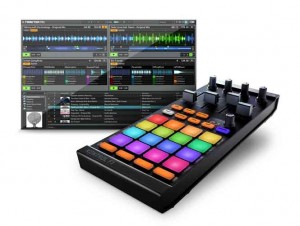
Native Instruments has announced TRAKTOR KONTROL F1, a pad-based, USB-powered hardware controller built to control the advanced Remix Decks™ in the included TRAKTOR PRO 2.5 software. TRAKTOR KONTROL F1 provides 16 multi-colored, touch-sensitive LED pads, an advanced global control section as well as an ergonomic mixer section including four volume faders and dedicated filter knobs. Designed specifically for DJing, NI says that the KONTROL F1 offers a DJ-centric workflow for launching clips in an intuitive way, allowing users to switch between up to 64 tracks, loops and one-shot samples on each deck.
TRAKTOR KONTROL F1 includes the full version of the TRAKTOR PRO 2.5 software, also available as a free update to all users of the TRAKTOR 2 generation. NI tells us that version 2.5 introduces the innovative Remix Decks, giving access to a powerful loop suite made up of 64 slots, each able to hold loops, one-shot samples or even tracks. DJs can control up to four Remix Decks at once and save their work as an entire Remix Set with its respective beat grids, BPM and key information in a new file format that can be comfortably imported into a track deck via TRAKTOR’s browser.
TRAKTOR KONTROL F1 was designed specifically to control the Remix Decks and provides full and tactile control over the new feature, benefiting from seamless bi-directional software-hardware integration and offering full visual feedback through the multi-colored LED pads. Advanced parameters such as Punch mode and FX assignment can also be comfortably changed from the KONTROL F1 and four smaller pads at the bottom of the matrix stop or mute a group of samples. Controlling Sync, Quantize, Sample Size, Reverse and other functionality, the comprehensive global section also features a push encoder to switch through the four pages of the 16 pads and offers a ‘Capture’ button, which allows DJs to grab samples from running tracks of each track deck within the TRAKTOR software, both before and during the actual DJ performance.
Each regular track deck within TRAKTOR PRO 2.5 can be switched to a Remix Deck, thus offering dedicated transport, sync and tempo master controls. This allows DJs to control an entire Remix Deck via Native Scratch timecode control with vinyl or CDs, or using the jog wheels of the KONTROL S4 and KONTROL S2 hardware.
TRAKTOR KONTROL F1 was designed to integrate perfectly into any TRAKTOR DJ setup. With the same form-factor as TRAKTOR KONTROL X1, KONTROL F1 fits neatly alongside standard DJ mixers and the all-in-one DJ systems TRAKTOR KONTROL S4 and S2. The TRAKTOR Bag provides reliable protection for the KONTROL F1 during transport, and also doubles as a solid stand, elevating the KONTROL F1 to standard mixer and turntable height.
MidiPads (MidiPadz) with Traktor Pro
MidiPads is the full version of MidiPadz Lite and it’s got several new features. It’s not just a drumpad controller, here its usage with Traktor Pro.
Learn about the user interface in the first part. For details in conjunction with Traktor skip to the last third.
Get MidiPads on the App Store: http://itunes.apple.com/us/app/midipads/id418216060?mt=8
Once connected, MidiPads sets itself apart with flexible control on each of those pads. Just tapping rectangles isn’t much fun on the iPad, of course – you lack tactile feedback and pressure sensitivity found on a physical pad. So, instead, MidiPads provides other modulation to exploit the touchable surface for continuous control. In fact, thinking of it as a “drum pad” is almost a bit unfair. New in this release:
- Presets, which you can share with other users – which could in turn make a nice little community of users here
- “Bouncing mode” for touch pads and sliders
- Send multiple messages with each axis and knob
- Individual up/down messages for each touch pad and slider, if you so wish
- Enhanced views, settings reset, and MIDI connection settings
- Resize pads and pad area (essential for either fat fingers or getting more controls!)
MidiPads (MidiPadz) with HALion Sonic
DJ: Quick Look at New Behringer Modular Controllers
Here’s a new video featuring the Behringer modular DJ controllers together with Traktor:
For more information on the Behringer CMD series, please visit: http://www.djtechtools.com/2012/01/20/behringers-cmd-line-modular-dj-controll…
- Wide variety of modular units that apply to different uses
- Super precise jog wheel and 60mm faders
- Come with new Behringer 3-year warranty
- CDM-MM1 mixer unit includes a built-in powered USB 2.0 hub
Traktor / Maschine Tutorial – How to Midi Map + Free Mappings (Settings)
More info – http://bit.ly/xgwmpd
In this video, Dubspot Instructor, DMC World Champ, producer and demanding critic of sandwiches DJ Shiftee shares one of his most prized possessions – his Maschine mapping file for Traktor! In part one, he demonstrated an incredible routine using Joker’s “Slaughterhouse” track. In part two, he went into the complex world of LED mapping and modifiers. And now for the final installment of the Shiftee Trilogy, our generous instructor takes you through his Maschine settings, offering a detailed explanation of his mapping and shows you some very cool options for mapping to pads along with some basic functions for cue points setting, looping and syncing.
“Here it is, you hooligans. You thieving scoundrels. My precious Maschine mapping for Traktor. Why don’t you just take my wallet? Or key to my car? Why don’t you spit in my food and tie my shoelaces together? Why don’t you shave off my eyebrows and paint on new ones with a magic marker? Have you no decency? Have you no compassion? Where is your common courtesy? Stealing a man’s Maschine mapping (even though he’s willingly giving it to you for free)? For shame! For Shame!!! FOR SHAME!!!!!!!!!!!!!!!!” – Shiftee
NAMM 2012: Electrix Tweaker introduction
The Tweaker is a performance controller for Abelton users, Traktor users, and music producers and performers of all genres.
At the heart of Tweaker lies a grid of 32 rubber pads backlit by RGB LEDs, and 8 velocity sensitive drum pads. There is a channel strip on each side of the grid, and a crossfader centered underneath. Each channel trips is comprised of a fader, three backlit rubber pads, an analog knob, and three push encoders with red LED rings. The navigation section at the top of the unit has a large browsing encoder and a four-way selection push grid (left, right, up, down).
Tweaker is fully USB bus powered and also has MIDI In and Out ports.
Latest updates will be announced here >>
Electrix Tweaker – Final Production Model at NAMM 2012
We finally got a chance to see a final version of the Tweaker in person, running a mapping for Traktor Pro 2!
DATAMASKIN

