
Design your own MIDI set up
November 25, 2010 · Posted in Uncategorized
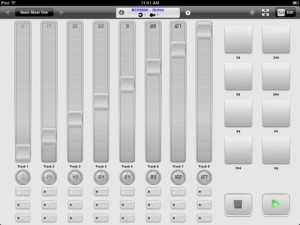
MIDI Touch (App Store link) is a new app for the iPad that lets you design your own ultimate MIDI controller, by placing knobs, sliders and other controls onto the screen wherever you want.
According to the developers, MIDI Touch lets you send MIDI over Wi-Fi with latency as low as 2-5ms and and via compatible MIDI hardware devices with near-zero latency, using the Camera Connection Kit.
Features:
- Design & save your own MIDI controllers by dragging and dropping sliders, buttons and more where you want them to create personalised control surfaces
- Native MIDI Device support – connect compatible devices via the Camera Connection Kit and your iPad becomes a proper MIDI control surface with almost zero latency
- Excellent performance – measured latency over WiFi to a Mac: 2-5ms, over Camera Connection Kit: 1-2ms
- Send messages over Wi-Fi with easy setup (Windows: requires the free software driver rtpMIDI (http://www.tobias-erichsen.de/rtpMIDI_configuration.html), alternatively use DSMI Server for Mac, Windows or Linux, also free)
- Several different control types – Add sliders, knobs, buttons (momentary or latched), drum-pads, X-Y controllers, transport controls and preset-jump buttons
- Easily change the settings of each control – CC number, note number, minimum & maximum range, size & label
- Standard & neon control themes to skin controls
- Multi touch – control multiple knobs/sliders etc at once
- In-app brightness control allows dimming of the screen to very low levels for performance
- Full screen mode to reduce distractions
- Controls snap to each other to help create aligned layouts
Comments
DATAMASKIN

