
Modstep – new full-blown MIDI Sequencer for iPad
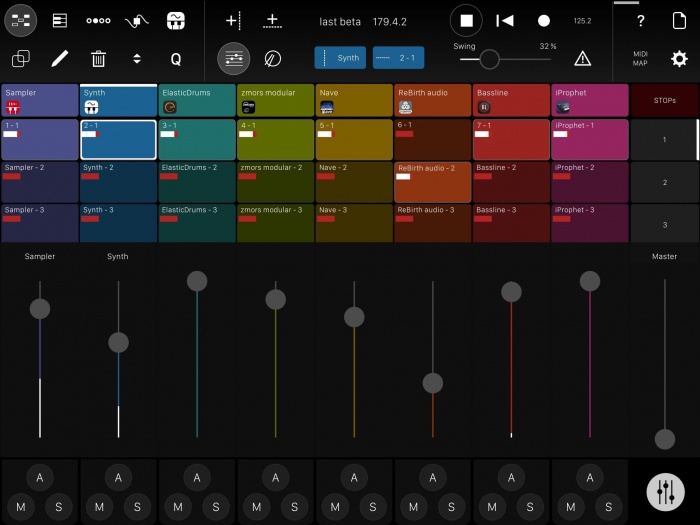
Modstep has launched version 1.0 of its app that allows you to create music and jam with your iPad.
Seemlessly combine your favorite tools no matter in what shape or format they come: IAA Apps, your MIDI hardware, Mac- and PC Software, as well as the internal drum sampler and synth. Modstep speaks MIDI, Inter-App Audio, can send a trigger-signal and stream MIDI and audio between your computer and your iPad with studiomux.
Use it as the centerpiece of your setup to create and perform music on the go, in the studio and on stage.Modstep is developed and designed by Christian Blomert, Benjamin Weiss and Pascal Kaap.
Modstep features
- Full-blown MIDI sequencer with Step Sequencer and Piano Roll.
- Unlimited MIDI tracks.
- Extensive Step Sequencer with active steps.
- Audio and MIDI streaming directly via the charger cable to Mac and PC using studiomux technology.
- Up to 128 MIDI CCs per Track can be modulated.
- Built-in drum sampler with filter, delay and reverb, fully modulatable.
- Built-in synthesizer with filter, delay and reverb, fully modulatable.
- Templates to control external MIDI hardware.
- Template editor to create your own templates for IAA Apps, desktop Apps and external MIDI devices.
- Supports all MIDI interfaces for the iPad.
- Core functionality controllable via external MIDI controllers.
- Use third party IAAs as instruments and effects within one app.
- Integrated IAA mixer.
- Trigger out.
Modstep is available for iOS 8 or later, priced at $19.99 USD. iPad 1 is officially not supported, though all MIDI functionality including MIDI-streaming via studiomux currently works on iOS 5.1.1. For audio and MIDI streaming to a Mac or PC, the studiomux server software is required.
A version 1.0.1 update will be available soon, featuring bugfixes and Ableton Link-integration.
Auria Pro – new professional level DAW for iPad
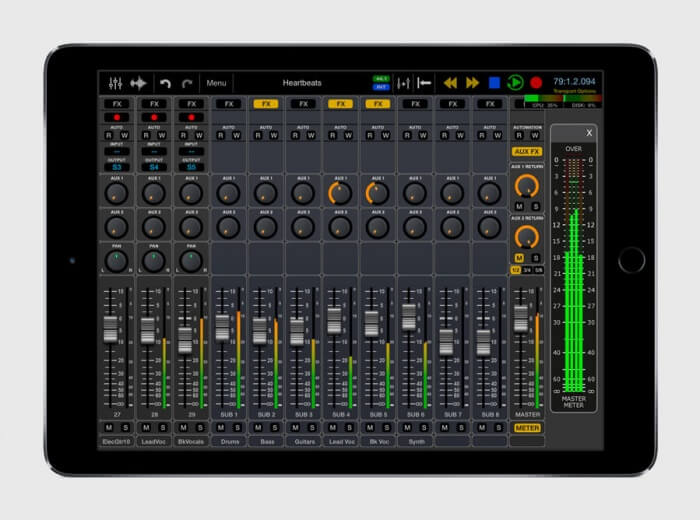
WaveMachine Labs has released Auria Pro, a professional level DAW for iPad.
Introducing Auria Pro. The first Digital Audio Workstation designed from the ground up for iPad.
With professional-level features like comprehensive MIDI support, built-in sampler player and analog synths, real-time audio warping, AAF import/export, powerful busing, and optional third-party plug-in support from names like PSP, FabFilter, Overloud and Drumagog, Auria Pro clearly sets a new standard for mobile music production.
The original Auria app was also updated to version 2.0, which includes updated retina graphics and various bug fixes and improvements.
Auria Pro is available for purchase for $49.99 USD; Auria is $24.99 USD.
7 Minutes with an Ipad Synth – SoundScaper
This week, it’s time for SoundScaper App
– experimental Noise
– textures
– soundscapes
SoundScaper is available here
https://geo.itunes.apple.com/us/app/s…
New iPad app: Fugue Machine – Bach in a box
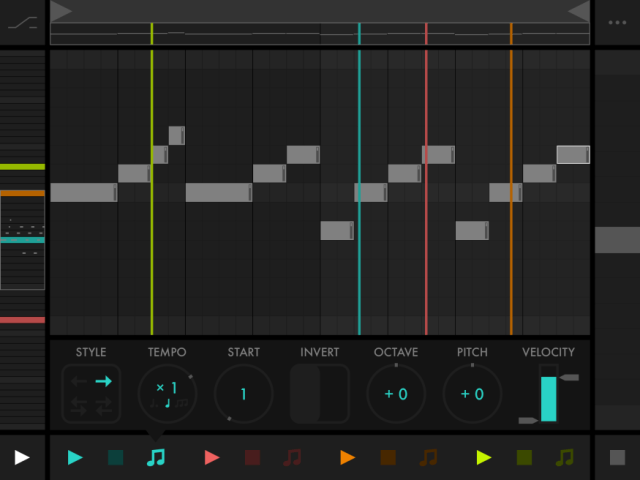
Fugue Machine is a tool inspired by composition techniques used in classical music, from Baroque to Serialism and Minimalism. The developer’s goal was to create a tool that lets you manipulate a melody’s speed, direction, and pitch, as well as play multiple variations of the melody simultaneously.
Fugue Machine implements this by reimagining one of the basic elements of music sequencers: the piano roll.
The Multi-Playhead Piano Roll
Alexandernaut calls Fugue machine ‘the world’s first multi-playhead piano roll’.
It lets you create a musical sequence and play it back with up to four playheads at once — with control over each playback head’s speed, direction, and pitch.
FUGUE MACHINE for iPad, the world’s first multi-playhead music sequencer.
Download it here: http://fuguemachine.com.
miniSynth Pro by Yonac, Demo for iPad, Total Classic
You can get miniSynth PRO here at the App Store
https://itunes.apple.com/gb/app/minis…
miniSynth PRO is a fully-featured, professional-grade virtual analogue synthesizer. It can work as a polyphonic or a monophonic synthesizer at the flip of a switch. It incorporates an improved version of the time proven zero latency “push-pull” Yonac keyboard algorithm that powers our existing synthesizers, and features a highly customized version of our original analogue-clone “Vincent” tone shaping filter. More importantly, it marks the debut of our brand new cutting-edge YASSE (pronounced “Yah-See”) modular sound sequencing and synthesis engine, developed in our labs over the last three years.
As a step up on its predecessors, miniSynth PRO is designed as an FM / Subtractive hybrid synth. Among other innovations, it features our special dynamic waveform selection algorithm, individually parameterized voice processing, and carefully selected waveforms driving its dual interactive oscillators and its five-destination LFO.
miniSynth PRO offers many other features to render music making easier. They include a dedicated arpeggiator module, dual individually adjustable keyboards, user control matrix with configurable assignments, and 82 presets designed by actual musicians. Did we also mention that users are able to record their own performances, as well as save and recall any number of their own presets in our brand-new patch design format?
Selected Specs
• Dual Subtractive / FM virtual-analogue polyphonic / monophonic synthesis
• Fully configurable FM, filter or modulation based tone shaping
• Up to 12-voice polyphony with individual voice parameterization and processing
• 44100, 16-bit CD-quality stereo audio output
• Zero latency sound processing
• Dual syncable oscillators
• 6 optimized, custom waveforms per oscillator
• Dedicated oscillator octave, fine tune and mix
• Osc 2-to-1 adjustable frequency modulation
• Custom VCF (“Vincent”) w/ adjustable quadruple (Initial, Peak, Sustain, Final) stages and dedicated envelope
• VCA (Amplifier) ADSR envelope
• Noise generator w/ adjustable mix
• LFO with 8-octave range and 6 waveforms
• Dedicated LFO fine tune
• Five individually adjustable LFO destinations (Osc1, Osc2, FM, VCF, Amp)
• LFO key syncing
• Control matrix w/ configurable axes, including pitch bend, LFO modulation, filter parameters and more
• Adjustable continuous glide
• Faithful “latest-priority” keyboard control algorithm in monophonic mode
• Adjustable dual keyboards w/ individually settable key width, position & size.
• Custom arpeggiator module w/ 4 different note orderings; hold, track or trigger modes; 5-octave stepping w/ up to 5 repeats-per-octave
• Option to control the Arp w/ upper KB only
• BPM-based arp timer w/ settable note value
• Custom analog-tone stereo reverb w/ individually adjustable channels
• Recording module w/ file saving and playback
• Export/import recordings and patches via iTunes or Wi-Fi
• 82 carefully engineered presets, including retro, basses, arpeggios and more
• Users can save unlimited presets
• Metronome
• Audio Copy/Paste
• USB MIDI Support for external controllers (requires OS 4.2+ & USB adapter available in the Camera Connection Kit)
• Virtual MIDI IN
• Audio Backgrounding
7 Minutes with an Ipad Synth – TC Performer
TC Performer is a free app with in-app purchase for full presets
https://geo.itunes.apple.com/lu/app/t…
Explore unreal synthesis with the most unique performance control on iOS! TC-Performer presents a multi-touch performance environment unlike any other synthesizer. Simply touch the screen; there are no buttons, keys, or sliders to hit. The sounds are generated entirely by your touch movements.
Each patch has a unique method of control. Pull, tap, drag, twist, and stretch your touches on the screen. There is no wrong way to play! Every instrument is a new landscape of sound creation. Pads, leads, effects, and indescribable oddities await.
AnalogKit – synth builder for iOS
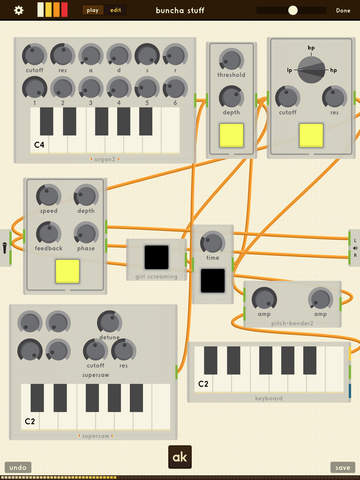
AnalogKit lets you play, share, and build synths and effects in an incredible digital playground.
A music hacker’s paradise, Analogkit is designed to be enjoyed by both seasoned synth aficionados and curious cable-wranglers. Whether you’re into built-from-scratch effects pedals, synths, vocoders or even DIY games, AnalogKit allows you to build nearly anything you can dream of.
• Piece together controls, effects and signal generators into any gear you can imagine.
• 50+ included core components that can be combined to create endless possibilities of sounds.
• Share your creations with the community via the built-in Swap Meet, or browse, live-preview, and download gear built by other users.
• Compatible with many external audio interfaces so you can run AnalogKit as an effects board for mics, guitars, and other analog instruments.
• Full USB, Bluetooth, and WiFi MIDI support to let you use your favorite external controllers
• Advanced optimization algorithms enable you to run tens of thousands of basic modules in real-time on a modern iPad.
• State of the art anti-aliased oscillators provide the most authentic sound sources digital synthesis can offer.
• All the favorite toys from modular analog synths as well as digit logic components so you can build all the hybrid franken-synths your hardware modular friends could only dream of.
Under the hood, AnalogKit is anything but a toy. The process of putting things together with Analogkit is nothing less than an exploration of digital audio creation that’s both revealing and powerful.
Like a supercharged electronics project kit, Analogkit lets you combine and wire things up in any way you want, rather than having to settle for adjusting settings on existing gear. Depending on what components you choose, it can be both a trippy generative app that’s easy to lose hours with, or nimble and precise tool for building custom setups quickly.
Analogkit takes full advantage of its digital nature and lets you literally hook anything into anything, chain together as many of a thing as you like, and finally experiment like a kid again …a kid that happens to have the best audio toy to come to the iPad yet.
7 Minutes with an Ipad Synth – Strng
This week: Strng Synthesizer from Erik Sigth. What is Strng?
“Strng is a string synthesiser inspired by the karplus-strong alghorithm. The physical modelling starts with a short burst of noise that then guided by a tuned delay buffer and string tension filter, generates plucked string like sounds. No samples are used. Strng is 16 voice polyphonic and can be controlled with an in app 25 key chromatic keyboard or connect prefered midi controller through USB or Wifi. To further shape the sound two post effects are available, a ping-pong stereo delay and two channel resonant filter controlled by two LFOs.”
https://geo.itunes.apple.com/lu/app/s…
7 Minutes with an Ipad Synth – Ondes (Olympia Noise Co.)
This week: Ondes from Olympia Noise Co.
Ondes is a fantastic app in my eyes for special playing with synthesis. You can also add it to your modular synthesizer setup
Inspired by early electronic instruments such as the Ondes Martenot and the Theremin, Ondes emulates the fluid playing style of those classic instruments with an interface and synthesis engine firmly grounded in the present day.
Whether you’re gliding through melodies & chord changes or creating dense polyphonic sci-fi soundscapes, Ondes is an instrument unlike any you’ve played before.
Support Synth Anatomy and the app is available here: https://geo.itunes.apple.com/lu/app/o…
7 Minutes with an Ipad Synth – Elastic Drums
A new Episode of 7 Minutes with an Ipad Synth. This week I jam on Elastic Drums. This amazing app is a modular drum synthesizer and drum sequencer in one. Personally the automation of the parameters during the sequence is a fantastic way to make some crazy drum actions.
Available here and if you want to support my channel and work please use this link
https://geo.itunes.apple.com/lu/app/e…
DATAMASKIN

