
Deckadance Mobile for the iPad
June 13, 2012 · Posted in Uncategorized
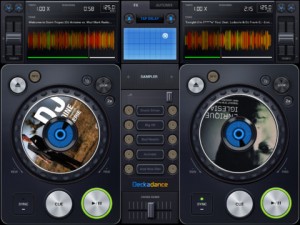
Image Line has released Deckadance Mobile for the iPad:
Load music from your iTunes library and mix, scratch or loop up a storm.
When you are ready to kick back, use the automix feature and let Deckadance mix up your playlists for you.
Key Features:
- Beat detection and autosync – Tap the SYNC button on a deck to sync its tempo to that of the opposite deck.
- Left / Right deck faders & Tempo control with nudge – Individual deck volume faders and X-fader.
- Cue points – Add up to 4 cue points per-track per-deck. Select CUES from the mode window. Tap Rec and a cue memory slot to save the current playback cursor position. Alternatively, with the track stopped press the CUE button to set a cue point. When playing the CUE button jumps back to the cue point and pauses.
- Automix – Select the AUTOMIX tab and music source to hear your selected music automixed.
- Equalizer – From the EQ mode window adjust Low, Mid and High equalization.
- Waveform view – Inspect beat alignment from the WAV mode window.
- Loop – After Deckadance mobile automatically detects the beat, from the mode window select 32 to 1/32nd beat loops and tap the Loop button on the deck to engage.
- Sampler – 5 assignable sampler slots per deck. Play from included sample libraries from the mode window.
- Play effects – From the mode window hold Stutter, Turntable, Censor, Break or (back)Spin to add the effect.
- X/Y effects – From the FX tab choose Ring-Mod, Lo-Pass, Hi-Pass or Tap-Delay effects and control them from the X/Y pad.
Deckadance Mobile is $3.99 in the App Store.
Comments
DATAMASKIN

