
The Nlog for iPad has arrived

Tempo Rubato has announced Nlog MIDI Synth (App Store link) – a new iPad synth that they describe as a “professional virtual analogue synth”.
NLog MIDI Synth is based on the company’s NLOg synth, but adds hardware MIDI support, via the Line 6 MIDI Mobilizer. Tempo Rubato says that other interfaces, like Akai’s Synthstation, will be supported in future updates. The app is also usable without MIDI interface with an on-screen keyboard, as shown above.
NLog MIDI Synthesizer includes full hardware MIDI implementation for note on/off including velocity control, pitch bend, sustain pedal, modulation wheel and assignable MIDI controller.
NLog MIDI Synth turns an iPhone, iPad or iPod touch into a hardware synth for $8.99, which is a very interesting development. We’re expecting MIDI support to become a de facto requirement for iOS synths in the next few months.
Here’s what Tempo Rubato has to say about NLog MIDI Synth’s features:
ENDLESS options for SOUND EDITING
- Over one hundred parameters and options
- More than your beloved hardware synths might offer
- Store up to 96 own edits in 3 user banks
- Exchange sounds with your friends by email
STUDIO QUALITY sounds
- Professional 44.1 kHz Stereo CD quality
- Internal 32bit floating point engine
- Highly efficient sound algorithms
- Enabling maximum CPU performance of your iPhone / iPod devices
STAGE safe KEYBOARD implementation
- Fully customizable keyboard to your personal style
- Keeps all settings automatically in your preferences
- Famous SLIDING keyboard and LOCK options
- Double manual option: two independent keyboards on screen
- POLY, MONO & LEGATO modes
- Optional velocity control
- Four different key sizes
- Full range of 6 1/2 octaves
Fully customizable EXPRESSION CONTROL
- Realistic PITCH BEND and MOD WHEEL implementation
- X/Y two dimensional controller
- Four fully customizable PERFORMANCE knobs
- Keyboard with VERTICAL modulation control
Incredible FAT & RICH:
- New filter implementation for SMOOTH and JUICY control with 7 FILTER types
- Incredible UNISONO mode for up to 4 parallel sounds with detune, delay and panning control
Sound Editing Features:
- 2 Oscilators with 20 waveforms:
- classic analouge SIN, SAWTOOTH, TRIANLGE and SQUARE
- and 16 additional carefully designed wavetables
- True PWM pulsewidth modulation
- Modulated by LFO or envelope
- Frequency modulation
- Sinusoidal and complex waveforms
- Modulation by LFO and envelope
- Ring modulation
- Noise generator
- 7 filter types
- Low Passes, High Passes & Band Passes
- Finest sweeps and smoothest cutoff tuning
- Carefully resonating
- 12 & 24dB option for steepness
- 3 Envelope generators
- Classic Attack, Decay, Sustain and Release
- Velocity controlled attack time
- 2 Modulation LFOs
- 4 waveforms
- Sample & hold
- Fade in delay
- Rich set of modulation parameter
- Organized into 3 modulation pages
- Exclusive modulation envelope
- Multi-effect section
- Stereo delay with cross-feed and damping filter
- chorus
- distortion
Nice demo of the Xenon groovebox
First demo that I did with the awesome Xenon groovebox on my iPad. I especially love how the synths sound in this one, they’re surprisingly good! Highly recommend this app (it also runs on iPod touch and iPhone).
Starship synths here we go
Quite an amazing control panel of iPads
touchAble team and sound designer/composer Arnaud bertrand controlling touchAble with 4 ipads on a same live session!
touchAble is the new dedicated multitouch controller for Ableton and iPad,
more infos on http://www.touch-able.com
Glowing magic on the iPad
This film explores playful uses for the increasingly ubiquitous ‘glowing rectangles’ that inhabit the world.
We use photographic and animation techniques that were developed to draw moving 3-dimensional typography and objects with an iPad. In dark environments, we play movies on the surface of the iPad that extrude 3-d light forms as they move through the exposure. Multiple exposures with slightly different movies make up the stop-frame animation.
iPad interface for the ATC-Xi synth
Federico Solazzo created this iPad interface for his Studio Electronics ATC-Xi synthesizer using TouchOSC on the iPad.
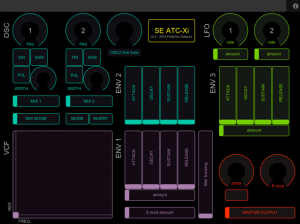
Interface Notes:
- Blue: OSC section
- Purple: VCF section
- Green: LFO section
- Red: master section
By exposing most of the synth’s parameters via a multi-touch screen, the TouchOSC interface makes patch editing tactile and fast.
Preview below:
Technical details:
TouchOSC (iPad) > OSCulator > Logic Pro > emagic amt8 > Studio Electronics ATC-Xi
The ATC is being played via MIDI on a Kurzweil K2VX.
Next iOS ships with MIDI
The next version of iOS – the operating system for the iPhone, iPad and iPod touch – will have an unexpected surprise for musicians: real MIDI support.

Apple’s iOS 4.2 update, due in November, includes some interesting new features that didn’t make Steve Job’s official announcement.
According to a report in AppleInsider, beta testers have found that iOS 4.2 adds support for the CoreMIDI framework to the operating system’s application program interfaces.
CoreMIDI could be huge for iOS music apps, because it provides standardized MIDI support. It is a built-in system that supports MIDI devices and how they communicate with other applications.
MIDI support means that the iPad could be a touchscreen control surface for any MIDI device; developers will be able to create multi-touch sequencers that control MIDI hardware; and you should be able to plug your MIDI keyboard into an iPhone, iPod touch or iPad and play your iOS software synths.
CoreMIDI on iOS 4.2
CoreMIDI support should help make MIDI more plug-and-play on iOS devices.
Here’s what Apple has to say about CoreMIDI:
In Mac OS X, Apple provides a new set of system services, so that applications and MIDI hardware can communicate in a single unified way, using a single API.
MIDI services, which are low level, provide high-performance access to MIDI hardware devices. There is a driver model in the MIDI world that “talks” directly to IOKit, so your application has a direct path from the MIDI services API to the hardware.
Using this driver model, third-party manufacturers can create driver plugins that talk to IOKit. Those can then be loaded and managed by a server, which applications talk to through the Core MIDI framework.
The CoreMIDI framework provides the client-side API that applications use to interface to MIDI devices.
The primary goal of MIDI services in Mac OS X is to have interoperability between applications and hardware, so that everyone is working to the same standard. Other goals include providing MIDI I/O with highly accurate timing, as required by professional applications. This means from a musical point of view being able to get a MIDI event into and out of the computer within one millisecond, i.e., to keep latency under one millisecond, and also to keep jitter –– i.e., the variations in I/O –– under 200 microseconds.
Another goal is to provide a single system-wide configuration, i.e., knowing what devices are present, and being able to assign names to those devices, manufacturer names, and what MIDI channels they’re receiving on and so on.
The MIDI services are designed as an extensible system. Toward that end, a device can have any number of properties attached to it. And a device manufacturer can publish their particular properties of their device.
Developers should be able to code apps with MIDI support, rather than having to support individual interfaces. CoreMIDI could also open up using the Apple iPad Camera Connection Kit for connecting existing USB MIDI devices.
Developers are already starting to support MIDI hardware on iOS, with devices like the Line 6 MIDI Mobilizer interface, This trend is likely to explode, though, with CoreMIDI support.
It’s not clear yet how “baked” MIDI support will be in iOS 4.2. If you’re an iOS developer or if you’re testing the iOS 4.2 beta, let us know if you’ve done any MIDI testing yet.
iPhone, iPad & iPod touch Getting MIDI Support
With this news, iOS 4.2 just got a lot more interesting for musicians.
Get the grips on iSequence for iPad
This video shows how to make a beat in a few simple steps. You can find here some features like live recording, manual programming, mixing with filter or delay effects and automation.
Wait there is more below:
iSequence for iPad tutorial : Quickstart
iSequence tutorial : note velocity and instrument volume
iSequence tutorial : selections in pattern
iSequence for iPad – importing samples
iSequence tutorial : sequence editor
iSequence tutorial : mixer section
iSequence for iPad – drunken master test
iSequence for iPad – single pattern beep-fu
iSequence for iPad
Featuring Clear Notice’s debut music app release for the iPad
With a world premiere of all the videos at Manchester’s Cornerhouse on 4th November, here’s a taster of the videos featuring in Clear Notice’s debut music app release for the iPad. More information on the Clear Notice website.
“HUGE thanks to Ryan Mackfall of Crashburn Media for his outstanding work as Executive Producer to the videographers.”
Clear Notice Recordings, founded by electronic musician Kieron James, is singular in its mission: to become home to the world’s finest electronic musicians and videographers. The ambition is reflected in the bold approach CNR has taken with its debut. Not content with showcasing twelve truly innovative artists, releasing an album rich with composition and technical brilliance, Enter Calico will be launched initally as an iPad App featuring videos produced by twelve animators and filmmakers to accompany the music. Ryan Mackfall of Crashburn Media is the Production Manager overseeing videography.
Free synthesiser application for the iPad

Retro Sound Studio (App Store link) is a free synthesiser application for the iPad that is aimed at creating retro electronic sounds reminiscent of 80?s arcade games.
It is intended to be used by game developers to create sounds for their games or by music producers as a sample source, particularly for producers working in dance music genres such as tech house and electro.
Saved sounds can be accessed by using iTunes.
Select the device, then go to the Apps tab and finally select Retro Sound Studio under File Sharing.
If you give Retro Sound Studio a try, leave comment and share you thoughts on it!
Visit: Retro Sound Studio
Mugician, the latest stuff to arrive for the iPad
We really seem to be swamped by iOS stuff these days 
This video captures a improvisation with Mugician, a free iPad app that’s designed for experienced guitarists., a free iPad app that’s designed for experienced guitarists., a free iPad app that’s designed for experienced guitarists., a free iPad app that’s designed for experienced guitarists.
It’s designed to offer cutting-edge features, but designer Rob Fielding warns that Mugician is also intended to be experimental:
You are on a ride with my free app experiments, but I’m not ignoring the bad feedback! I want people to go out and gig with Mugician so that when I have a future version, I have a loyal audience to sell new apps to.
I did have the crazy ambition to, for many purposes, replace the guitar as the internationally recognized voice of dissent. Creating a subversive instrument that causes people to begin to play microtonal music is a little ambitious at this point, but a well executed touch-screen guitar replacement is certainly not.
If you’re an iPad owner, check out Mugician and leave a comment with your thoughts on it!If you’re an iPad owner, check out Mugician and leave a comment with your thoughts on it!If you’re an iPad owner, check out Mugician and leave a comment with your thoughts on it!If you’re an iPad owner, check out Mugician and leave a comment with your thoughts on it!
Visit: Mugician in the App Store
DATAMASKIN

