
7 Minutes with an Ipad Synth Special – WaveTable Synthesizer
PPG WaveGenerator is the latest development from the inventor of wavetable synthesis, Wolfgang Palm. It is a next generation synthesizer, building on the heritage of the PPG Wave keyboards.
The PPG WaveGenerator comes with a multitude of wavetables. The sound material contains the typical sounds from the original PPG wave models, as well as many new sounds generated by versatile analysis tools and also hand edited waves.
This app enables the user, to create his own wavetables in a playful way, and to hear the result immediately. Also you can construct the waves by adding harmonics very precise.
Another way is to transform a picture into a wavetable. You can load photos from your album or even shoot a picture with the camera.
The waves are collected in a grid of 256 fields, to which the 3 oscillators of the synthesizer have arbitrary and independent access.
In a 3D display you get a visual impression on how the sound evolves. You can turn around the 3D object and zoom in and out,
The Parameters of the synthesizer are divided into modules, which allows easy, yet powerful editing.
It contains 3 oscillators with independent control of pitch and waveform. Each oscillator has its own glide, which gives a very dynamic sound.
With a sophisticated routing system, the diverse modulation sources can be connected to all important control points.
The keyboard is configurable totally freely, so you can setup all well-known musical scales, but also all imaginable custom scales that best fit into your music.
PPG WaveGenerator benefits all advantages of the iPad, like X/Y control after the key on event, or two finder gestures for spectrum control. After a key is hit, the tone may be modified and modulated in various ways, just by moving your finger.
A comfortable browser lets you sort the sound programs; you can categorize and rate them. Also complete custom sound banks may be created.
All significant parameters are controllable via MIDI.
There is a built in context specific help for all pages and modules.
Key Features:
• Creation of your own waves and wavetables.
• Playful sound creation simply by drawing or picking harmonics
• 3D page, visualization of the wavetables, transformation from photos into wavetables.
• 256 waves assembled within a wave grid
• 3 Audio Oscillators
• 3 Noise generators, for audio and modulations
• Classic 24 dB Lowpass Filter, combined with an overdrive simulation.
• Dual amplifier, for versatile control of 2 audio signals as well as panning.
• 13 Envelopes, for independent control of pitch, waveform, filter and noise gain and panning
• 4 LFOs
• Arpeggiator
• Delay/Reverb effect
• Audio engine with 2 synthesis modes, and variable wave blending quality.
• Directly accessible context help inside the app
• Use a camera, to shoot a picture and then transform it into a sound!
• Using state of the art technologies, but still the versatile and efficient synthesis system.
• Build your own keyboard, with the keys you prefer for your music.
• Audio recorder, up to 10 min. at 44.1 stereo
• Audio Copy to the pasteboard
• File Sharing via iTunes
Roland JD-XA teardown – a look at what’s inside
A look inside the Roland JD-XA crossover synthesizer.
The JD-XA is a unique crossover synth that brings together analog warmth and digital versatility in one super-creative, no- compromise instrument. First, there’s a four-part, all-analog monster with true analog filters and a direct dry output. Next up is a four-part digital engine powered by Roland’s SuperNATURAL synth technology, plus an impressive selection of potent effects.
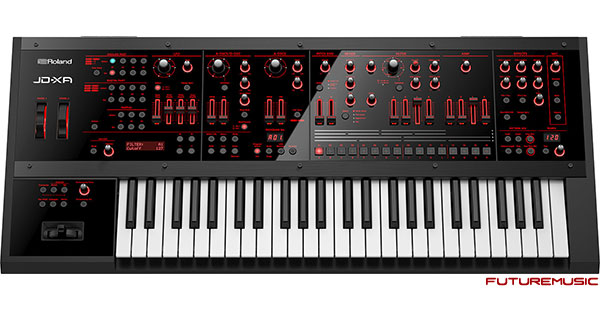
The JD-XA’s engines can be used independently or interactively, providing an incredibly flexible platform for sound design, studio work, and live performance. Use the analog and digital parts side by side, stack them up for total sonic devastation, or shape digital waveforms via the analog filters to create sounds never heard before. With the JD-XA, you can forget about analog or digital—just close your eyes, imagine how the future sounds, and start creating music.
New App for iPad (Work in Progress)
Working on a new app based on the original idea of Szymon Kaliski’s MicroTones (http://microton.es/)
MicroTones is a microtonal synthesizer, allowing simultaneous playback of up to thirty sinewaves set with accuracy to one hundredth of a hertz.
Website: microton.es
MicroTones is a microtonal synthesizer for iOS, allowing simultaneous playback of up to forty sine waves set with accuracy to one hundredth of a hertz.
Easily place multiple sine waves with full multitouch support, move them around in full audible frequency spectrum, create ambient textures and drone noises by combining multiple sine waves close to each other, or create unusual harmonics spreading them around!
Record your sounds live, with full background audio support, and import them to your DAW of choice using iTunes file sharing.

Features:
– up to forty simultaneous sine waves
– full audible frequency spectrum
– multitouch support
– background audio
– live audio recording
– iTunes file sharing of recorded samples
AppStore: itunes.apple.com/us/app/microtones/id522720716?ls=1&mt=8
Dave Smith Instruments Prophet ’08: Drawbar Organ
This improvisation is meant to demonstrate the ability of the Prophet ’08 to imitate the sound of a drawbar organ. The pulse width modulation patch solo was played on a second P’08.
Background video description:
I’ve never been a fan of the Hammond Organ. I’ve owned several – most recently an XK 3c – and don’t regret selling them a bit. There are only a few drawbar settings that I like, and this patch is an imitation of one of them. However, the classic Hammond/drawbar organ sound positively requires a Leslie effect, or at least a Leslie simulator. Mere detuning is a lame substitute. This patch would greatly benefit from such a simulator.
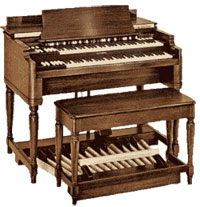
Good organ playing requires an exacting technique. Because of the nature of the instrument’s envelope – having a sharp attack and an immediate release – it’s essential that notes played together be struck exactly at the same instant. Sad to say, I find that synthesizer keyboards do not meet the quality necessary so that such a precise attack can always be made. This is true for the Prophet ’08 and Poly Evolver Keyboard as well. I’ve noticed many times, especially when playing hymns or Bach chorales, that it’s nearly impossible to get the attacks of the notes to be crisp and clean, even with repeated tries of the same passages. The same is true for this piece. There are many instances when the strikes of simultaneous notes are not together, creating a smearing effect. That’s my disclaimer. There are many imperfections in this improvisation.
Here’s a bit of trivia. Although the Hammond Organ is now most widely used for rock and jazz, as well as Gospel music, its inventor, Laurens Hammond, in no way intended it to be so. He actually designed it to be used in churches as an inexpensive substitute for the pipe organ. It was meat to be used for traditional liturgical music, hymns, preludes, interludes, postludes, and so on. It has been used in many small churches, and I’ve had the misfortune of having to play a CV at a country parish, but I can say that…A HAMMOND IS NO SUBSTITUTE FOR A PIPE ORGAN!
Instrumentation:
DSI Prophet ’08 Keyboard (2)
DSI Prophet ’08 Module
DSI Evolver Desktop
Hammond XPK 200L
Effects:
Lexicon MX300
Alesis Nanoverb 2
iVCS3 Demo 180 Free Presets by Red Sky Lullaby
Demo of Red Sky Lullaby presets for iVCS3
3 Sound Banks (180 Free Presets).
Available within the Store section of the iPad app.
https://itunes.apple.com/us/app/ivcs3…
Official EMS VCS3 emulator
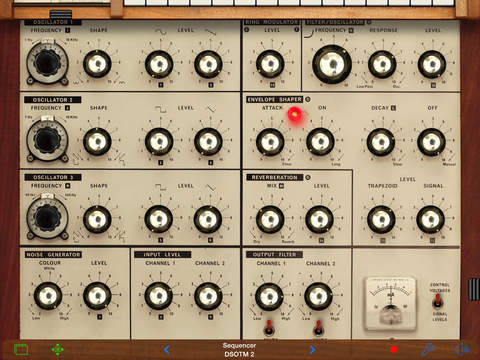
The VCS3 was created in 1969 by Peter Zinovieff’s EMS company. The electronics were largely designed by David Cockerell and the machine’s distinctive visual appearance was the work of electronic composer Tristram Cary. The VCS3 was more or less the first portable commercially available synthesizer—portable in the sense that the VCS 3 was housed entirely in a small, wooden case.
The VCS3 was quite popular among progressive rock bands and was used on recordings by The Alan Parsons Project, Jean Michel Jarre, Hawkwind, Brian Eno (with Roxy Music), King Crimson, The Who, Gong, and Pink Floyd, among many others. Well-known examples of its use are on The Who track “Won’t Get Fooled Again” (as an external sound processor, in this case with Pete Townshend running the signal of a Lowrey Organ through the VCS3’s filter and low frequency oscillators) on Who’s Next. Pink Floyd’s “On the Run” (from The Dark Side of the Moon) made use of its oscillators, filter and noise generator, as well as the sequencer. Their song Welcome to the Machine also used the VCS3. The bassy throb at the beginning of the recording formed the foundation of the song, with the other parts being recorded in response. The VCS3 was also a staple at the BBC’s Radiophonic Workshop, and was a regular (and most frightening) sound generator for the Dr Who TV series. Many fo the monsters and atmoshere;s created for the show came directly from the VCS3.
Description
The VCS3 has three oscillators (in reality, the first 2 oscillators are normal oscillators and the 3rd an LFO or Low Frequency Oscillator), a noise generator, two input amplifiers, a ring modulator, a 18dB/octave (pre-1974) or 24dB/octave (after 1974) voltage controlled low pass filter (VCF), a trapezoid envelope generator, joy-stick controller, voltage controlled spring reverb unit and 2 stereo output amplifiers. Unlike most modular synthesizer systems which use cables to link components together, the VCS3 uses a distinctive patch board matrix into which pins are inserted in order to connect its components together.
Keyboards controller
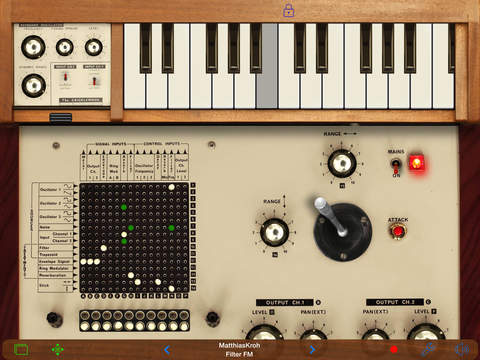
DK1 keyboard controller
Although the VCS3 is often used for generating sound effects due to lack of built-in keyboard, there were external keyboard controllers for melodic play. The DK1 in 1969 was an early velocity sensitive monophonic keyboard for VCS3 with an extra VCO and VCA. Later it was extended for duophonic play, as DK2, in 1972. Also in 1972, Synthi AKS was released, and its digital sequencer with a touch-sensitive flat keyboard, KS sequencer, and its mechanical keyboard version, DKS, were also released.
The Real Parakeet – Cockta Haze
The Real Parakeet – Cockta Haze, tribute video made by Tonefloat to celebrate Cockta as the official Swedish synthpop/electronica soft drink
Go behind the scenes with electronic act Node
The Killers, Depeche Mode, U2, Smashing Pumpkins, Warpaint, PJ Harvey – these are just a few of the names that producer Flood has worked with to help shape their sound, and the history of music as we know it. He’s also one quarter of a collective of musical vanguards that make up synth pioneers Node – who recently ended their 17 year hiatus for a new album and live performance at London’s Royal College Of Music.
http://www.gigwise.com
http://www.twitter.com/gigwise
http://www.facebook.com/gigwise
Respectably Insane – Dave Smith Instruments – Sequential Prophet 6
The weird and wonderful world of the beautiful Prophet 6. Arpeggiated patch at very slow intervals and bpm with the occasional knob-twiddle for good measure. Recorded live in 1 take and the only effects are a touch of built-in chorus and BBD. Video shot separately just after the audio had been recorded, then spliced together.
TB-303 ACID JAM
Working on the new live Acid set for the Sept. Carry on Avin it party. Straight to camera mic.
Technical Details:
- Roland TB-303 bassline synthesizer
- Roland TR-909 drum machine
- Sequential Circuits Pro One synthesizer
- Audio is straight to camera
First music instrument on Apple Watch – Micro-SqueezeBox Accordion
First tests of the AppCordions.com Micro-SqueezeBox Accordion app for the Apple Watch.
Check out all Accordion, Concertina, and Bagpipes iOS and Android apps!
DATAMASKIN

