
NAMM 2016: MFB Tanzmaus and Tanzbar Lite
Two new drum machines from the Berlin residents
zZounds http://www.zzounds.com/lp/zzounds-bac…
Arturia Matrix Brute – NAMM 2016
Analogue synthesizer with matrix control.
Introducing K-Mix from Keith McMillen Instruments
Introducing Keith McMillen’s K-Mix: an unbreakable, 8-in/10-out audio interface and programmable mixer. K-Mix features 2 ultra-accurate, high-efficiency low noise μPre preamps, and a precision opto-tactile control surface that was designed from the ground up for an unprecedented level of control. We’ve made super clean audio more accessible, so you can focus on the music.
K-Mix is a go-anywhere, fully-programmable, audio multi-tool that can meet all your needs as an artist, whether you’re in the studio or on the road. With no moving parts, K-Mix can be transported in a backpack without the fear of snapping off a fader or knob, while still giving you unrivaled audio quality, mixer functionality, and control.
Now Shipping!
Aerodrums – a virtual reality Oculus Rift instrument
Aerodrums is an air-drumming instrument. It is portable and as expressive as a real drum kit. With headphones, it can be silent to those around you.
Visit http://aerodrums.com for more information.
Developed by former researchers at the Trinity College Dublin Vision and Visualization lab, Yann Morvan and Richard Lee, Aerodrums is an air drumming musical instrument which utilizes motion capture technology to create a fully functional, customizable drumset.
Aerodrums are intended as an alternative for drummers who lack space for an acoustic or electronic drum kit, as well as for drummers who don’t want to annoy their neighbors — or even as the perfect starter kit for a young aspiring drummer who may have difficulty convincing their parents to commit to buying an acoustic drum set.
The Aerodrums virtual drum set system works via small reflective balls placed on the ends of drumsticks and reflective strips the user attaches to their feet. A commodity high-speed camera locks on to these strips to track the drummer’s hand and foot movements converting them to quality drum sound. The user can customize the drum set to allow for their preference of drum, cymbal and pedal configuration. In addition, they can upload their own sounds to further customize their kit, or use Aerodrums’ MIDI compatibility to interface with other music software or hardware.
The Rift is a virtual reality head-mounted display developed by Oculus VR. With Aerodrums, the headset displays a fully immersive 3D experience that makes you feel like you are actually behind a traditional, acoustic drumset. Aerodrums leverages Rift’s head-tracking capability to take into account the drummer’s head position when rendering both the visuals and the audio.
“Since we made Aerodrums, I have resumed playing drums even though y drum kit is still in my parents’ garden shed. With the VR mode, I find myself forgetting that the kit isn’t actually there,” said co-developer of Aerodrums, Richard Lee.
Aerodrums allows the player to perform dynamic techniques seemingly impossible in air drumming such as double stroke rolls (two single strokes played by the same hand to create a sustained, continuous sound); ghost notes (ornamental notes played very softly between the ‘main’ notes). Even open and closed hi-hat cymbal sounds are easily played with Aerodrums with virtually no latency. Drummers can also navigate the software’s user interface using their drumsticks. The Aerodrums system is as intuitive as air drumming and uses the same coordination skills a player would need on a real kit. Aerodrums are also incredibly dynamic, sensing the velocity of the drummer’s motion allowing the player to “hit” the drums softly or loudly.
The Aerodrums kit includes the sticks, stick tips, reflective strips, light and software. The full set retails worldwide for$199, £129 and €175, and includes unlimited, lifetime customer service. The Aerodrums virtual reality upgrade will be available in Q2 2016. See the Aerodrums site for details.
Full focus on Korg Minilogue Polyphonic Analog Synthesizer
This is the unboxing of and my initial go at using Korg’s brand new Minilogue Polyphonic Synthesizer. This is a four voice analog polysynth with a BBD-style delay. It sounds fantastic and allows you to store 200 patches. It also has a 16 step sequencer storable per patch that allows you to store your melodic ideas and parameter automations to remind you of what you had in mind stylistically for the patch in addition to its tone. This will serve as my main keyboard-style synth in The Galaxy Electric. It’s analog, allows for a decent amount of patch storage, and it has a built-in beautiful sounding delay which is typically my go to effect for the kind of synth work I do. I am a fan and found its timing to be very serendipitous.
Great deals on Korg minilogue at Kraft Music:
http://www.kraftmusic.com/brands/korg…
The Korg minilogue polyphonic analog synthesizer at the 2016 Winter NAMM Show.
Rhythmic sequences with Korg Monologue. No external FX.
NAMM2016 Introducing the New Sputnik Modular Eurorack Modules
NAMM2016 Introducing the New Sputnik Modular Eurorack Modules
Sputnik Modular – Dual Multisegment Function Generator
Sputnik Modular – Sequential Filter
Sputnik Modular – Spectral Processor
Sputnik Modular – KB MD Expander
Sputnik Modular – Frequency Shifter
Sputnik Modular – 16 Step Voltage Source
Sputnik Modular – Multistep Voltage Source
Sputnik Modular – Dual Envelope & Gate
Available soon from
http://analoguezone.com/sputnik-modular
NAMM: Teenage Engineering demos new Pocket Operators – Arcade, Office, and Robot
introducing PO-20 office by teenage engineering and cheap monday.
order here: https://teenage.engineering/store#po-20
online manual: https://teenage.engineering/guides/po-20
http://cheapmonday.com
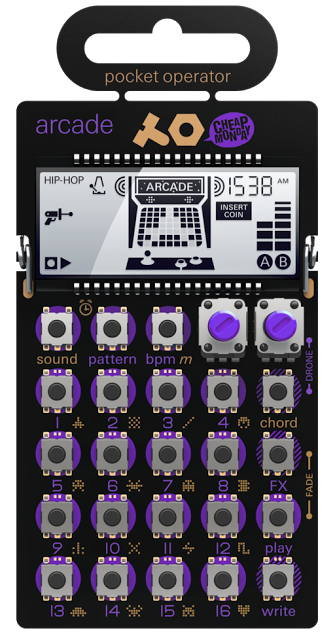
arcade synthesizer and sequencer, with parameter locks, chord control and punch-in effects.
rapid beat making and chiptune improvisation
synthesized arcade sounds
128 chord chaining
128 pattern chaining
16 sounds
16 punch-in effects
step multiplier
only $ 59
introducing PO-24 office by teenage engineering and cheap monday.
order here: https://teenage.engineering/store#po-24
online manual: https://teenage.engineering/guides/po-24
http://cheapmonday.com
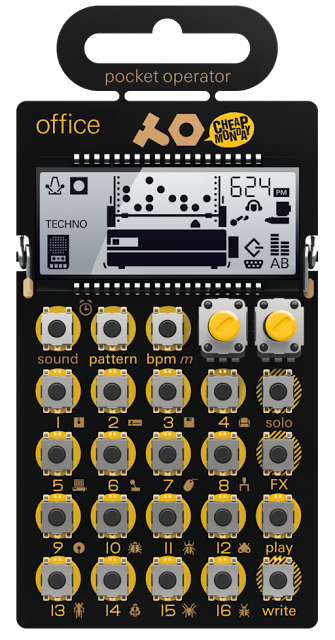
noise percussion drum machine and sequencer, with parameter locks, solo functionality and punch-in effects.
sampled vintage hardware and real synthesizer engines
solo control
128 pattern chaining
16 sounds
16 punch-in effects
step multiplier
only $ 59
introducing PO-28 robot by teenage engineering and cheap monday.
order here: https://teenage.engineering/store#po-28
online manual: https://teenage.engineering/guides/po-28
http://cheapmonday.com
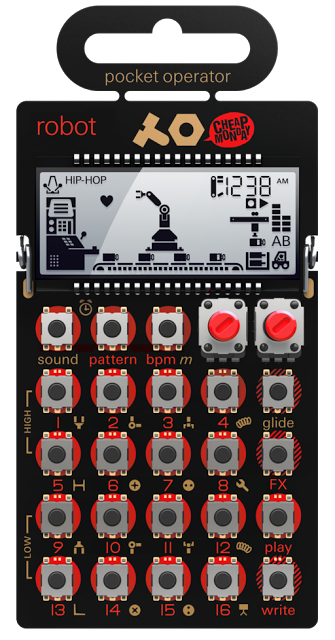
live synthesizer and sequencer, with parameter locks, glide control and punch-in effects.
real 8-bit synthesizer engines for making live and sequenced melodies and leads
15 sounds + micro drum
live play + sequencer combo
128 pattern chaining
step multiplier
only $ 5
M-AUDIO introduces CTRL 49 Controller with the ability to host VSTs onboard
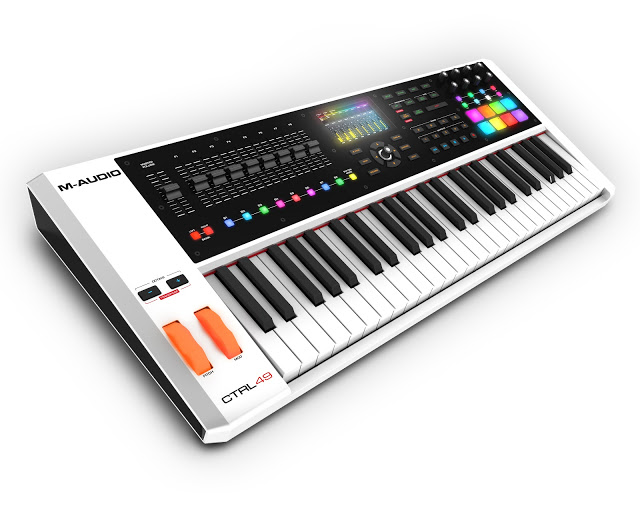
M-AUDIO ADDS REVOLUTIONARY VIP SOFTWARE TO ITS LEGENDARY KEYBOARDS IN GROUNDBREAKING NEW CTRL 49 CONTROLLER
Producers can now load, play and control all their virtual instrument plugins directly from the CTRL 49 keyboard, for seamless hands-on performance and perfect VI software integration.
Cumberland RI, USA (January 21, 2016)— M-Audio (m-audio.com), synonymous with innovative music production technology, today announced the introduction of their revolutionary, premier controller, the CTRL 49. The new keyboard provides advanced control of virtual instruments and DAWs via a full-color, high-resolution 4.3-inch screen. It features a 49-key semi-weighted keybed, and the directional cluster of hardware controls has been meticulously thought out for effortless operation. Producers will find the CTRL 49 to be an inspiring and intuitive experience.
The CTRL 49 is powered by the included Virtual Instrument Player (VIP) software. VIP software enables users to access any VSTi virtual instrument or effect in their computer directly from the keyboard. Users can quickly filter and search through every patch in their plugin library by using the built-in tagging function, making it simple to find the sound they’re after quickly. VIP auto-maps the CTRL 49’s controls to the selected plugin, and displays the plugin parameters directly on the full-color display for a natural, familiar 1:1 workstation-style experience.
VIP software in the CTRL 49 also creates a multi directly from the keyboard. Using a multi, producers can combine up to 8 patches from 1 or more plugins, and have the option to layer, mix and pan these patches all at once. Users can even set keyboard splits and transpose individual patches within their multi. This advanced design feature means users can save all the new sounds they’ve created and easily recall them at any point.
For optimum live performance use, VIP software also creates ‘setlists’ that deliver fast on-demand access to virtual instruments and effects. With the press of a single button, users can switch to the next plugin they want—without ever reaching for a computer.
CTRL 49 Features:
• Integrated 4.3-inch high-resolution full-color screen with dedicated interface buttons
• Screen provides 1:1 real-time feedback of plugin parameters
• Includes Virtual Instrument Player software— load, play and control any VST or effect plugin quickly
• Mackie/HUI for DAW control
• 49-key M-Audio semi-weighted keybed
• 9 faders and 8 buttons with Mackie Control® and HUI® for seamless control of the DAW
• Performance-ready 360-degree encoders
• FX button for future VIP updates
• 4 banks of 8 velocity- and pressure-sensitive drum pads with RGB illumination
• Roll mode, time division, transport, arpeggiator, and tap tempo buttons
• Functions as a standalone MIDI controller or controls your plugins and DAW simultaneously
• Includes software: Ableton Live Lite, AIR Creative Collection FX (20 World Class FX AU/VST
plugins as made famous by Pro Tools®), Vacuum Pro, Loom, Hybrid 3, Xpand!2, Velvet, Transfuser, Eighty Eight Ensemble
‘The CTRL 49 is a game-changer for serious producers,’ said JC Sutherland, Product Manager for M- Audio. ‘Now they can access their entire virtual instrument library right from their keyboard, without ever being distracted by a computer, which makes the creative/performance process smoother than ever before. Working together, the CTRL 49 and VIP unlock your VSTs and enable them to function like actual instruments. Once you get used to this, there’s no going back.’
The M-Audio CTRL 49 has a U.S. retail price of $499
It will be available in the 2nd Quarter of 2016.
Please visit us in Hall A, Booth #6700 at Winter NAMM.
NAMM 2016: Checking out the Yamaha Montage
We take a look at Yamaha’s new flagship synth with up to 10x the power of the Motif
zZounds: http://www.zzounds.com/lp/zzounds-bac…
Yamaha’s new Montage is stacked with power, with 128 stereo AWM2 voices and a new sample set (10x what the Motif had) and and FM engine boasting 8 operators, its got a lot of synthesis going on as well as the more workstation like sounds.
The Super Knob is another key feature, with macro control of up to 32 parameters in both positive and negative, there are some impressive sound transformations available.
Tom Oberheim & Dave Smith Introduce the OB-6
The OB-6 is the brainchild of a historic collaboration between analog synthesizer pioneers Tom Oberheim and Dave Smith. More info here:
http://www.davesmithinstruments.com/p…
Tom Oberheim and Dave Smith Unveil OB-6 Analog Synthesizer
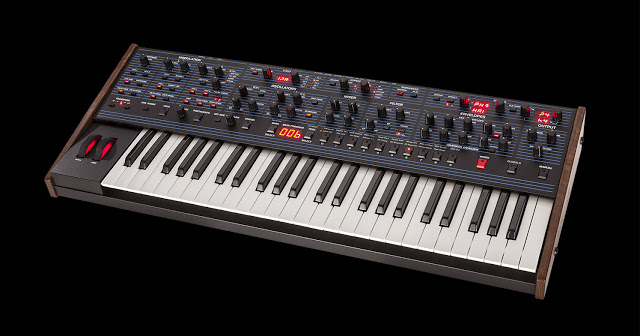
Legendary Poly Synth Creators Team Up on New Instrument with Discrete VCOs and Filters
Anaheim, CA—January 21, 2016—Dave Smith Instruments today announced the OB-6, a new 6-voice synthesizer with an all-analog signal path and discrete VCOs and filters developed in collaboration with Tom Oberheim. Boasting a sound engine inspired by Oberheim’s original SEM (the core of his acclaimed 4-voice and 8-voice synthesizers), the new instrument is designed to provide true, vintage SEM tone with the stability and exibility of modern technology.
Said Smith: ‘Tom and I have been friends and friendly competitors since the late 1970’s. Back in the day, people were typically in either the Prophet or the Oberheim camp. Now, with the Prophet-6 out and doing so well, we thought it would be fun to combine our strengths and bring back Tom’s classic polyphonic sound, too — in a modern format.’ Added Oberheim: ‘A lot of people, myself included, have always felt that the SEMs had a certain uniquely big, organic sound unlike anything else. Working with Dave to make that sound widely available again with some modern touches and full programmability has been real a pleasure.’
The OB-6 features two discrete voltage-controlled oscillators (plus sub-oscillator) per voice, with continuously variable waveshapes (sawtooth and variable-width pulse, with triangle on oscillator 2). There is a classic SEM- inspired state-variable lter (low-pass, high-pass, band-pass, and notch) per voice. Voltage-controlled ampli ers complete the all-analog signal path. ‘The classic, bold SEM sound is all there,’ said Oberheim.
Present also is X-Mod, with lter envelope and oscillator 2 as modulation sources (with bi-polar control). Destinations include oscillator 1 frequency, oscillator 1 shape, oscillator 1 pulse width, lter cutoff, and lter mode. The knob-per-function front panel puts virtually all parameters at a user’s ngertips. Toggling on the Manual switch enables live panel mode, in which the OB-6 switches to the current settings of its knobs and switches.
A dual effects section provides studio-quality reverbs, delays (including standard and BBD), chorus, and faithful recreations of Tom Oberheim’s acclaimed phase shifter and ring modulator. The effects are digital, with 24-bit, 48 kHz resolution, but a true bypass maintains a full analog signal path. Additionally, the OB-6 features a multimode arpeggiator and a polyphonic step sequencer with up to 64 steps (and up to 6 notes per step) plus rests. It allows polyphonic keyboard input and can sync to external MIDI clock.
The full-size, four-octave, semi-weighted keyboard is velocity and aftertouch sensitive. Said Dave Smith, ‘As with the Prophet-6, we made size a primary concern on the OB-6. It’s the right mix of power and portability and it ts right in on-stage or in the studio.’ Added Oberheim, ‘And of course, it’s got that unmistakable SEM sound that’s going to turn a lot of heads. ‘
The OB-6 is manufactured and sold by Dave Smith Instruments. It will be available in March, with a projected MAP of $2,999.
DATAMASKIN

