
PULSAR – Overview [Reaktion]
Quick overview of our new release for Reaktor: Pulsar.
Read more and buy it at: http://www.reaktion-sound.com/pulsar/
Pulsar
PULSAR is an effect processor that enables you to apply complex rhythmic and FX/Lo-fi textures to any kind of audio source.
Combining two “Slicers” (independent Step-Sequencers – one per audio channel – with variable gate repeats per step), you can “slice up” your sound and modulate the
parameters of the main FX and VCF/VCA sections.
-
Create your “sliced” signal with the variable number of gate triggers per step
-
Adjust the sync factor to the host clock, sequence length, step On/Off state and gate width for both sequencers
-
Shape the overall sound with the analog sounding multimode filter in the VCF section
-
Insert an effect in the FX section choosing from four different algorithms (Tape Echo, Pitch Shifter, Modulator and Lo-Fi)
-
Make the final adjustment in the VCA section with controls over stereo widening and distortion level
-
Modulate the main parameters with the CV control from the two step sequencers
-
Use the CV smooth to glide between values
-
Mix the dry/wet signals of either the two “slicers” and the main FX
-
See how parameters are being modulated by the sequencer with the LED blinking inside each main knob
The PULSAR interface was built with focus on instant usability, easy access to all parameters and with a creative approach in making new sounds.
The Ring – Blocks Edition – new free Lemur for iPad template and Reaktor Blocks module

Twisted Tools has announced the release of The Ring – Blocks Edition, a free Lemur for iPad template and Reaktor Blocks module.
It’s that time of year and Twisted Tools is celebrating the holidays with a free downloadable gift and by having a storewide sale (35% OFF).
THE RING – BLOCKS EDITION is a temporal modulation tool for creative sound design and a live performance using REAKTOR Blocks. The release consists of an iPad LEMUR template and a brand new REAKTOR Blocks module, together giving you the ability to get away from the mouse and modulate your Blocks using the power of touch.
The Blocks Edition of THE RING comes with a REAKTOR Block module, called THE RING – OSC RECEIVER. This module automatically receives and converts OSC control messages sent from the iPad to audio rate control messages designed to be used as modulation signals within the REAKTOR Blocks framework. This allows you to control REAKTOR Blocks using your iPad running THE RING inside the Lemur app. The only setup required is the OSC configuration, but other than that the Blocks module takes care of the rest. Just patch away as if it was any old REAKTOR block.
The Ring – Blocks Edition features
- Advanced iPad Lemur Template by Antonio Blanca.
- Fine-tuned controls for use with REAKTOR Blocks.
- 16 assignable OSC/MIDI controls.
- REAKTOR Blocks OSC Receiver module with audio-rate modulation outs.
- 8 presets with morphing.
- Easy configuration with no need for mapping.
- Patchable with REAKTOR Blocks.
- Advanced randomization and customization options.
- RGB color settings.
Twisted Tools has also launched a storewide sale, offering 35% off all products until January 3rd, 2016.
Rifflab for NI Reaktor – new powerful step sequencer
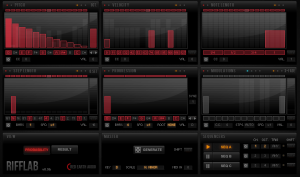
Red Earth Audio has released Rifflab for NI Reaktor. Rifflab is a probability-based step sequencer capable of generating and playing up to 3 scale locked sequences simultaneously. Each sequence is generated in accordance with the probability parameters set by the user. The Probability sliders allow control of Pitch, Velocity, Note Length, Step Length, Progression, and up to 7 Modulation lines for each generated sequence. It is designed for producing basslines, leads, melodies, chords and arpeggios.
Each click of the Generate button will create an entire new sequence based on the probability parameters a user has set. Rifflab does not output any audio itself, but sends generated MIDI data to the chosen MIDI channel (s) to drive anything that allows MIDI input.
Features:
- Generates up to 3 sequences at a time.
- Generate values per panel, per sequence or all 3 sequences simultaneously.
- Set Key and Scale – ability to make own scale.
- Scale lock on playback – all notes forced to scale.
- Value lock – Keep wanted values and only generate new values for unlocked steps.
- Up to 2 octaves per sequence.
- Base octave per sequencer.
- Variable step lengths – including dotted and triplet notes.
- Rest notes (0 Velocity slider).
- Variable playback speed.
- Up to 64 notes per sequence.
- Up to 32 bars per Progression.
- Variable Note lengths from 1/4 length to full length.
- MIDI output up to 3 separate channels.
- MIDI CC output via 4 Modulation panels, as well as Pitch, Velocity and Note Length values.
- MIDI in triggers for Progression and sequence output.
- Progression sync to all sequencers.
- Timing Offset per sequence.
- Shift steps per panel, sequence or all sequences.
- Ability to skip steps or randomize played steps.
- Low CPU usage.
Price: $9 – A free Lite version is also available.
Flesh – new Reaktor instrument developed by electronic musician and inventor Tim Exile
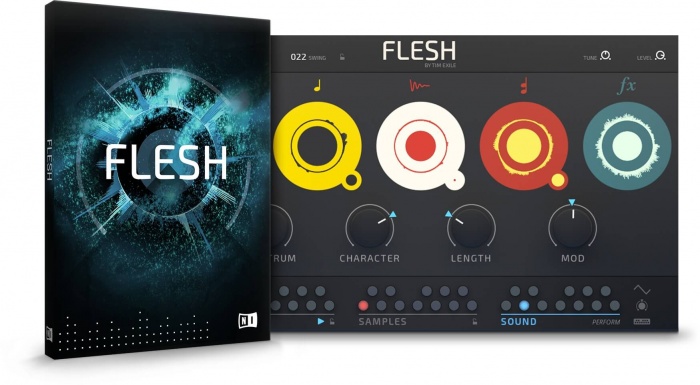
Native Instruments has announced the release of Flesh, a new Reaktor instrument developed by electronic musician, producer, and inventor Tim Exile.
FLESH uses a set of advanced algorithms to turn rhythmic source material into all the elements of a complete production, including basslines, melodies, chords, harmonies, and more. The instrument is aimed at creative producers looking to enhance their live sets or find fresh inspiration for their original productions through a fun, improvisational approach.
“The concept for FLESH came to me when touring with my custom looping, beatmaking, and improvising instrument that I built in REAKTOR,” says Tim Exile. “I was missing a way to make harmonic and melodic material in a live, improvised scenario. I wanted something that would empower me to create expressive and dynamic sounds which fit in perfectly with whatever was going on at the time.”
FLESH was designed to be a fun and easy-to-use performance instrument.
Its advanced algorithms analyze the transients and spectral profile of sampled source material in the background. This information is then sent to four audio engines as curves and triggers for re-synthesizing the source material. The result is dynamic riffs, grooves, and chords that retain the feel of the original sample. This advanced processing is made possible by the REAKTOR 6 engine.FLESH comprises four audio engines, plus effects and modulation sections. Each engine has a specific function, from changing the sonic character of the sample itself to transforming it into a monophonic sequence or lead, chords, or sub-bass frequencies. Additionally, the sound generated can be further modified by the effects section and modulation page. The effects section re-creates a highly-modified dub delay while the modulation page allows producers to add subtle to radical motion to their sound.
FLESH features a streamlined control set allowing for radical changes to the rhythmic and tonal output of the instrument. Producers can play rich harmonic progressions, trigger and switch source samples and sound snapshots, then tweak parameters across all engines at once in real time. A clever system of global macro controls allows for consistent and tactile live tweaking on just four main controls – Spectrum, Character, Length, Mod.
FLESH is the first REAKTOR Instrument designed from the ground up to get the most out of the KOMPLETE KONTROL S-Series keyboards. FLESH uses the Light Guide to provide tight visual feedback, highlighting sounds and samples, and sequenced harmonies. Native Map® automaps parameters to the eight control knobs on the KOMPLETE KONTROL keyboards. Users can also save presets – including samples – and recall them in real time.
Tim Exile has seen his career move from performing in small clubs, to big stages around the world and releasing albums on the Planet Mu and Warp imprints. For the last years, Tim has worked closely with Native Instruments to design his own set of ‘audio instruments’ including THE MOUTH and THE FINGER.
Flesh for Reaktor 6 and Reaktor 6 Player is available for purchase for $99 USD / 99 EUR / £89 GBP.
AM102 Programmable Wavetable Oscillator for Reaktor Blocks
AM102 is a Block module for use with the Native Instruments’ Reaktor Blocks Modular System.
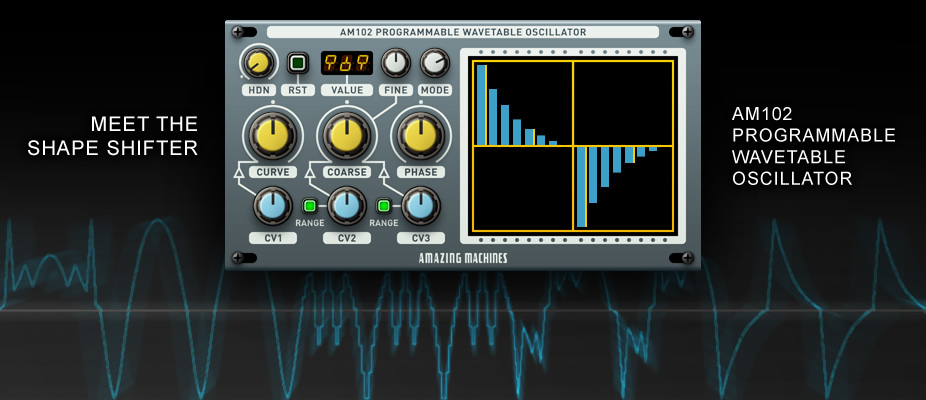
A Programmable Wavetable Oscillator, featuring a 16 Stages Wavetable with 3 selectable Playback Modes and 3 types of Output Curves, AM102 is a Shape Shifter yet to be rivalled.
For more information please visit:
amazingmachines.com.br
AM102 Programmable Wavetable Oscillator for Reaktor Blocks:
–
A Programmable Wavetable Oscillator, featuring a 16 Stages Wavetable with 3 selectable Playback Modes and 3 types of Output Curves, AM102 is a Shape Shifter yet to be rivalled.
–
Click and drag the faders in the Wavetable Display to draw your own Waveforms, use the CURVE and MODE controls to modify Waveforms even further, connect AM102 to a FREE AM103 Expander Module in order to control the Modulation Inputs of Stages 1, 5, 9 and 13.
–
AM102 also features a Pulse Waveform Output with a PWM Input, in Backward (BWD) and Forward (FWD) Playback Modes the Pulse Waveform is tuned 1 Octave below the Wavetable, serving as a Sub Oscillator or a Synchronization Source for other Oscillators.
–
Features:
–
– 1 Reaktor Block
– 16 Stages Programmable Wavetable
– Stages 1, 5, 9 and 13 with Dedicated CV Inputs
– Sync Hardness Control (HDN) with a Dedicated CV Input
– Reset On/Off Switch with Phase Control and Phase Modulation Input
– Wavetable Playback Mode Rotary Switch Selects between Backward, Alternating or Forward
– Curve Control Crossfades between Stepped, Linear and Exponential Output Curves
– Curve Modulation Input
– Coarse and Fine Tune Controls with 2 Independent CV Inputs
– CV2 and CV3 Range Switches to select between Semitones or Cents
– Additional Pulse Waveform Output
– PWM Input
Reaktor 6 – The Sound Of Blocks (all you need to know)
Native instruments has finally released Reaktor 6, the latest version of its software modular synthesizer. The update features Blocks – Eurorack-style virtual modules; new power developer features, an updated user interface; a lower price and more.
Reaktor 6 comes bundled with 30 Blocks in several categories, each with a specific purpose. Bento Box Blocks represent the core components of a modular synth setup. Boutique Blocks take inspiration from custom hardware that bring advanced sound shaping to the world of modular synthesis. Digilog Blocks create complex rhythms, process notes, and provide structure in patches. NI All-Star Blocks are single rack-style components of Native Instruments synths such as Rounds and Monark. The world of Blocks will continue to grow as the vibrant Reaktor community builds and shares new Blocks and Blocks patches – all available for free online at NI’s Reaktor User Library.
www.native-instruments.com/en/products/komplete/synths/reaktor-6/
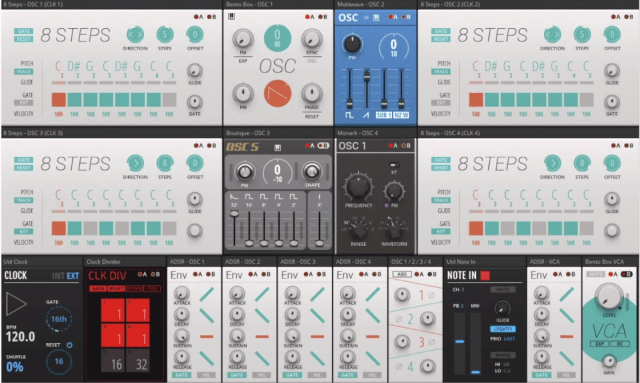
- Blocks – Blocks are the new rack-style framework in REAKTOR 6. Blocks offer the speed and flexibility of modular patching, combined with all the benefits of working in the digital domain. Get total recall of complex rack creations. Load as many instances of oscillators, filters, VCAs, LFOs and sequencers as you need. Blocks and Blocks patches can also be shared by the Reaktor community.
- Power Developer Features – Three key additions extend REAKTOR’s workflow efficiency and sampling power at the Core level.
- The Table Framework feature allows flexible and efficient data sharing throughout REAKTOR, including from Primary to Core levels. This opens up new possibilities for building custom sampler engines.
- Bundled wires are like multicore cables, making intra-level patching cleaner and more elegant.
- Scoped buses allow ‘wireless’ connectivity across multiple structure levels.
- Major Library Updates – Both Primary and Core Macro libraries have been re-organized for ease of use with new categories and more intuitive folder structures. This makes prototyping and instrument building workflows more efficient.
- The Core library macros have been re-written for improved sound quality and more efficient use of CPU, letting you build more complex devices that sound better than ever.
- The library is also extended to include new anti-aliased oscillators, ZDF filters, envelopes, LFOs, effects, and sampler macros that make use of the Table Framework.
- New User Interface – Numerous interface improvements give builders increased readability and optimized use of screen space.
- Curved and colored anti-aliased wires allow builders to quickly differentiate wire and port types visually.
- There are also numerous builder workflow enhancements including improved structure editing, and a revised property and navigation pane.
WRECKER – new Multi-function Effects Processor Ensemble for use with Native Instruments’ Reaktor
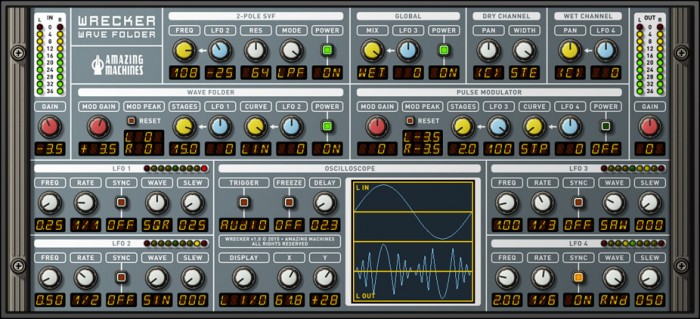
Amazing Machines has released WRECKER, a Multi-function Effects Processor Ensemble for use with Native Instruments’ Reaktor.
With focus on Wave Folding Effects WRECKER also includes a Pulse Modulator, a State Variable Filter, a Pan Modulator and an Oscilloscope.
Features:
- 1 Reaktor Ensemble.
- 16 Stages Wave Folder (With Curve Control which Crossfades between Stepped and Linear Modulation Curves).
- 16 Stages Pulse Modulator (With Curve Control which Crossfades between Stepped and Linear Modulation Curves).
- 2-Pole State Variable Filter (Band Pass, High Pass and Low Pass Filter Modes / Builtin Filter Mode Crossfader).
- Pan Modulator.
- 4X LFO (Built-in Waveform Crossfader / Built-in Slew Limiter).
- Oscilloscope.
Price: $19.99 from the Amazing Machines’ Online Store. Requires Native Instruments’ Reaktor 5.8 or newer (Full Version).
Wrecker – Wave Folder – new multi-function effects processor ensemble for Reaktor
Amazing Machines has launched Wrecker – Wave Folder, a multi-function effects processor ensemble for Native Instruments Reaktor.
With focus on Wave Folding Effects the WRECKER also includes a Pulse Modulator, a State Variable Filter, a Pan Modulator and an Oscilloscope.
Wrecker features
- 1 Reaktor Ensemble.
- 16 Stages Wave Folder (With Curve Control which Crossfades between Stepped and Linear Modulation Curves).
- 16 Stages Pulse Modulator (With Curve Control which Crossfades between Stepped and Linear Modulation Curves).
- 2-Pole State Variable Filter (Band Pass, High Pass and Low Pass Filter Modes / Builtin Filter Mode Crossfader).
- Pan Modulator.
- 4X LFO (Builtin Waveform Crossfader / Builtin Slew Limiter).
- Oscilloscope.
Wrecker for Reaktor is available for purchase for $19.99 USD. Requires Reaktor 5.8 or newer (full version).
C-Tools – trinity of retro synth sounds for Native Instruments Reaktor
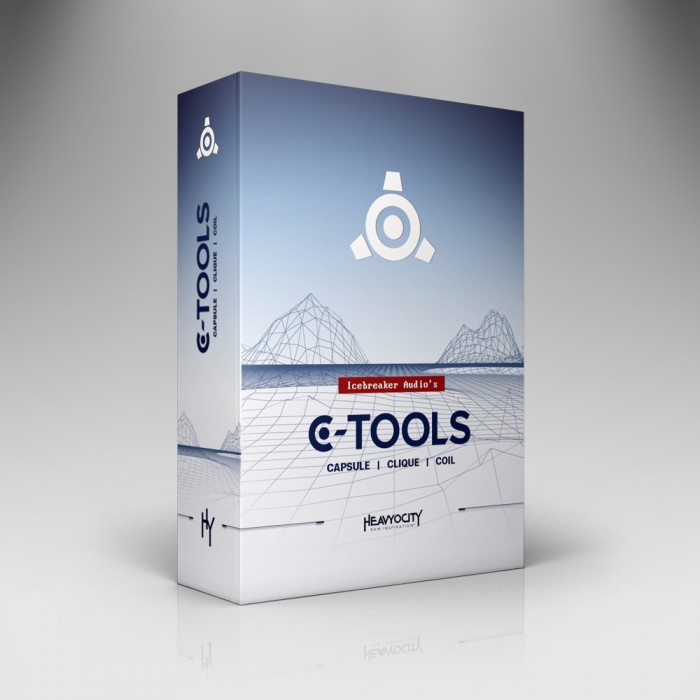
Heavyocity has announced it has partnered with Icebreaker Audio to release C-Tools, a trinity of retro synth sounds for Native Instruments Reaktor.
Inspired by the future aesthetic of the 70’s and 80’s, C-Tools is three distinct instruments: Capsule (drums), Coil (bass) & Clique (keys). From nostalgic strings to archetypical pulsing rhythms, C-Tools is the framework for building the vintage synth sound of yesterday, today.
“C-Tools was really built out of necessity,” says Icebreaker Audio Founder Adam Hanley. “Personally, I wanted an all-in-one tool that I could use, right out of the box, to produce the kind of retro synth sounds I use most often, without being restricted to a single piece of vintage hardware. And C-Tools does just that.”
C-Tools features
- Capsule: the C-Tools Drum Machine, featuring eight drum channels and a built-in sequencer. Complete with thumping kicks and kitschy hand claps, Capsule takes a mostly analogue approach to its synthesis engines. Also with an additional effects chain crafted specifically for drums, including a gated reverb.
- Coil: a hybrid monosynth designed especially for bass sounds. It uses digital FM and analogue subtractive synthesis techniques to produce a rich sound palette – from biting and percussive, to deep and throbbing, and all spaces in between.
- Clique: a combination of string machine and combo organ – two instruments that used similar frequency division techniques to produce their polyphonic sounds. Added is a split keyboard routing mechanism, which allows you to assign different parts of the synthesizer to the upper, lower, or both halves of the keyboard.
C-Tools is available for purchase for the introductory price of $29 USD until July 28th, 2015 (regular $59 USD). Requires Reaktor 5.9.2 full version. A one week bundle offer of $59 USD is available for purchasers of C-Tools and BitRate II & MonoBoy.
Vokaloid – new format filter ensemble for Native Instruments Reaktor
Reaktion has released Vokaloid, a format filter ensemble for Native Instruments Reaktor.
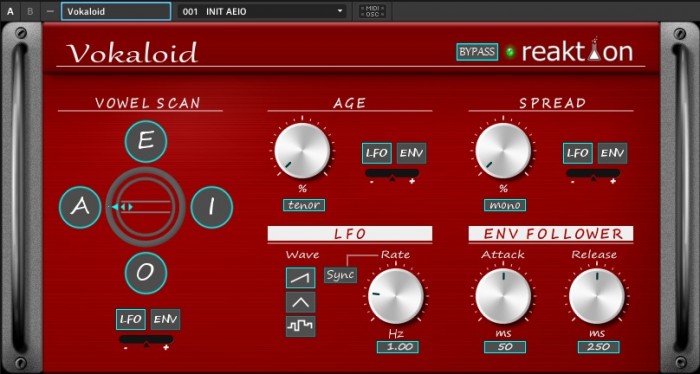
Vokaloid is basically a Formant Filter – a special kind of filter with fixed frequencies in the spectrum (formants) that simulate the sound of vowels of the human vocal tract.
In each circular box you can select a different vowel sound and smoothly scan through them with the “Scan” parameter.
You can vary the timbre with the “Age” parameter and control the stereo widening with the “Spread” parameter.
You can use an LFO or an Envelope Follower as a modulation source for all these parameters.
Vokaloid is available for purchase for 9 EUR.
DATAMASKIN

