
Abbey Road extending collaboration with Waves Audio

Following closely on the heels of the release of the well-received Waves/Abbey Road – The King’s Microphones plugin, Waves Audio and Abbey Road Studios have announced a long-term strategic partnership.
As part of this relationship, Waves’ R&D department will collaborate closely with Abbey Road Studios’ engineers to create an ongoing series of audio plugins.
Abbey Road Studios has been home to sessions for countless landmark recordings by artists such as The Beatles, Pink Floyd, The Hollies, Cliff Richard, Kate Bush, Radiohead, Muse, Oasis, Florence and the Machine and Sting. Its engineers have consistently been at the cutting edge of recording technology. Now, as they team up with Waves, the “Abbey Road sound” is available to any artist, recording engineer, producer or studio in the world.
Moog’s made a VST controller for their MuRF

MuRF_Controller is an exciting addition for any Midi MuRF owner wanting to easily control and expand its’ power and capabilities from within their DAW.
Features include:
•Full automation functionality- Use your DAW’s plugin automation tools to create fully automated parameter changes on the MIDI MuRF. Every knob and every filter is now “easily” edited from the MuRF_Controller.
•Create, recall and save presets- Quickly capture and recall any amazing sound you have created on your MIDI MuRF. Once you’ve discovered a sound, you can easily save it within your MuRF_Controller plug-in.
• Envelope Scale- Allows you to access a time multiplier for the envelope that “stretches” or “shrinks” the duration of the envelope without changing the envelope shape. Changing the envelope time scale independent from the pattern rate provides a whole new range of sonic effects!
• LFO Rate- Directly access and control the MuRF’s LFO speed
• Staccato and Triplet mode- Allows access to even more creative musical timing modes in the MIDI MuRF
Availability and pricing: MuRF_Controller is a free download for all owners of the MF-105M MIDI MuRF. The VST MuRF_Controller is available for Windows and Mac. It requires a VST host and is not a “stand-alone” program.
Spectrasonics Trilian Review

Marty Cutler over at Gearwire has written a full review of the Spectrasonic Trllian bass plugin.
What does a bass track mean to you? Is it a Fender Jazz bass played finger-style, close to the bridge with an occasional slap on the lower strings? Or, is it the smeary, square-wave synth bass populating so many Drum ‘n’ Bass tracks? Or maybe it’s a Chapman Stick, or a full-bodied upright acoustic with an occasional Ron Carter-like growl? More than any collection of sampled bass instruments, it’s safe to say that Spectrasonics Trilian—with a library comprising over 35GB of sample data—has you covered, no matter what kind of bass you have in mind.
Fit MIDI notes to a selected musical scale with Max for Live
Berlin’s own Henrik Schwarz has always had an ear for music, but didn’t learn a traditional instrument or music theory — the computer has always been his weapon of choice. But as an electronic artist who loves to perform with live musicians, he needs to be able to find the right notes fast. To help, Henrik used Max for Live to build the Schwarzonator, which he has now updated and relaunched as the Schwarzonator II.
Using the Schwarzonator II
The Schwarzonator II automatically fits notes to a selected musical scale by transposing any MIDI notes that you play, making it easier to play and improvise with other musicians. The latest update now allows users to easily create their own scales and chord progressions, and even upload them to the web.
Vince Clarke on the RSF Kobol
Vince Clarke has added another episode of his Analogue Monologues. This time he cover the french little synth Kobol by RSF.
Usine includes “save as VST” function
With version 5.7 of Usine Pro you can now export your workspace into a stand alone application or a VST (a dll), so you can share a redistributable and royalty-free package of your creations.
The package will include all the patches sound files, user modules and a fully functional version of Usine called Usine Reader.
Really cool!
The video above doesn’t show the save as function however. We’ll return to this as…
But 5.7 includes obviously a number of improvements and addition.
Podium 3.0 announced
Zynewave has released version 3.0 of Podium, its music production software solution for Windows, which is now available in both 64-bit (x64) and 32-bit (x86) builds.
New in v3.0:
Podium is now available in both 64-bit (x64) and 32-bit (x86) builds. Podium x64 requires 64-bit Windows OS and 64-bit VST plugins. The Zynewave zPEQ, zReverb and zPitch plugins are also ported to x64.
Added “Enable jBridge x86/x64 VST plugin wrapping” option to the preferences dialog. The jBridge third-party software can be used to load both 32-bit and 64-bit VST plugins when running Podium x86/x64 on a 64-bit Windows OS. Podium will detect if jBridge is installed, and invoke it when scanning and loading VST plugins that use a different processor architecture. It is not necessary to use the jBridger tool to create wrapped dll files.
Podium releases are now created with a different installer tool that supports x64 packages. The zip file download contains separate x86 and x64 installers. The new installer presents the Podium application and the Zynewave plugins as independent features. The plugins are by default installed as a subfolder under Podium, as it was done with previous installers, but you can now customize the folder to for example place the plugins in your main VSTPlugins folder.
Changed the version numbering from x.xx to the more common x.x.x scheme. The third number in the version text represents maintenance revisions.
Removed the date expiration in the Podium demo.
Fix: Solved an issue where inserting a VSTi inside of eXT2 would cause the Podium play cursor animation to stop.
The price remains at $50. The free version is still v2.40.
Circuit bent TR-707
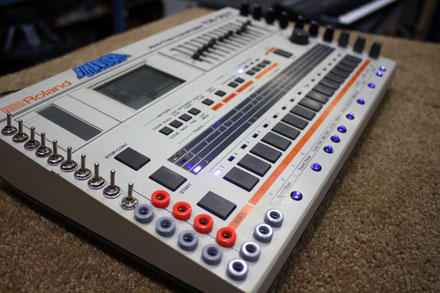
Devil07 is a classic Roland TR-707 drum machine instrument and much, much more! With close to 600 individual samples, and 21 banks of sounds, Devil07 will take you to places that the original 707 could never come close to.
The TR-707 used for this library was completely upgraded by master circuit bending technician Diabolical Devices. Using a system of patches and switches, each “bent” sound was explored and all of its expressions captured with high resolution a/d conversion. The library includes an enormous collection of “Mechanical”, “Bitpitched”, “Shorted” and “Rusted” sounds all categorized into individual banks.
Devil07 features
– Over 20 multi-sampled banks.
– Close to 600 high quality samples.
– Singly integrated Ableton Live Rack can be played as a seamless instrument.
– “Renoise Ready” XRNI files for instant playability.
– Kontakt KSP easy edit GUI
Devil07 is now available to Puremagnetik subscribers (requires Ableton Live 8.2.2, Kontakt 4.2, Logic 8 or Renoise 2).
Modular environment for iPad
The heart of Tabletop is a modular environment where you can mix and match different devices. Select from more than a dozen devices including samplers, mixers, effects, sequencers and more. Plug the output of a keyboard into a delay to add an echo, or wire it up to a mixer and adjust the pan. Chain up multiple effects to create new and evolving sounds. Tabletop is an audio playground where you can create beats, compose songs, mix live, make mashups with samples from your iPod library… the possibilities are wide open.
Powerful Features
15 unique Devices at launch
300 sounds (multisample instruments, loops, phrases)
Record sequences, arrange into songs
Adjustable quantization (pre- and post-record)Recordable parameter automation
Overdub and replace record modes
Trigger sequences and patterns live
Multitouch instruments and devicesSampling (internal mic, line in)
Adjustable tempoImport your own sound library, save presets
Support for imported .mid phrasesInsert and send/return (master) effects
Undo history44Khz, studio-quality audio
Sync 2 iPads running Tabletop or other apps with WIST
Import sounds from dozens of apps with AudioPaste
… and much more! See the full feature list
Hologram Room FX sample library

Hologram Room – vol.1 by usoproject
Hologram Room is the first bundle of the abstract Sound Design Collection produced by sound designers and composers Matteo Milani and Federico Placidi (aka U.S.O. Project).
The two gigabytes of “ready to use” original sound elements are designed to help sweetening and enhancing a sound production. The whole library is organized in eight main folders: Active Drones, Alarms, Blips, Buttons, Communications, Ignitions, Telemetries, Transitions. It provides a selection of out of this world drones and ambiences, futuristic sound effects and electronic tools.
The sound designers have been spending hours composing, editing, mixing these categories in Symbolic Sound Corporation Kyma and Avid Pro Tools. All of the audio files have been embedded with metadata for detailed and accurate searches in a asset management software.
A note about the mastering: the library has not been peak normalized, but loudness normalized, based on the recommendation by the European Broadcast Union. What does it mean? During the audition of the samples, they will have the same loudness level when played through monitors.
This work has been made possible by the aid of LevelOne, a program developed by Grimm Audio.EBU TECHNICAL provides all kinds of information about the EBU R128 loudness recommendation. The official R128 documents and guidelines can be found online, as well as introduction papers and videos.
Here is what is included in Hologram Room – vol.1:Folders:Active Drones (81 items)Alarms (26 items)Blips (52 items)Buttons (62 items)Communications (18 items)Ignitions (34 items)Telemetries (35 items)Transitions (123 items)Tab-delimited file (.txt)Excel spreadsheet (.xls)License Agreement (.pdf)Artwork (.jpg)
Audio Format: Broadcast Wave Files (.wav) Sample Rate: 48 kHz Bit Depth: 24-bit Size: 1.87 GB Download size is 1.66 GB (compressed .zip archive)
Price: $ 25
DATAMASKIN

