
Ableton Tutorial – Ping Pong Delay
http://www.pointblankonline.net/mixing-dance-music-course—ableton.php In this video, Danny J Lewis (Defected, Enzyme Black) demonstrates how a ping pong delay can be used to build tension in a build up before the groove kicks back in.
This is the first of the series of tutorials taken from the Mixing Dance Music in Ableton course (http://www.pointblankonline.net/mixing-dance-music-course—ableton.php)
Free Ableton Live Rack – “Yamaha CP-35”
AfroDJMac’s latest contribution where he takes on the Yamaha CP-35.
The Yamaha CP-35 is a pretty cool vintage electric piano. Made sometime in the 1970s or 80s this instrument has a wide range of tone, sometimes reminiscent of the Fender Rhodes keyboards. Probably my biggest gripe about this keyboard is its size. The thing is huge and heavy. Cleverly, the case transforms into legs, but lugging this baby around to gigs is pretty much out of the question. Fortunately, it now fits in your laptop. The original model has flanger and tremolo effects, which I have attempted to emulate. I’ve also added some chorus, vibrato, and delay to add some flavor to it. The CP-35 is capable of a fairly wide range of electric piano sounds, and I have sampled five offerings. So the next time you need a nice dreamy vintage piano sound reminiscent of “Daniel” by Elton John, or a Stevie Wonder-esque funk piano, load up the AfroDJMac CP-35 rack.
In this video:
Ableton Live Instrument Rack created by sampling a Yamaha CP35 electric piano. Effects are then layered, including a tremolo using Ableton’s Auto Pan effect.
Download the Live set here: http://bit.ly/freesynth9
it includes two versions, one with Sampler and one with Simpler.
How to use the new NLog together with Ableton Live
NLogPoly Synth app is a polyphonic and multi-timbral virtual analogue synth: So, you have 8 synths in one and each itself is polyphonic. Each synth has 4 OSCs, 2 FILTER, 4 ENVs & 4 LFOs plus its individual effect bank. In multi-layer set-up you have thus a polyphonic hyper-synth with 32 OSCs, 16 FILTERs etc. ! Each synth timbre can be assigned a dedicated MIDI channel and routed to a specific audio channel pair. Or you layer multiple sounds on the same MIDI channel.
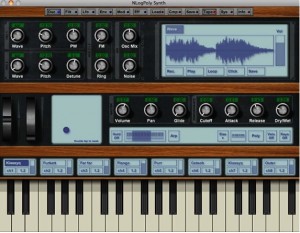
The synth supports Apple’s CoreMIDI and CoreAudio technologies, so all compatible devices can be used. It can be played either from your external MIDI devices, or integrated into your DAW or Sequencer like Logic etc. using freeware virtual audio cables like Soundflower (http://cycling74.com/products/soundflower)
Exchange sound patches with iPad app “NLogSynth PRO” and read patches from iOS app “NLog MIDI Synth.”
– A PROFESSIONAL GRADE SYNTH
– 192 FACTORY SOUNDS
– including fresh new sound set by the trance producer 7 Skies (www.7skies-music.com)
– ENDLESS options for SOUND EDITING
– Over one 150 parameters and options
– Store up to 96 own edits in 3 user banks
– STUDIO QUALITY
– Internal floating point engine
– Highly efficient sound algorithms
– FAT & RICH SOUNDS
– New filter implementation for SMOOTH and JUICY control with 7 FILTER types
– UNISONO mode for parallel sounds with detune, delay and panning control
=== SOUND editing features ===
– 4 Oscillators with 20 waveforms:
– classic analogue SIN, SAWTOOTH, TRIANGLE and SQUARE
– 16 additional carefully designed wavetables
– True PWM pulse-width modulation
– Modulated by LFO or envelope
– Frequency modulation
– Sinusoidal and complex waveforms
– Modulation by LFO and envelope
– Ring modulation
– Old school electronic effect
– Noise generator
– Individual modulation by LFO and envelope
– 2 Filter with 7 filter types
– Low Passes, High Passes & Band Passes
– Finest sweeps and smoothest cutoff tuning
– Carefully resonating
– 12 & 24dB option for steepness
– 4 Envelope generators
– Attack, Decay, Sustain and Release
– Velocity controlled attack time
– Slope control
– 4 Modulation LFOs
– 4 waveforms
– Sample & hold
– Fade in delay
– Modulation Matrix
– 4 Modulation slots each modulating 3 destinations
– Multi-effect section
– Stereo delay with cross-feed and damping filter
– chorus
– flanger
– phaser
– distortion
– reverb
– parametric EQ
In this video:
NLogPoly Synth now available from Mac App Store plus free Audio Unit at www.temporubato.com
How about making a virtual synth out of beer bottle samples?
AfroDjMac continues persistently to deliver new racks for Ableton, just as he has promised, and this week we are heading for beer. Here’s what he says about it. Ableton Live Instrument Rack created by blowing on a Red Stripe Lager bottle and sampling the tone. Effects are then layered, including a tremolo using Ableton’s Auto Pan effect. I created a little beat and left you the stems, which I encourage you to remix. Send anything you make to afrodjmac.com or soundcloud.com/afrodjmac and I will post it.

Download the Live set here: http://bit.ly/freesynth8
it includes two versions, one with Sampler and one with Simpler.
Background info:
Sometime, about two thirds into a mid-winter “I wish I was on a tropical island” fantasy, the iPod shuffle Gods brought me The Rolling Stones’ “Sympathy for the Devil.” As I found myself increasingly lost in the antics of Jagger, Richards and company, I realized that when I blew over the top of my frosty bottle of Red Stripe, the tone was perfectly in tune with the “whoo whooo’s” that adorn most of the track. As awesome as I thought this was, I couldn’t resist another cold taste, and justified it by figuring I would drink until I found an equally harmonious tone. Soon thereafter the idea for this synth was born.
I have sampled a couple of tones from those very Red Stripe bottles, as well as others from a plastic water bottle. These two slightly different tones are mixed together to create this weeks Free Weekly Ableton Live Rack. From there, I added an Auto Filter with macro knobs to control the various parameters and LFOs; next I used Ableton’s Auto Pan to create a tremolo effect that is synced to the master tempo. A delay set to repitch mode is followed to add some fun twisting effects, followed by an Erosion plug in to add some noise for character. I especially like this particular synth for its tremolo effect, which is easily modulated thanks to the macro knob.
Get ready to explore the mysteries of reverse reverbing in Live
When it comes to special effects, reverse reverbs are amongst the most useable processes there are. Although the method for creating these effects is often looked upon as complex, the right technique can lead to a transparent workflow and impressive end results.
In this video you have one great tutorial on how to go about doing one, but if you are keen to learn even more I found this slightly older article on the subject. Go here >>
How to effectively record audio in Ableton
This tutorial walks the brand new Live user through the necessary & basic steps of setting up and Recording Audio with Ableton Live.
Part 2 of a new series featuring Ableton’s lead clinician Huston Singletary
AfroDJMac Dubstep Lawnmower Man
This weeks freebie from AfroDJMac:
Dubstep wobble bass created with a sample of a lawnmower engine. From there a sub bass synth using Analog is layered underneath to produce some window rattling low frequencies. As always, this rack can be manipulated to taste to serve as anything from a dance floor dubstep mind killa to an airy atmospheric pad hovering overhead.
Every week I post a new Ableton Live Rack, please check http://www.afrodjmac.com for synths from the last few weeks and for another next week.
Download here: http://bit.ly/freesynth7
This week, I am harnessing the power of the lawnmower’s song and coupling it with a deep sub bass sound to create the “Dubstep Lawnmower Man” synth. After sampling my lawnmower, I have applied filters and effects associate with the Dubstep genre to create those massive filter wobbles that have become so popular. Next, a deep sub bass synth was create using Ableton’s Analog synth to really get those speakers shaking. Each sound can be mixed together or played separately, which means even if you are not into the sound of my aging Craftsman mower, you still have a chest thumping bass sound to play around with.
Ableton Live iPad controller apps – Miixer tutorial
The Miixer module for Griid gives you high-resolution control over your mix. Make precise adjustement to the volume or make drastic changes to the sends and pans. Options include 0dB lock, relative touch mode and units display. Miixer is free with Griid Pro and available as an In-App purchase for Griid.
Max for Live: Mark Egloff’s APC Step Sequencer
A mild-mannered logistics expert working for Ableton by day, Mark Egloff is also a hobby musician and remixer, who always preferred the direct control and tactile feel of hardware drum sequencers over their software equivalents. Working with Akai’s Shane Hazleton, Mark created a patch that can be used for hours of beat making without touching the keyboard or mouse.
Download the APC Step Sequencer for free here: http://www.ableton.com/pages/max_for_live/apc_step_sequencer
Also, through April, take advantage of deep discounts on Max for Live with Suite 8: http://www.ableton.com/maximized
Live beats with UltraNova and Launchpad
Novation’s resident Controllerist jamming on UltraNova and Launchpad with Ableton Live.
DATAMASKIN

