
Free Weekly Ableton Live Rack – Vocal Rack and Dub Delay
Follow along as AfroDJMac shares the vocal effect rack he uses for live performances. Various effects and techniques from Beat Repeats to Reverbs, Distortions, Delays, etc. are discussed in a practical and immediately usable way. Also, there is a Dub Delay Rack for use on Send Channels to further add dimensions to your music. Enjoy!
Download the Live set here: http://bit.ly/freesynth12
Save the presets to your library.
I have been asked a bunch of times how I process my vocals for live performance. This week I am giving away the exact rack I use in my rig. It contains many different devices: reverbs, delays, filters, choruses, beat repeats… If we were talking about guitars, it would be as if I let you have my pedal board. I’ve spent the better part of a year tweaking this set up to get it to the point it is now, and I’m sure it will continue to evolve. The entire rack is made up of Ableton Plug ins, except for one, Izotope Nectar, which I occasionally use for an auto-tune effect (is that a sin?). (Note: if you don’t own Nectar, the rest of the rack will function normally). I’ve mapped most of the parameters of this effect rack to knobs on my APC 40 and LaunchPad. I left the midi mapping intact, in case you happen to own those two wonderful controllers (the video details the mappings). Otherwise, just map them to the controller of your choice.
Also, I’ve included another useful effect rack, “Dub Delay the AfroDJMac Way.” This is a rack I place on a Send Channel and use it to further manipulate various tracks in my set up. It has delay, reverb, chorus, high pass filter and allows you to send the output of the track back to the track itself, creating the Dub Delay effect. ( Dub Delay is simply when the output of a delay is fed back into the delay, essentially creating a feedback loop). In order to enable the sends on a send channel, you need to right click the send knob and select “enable send.” Be careful with this particular technique, because the track can get very loud very quickly.
Ableton 101 continues – know it all in one video
Forty minutes of pure Ableton tips and tricks in this Ableton 101. This video packs the gross part of what you need to master Ableton, for more information check out the links below:
http://www.musicsoftwaretraining.com/products
http://www.musicsoftwaretraining.com/blog
http://twitter.com/abletonvids
The most Ableton Live Tips, tricks and shortcuts packed into 1 video!
A greek god provides percussions to Ableton
Soniccouture and Ableton have released Morpheus, described as a ‘unique take on a most unusual mallet percussion instrument’, for Ableton Live.
Named after the Greek god of dreams, the Freenotes Morpheus is a modular metallic instrument consisting of a series of metal bars, each attached to its own resonator. With no damping, the notes buzz freely, allowing for lush, ringing pads and sharp attacks alike.
The Morpheus is one of the cleanest, purest sounds you will hear – add tremolo and it sounds very much like a vibraphone, but with an extra ‘glass-like’ quality. Used with subtle delay and phase effects it takes on a hypnotic quality, showing why it is often used for mediative healing. Roll-off the attack transient and you’re left with an almost perfect sine-wave, but not quite; the gloss and shimmer of the metal still remain, making serene yet characterful sustained tones.
Beyond the multiple acoustic presets that come with Soniccouture Morpheus, there are also a series of abstract presets – the Morpheus, sculpted into ambient textures, lush pads, and other experimental timbres, loops and tones.
These presets demonstrate the malleability of the resonances of the Morpheus, and include complex chains of effects, with macros set to easily control the important nuances of the sounds.
Morpheus is available now for US $79 / 59 GBP
This is what it sounds like:
Morpheus by Soniccouture
TouchControl – Multitouch Monome Emulator and Midi Controller
TouchControl Software Demonstration with nice Asian music influences 
TouchControl is a program that allows you to turn your Multi Touch display into a controller for audio or video software. What seperates TouchControl from other control applications is the inclusion of a Monome 40h emulator.
In this video I am using TouchControl with Ableton Live 8.
The midi faders have been assigned to track levels, scene triggers, and effects. The monome section is using osc messages to communicate with a max for live sequencer patch, which in turn is outputting midi notes to a drum rack.I wrote the software using python and the PyMT framework.
Big thanks to the PyMT developers and Nuigroup Community
REVIEW: PUNCH Drum Synth VSTi by ROB PAPEN with Ableton Live
Like to Make Beats? You’re in for a treat. With Rob Papen’s Punch, you can can use synthesis to build your own unique sounding drum-kit, but you can also load your own samples into Punch to complete your kit. Your sounds can then be shaped using the filters and synth features.
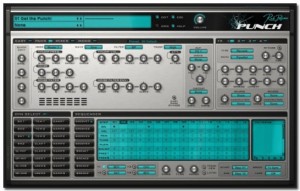
Drums Synthesis
- 2 Bass Drum with 4 different models and 18 built in samples
- 2 Snare Drum with 2 models and 33 built in samples
- 2 Open Hihat and 2 Closed Hihat, with 3 models and 12 built in samples
- 3 Toms with 2 models and 8 built in samples
- 2 Claps with 3 models, and 13 built in samples
- 3 User Drum , with 5 models and 37 samples
- 8 Dual Sample slot, each with there own amp / pitch envelopes & filter and filter envelope.
- Each drum has it’s own ‘easy controls’, distortion (20 different models) , output destination (to dry or any of the 4 fx / output channels) , and choke groups.
- Each drum can be preview and selected by clicking in the Drum Preview Pad.
Sequencer
Punch has it’s own internal sequencer which can play 8 different patterns of up to 16 steps long (4 Grooves & 4 Break patterns) , these having a swing and humanization controls.
Each pattern is composed of 4 tracks, each track having it’s own drum output.
Each step in each track can have different velocity, panning, pitch , envelope speed & flaming, and each pattern also has two free step values which can be used to modulate controls.
Modulators
Punch has 2 envelopes, 2 LFOs and 8 modulation slots , which allow you to use a wide variety of modulation sources to control Punch’s parameters.
Mixer
The Mixer screen shows the volume & panning of all the controls, plus the fx mix & panning, allows you to easily mix the drum sounds.
Easy Screen
Easy to use sliders let you alter the main controls on the fly during use.
FX 1 to 4
4 FXs, each with 25 different type of fx (delays, reverbs, chorus , distortions etc), which can arrange in 5 different ways. In the multi-channel version of Punch, these fx are output to the different output channels.
Manager Screen
Full Manager screen, which show you all the presets, banks & presets, allow you to load, save, copy & paste etc them, including the powerful find function.
Free Weekly Ableton Live Rack – Found Percussion
Here’s this weeks contribution from AfroDJMac:
Music from noise. This weeks rack was created by sampling various objects from around my kitchen, recording them, chopping them up, and putting them in Ableton’s drum racks.
Download the Live set here: http://bit.ly/freesynth11
it includes two versions, one with Sampler and one with Simpler.
*Non Live Users: The actual samples are included and can be imported into your DAW of choice. Instructions on how to do so are included in the download.
In a sense, music is merely a collection of organized noises. I’ve always been fascinated when everyday sounds and noises are put into a context that makes them musical. For a beautiful example of this, give a listen to Jon Brooks’ Music for Dieter Rams; every sound on this album originated from a Braun AB-30 alarm clock. Create Digital Music did a nice write up here, complete with relevant videos and Bandcamp sites. This weeks Ableton Live rack/sample pack makes musical instruments out of non-musical items.
A while back, I spent some time in my kitchen, recording percussive sounds using bottles, cans, candy wrappers, cabinet doors, car keys, the hands of a clock, brooms, guitar picks on plastic caps… literally everything but the kitchen sink. These samples have been chopped and arranged on a drum rack with a variety of effects, most notably an Arpeggiator. The Arpeggiator allows you to hold down a bunch of notes and create rhythms at a specified musical rate (quarter notes, sixteenth notes, etc. ) Set the rate fast enough (1/48 and above) and glitchy musical tones begin to emerge. Play around with the filter LFOs and you may just fashion yourself a sort of dubstep wobble bass.
In the digital and electronic realm, it’s nice to inject some “living, breathing” type “instruments.” I find this rack quite useful in creating organic percussion parts. Often, I route this rack, with the Arpeggiator running, to an audio track, and record it to create many unique bars of percussion. From there, I pick out some of my favorite bars and trim those bits down for use in a song. Of course, you can add your own samples to the collection by simply dropping them on the drum rack.
Let your fingertips do the work
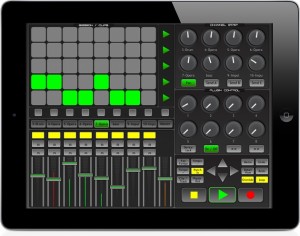
Kiss goodbye to your mouse and keyboard, and let your fingertips do the work with LiveRemote for you iPad, iPod or iPhone. LiveRemote connects to Ableton via CoreMidi networking technology with incredibly low latency of between 1-3ms. Control your session from the comfort of your couch, or whilst walking around the room. LiveRemote gives you direct and precise control over the many Live features.
Mixer:
– Control up to 8 faders at a time + the Master with solo, mute, record also available. *High Resolution Precise meter readings of the audible decibels for each channel.
Clip Launcher:
– Launch clips direct from your device, using the 8*5 matrix. *Launch scenes, or stop them at any time.
– Move around your session easily with the control arrows, the clip launcher will activate any clips that are within the red box highlighted in Live.
Channel Strip: For each channel you have precise and fast control on the pan and upto 3 send channels.
Plugin Control: Simply and easily control the plugins for each selected channel, LiveRemote automaps the available controls of the selected device.
Transport Control: All the necessary transport controls such as Play, Record, Stop ect are implemented for quick, on the fly recording.
LiveRemote is compatible with both Mac and Windows. Price £5.99/$9.99 iPad Version / £3.49/$5.99 iPhone Version and availible in the iTues App store.
For more information please visit there website www.iximix.com
Generative Music in the Blues Scale using AudioCubes and Ableton Operator
AudioCubes are shown in this video with the new free generative music app from Percussa, capable of generating complex melodies, using note intervals from the blues scale. Notes can be sent via MIDI to any compatible hardware or software such as the Operator synth in Ableton Live 8 in this example.
By adding cubes melodies can be added on top of each other. Rotate cubes to change number of notes played per bar, and place cubes next to each other to make them add to each other’s note intervals to create subtly changing melodies, which will continue to have a time and harmony relationship.
How to seriously hack the Kinect
Kinect for Xbox 360, or simply Kinect (originally known by the code name Project Natal), is a “controller-free gaming and entertainment experience” by Microsoft for the Xbox 360 video game platform. Based around a webcam-style add-on peripheral for the Xbox 360 console, it enables users to control and interact with the Xbox 360 without the need to touch a game controller, through a natural user interface using gestures and spoken commands. The project is aimed at broadening the Xbox 360’s audience beyond its typical gamer base. Kinect competes with the Wii Remote Plus and PlayStation Move and PlayStation Eye motion control systems for the Wii and PlayStation 3 home consoles, respectively.
In this video:
Matt Davis hacks a Kinect using OpenNI & Max/MSP. With it mapped to Ableton live and Henry Strange’s MIDI to DMX Laser Control System, Matt demonstrates this fun a/v control system.
Broken Bells Rack for Ableton
Xylophone, Glockenspiel, Bells… This rack is a sample of two xylophones, they can be played in unison or separately. Layered underneath those samples are reversed xylophone samples, so when you play, the normal xylophone sounds then reversed ones echo back.
Download the Live set here: http://bit.ly/freesynth10
it includes two versions, one with Sampler and one with Simpler.
*Non Live Users: The actual samples are included and can be imported into your DAW of choice. Instructions on how to do so are included in the download. On this collection, the samples go from notes A,B,C,D,E,F,G,A for three octaves*
There’s a certain feeling created by the sound of the xylophone, maybe it is memories of Mr. Rogers’ Neighborhood or all the simple musical toys children have, but, to me, the sound is very reminiscent of childhood. This week’s download is created from samples of two different xylophones. One, I bought at a music store for about a hundred bucks and another belongs to my friend DF, who plays in an excellent noise rock band from Brooklyn called Imaginary Weapons (check them out, it’s very melodic, noisy, contemplative guitar rock woven together with some beautiful synth parts). The synth you are getting this week is actually four instruments in one. The first two are the xylophones layered together. These can be mixed together to your preference. Next, while thinking about the nostalgia I get from the xylophone, and how our memories are often distortions of what really happened, I decided to reverse the samples and layer those over the original sounds. So, when you hit the notes, a traditional xylophone sounds, but then a reversed xylophone creeps back in with an echo of those same notes. You can play the instrument with just the normal xylophones, just the reversed ones, or a blend of both. The reversed xylophones are being moved around the stereo spectrum via LFOs, which adds the the cerebral effect I am going for with this instrument.
DATAMASKIN

