
Touchable controlling Ableton Live w/ XYZ control
Jook Music presents a Killrkat live remix of the song “Alley Creeper” on the new Touchable iPad Ableton Live controller app. Killrkat are an innovative electronic duo trailblazing the newest of music production and performance techniques to bring danse floors to height of raw energy and power. For more information visit facebook.com/Killrkat
Feature overview:
NEW XYZ Pad module:
- •Up to 4 Dots at once – each with their own X, Y & Z Parameters.
- •Choose the dots X, Y & Z Parameters from All of Lives Mixer & Device.
- •Easy parameter assignments through the config menu.
- •Set direction & force of gravity and bouncing mode individually for each dot.
- •Record the dots movements – loop, reverse or cut them till they fit your needs.
- •Play them back as automations – quantized and in complete sync with Ableton Live.
- •Save automations and parameter assignments to the database within touchAble and exchange them with other iPads and Users via iTunes.
- •Save snapshots of the dots positions: Hold, Stop & Morphing mode.
- •Set morphing length & which of the are dots affected by snapshots.
NEW ‘Snap’ mode:
- •You can activate the Snap mode per device with the ‘snap’ button in the Menu to the right.
- •If enabled, the control elements will snap back to their original value once you lift your finger.
- •To change the original value of the parameters: disable Snap mode – tweak the device to your needs and enable Snap mode again to jump back to these values at the end of your touches.
Device Module:
- •The Control elements on the FX8 & FX32 View now switch their behavior & style depending on the parameter they control.
- •Possible styles are: Toggle, Multitoggle, Fader & centered Fader.
- •This will work with Lives devices & all M4L Devices.
“Salt Shaka” Ableton and OP-1 jam
Ableton Live and Teenage Engineering OP-1 Jam created on July 1, 2011. Made with samples from Salt n Pepa’s and The Hues Corporation, Teenage Engineerings OP-1, Ableton Live, APC40, Novation Launchpad, MPK49. Featuring footage from New York’s Southard’s Pond. Salt n Pepa sample captured from the OP-1’s internal FM radio, Hues Corporation from vinyl.
New Ableton Live Rack featuring lots of Noises, Risers, Swooshes and more
This weeks Ableton Live Rack is a collection of white noise swooshes, risers, falling synths, and other useful transitional sounds.
They are great for adding tension or creating releases. Most were created with either virtual synths or sampled synths, and some sounds were sampled from old video games. These are some of the exact sounds I use during my live performances to add anything from anticipation, signaling a change, or creating atmosphere. I have added a bunch of useful effects. These are explained in the video, as well as a quick demonstration of how I might use them on a track, although for the sake of example, I may be slightly overdoing it. Enjoy and Share  **Non Live users: You can use the samples in your DAW of choice**

Download the rack here: http://bit.ly/freesynth14
So much of our enjoyment in life relies on tension and release, and music is no different. This weeks free Ableton Live Rack is designed to help build that tension and release in your music. I’ve created a bunch of white noise risers and fallers, sampled some choice sounds from old video games, and created synths that climb and fall many octaves over time. Many of these sounds have been staples of dance and electronica for years, but more and more, as genres of music mix together, I find these sounds as useful in rock music as they are in anything else. Experiment with them. Use them to alert the listener to changes that are approaching, and to smooth out transitions.
Many of these sounds are the exact ones I use in my live performances, and they can work wonders whether entering or leaving a chorus, switching to a new song, or just as something to get the audience to make some noise of their own. I’ve added some effects that lend themselves nicely to all this swooshing around. There’s Flanger, Phaser, Reverb, Delay, AutoPan, Bit Crusher and a Beat Repeat that allows you to further destroy the sound. In the video, I explain how it all works and demonstrate some ways to (over)use the AfroDJMac Noises, Risers, Swooshes Rack. Use and abuse; enjoy and share.
Maximizing viewable area on your screen
Ableton Live Tutorial Video, hiding browsers & maxing your screen Vespers, Ableton Live Certified Trainer, Vancouver, BC, Canada.
http://www.vespers.ca http://www.soundcloud.com/vespers http://www.twitter.com/djvespers http://www.facebook.com/vesperspage
Understanding the basics of warping full tracks
Ableton Certified Trainer and Dubspot Instructor, Michael Hatsis, a.k.a. !banginclude explains and demonstrates basic and essential warping techniques in Ableton Live in the part one of this three-part video tutorial series exploring creative ways to warp tracks in Live. Using a standard house track with a 4×4 drum pattern, Hatsis shows how to set Live warping preferences, determining and entering an approximate tempo by tapping the tempo Tab along with the song, figuring out the downbeat and set where the track starts, in this case – first kick, transient marker. Stay tuned for part two and three, as Michael Hatsis delves further into Live and offers more creative tips and techniques for warping.
For more info – http://bit.ly/gmwhsZ
Using Ableton Live as Sync Master
Ableton Live as Sync Master driving Innerclock Systems Cynq-Lock via the new Sync-Gen II software driving Elektron Machine Drum (Midi Clock) and Analogics ACS Sequencers/Tip Top Analogue Modular via Cynq-Lock Trigger and Reset Outs.
Machine Drum and ACS Sequencers swing from Sync-Gen II Software. No effects. No delays. No post production. No Audio Loop Time correction, warping or track offset.
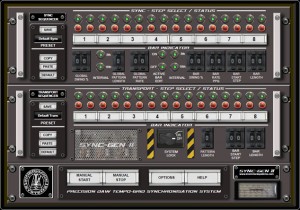
The Cynq-Lock/Sync-Gen II combination works with any existing multichannel soundcard and requires absolutely no modification to your existing hardware. It is a genuine Plug-and-Play system that lets you get ‘out of the box’ to concentrate on making, recording and enjoying music with external hardware again.
The Cynq-Lock generates phase-synchronous Din-Sync, Midi Clock and Analogue Pulse Triggers within 20 microseconds (0.882 samples at 44.1 kHz) which in real terms means your external hardware and your DAW recorded audio line up perfectly in real-time every time. Your DAW audio and your external hardware sound like one tight machine.
Unlike software generated Midi Clock which is notoriously prone to slop and jitter, our new Sync-Gen II software feeds sample accurate and tempo-grid locked pulses from your DAW Host Application to the Cynq-Lock which in turn generates ultra-precise and phase-synchronous Midi Clock, Din Sync and Voltage Triggers to feed all your external hardware. They sound they way they were designed to and tracking perfectly synchronised playback back into the DAW with zero sync jitter means the recorded audio lines up exactly with your grid. No more time wasting waveform editing or re-quantizing of audio just to make things sit right plus you get to use ALL the recorded performance and not just a single bar.
Korg Monotron Rack for Ableton Live
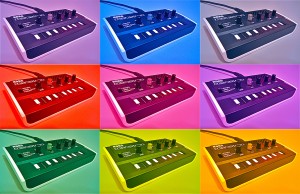
The Korg Monotron is a great little analog synth with a big, thick sound and amazing filter. However it is controlled not with keys, but a ribbon controller. I find it extremely difficult to play in pitch. So I’ve sampled it and racked it up in Ableton. Now notes are easy to hit, and there are also a few extra goodies not possible in the original. Follow along as I take you through it and download it yourself and enjoy!
**Non Live users: You can use the samples in your DAW of choice**
Download the rack here: http://bit.ly/freesynth13
More information below:
For something about the size of a cassette tape, the Korg Monotron packs quite the punch. Don’t let that built in speaker fool you, plug this little guy into an amp and it can rattle the windows. The filter sounds great, and can even be used on external audio sources, very cool. The downside: I can’t play the thing in tune! Too bad it doesn’t have some cheap little buttons for keys instead of that ribbon keyboard. Hitting the exact pitch consistently, for me, seems to be out of the realm of possibilities. Thank goodness for samplers
This week, I have created a free Ableton Live Rack using samples from my Korg Monotron. Although some might argue that this rack lacks one of the most alluring qualities: the built in filter, it is now a much more playable synth, being that you can control it with a normal keyboard with actual keys. (Plus I think the filter in Ableton’s Sampler and Simpler are pretty nice substitutes). To take advantage of some of the possibilities offered to us in this computer age, I’ve done a few things the actual Monotron is incapable of. First, I layered a few Monotron samples to thicken out the sound. I’ve made it switchable from mono to polyphonic (Polytron?), Portamento and Glide are now options, you have control over Attack and Release, the Filter Envelope now has an attack you can play around with, and another macro knob allows you to select different combinations of samples. For the purists out there that don’t want layered samples, I’ve included an identical rack, with only one sample and a few different effect macros (chorus and delay.) For both racks, I have the mod wheel set to introduce some vibrato. So, watch along in the video and download it for yourself, it’s free and most importantly, from the heart. I think you’ll be pleased with just how much punch that little box can deliver. **Big thanks to Big C for giving me the Monotron for Christmas
xo **
OSC Physics Demo
OSC Physics sending data to Max/MSP and Ableton Live.
Max receives OSC messages from the iPad and visualizes and converts it midi. Midi messages are sent to Ableton Live to control audio effects.
Here’s a new free drum rack for Live, enjoy

Voltage Disciple has released a free drum rack for Ableton Live, VOLT100A,.
Here’s what they have to say about it:
The lost VOLT100A free Ableton LIVE Pack.
A 96kHz 24 bit glitch drumrack containing 22 unique tortured sounds from a mysterious old analogue synth combined with a glitch FX rack and some New York Compression.
This pack is compatible with LIVE and LIVE Suite.
Visit Voltage Disciple, download the LIVE Pack, choose install LIVE pack from within LIVE and enjoy the torture. While you are there check out our other great LIVE packs.
VOLT100A is available now as a free download from the Voltage Disciple freebies page.
Tips: Understanding the impact of New York (parallel) compression
Parallel compression is also known as New York compression, and is a very popular technique for getting drums louder whilst retaining most of the energy of the original envelope.
Basically, what you do is mix two versions of the drum track together – one track being treated with quite severe compression, and the other being uncompressed. The compressed track brings up the ‘oomph’ whilst the original ensures that the dynamic interest of the beat is maintained.
Of course, this technique is not exclusively for drums – it can be very effective on vocals too, or any other instrument that needs to be tightly controlled.
Here is an example of parallel compression that I have used:
Put a compressor on a return track in Ableton (or any other DAW)
Make sure you use a compressor that can be set to 100% wet and has a ‘look ahead’ feature
put the threshold deep, like -50 db
Ratio about 2:1 – 2.5:1
Attack as fast as possible 1ms or faster
Release set to 250ms-350ms
Now you can mix in your compression on any track you want to beef up using your sends without affecting the original signal. It’s like the best of both worlds, a combination of compressed and uncompressed signal. This way you get the transients of your uncompressed sounds (the peak you see on a snare or kick drum for example).
The transients give your sound bite and helps things stick out better in your mix. The compression gives your sounds more body and more punch and brings out hidden frequencies for a fuller sound. If you don’t want to use a return track, you can simply copy your track and apply these compression settings on the copy and then mix to taste. Give it a shot and let me know how it goes for you.
DATAMASKIN

