
More cool stuff from Roland – A-01 Controller + Generator
Take control of your musical setup with the A-01 Controller and Generator. Connect your gear using standard MIDI, hook up to your computer-based DAW with USB MIDI or play music apps on tablets and smartphones via Bluetooth. You can also drive vintage synthesizers and modular synths via the CV/Gate outputs and step-sequencer. Along with the knob and ribbon controllers, the A-01 also includes an 8-bit monophonic synth engine for creating distinctive synth tones.
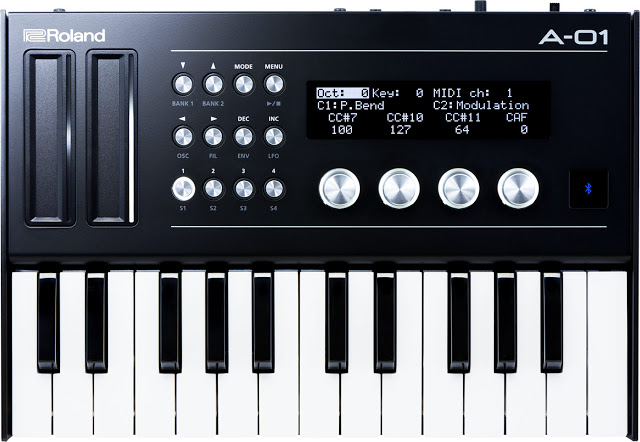
A controller is a vital part of any music production setup, but choosing the right one can be a dilemma. You want a unit with the flexibility to drive all your MIDI and CV/GATE-equipped analog gear. You need to connect to the huge range of music-making apps for tablets and smartphones. And as a modern musician moving from gig to gig, you need to be able to work on projects whenever inspiration strikes. The Roland A-01 ticks all of your boxes—whether you want to warm up backstage, control every element of an elaborate home studio setup, or create original music from scratch, this flexible controller and sound generator is your one-stop solution.
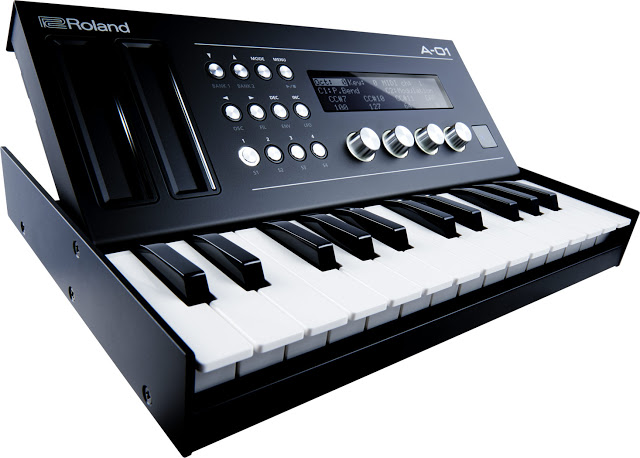
SPECIFICATIONS
Memory
Controller Mode: 16 patches (4 patches x 4 banks)
Synth Mode: 16 tones (8 tones x 2 banks)
Seq Mode: 16 patterns (8 patterns x 2banks)
Connectors
PHONES jack: Stereo miniature phone type
CV OUT jack: Stereo miniature phone type
GATE OUT jack: Stereo miniature phone type
MIDI (IN, OUT) connectors
USB port: MicroB type (MIDI)
Bluetooth
Bluetooth LE
Power Supply
Rechargeable Ni-MH battery (AA, HR6) x 4
Alkaline battery (AA, LR6) x 4
USB bus power
Current Draw
500 mA (USB bus power)
Expected battery life under continuous use:Rechargeable Ni-MH battery: Approx. 12 hours
* This can vary depending on the specifications of the batteries, capacity of the batteries, and the conditions of use.
Accessories
Owner’s Manual
Leaflet “USING THE UNIT SAFELY”
Alkaline battery (AA, LR6) x 4
Options (sold separately)
Keyboard unit: K-25m
SIZE AND WEIGHT
Width300 mm
11-13/16 inchesDepth128 mm
5-1/16 inchesHeight46 mm
1-13/16 inchesWeight950 g
2 lbs 2 oz”
CME XKey37 Review
“CME XKey37 Review – The CME Xkey controllers are among my favorite for their sheer sleekness. They just seem to fit into any situation (literally). I may have mentioned on my previous review of the 25 key version that the design of the the CME Xkey is rather masterful.
Read the full review Here: http://wp.me/p2DmTM-2sF”
The CME XKey37 is a low-profile desktop keyboard MIDI controller that has thin piano-size, velocity-sensitive keys. It also features polyphonic aftertouch, a feature that’s rare even on full-size keyboards.
The CME XKey37 is avialable now, with a street price of about US $200. See the CME sitefor details.
Controller Clinic: DIY MIDI Controllers
In this episode we take a look at all of the hand crafted DIY MIDI Controllers Kyle has made so far and what unique cases he used.
*Special Thanks to Toby Hendricks aka Otem Relik (https://www.youtube.com/otemrellik) he helped out a ton with providing base code/sketches for these.
All controllers use a Teensy 2.0 Board: http://amzn.to/1TotKRX
Wood Controller uses an Arduino Leonardo Board: http://amzn.to/1gqGdGu
3D Printing done by Justin Koch: Send your 3D Printing Inquiries to justinkoch@gmail.com
https://www.facebook.com/OfficialKyle…
Sign up to receive these videos and free soundpacks straight to your inbox every week:
http://www.kmprodj.com/djproducer-res…
Video Credit: Alex Medvick
Check out the Soundpack4Soundpack Collective: https://www.facebook.com/soundpack4so…
Akai Pro Advance – the smart controller for all your plug-in needs
Jennifer Hruska from inMusic shows us how the new Akai Advance controller keyboard works and its smart way for controlling software plug-ins.
User Modules | Ableton & Traktor controller for iPad
http://appstore.com/conductr || http://www.conductr.net
http://facebook.com/c0nductr || http://twitter.com/c0nductr
CONDUCTR ABLETON USER MODULES
• 2 fully customizable module types: Default and XY-4D pads.
• Each Default User Module can contain up to 8 parameter controllers from any device on any track featured in your Ableton Live set.
• 4 different control interfaces: faders, crossfaders, buttons and quantized scales.
• Default User Modules can be quickly created and edited at any time, even while playing, by browsing and selecting any of your set’s parameters on the iPad or through the LEARN feature.
• RESET feature: create parameter’s values memories and recover them whenever you want.
• GESTURAL MODE: automatic gesture detection to play without looking at the iPad!
DOWNLOAD CONDUCTR NOW AND TRY THE USER MODULES FOR FREE: http://appstore.com/conductr
Traktor Kontrol D2 – the next-generation pro deck controller from NI
Native Instruments has announced Traktor Kontrol D2, the next-generation pro deck controller for Traktor Pro 2.
Designed for creative DJ performance that takes the DJ’s focus away from the laptop, TRAKTOR KONTROL D2 offers groundbreaking touch-and-see workflow in a compact format optimized for easy set-up with club equipment. TRAKTOR KONTROL D2 will join TRAKTOR KONTROL S8 as one of the first DJ hardware controllers to support Stems* – an upcoming, open audio format that allows multi-channel mixing with individual musical parts. Robust, lightweight, and compact, the D2 is the ideal performance deck for the touring DJ.
TRAKTOR KONTROL D2 creates a multisensory DJ experience thanks to its touch-and-see technology. Tracks appear on a full-color display as vector waveforms while several key views and pop-up panels are revealed when a corresponding control is touched. The Browse Knob for example, triggers the Browse View for track selection directly from the controller. Performance Panels appear over track waveforms to view and modify BPM, key, filter, or effect values when activated by touch-sensitve knobs. And an LED-guided touch strip provides motion-sensitive pitch bending, track seeking, vinyl scratch emulation, and keeps track of phase in dark environments.
TRAKTOR KONTROL D2 naturally delivers enhanced TRAKTOR deck functions that empower pro DJs to develop their own trademark sound. Samples and loops are easily accessible for mixing with the four dedicated Deck faders when using a Remix Deck. Eight color-coded pads can trigger sounds, juggle cue points while in Hotcue Mode, or rearrange a playing track on the fly in Freeze Mode. Similar to Remix Deck usage, the D2’s touch-sensitive performance knobs and faders will instantly correspond to a loaded Stem file’s different ‘stem’ parts.
Designed to minimize bulk and setup time, TRAKTOR KONTROL D2 is highly transportable for DJs on the go. The lightweight, yet robust build features four foldable rubber-padded feet that extend to raise the unit to industry-standard height, or incline it for contoured comfort. Though one D2 alone can navigate through two TRAKTOR decks, two USB ports found on the rear panel allow a second D2 to be daisy-chained to one computer USB port for a two-unit setup. Connections are further simplified with an included power supply splitter cable that allows two units to be powered using one power supply unit.
Fueling the technology behind TRAKTOR KONTROL D2 is the included TRAKTOR PRO 2 software. An innovation in and of itself, TRAKTOR PRO is the award winning DJ software used by countless professionals. Four software decks, over 30 studio-grade effects, and powerful advanced features for creative looping and cueing have provided DJs all over the world with inspiring and customizable DJ possibilities.
TRAKTOR KONTROL D2 will be fully compatible with Stems on public release of the format in summer 2015.
Traktor Kontrol D2 will be available for $499 USD/499 EUR/£429 GBP on May 4th, 2015. Preorder is also available.
Analog Modular controlled by iPad MIDI Controller
Using Geo Synthesizer iOS app by Wizdom Music though Silent Way Voice Controller Plug-In to control pitch and gate of my eurorack modular analog synth.
Arturia announces KeyLab 88
The KeyLab 88 is a professional-grade 88-note MIDI keyboard controller designed with the working musician in mind. Featuring a new hammer-action keybed from Fatar and deep integration with our award winning Analog Lab software, the KeyLab 88 is unique with its robust, solid metal construction and classic wooden side panels.
More info: http://www.arturia.com/products/hybri…
KeyLab 88, the largest in the KeyLab series, comes with Arturia’s Analog Lab, a software synthesizer solution with over 6,000 presets derived from Arturia’s range of Analog Classics. These include the TAE (True Analog Emulation) synthesis-powered Mini V (Minimoog monosynth emulation), Wurlitzer V (virtually bringing back to life the well-known ‘Wurly’ electric piano), among others.
The first 3,000 units shipped come with two virtual instruments: Grand Piano Model D from fellow French developer UVI, and Pianoteq 5 Stage, a physical modelling-based virtual instrument that provides acoustic and electric piano recreations as well as chromatic instruments.
The keyboard also acts as a controller which is compatible with any third-party software or hardware. Customizable MIDI assignments are accessible via the LED screen or the included MIDI Control Center software.
KeyLab 88 also sports a music stand, and a rubberized, attachable shelf extension to create a work surface for holding a laptop, tablet, or another small synth.
BeatStep Pro — new flagship controller from Arturia
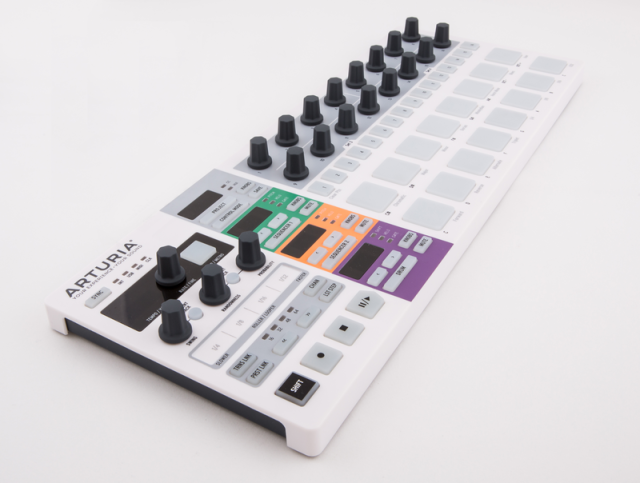
Arturia has introduced the BeatStep Pro — a flagship controller and dynamic performance step sequencer that they call ‘a sequencing powerhouse’.
BeatStep Pro has been designed from the ground up to provide a hands-on hardware sequencing experience. It offers 16 touch-sensitive knobs, for entering of pitch, gate, velocity amounts, and timing shifts per step.
It includes two independent (colour-coded) monophonic step sequencers, each with dedicated displays to show the current playback position and bank length of the currently selected sequence. SEQUENCER 1 and SEQUENCER 2 have been greatly expanded with up to 64 steps per sequence, 16 sequences per project, and 16 projects, making BeatStep Pro one of the more powerful step sequencers ever made. each sequencer has its own 1V/Oct CV (Control Voltage) and (10V) GATE outputs to connect to suitably-equipped analogue synthesizers, together with a separate VELO (Velocity) output to allow for even more possibilities when working with a modular synth system setup.
An additional DRUM sequencer allows for 16 separate tracks of sequencing. Record in quantised realtime via the 16 pressure sensitive pads or use the 16 step buttons for a classic drum machine workflow. when working in SEQ1 and SEQ2 mode, the pads can control pitch transposition as well as accessing various musical scales — such as Chromatic, Major, Minor, Dorian, Mixolydian, Harm Minor, Blues, and also a User setting — while the DRUM sequencer itself also has eight DRUM GATES at its disposal (to send gate outputs from the corresponding pads for triggering external devices).
BeatStep Pro is also a controller. Switching from PROJECT to CONTROL MODE means users can trigger clips in their favourite DAW (Digital Audio Workstation), play drum sounds from an external module, or adjust parameters in their favourite plug-in. Possibilities are (almost) endless, limited only by (lack of) imagination.
Beatstep Pro also offers performance effects, including a realtime ROLLER/LOOPER touch strip; PROBABILITY, RANDOMNESS, and SWING settings.
Features:
- 2 monophonic step sequencers
- Up to 64 steps per sequence
- Note, velocity and gate time settings per step
- Note tie
- 16-track drum sequencer (one track per pad)
- MIDI controller mode
- Fully customizable for knobs, step buttons and velocity and pressure sensitive pads
- Send MIDI CC, note data, program changes
- 16 Projects, each with 16×2 sequences, 16 drum sequences and a controller map.
- Performance controls
- Randomizer with Amount and Probability settings
- Real-time looper/roller touch strip
- Independent swing amount per sequence
- Touch sensitive knobs
- Tap Tempo
- Connectivity
- CV/GATE outputs (1 volt per octave CV, 10 volt gates)
- 8 drum gate outputs
- Clock sync with multiple standards
- MIDI In/Out with supplied MIDI adaptors
- USB class compliant
- Kensington lock
BeatStep Pro will be shipping in Spring 2015 and available for €249.00 EUR/$299.00 USD. See the Arturia site for details.
Casio has introduced two new Trackformer DJ products
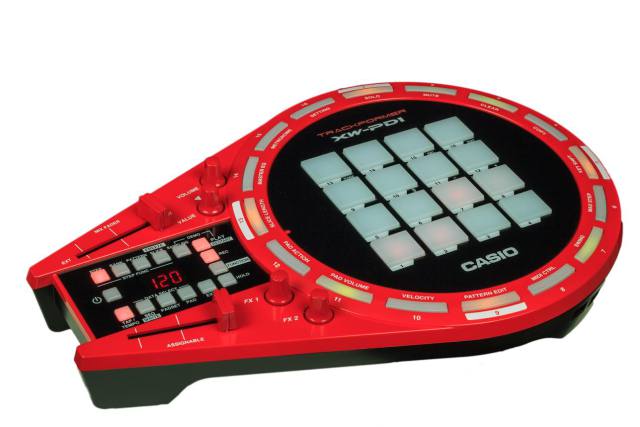
Casio has introduced two new Trackformer DJ products, the XW-DJ1 DJ Controller and XW-PD1 Groove Center.
XW–PD1 Groove Center
The XW-PD1 Groove Center, above, is equipped with the sound engine from Casio’s XW series of synthesizers The XW-PD1 design includes 16 velocity-sensitive pads and 4 knobs for fast real-time music production.
The XW-PD1 features an outer ring containing 16 buttons, which let you visualize the current rhythm pattern at a glance. Users can create rhythms and phrases with the pads as well as apply DSP effects such as roll, filter, bit crusher, break, and pitch shifter.
The XW-PD1 includes drum sounds for a variety of electronic styles, including Hip Hop, Trap, and House. It also features a synthesizer engine, a variety of effects and can sample sounds.
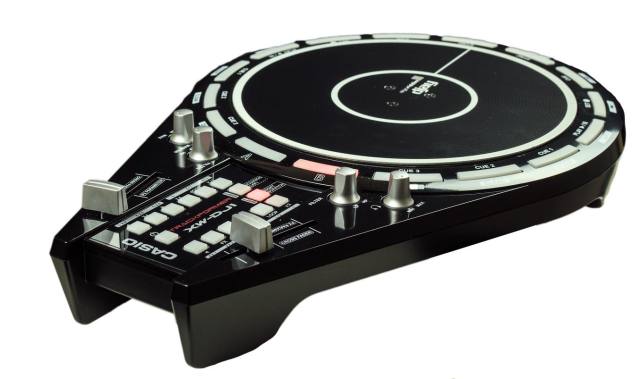
XW–DJ1 DJ Controller
Casio’s XW-DJ1 DJ Controller, above, features a 7-inch platter that provides the feel of an analog turntable, filter controls and cross fader. The XW-DJ1 is compatible with Algoriddim’s djay2 apps.
The XW-DJ1 integration with djay2 provides direct controls for cue points, tempo sync, effects and looping. Additionally, the XW-DJ1 is portable because it is battery-powered and offers a built-in-speaker.
The two Trackformer controllers can also be used in tandem. The audio output of the XW-DJ1 can be connected to the audio input of the XW-PD1. This lets users do remix performances, using the unique capabilities of each product.
Pricing and Availability
The XW-DJ1 DJ Controller will be available, beginning January 2015, for an MSRP of $299.00.
The XW-PD1 Groove Center will be available beginning March 2015 for an MSRP of $399.00.
DATAMASKIN

