
Get the latest version of Ableton Live – 8.1.4
Ableton Live 8.1.4 is now available. They list improvements as:
“Combination Mode is now active when multiple Akai APC40/20s are in use. This means that the topmost controller selected in your preferences will control tracks 1-8, the second controller selected will control tracks 9-16, and so on. When an APC40 and an APC20 are connected at the same time, the APC20’s buttons will default to Track Selection, and its faders will default to volume.”
For list of bugfixes checkout the forum post – http://forum.ableton.com/viewtopic.php?f=1&t=141021
You can update to the latest version here – http://www.ableton.com/latest_versions
Setting up a cue mix and a crossfader in Ableton
Nice tutorial for Live 8, perhaps one could wish that it had been somewhat more extensive
Ableton launches cool Drum Machine for Live
Skinnerbox introduces their new SBX 2049 FM drum machine for Ableton Live, made with Max for Live:
sbx 2049 is a six-voice synthesis-based drum machine with an integrated pattern sequencer. Its powerful sound design capabilities are easy to use, and provide a variety of sounds suited for all styles of electronic music.
Pricing and Availability
This device is available now as a free download for all Max for Live owners. Requires Live 8.1.3 or higher and Max For Live.
Live:
Intello for Ableton and Max
A good nice preview of Intello, an “Intelligent Looping Device” for Ableton Live 8 + Max For Live:
The goal is to make a plugin, running in Ableton Live, programmed in Max for Live, which produces Glitches in a new fantastic way.
This is a work in progress. See Zettt’s site for the latest update.
Demo of nativeKONTROL blockLive
This is a demo of nativeKONTROL blockLive, a preset for Livid Instruments Block that turns the controller into a powerful control surface for Ableton Live 8.
nativeKONTROL creates Windows and OS X software solutions that are designed to “empower your MIDI controller, allowing you to focus on making music, while spending less time with a mouse in hand.”
Free sets for Ableton Live

Ableton & Minus have released ten Ableton Live sets that are available as a free download:
The Live Sets were made exclusively for Ableton by ten artists from the Minus roster. Each Set comes with a companion Lesson that reveals insights into the artist’s musical vision and offers valuable production tips.
Includes material from: Click Box, Hobo, Heartthrob & Troy Pierce, Magda, Marc Houle, Fabrizio Maurizi, Barem, Ambivalent, JPLS and Gaiser.
This Live Pack requires Live 8.1.3 or higher. To install the Pack, download it, unzip it and double-click the .alp file. You’ll then be asked where to save the contents of the Pack.
Note: This Live Pack will work in Live Intro or Live Lite, but the Sets will be read-only.
Link:
How Vesper made Lady Gaga’s Telephone call
The final outcome:
And here’s how he did it in Ableton Live, who actually was chosen as the number 1 DAW at ST
There are several pieces of Youtube videos connected to this one so the rest you will have to see on his Youtube channel
Controlling Ableton Live through an Ohm 64
Producer/DJ Eliot Lipp discusses and demonstrates how he uses his Livid Instruments OHM 64 MIDI controller to control Ableton Live.
Eliot explains the functionality and layout of his project and controller; as well as his custom effects and tools to add variation and complexity to his music.
After the tutorial there is a section of his live performance from a recent show in Austin, Texas.
The Ohm64 is an adaptable, programmable, and interactive MIDI control surface designed to give you hands-on control over your performance. High-quality sliders, knobs and buttons provide the interface for creative expression, whether you’re mixing samples and synths or DJ’ing a cutting-edge set. Constructed with an aluminum faceplate and a gorgeous body of hand-finished wood, the quality is felt down to your fingertips. All of our controllers are proudly hand crafted and assembled for artists by artists in our Austin, Texas shop.
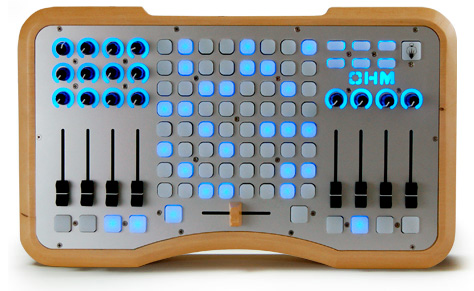
The Ohm64 has bi-directional talkback communication allowing the controller to talk to your software, and software to your device. MIDI messages can be sent to the Ohm64 to light up the buttons for an interactive performance. Completely programable and mappable, the Ohm64 provides a flexible control surface that be used with any software or setup. Completely USB powered means you don’t have to worry about adapters and and power strips, and it is plug and play so no drivers are required.
The sound of Rubik’s cube – recommended
Projection Mapping Music Sequencer – Rubik’s Cube (Sequencer programmed in Processing, sound is generated in Ableton Live)
Nice glitch Ableton Live tutorial
Ableton Live guru Tom Cosm explains his approach to creating “a glitching effect that compliments whatever you want to glitch. I have named this effect Clitch”.
This is the latest in a series of very nicely done videos by Cosm – see his site for more info and his YouTube channel for earlier videos.
In this tutorial video I explain a unique way of glitch up your audio, be it synths, drums or vocals.
The technique works like this
- Add an audio effect rack after what you want to glitch, and give it 128 chains
- Give each chain a unique effect (beat repeat, filter etc)
- Midi asign a range of 128 keys (C-2:G8) to the Chain Selection Ruler
- Create a new “trigger” midi track
- Send the MIDI of that trigger track out to the IAC driver
- Either duplicate the MIDI clip for your synthline, or extract a groove from a sample and drag it from the groove pool onto the new trigger clip
- Add MIDI effects to the trigger track so that the new notes in the MIDI clip do new and intersting things.
This is probably the most advanced tutorial I have made, so I encourage you to watch the video as I feel I do a much better job explaining it than I do writing it down!
DATAMASKIN

