Improvisation for Animoog and Moogerfoogers
Here’s a nice improvisation for Animoog, Moogerfoogers and Piano in C minor.
Shared by experimentalsynth
Just a quick note:
Moogerfoogers are a direct descendent of the original modular Moog synthesizers. Housed in a rugged steel and hardwood enclosure, the Moogerfooger’s timeless good looks, versatility, and exceptional sound quality is designed to be equally at home on stage or in the studio. Their expansive functionality combined with warm, analog sound come from their state-of-the-art all-analog circuitry, designed and built under Bob Moog’s personal direction. Musical, flexible, playable, and durable Moogerfoogers are the secret weapons of top players and producers everywhere.
Animoog has been updated to version 1.0.1
Moog Music’s Animoog synth for the iPad has been updated.
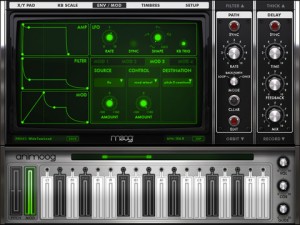
Here’s what’s new in Animoog 1.0.1:
New functionality:
- Background audio support
- Record module now has a 4 beat count-in with optional beep (configured on Setup page)
- Also on Setup page, a new Random Preset button (warning: dangerously addictive)
- Timbres page: ‘Preview’ button, select timbres silently or select & preview them audibly
- Multi-mode knobs are now easier to adjust
- Network MIDI session now enabled by default.
Bugs fixed:
- Memory leak on switching page views was causing crashes
- MIDI Clock Sync much smoother
- MIDI note to KB display mapping is now correct
- Handles MIDI NoteOn w/ velocity 0 as a NoteOff.
And Animoog is still $.99 in the App Store.
Animoog Polypony + XY Control Demo
“Everyone is going bonkers over the the Animoog synth itself. Not much focus on the incredible job Moog did on the polyphonic keyboard and XY controller. Its easy to over look, but watch and listen for independent control of volume and pitch for each note. So you can have a fast attack touch at the top of the bar, or start at no/low volume and fade in for slow attack. Addtionally, you can bend the pitch note to note for smooth runs.”
Via Synth.me
Animoog as a MIDI output device from a PC over WIFI using Fruity Loops
A video showing Animoog on the iPad running as a midi output device in fruity loops studio so that it can be sequenced
Just playing around with the iPad app Animoog, which I believe is still available for $0.99 at the iTunes app store. This is a huge bargain on a really really cool app. I won’t get into the specifics of the app, but if you want to know more about what Animoog is or how to use it, I recommend this YouTube video.
So, while playing around with the Animoog app, if you go into the setup menu there is a selection under ‘Refresh MIDI input(s)’ where you can select ‘Off’ or ‘Network Session 1′. This intrigued me! Apparently you can use MIDI over the ‘Network’. After some Googling I was still unclear on how to get this setup, so I thought I’d just tell everyone how I did it so you can get to making some cool tunes yourself.
Reason Refill featuring the Animoog
Here´s a treat from Peff for those of you who are Reason fans. Here’s how he describes it:
My latest obsession has been the new animoog iPad app from moog music, inc. It’s a brilliant example of the tablet platform and touch control surface as a creative and expressive musical instrument. If you haven’t tried animoog, I highly highly highly recommend getting it.
Animoog’s sound generation system is akin to a vector synthesizer, however the main XY pad merges an eight way source selector against a wavetable grain selector. The modulation of the XY pad can be automated allowing you to explore complex variations between wavetables and granular systems. I’ve found that bypassing the modulation “orbits” and “path” parameters and simply controlling these parameters in real-time offers and incredible performance experience. This has inspired me to try to share the experience with Reason 6 users who may not have access to an iPad.
Reason users have had a similar technology available for quite some time in the Malstrom graintable synthesizer where you have two graintable oscillators. The main difference in the experience is the control over the graintables. Animoog allows you to “crossfade” between each of the sources while Malstrom’s architecture is somewhat fixed and allows you to layer the two sources or fade with envelopes, rather than a real time control.
Using a combinator configured with several Malstroms and a multi source fader, I’ve devised a patch that simulates the experience of the animoog sound source. Due to the limitations of using multiple synth devices, the configuration is limited to a monophonic instrument. Despite being mono, it’s fun nonetheless!
Download
The combinator is contained in the example Reason 6 session file and patch archive available here:
peff-animoog_inspired_combi.zip
Combinator Controls
Below is a description of the combinator controls and the functions they perform. To simulate the animoog style of table/index control try mapping the modwheel and Index control to an XY pad. This particular patch is designed to create aggressive dubstepish tones, however you can modify graintable selections and other Malstrom parameters to customize the behavior.
Mod Wheel: Multi Source fader control fades between the 8 graintables
Rotary 1 – Index: simultaneously controls all graintable index positions.
Rotary 2 – Shift: simultaneously controls all 8 graintable shift amounts.
Rotary 3 – BitCrush: increasing this knobs applies more bit crushing
Rotary 4 – LFO Rate: controls the wobble rate
Button 1 – Index Mod: applies ramp modulation to the index of all 8 graintables.
Button 2 – Table Sweep: applies LFO to the multi source fader
Button 3 – Crush On: Enables/Disables the Scream 4 bitcrush effect
Button 4 – LFO Enabled: Enables/Disables the modulation of the filter and amp sections
Multi Source Fader control
The eight way source selector relies on an old technique (think power tools for Reason 2.5 era) of using the BV512 Vocoder as an audio to CV converter. When the combi receives a note on message, a Thor polysonic synth is triggered to generate a sine wave. The sine wave acts as a modulator signal on the vocoder and opens specific bands on the vocoder. The CV signals generated by the individual bands control the fader levels of remix mixer. When the pitch of the sine wave is adjusted (by way of the mod wheel), the a different range of bands opens and subsequently opens a different mixer channel. This is an important as aspect of the patch because this is key in understanding the experience of using animoog.
Moog releases free Halloween sound set for Animoog
Moog Music has announced that it has paired up with sound design and synthesist wizards Drew Neumann and Kevin Lamb to concoct a brew of unsettling and bone-chilling sounds that are now available as a free download for Animoog, the incredibly popular, professional polyphonic synthesizer designed for Apple’s iPad.
Moog instruments have been iconic in popular music for more than 40 years, but they’ve also been responsible for creating the sounds of fear, suspense and terror in popular cinema. From Hollywood blockbusters to horror films, and even The Simpsons’ Halloween specials, Moog synthesizers have added a spooky element to thousands of soundtracks.
In the “spirit” of Moog’s scary side, and due to the phenomenal success of Animoog as one of the top-10 paid iPad apps on the iTunes store, Moog Music is offering a Halloween sound set to users for free on it’s website (http://www.moogmusic.com/content/animoog) through Friday, November 4.
“It’s always thrilling to hear the new sounds that artists and sound designers create when we have developed a new instrument,” said Cyril Lance, chief engineer at Moog Music. “In this case, Animoog inspired Drew and Kevin to create an entire library of spooky sounds for Halloween which we are extremely excited to share with you.”
The add-on to Animoog includes presets that span the range from sci-fi to horror, and, in some cases, look like their names. Users can watch for the Zombie Hand, run from the Cyclops, escape the Evil Portal, and avoid the Scythe of the Grim Reaper!
The heart of Animoog is Moog’s Anisotropic Synthesis Engine (ASE), a technology that has been in development at Moog for nearly six years. Animoog captures the vast sonic vocabulary of Moog synthesizers and applies it to the modern touch surface paradigm, enabling any user to quickly sculpt incredibly fluid and dynamic sounds that live, breathe, and evolve as they play them. Whether users are new to synthesizers or are professional musicians, Animoog’s unique user interface gives them the ultimate tool for total creative expression.
Animoog is currently available on the iTunes app store for the iPad and iPad 2 for a limited time price of only $.99 USD (returning to the regular price of $29.99 USD November 18).
ANIMOOG demo, with TENORI-ON
Here’s a detailed description of what is going on:
I’d rather play it with DOTS than use a keyboard like the rest! To do this was easy, if you have a USB MIDI device like this Alesis IO Dock – I plugged the MIDI OUT dongle on my Tenori-On W to a standard MIDI cable, then to the MIDI IN on the IO Dock. Start up Animoog, and press “SETUP” on the top bar. Press “Refresh MIDI Input(s)” if necessary. Then I selected the option “dock” from the list below. Then I pressed the “X/Y PAD” word on the top bar to go back to playing mode. The Animoog “listened” to the MIDI notes from Layer 1 of my Tenori-On, as if it was any keyboard! I then used layer 2, etc. to add drums and such, while my right hand operated the AniMoog’s amazing touch pad and other controls. Enjoy these 3 jams! Which get more complex as the video goes on. Subscribe, comment, and send me your apps etc. for review!
New version of The Elektron Tapes
Elektron tapes (#4). Studies inspired by Aphex Twin & Venetian Snares productions — using Elektron Monomachine SFX60+ Elektron Octatrack w/ Pro X Fade coss-fader on Vestax PMC-05 Pro III. Also featuring Oto Biscuit (w/ iPad as sound source) + Korg Kaoss Pad KP3 (x2). [Apps used on the iPad are: Moog's Animoog & MorphWiz]. Performed by sound artist & noise designer Zviij © 2011.
* Booking : zviij AT zviij.com
UP-DATE#2: “Naked flowers” (Album) is available on iTunes! http://itunes.apple.com/us/album/naked-flowers/id475830077 and Bandcamp http://zviij.bandcamp.com/album/naked-flowers
UP-DATE#1: “High heels failure” (5 ‘single’ tracks) are available on iTunes! http://itunes.apple.com/us/artist/zviij/id422672054 and Bandcamp http://zviij.bandcamp.com
N.B.— Zviij’s singles “Bug Machines III, IV, V” are available for download on iTunes http://itunes.apple.com/us/album/bug-machines-v-single/id432389810
Zviij — (born Franck Smith) is a French sound artist, noise designer and electronic musician, active as a soloist, living and working in Brussels.
Animoog and Reaktor working together
A short improv on Animoog, with an SH-5, Reaktor, and Pro-One acting as the backup band.
Animoog versus the real thing
Here’s a good bass check up from one who I believe knows what he’s talking about when it comes to comparing real Moogs to softies:
Animoog Taurus bass impression, compared with “Taurus” presets from the Moog Little Phatty, and Arturia Minimoog V. $1 vs. $1300 vs. $200.
First thing I worked on with the Moog Animoog iPad app, was programming a passable Taurus-type bass sound(two saws, octave apart, detuned slightly). There is mojo coming from both the Little Phatty and Arturia Minimoog that I couldn’t capture, but I feel like this’ll do a pretty good job in a pinch.
To program the sound, this is what I found:
1. Build off of a static saw Timbre. “StaticFatSaw1″ is good. Putting a “Sine” wave, or “OctaveSaw” in the Timbre slot next to it gives some good variation moving around on the X/Y pad.
2. The key for me to getting the vibe in the right ballpark was forcing the synth into mono operation, and using the “Detune” control to separate the saw into two separate octaves. This can be accomplished in two ways I’ve found:
-(preferable) “Unison” set to “4″, “Detune” set to approximately “8″, and ONLY use the Left audio output from the iPad(I used the “tip” side only of a stereo 1/8″ TRS to dual mono 1/4″ TS cable, coming out of the headphone jack)
- “Unison” set to “2″, and “Detune” very slightly under “10″. This’ll sound alright coming out of the iPad speaker, but is less flexible, and would be difficult to perform with.
3. all Orbit, Path, Delay settings to “0″
4. approx. fiter settings: Drive “10″, Env. “0″, Freq “5.3″, Res. “1″ – maxing out the filter “Drive” seemed to be a key to getting the right amount of “spit” in the sound with the filter wide open.
5. approx. Thick settings: Crush “0″, Drive “2.5″
6. I zeroed out all Mods, except for one, that makes the poly-pressure open up the filter freq:
- Source off, amount “0″
- Control poly-pressure, amount “+33″
- Destination: filter-freq
7. Setting the KB scale to “Chromatic” with “Mono” and “Legato” makes the on screen keyboard act as I would expect. “Cor” at “10″, “Glide” around 45%.
All three Synths recorded straight into Steinberg MR816csx. Levels adjusted slightly, no additional post processing.


