
Beautiful hardware controller for the Animoog
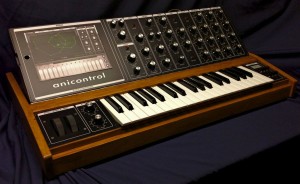
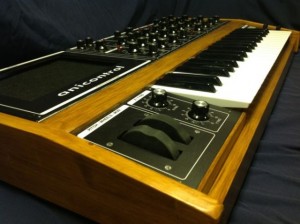
Synth-Project has created a fantastic custom MIDI controller for Moog Animoog – the Anicontrol.
The controller offers a 3-octave keyboard, pitch and modwheel – plus 31 knobs and 5 switches to control the most important parameters of Animoog.
Moon Modular M569 controls PPG Wavegenerator and more
http://youtu.be/GxrBHGFFOjg
A short test setup, controlling the iOS PPG with the M569 sequencer via the M552 CV2MIDI module.
Download or stream the audio at SoundCloud: http://snd.sc/RuFf7x
Live looping with Ableton Live, a DSI MoPho, an Akai MPD26 and APC20, a DJ TechTools MIDI Fighter 3D, and three iPads running PPG Wavegenerator, Lemur, and Animoog. An iConnectMIDI is sending and receiving MIDI notes from Animoog to MIDI clipslots in Ableton Live. Bass from the PPG app is being looped with Ableton’s looper plug-in, controlled by Lemur. All loops are recorded live, nothing was pre-recorded.
Understanding Wavetable Synthesis
This lesson explores wavetable synthesis and looks at different ways of playing with Animoog. This should be helpful for people using PPG Wavegenerator and other wavetable synths too! Visit the site a free pack of Animoog Timbres and details on how to make your own: http://discchord.com/blog/2012/8/25/official-unofficial-animoog-timbres-plus-…
Wavetable synthesis was pioneered by Wolfgang Palm in his PPG synths of the 70s and 80s. With wavetable synthesis, a library of relatively complex wave shapes, rather than sine, square or triangle waves, are used as building blocks of sounds. Dynamic sounds can be created by mixing or morphing between different wave shapes.
Note that Moog calls the heart of Animoog its ‘Anisotropic Synthesis Engine’, which combines elements of wavetable synthesis and subtractive synthesis. Animoog lets you animate the modulation of your wavetable source(s), and then lets you filter the result with virtual-analog filters.
Magellan and Cassini – iPad Show
This week Sonic State takes a look at the new update to Animoog and hooking up class compliant devices for MIDI and audio connectivity. Then they check out two new synth releases
Yonac – Magellan and Icegear’s Cassini
Featured Apps:
Animoog – innovative Moog synth at a price $29.99/ £20.99
Magellan- complex analog modelled synth $4.99 / £2.99
Cassini – clean, tabbed synth $4.99 /£2.99
Hosts
Gaz Williams – Songsurgeon.co.uk
Nick Batt – editor sonicstate.com
New release of ANIMOOG featuring MIDI CONTROL
Animoog v1.1.0 is here! New features include longer recording time in the looper, categorized presets, and fully assignable MIDI cc’s. In this video Moog’s Product Development Specialist, Amos Gaynes, shows you how to use Animoog’s new MIDI control features and explores some of the creative possibilities.
You can learn more about Animoog at:
http://www.moogmusic.com/animoog
ALBA ECSTASY – Music for iPad
All you can eat iPad electronic music 
In this video the music was composed only with iPad, overdubbing Animoog, Yamaha Synth&Dr Pad, Sunrizer, SynthTronica and Addictive Synth and it is only demonstrating some capabilities of the above music apps for iPad. Screenshots during recordings. Music composed by ALBA ECSTASY.
More music on http://www.albaecstasy.ro
130 new Animoog presets
Sunsine Audio has released Animation Vol 1, a set of 130 presets for Moog’s Animoog IOS synth.
Dubstep basses, modulation mayhem, chiptune keys, ambient voyages, hard leads and dirty funk characterize this set of 130 presets for the award winning Animoog ios synth. Compatible with both IPad and IPhone versions. The cheapest, most diverse and usable set available. Recharge your Moog and find out why this synth is creating such a stir!
- *Requires Animoog synthesizer for IPad or IPhone*
- 130 .preset files
- Includes easy installation instructions.
Pricing and Availability:
$4.99
More information:
Moog releases the Devine Expansion Pack
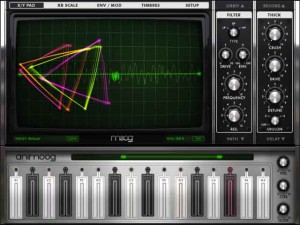
Moog has released an Expansion Pack for Animoog. They say that each Expansion Pack for Animoog contains powerful presets that inspire creativity as well as new timbres for creating sounds completely unique to you.
Created by Richard Devine, Moog tells us that the Devine Expansion Pack infuses an array of new and unique sounds into Animoog’s Anisotropic Synthesis Engine. They say that, from ethereal lead sounds to sci-fi insanity, the Devine expansion pack takes total advantage of Animoog’s uniquely expressive keyboard, modulation and timbre array.
The Devine Expansion Pack includes 32 original presets handcrafted by Richard Devine himself. Also included are 43 new Timbres nearly doubling Animoog’s sonic vocabulary.
Richard Devines speaks on his The Devine Expansion Pack,
“I have been a fan of Animoog since the day it was launched. Animoog’s ability to mix and match classic analogue waveforms and also digital waveforms is amazing! Being able to sweep, automate, and control them within the Anisotropic Synth Engine is what makes it such an expressive tool for creating new sounds. With the Devine Expansion Pack, I wanted to develop a sound set that took full advantage of all Animoog’s features. Something that was unique and could be played musically or controlled chaotically. The ultimate goal was to create a set of futuristic synth sounds that inspire new ideas and new music.”
Pricing and Availability:
$1.99
More information:
ANIMOOG – Timbres
Moog’s Chief Engineer Cyril Lance lifts the veil off timbres, the essential sound source of Animoog’s Anisotropic Synth Engine. ASE allows you to dynamically move through an X/Y space of unique timbres to create a constantly evolving and expressive soundscape. The constantly expanding library of timbres are the key to unlocking the limitless potential of Animoog’s 2D soundscapes.
Learn more about Animoog and its expansion packs here:
www.moogmusic.com/animoog
Jim’s Tips & Tricks: VIDEO SONG – RAKTATAK
Rock Video Song Features Face-Melting Moog Synth, Hammond Organ, Fender Guitar & iPad
Background data:
My first video song, an original I called RAKTATAK. What you see is what you hear, and everything you hear is seen.
Using some of my favourite instruments, this song came out of jamming on my Moog Little Phatty. Layed down the groove and added instruments – arranged with Fender Strat guitars, Fender Jazz Bass, Nord C2 Organ and Ipad Apps M3000HD and Animoog.
Drums programmed in Boom and Addictive Drums.
For lesson information in the Vancouver area, please visit:
https://jimmclaren.musicteachershelper.com/
DATAMASKIN

