
The Computer Orchestra
Created by Simon de Diesbach, Jonas Lacôte, Laura Perrenoud
Thanks to Andreas Gysin and Shiverland Productions
ECAL / University of Art and Design, Lausanne Switzerland
Bachelor Media & Interaction Design
Computer Orchestra is a crowdsourcing platform that allows users to create and conduct their own orchestra. They can choose to upload their own music or download samples to integrate into their formation. With a simple interface, they assign the chosen samples to each post. They can also arrange detection zones, that allow them to order the “musicians” to play, using various gestures. Once their orchestra is configured, they can direct it with the movements of their body.
Have a look at the full project on:
computer-orchestra.com
A Kinect detects the director’s movements and transmits the data to Processing via the SimpleOpenNI library.
Processing then sends a signal to the corresponding computers via wifi. These then play the samples that are assigned to them and generate a visual derived from the outgoing sound.
In this manner, the ‘musician-screens’ not only send sound back to the director, but also visual feedback.
Monster Computation – HorriblerAlien2 – featuring the Hybrid Music 5000 software
The BBC Microcomputer System, or BBC Micro, was a series of microcomputers and associated peripherals designed and built by the Acorn Computer company for the BBC Computer Literacy Project, operated by the British Broadcasting Corporation. Designed with an emphasis on education, it was notable for its ruggedness, expandability and the quality of its operating system…
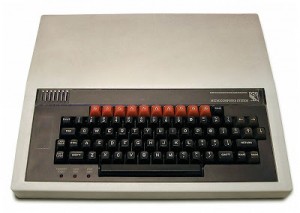
Background video description:
In the late 80s I amused myself with my BBC model B and the Hybrid Music 5000 software. It was an amazing program at the time. I have not had as much fun with any computer music program since. It could be persuaded to do both interesting and silly things.
Klangheim Project Computermusic made with Waldorf Pulse 2 and Arturia SparkLE
Contribution from ‘MrSynthmania’, the source of inspiration is not difficult to figure out, details below:
This is my new song “Computermusik”. The most parts are made with the Waldorf Pulse 2 Synthesizer and for the drums I used Arturia SparkLE.
It´s a multitrack recording with Steinberg Cubase 7.
A few weeks ago, after listening the first time to the new Waldorf Pulse 2, I found some presets which reminds me the first time dancing in a disco with 15 years. Do you remember Human League, Depeche Mode and Ultravox? This was all happening in the early eighties. I love that sound, which represents an era where many musicians made music with synthesizers and computers the first time.
This song is based on this decade. I hope you like it.
PIXEL HEAVEN 2013 – Retro entertaiment days
No computers were harmed during making this video ;).
Making of vimeo.com/65763564
Short made for Retro Entertainment Days 15-16/06/2013 / CDQ / Warszawa (PL) – pixelheaven.pl.
Created by me  – hlawka.com
Music – thevirusempire.com
Creating the film wasn’t an easy task. Preparations took well over 2 months of my free time. It is surprising, but no work was done using CGI, only good oldschool stopmotion animation and motion control slider provided by Ditogear.
Thx to: Lesny, Gajorro, Gumis, Fasola, Squoka, Radek, Ola – Janusz, Robert/ditogear, Robert/pixelheaven, Dzemik, Agata, Camel, Jake/the Virus Empire
Skrillex – Bangarang – Old School Computer Remix
Background video description:
Skrillex was the most requested artist so your wish is my command. Bangarang was a challenging song with respect to timing and now I have a new respect for Dubstep. For all the haters out there the audio in this video is 100% in sync with the original song. If you don’t believe me then test it out for yourself.
Vocals were performed with the DECTalk Express. The same speech synthesizer used by Stephen Hawking back in the eighties. The main vocals are the Betty and Rita presets overlapped. Kit and Dan vocal presets were also used.
Back in 2009 I used an 8 inch floppy drive in my Bohemian Rhapsody video but this time I wanted to update it with Sammy1am’s Arduino version. I find 3.5 inch floppy drives only sound good when playing short duraton notes with a fast tempo.
DECTalk – vocals
HP Scanjet 3C – lead
Yamaha CX-5 computer – guitar
Floppy and CDROM – lead bass solo
Modified Toy Laser Guns
Robot Bass, Snare and Cymbal
Writing music on the MSX (with FM expanders)
A look into how to create music on the MSX home computer using FM expanders.
Ft. Julian (CMEN) from the Netherlands, and cTrix from Australia.
Music and Games: Commodore 64 – 8 Bit Legend
FOR ALL YOU C64 FANS OUT THERE, ENJOY 😀
Video info:
I’ve been a big fan of the Commodore 64 since its release way back in 1982. As 2012 is the ’64’s 30th anniversary, I wanted to produce something in honour of this great little machine that has given me countless hours of pleasure, frustration, and head-banging! Here it is. For reasons of time and space, I had to cut a few scenes that were originally planned (and have been created) but I will probably use them in another C64 video in the near future.
If you’re able to recognise all the games/references in this video then you truly are an Old School Commodore geek. I’m proud of you!
Please check this description out again shortly, as I’ll be uploading some HD Windows desktop wallpapers featuring many of the 3D models used in this video, plus some more that didn’t make it into the final edit.
Credits:
Video by Mike Berry, AKA The Kernal.
Music from Terra Cresta, arranged and remixed by Jess D. Skov-Nielsen.
Originally composed by Martin Galway.
Thanks to Jess D. Skov-Nielsen for giving his kind permission to use his music.
Thanks also to David “Jazzcat” Simmons for helping to supply most of the group/scener logos.
Gotye – Somebody That I Used to Know – Old School Computer Remix
Background description:
HP Scanjet 3C as the vocals. It lags a bit due to the fast paced vocals. In order for the stepper motor to play a note it has to be moving and with that large carriage it takes a few milli seconds before it can play a note. It doesn’t sound like a lot of time but stretch that over a 4 minute song and voila…out of sync. Programming does help to compensate but it is not perfect.
Amiga 600 Bass on left audio output and Guitar on right audio output
Each audio channel was feed into an oscilloscope
2 Harddrives as the drums and cymbal
Xylophone as the Xylophone (duh)
Both the Harddrive and Xylophone are controlled by one PIC16F84A mircocontroller
Floppy disc music goes to space
Another useless device.
Imperial march played by two floppy disk drives.
Homepage: http://silent.org.pl/home/
How does it work?
“It’s nothing new and it’s very simple. The sound comes from a magnetic head moved by stepper motor. To make a specific sound, head must be moved with appropriate frequency.
FDD has a simple interface – the description may be found for example [ HERE ]. To move the head you need to activate the drive by pulling the DRVSB0 or 1 (depends on the cable you have and the connector – notice the crossover on the FDD ribbon cable) pin low and then falling edge on STEP pin makes the head move one step in direction dependent on DIR pin state.
An ATMega microcontroller is generating those frequencies and it makes the drives play music.”
Computer music featuring Barry Schrader
This is the second of two collaborations between Michael Scroggins and Barry Schrader in the late 1980s.
When Michael Scoggins first came to me with quite detailed plans for his computer video work 1921 > 1989, I was struck by the overriding importance of structure in the piece. While it was obviously in three large sections, the intricacies of the details of each section were such that they not only displayed specific characteristics which gave each sections its unique character, they also seemed to exhibit in visual terms the musical qualities of exposition, development, and expanded recapitulation, something akin to the classical sonata form. In addition, the precision of the timing of the movements called for composing a score that would catch the specific “hits” of the action. At the same time, I realized that constantly “stinging” the images would quickly grow tedious; some sort of deflection from the obviously expected was occasionally necessary in this regard. Finally I saw that the limitations of images and colors, which were explored in great detail of variation, demanded a similar approach in the musical materials.
I decided to employ these observations in composing the music, and also to take the attitude of scoring to a preexistent choreography. I saw 1921 > 1989 as a dance, not of human dancers, but of plastic geometric entities, constantly reorganizing themselves in different ways. The music, then, was arrived at by considering the score as if I were composing music to a dance already created. The resulting work reflects these attitudes, moving from accompaniment to counterpoint and back again to a more synchronous style of scoring, thus reflecting the overall structure and plasticity of the piece and creating a unified whole.
For more information, and an explanation of the title, go to barryschrader.com ➔ video
DATAMASKIN

