
The highly acclaimed Reaper 4 DAW is out
One of our absolute favorite DAWs here at Steelberry Clones has been thoroughly upgraded in its 4th incarnation. So, Cockos Software have just released REAPER in its latest version 4. REAPER 4 is not a radically new experience from REAPER 3, but adds a number of useful new features, ease of use improvements, and even more of that legendary REAPER customizability.
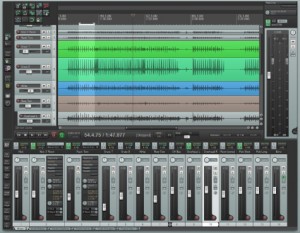
Here is the new stuff:
– Tweak, correct, and mangle audio with pitch envelopes, which can be applied to individual media items.
– Create fully automated surround mixes with multichannel track metering and the highly flexible ReaSurround plug-in. Apply rotations, transformations, and diffusions, and even automate the positions of the speakers themselves.
– Batch rendering wildcards provide sound designers with unprecedented flexibility when generating sound files in bulk.
– Manage project media and FX with the Project Bay, where you can collect, organize, and edit a list of resources that you are using, or might use, for different types of projects.
More Customizable
Arrange REAPER’s windows and toolbars in multiple dockers, redefine your mouse behavior with mouse modifiers, and use the new WALTER layout template engine to create flexible custom layouts for track/transport/mixer GUI elements.
Ease of Use
– They’ve added dozens of small improvements to help speed your REAPER workflow.
– Take comping is more predictable, with takes remaining aligned by recording pass, even after splitting and deleting errors.
– Previewing and inserting media is easier, because you can highlight, loop, and insert subsections of media files.
– Switch between different MIDI clips more easily in the MIDI editor. Pool MIDI items so that editing one item edits all pooled copies. Define scales and chords for quickly painting runs and arpeggios.
Reaper 4 is coming!

In alignement with Cockos’ open development strategy the documentation for Reaper 4 is already released, ahead of the release of the software. The Up and Running, a REAPER User Guide either as free download of as printed book. There’s also the advanced guide REAPER 4 Unleashed: Unlock Your Inner REAPER which is priced at modest $6.59!
As release candidate 4 came yesterday it’s a fair assumption Reaper 4 is coming this week, or even today!
Usine includes “save as VST” function
With version 5.7 of Usine Pro you can now export your workspace into a stand alone application or a VST (a dll), so you can share a redistributable and royalty-free package of your creations.
The package will include all the patches sound files, user modules and a fully functional version of Usine called Usine Reader.
Really cool!
The video above doesn’t show the save as function however. We’ll return to this as…
But 5.7 includes obviously a number of improvements and addition.
Podium 3.0 announced
Zynewave has released version 3.0 of Podium, its music production software solution for Windows, which is now available in both 64-bit (x64) and 32-bit (x86) builds.
New in v3.0:
Podium is now available in both 64-bit (x64) and 32-bit (x86) builds. Podium x64 requires 64-bit Windows OS and 64-bit VST plugins. The Zynewave zPEQ, zReverb and zPitch plugins are also ported to x64.
Added “Enable jBridge x86/x64 VST plugin wrapping” option to the preferences dialog. The jBridge third-party software can be used to load both 32-bit and 64-bit VST plugins when running Podium x86/x64 on a 64-bit Windows OS. Podium will detect if jBridge is installed, and invoke it when scanning and loading VST plugins that use a different processor architecture. It is not necessary to use the jBridger tool to create wrapped dll files.
Podium releases are now created with a different installer tool that supports x64 packages. The zip file download contains separate x86 and x64 installers. The new installer presents the Podium application and the Zynewave plugins as independent features. The plugins are by default installed as a subfolder under Podium, as it was done with previous installers, but you can now customize the folder to for example place the plugins in your main VSTPlugins folder.
Changed the version numbering from x.xx to the more common x.x.x scheme. The third number in the version text represents maintenance revisions.
Removed the date expiration in the Podium demo.
Fix: Solved an issue where inserting a VSTi inside of eXT2 would cause the Podium play cursor animation to stop.
The price remains at $50. The free version is still v2.40.
Second preview of the 3D modular audio environment AudioGL
If you like to automate your synths, check this out! Looks bloody impressive 
At 7.50 starts the second narrated part of the demo.
All you need to know about Reason 6
Propellerhead Software has announced Reason 6, a major update to the well-reviewed music software, which finally integrates all of Record’s audio recording functionality into one product. In order not to completely lose face by not incorporating audio recording into Reason in the first place and creating a stand-alone product. Propellerheads is calling Essentials “the successor to Record,” that packs all the recording, editing, effects, instruments, mixing and mastering necessary to sound great in a streamlined package and providing all Reason products with audio recording and editing.
Combining all the features from Record into the new version, Reason 6 adds audio recording and editing, along with Propellerhead’s excellent mixing console, multiple parallel racks, Line 6 amp models, new effect devices plus additional features.
New creative effects designed for inserting directly into instruments and tracks include: Pulveriser, sound crushing effect with crunchy compression, dirty distortion and flexible modulation; The Echo, advanced stereo echo with modern delay and analog tape echo emulation: and Alligator, a three band pattern gate for complex rhythmic texturing. Interface enhancements, high definition audio transpose and true 64-bit compatibility highlight other new feature improvements.
Mix in studio grade quality
 The fully equipped mixing desk adds a big studio signal chain to all your sound sources. Every audio and instruments track has its own channel strip — the built-in EQ, dynamics and advanced routing will give your music that unmistakable million-dollar console sound. The “radio ready” master bus compressor gives your mixes that extra punch.
Pulveriser
 Pulveriser puts crunchy compression, dirty distortion, a multimode filter and flexible modulation in a single, sound-crunching effect.
The Echo
 The Echo is an advanced stereo echo bringing together the brilliance of modern delays with the organic sounds of analog circuitry and old-school tape machines. The Echo is equal parts pristine stereo delay, sound sculpturing toolbox, and playable performance effect.
Alligator
 Alligator is a three band pattern-based gate effect that turns bland pads into rhythmic textures, radically twists your loops, and tweak boring beats into blockrocking breaks.
Neptune
 New in the Reason rack is the Neptune pitch correction and voice synth device. Neptune turns your performances into pitch-perfect ones in no time. Simply play your new harmonies on your MIDI keyboard for instant backing vocals.
Audio recording
 Capture your ideas with a minimum of mouse clicks and menu actions — version 6 introduces unlimited hard disk tracks and rock solid audio recording in Reason.
Time stretch & audio transpose
 With our now legendary non-destructive time stretch, you can actually record first and pick your tempo later. And with the brand new audio transpose you can even record first and change the key later. Change the tempo of your song, and the audio follows right along. Non-destructively change the pitch with a mouse click.
Recording meter
 The large Recording Meter overlay lets you tune your guitar and set the levels from across the room.
Line 6 guitar and bass amps
 With the virtual guitar and bass PODs® from amp and cab simulation experts Line 6, Inc. you are never short of interesting tones and timbres.
Comp editor
 As a perfect performance may be less than perfect from scratch, Reason 6 features our swift and easy to use comp editor. Building the ultimate vocal track is as simple as selecting the parts that work and muting the ones that don’t. Exit the comp editor and listen to the results; a perfect take containing only the good parts.
Expert exporting
 Want to move your song over to your DAW? In one single click, Reason will export your separate mixer channels as individual audio stems, with or without effects. Need just the effects? No problem.
More sounds
 The included Factory Sound Bank has been expanded with thousands of new patches and loops for Reason’s instruments, and hundreds of patches for the new Pulveriser, The Echo and Alligator effects. Finding your sound has never been easier.
On a journey with the Moon Modular
The M 551 is a module, which transforms an attached Midi signal into a couple of analogue control voltages. Thereby modular synthesizers can be integrated into a Midi-network and controlled by Midi-master-keyboards or Midi-hardware- or software-sequencers/DAWs.
The M 551 derives the following six control voltages from the fed Midi-messages:
– Keyboard CV (from Midi-note-number) Depending on the ‘Priority’ switch, the lowest, highest or last received note-on message is getting transformed. Voltage range: 0-10,53 V
– Gate (from the current Midi note-on/note-off commands)
– Velocity (transforms the key velocity [note-on velocity] of the current note-on message) Voltage range: 0-10 V
– Mod. Wheel (derives a control voltage from Midi-modula- tion messages [Controller 1]. Voltage range: 0-10 V
– Pitch Wheel (control voltage from the Midi pitch bend commands, bipolar) Voltage range: ±5 V (If “Add Bend CV” is active, a pitch bend voltage of ±0,5 V is added internally to the keyboard control voltage).
– Controller (transforms a selectable Midi controller into a control voltage [0-10 V])
Available are: – After touch – Breath controller (CC 2) – Foot pedal (CC 4) – Sustain pedal (CC 64) – Panorama (CC 10) – Main volume (CC 7), – the unspecified parameters CC 20, CC 21, CC 22.
The functions of the three toggle switches are:
– Add Bend CV
In ‘on’-position the Midi Pitch bend voltage (attenuated to ±0.5 V) is added internally to the keyboard voltage to ease pitchbending the oscillator
– Priority
Keyboard control voltage/gate signal/velocity voltage are derived from the hightes/lowest/last received note-on message
– Keyboard Mode
Retrig triggers a new keyboard control voltage/gate signal combination at any struck key
Legato starts a new event not before all keys are released
To select the Midi-Channel: Dial the rotary switch to the„Channel Select” position and initiate a MIDI-channel message (e. g. strike a note on a keyboard); the module sets itself to the most recently received MIDI channel (this setting is saved even if the unit is switched off).
http://www.moonmodular.com
A beast in the world of DAWs
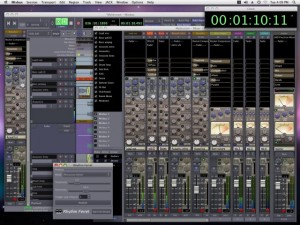
This DAW gets even more crowded every time I have a look at it, and since their is a new version out here are some details. Robust, console-style mixing meets modeled Harrison DSP and extensive editing options, appealing enough that many Mixbus users employ it as a mixing front end even with other tools. On Linux, it finally makes the open source Ardour more palatable, but on the Mac, too, it’s winning some converts. Finding an inexpensive DAW from a leading, ultra-high-end console maker is not too bad.
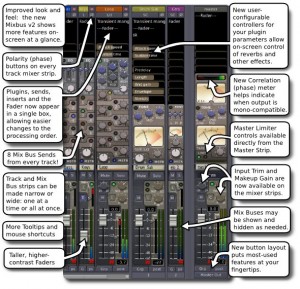
Mixbus 2.0 adds a great deal of additional functionality. As expected, that also includes a price hike; the software will cost US$219. That’s still awfully low given the quality of mixing and track processing effects you get; similar channel strips alone could cost as much or significantly more, and wouldn’t be integrated in a host in the way they are in Mixbus. And you get a far more fleshed-out tool with the upgrade.
New in this release – mixing:
- Mix bus sends, the signature and namesake of the tool, are doubled to eight from four.
- Map plugins controls directly on the mixer strip – that I don’t think I’ve ever seen in a host before, actually.
- Improved views: More controls in the main Mix window. Narrow mixer strips, hide/show mix buses. Consolidated plugins, sends, inserts, faders.
- Phase correlation meter, for checking how stereo mixes will bounce to mono.
- Polarity (phase) buttons for every mixer strip.
Editing:
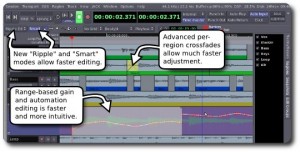
- Crossfade, layering, and automation editing improved.
- Ripple edits in Ardour, at long last.
- Transparent regions during drag operations for easier edits, and a “Smart Object” mode that requires less tool mode switching.
The upgrade also expands upon previously rather lean documentation, improves installation, adds key bindings, improves the UI and menus, enhances range selection, improves realtime automation recording, and enhances various other features which Harrison says were user-requested.
More info:
For all you Logic Pro fans out there
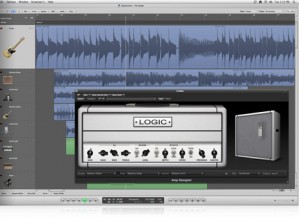
Apple has released version 9.1.4 of Logic Pro, the music production software for Mac.
You already know how to write great music. Logic Pro 9 streamlines the technical side of things, so you can record, edit, and mix it, too. Whether you work in a state-of-the-art studio or in your garage, now you can easily put the power of the most advanced tools to work for your projects. Tap into a huge collection of instruments, sounds, and loops for inspiration. Get set up and recording quickly. Perform complex edits in a fraction of the time. And mix down projects of any scale with full automation and surround capabilities. It’s a pro studio that’s not just for pros.
Changes in Logic Pro v9.1.4
- Compatibility
- Logic can now open songs created by GarageBand for iPad.
- Performance and Stability
- Logic now provides more specific messaging when playback is stopped because of hard drive performance issues.
- Resolves an issue in which Logic sometimes performed very slowly after a project that was saved without assets was consolidated.
- Logic no longer quits unexpectedly when copying, pasting, or swapping voices between slots in Ultrabeat.
- 64-bit Mode
- Resolves an issue in 64-bit mode in which a generic interface for some 32-bit plug-ins was displayed.
- Automation
- Resolves an issue in which moving a region to a different Arrange track assigned to the same channel strip could cause automation to be deleted.
- Drag-copy of automation curves now works as expected on grouped tracks.
- Moving an automation node that lies between two other nodes of the same value to the left or right no longer causes it to decrease by -0.1 db in value.
- Resolves an issue introduced in Logic 9.1 in which performing Undo after using the “Move Visible Track Automation to Region” command would delete the automation.
- Audio Editing
- Resolves an issue in which performing Undo after creating an alias for a region would shorten the region in No Overlap mode.
- Audio Regions that contain slashes in the name can now be successfully merged using the Glue Tool or Merge command.
- Quantization of audio regions that have stretched or compressed and contain tempo information now works reliably.
- Quantize and Q-Strength now work properly on regions created by exporting a Comp from a Take Folder.
- Resolves an issue where lengthening an audio region could sometimes cause the audio to unexpectedly stretch.
- Performing Undo after flattening Takes on a group of flexed tracks now works as expected.
- Takes no longer sometimes display as soloed when their parent Take folder is disclosed but not selected.
- Resolves an issue in which moving a take region with Quick Swipe Comping disabled sometimes did not move the corresponding take region(s) in tracks within the same Edit Group.
- Fixes an issue in which dividing a take region that had been created by merging several take regions together could cause the area to the right of the edit to disappear.
- Resolves an issue in which moving a take region with Quick Swipe Comping disabled sometimes did not move the corresponding take region(s) in tracks within the same Edit Group.
- Fixes an issue in which dividing a take region that had been created by merging several take regions together could cause the area to the right of the edit to disappear.
- Resolves an issue in which importing a Take folder into a project with a matching track could cause existing takes to be removed from Take folders in the original track.
- Control Surface Support
- Resolves an issue introduced in Logic 9.1.2 in which pickup mode for generic control surfaces did not work as expected.
- General
- Resolves an issue in which the key commands Next Screenset and Previous Screenset were reversed.
- If the Startup Action preference is set to “Ask,” it is again possible to open a project by dragging it onto the Logic icon while the Startup window is open.
- The default region quantize setting is now maintained after importing channel strips from another project.
Logic Pro is available to purchase as part of Logic Studio for $499 USD.
New release of POD Farm – 2.5
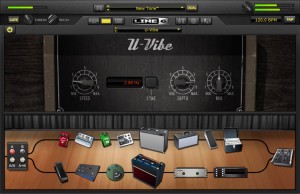
Line 6 has released version 2.5 of POD Farm and POD Farm Platinum, its premium tone plug-ins that add world-renowned POD® tone to any DAW.
They are packed with extensive model counts for guitarists, bassists and vocalists, and deliver lightning-fast workflows.
Each plug-in boasts an arsenal of historic amps and effects, the kinds gear fantasies are made of. They feature plenty of vintage and modern amps, cabs, studio-standard effects, classic stompboxes and colorful preamps.
Changes in POD Farm v2.5
- Hardware Independence – Use POD Farm 2.5 with any USB audio interface. We recommend POD Studio™ interfaces. They have the lowest latency and best signal-to-noise ratio for guitarists.
- Try POD Farm for free! – Download POD Farm 2.5 for free and try it with a limited model set. Upgrade to the full version at any time. Download POD Farm 2.5 now
- Standalone Version – Just grab your guitar, fire up POD Farm 2.5 and rock. No need to launch your DAW or instantiate a plug-in (unless you want to).
- 64-bit Support – POD Farm 2.5 now supports the latest 64-bit operating systems.
POD Farm 2.5 for Windows and Mac (VST/AU/RTAS) is available to purchase for the introductory price of $49 USD. The Platinum version is now $249 USD.
DATAMASKIN

