
SoundPrism Pro Expression Trailer
Here’s a new trailer for Soundprism Pro, an advanced MIDI Controller for iOS
What is SoundPrism Pro?
* a professional composition tool and midi controller
* an interactive generator for harmonic sound textures and epic cinema tracks
* a completely new way to control existing VSTis, synthesizers and sound modules
* an intuitive way to visualize and internalize musical relationships
* an innovative way to interact musically with geometric pitch space visualizations
* a way to define awesome pitch layouts by using the new PitchClassShifter
What can I do with it?
* compose film soundtracks
* find new chord progressions for your pop and rock songs
* create loops with advanced tonality
* compose epic sound textures for your next video game
* provide your media presentations with self made music
In this video:
http://soundprism.com/pro/
SoundPrism Pro 1.4 now supports Accelerometer Input.
Rejoice all of you Renoise fans – new update available
With Renoise you create loops, beats and melodies efficiently step-by-step. It’s a complete, expandable Digital Audio Workstation (DAW) with a refreshing twist.
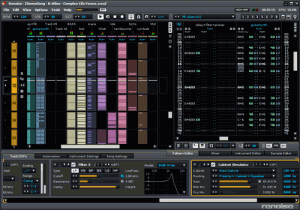
The Pattern Sequencer and the Pattern Matrix are shown on the left half of the screenshot above. They are intended to view and edit the song structure. The Pattern Sequencer is a playlist for Patterns. You can also use it to navigate around the song. The Pattern Matrix gives you a more detailed view of the song and speeds up the workflow by letting you copy/paste blocks.
On the right is the main editor, the Pattern Editor. It displays notes and effects in a grid that can be navigated and controlled with the computer keyboard. The Pattern Editor takes the best things about text editors and brings them into the audio world: they are perfect for precise, repeating operations. Constructing a beat just makes more sense when you can punch in the drum hits with a keyboard rather than clicking and dragging lines with a mouse.
On the bottom of the screen is the effect chain of the selected track. Renoise comes with a large set of built-in effects, but also supports VST, AU, DSSI and LADSPA plugins.
New Features in Renoise 2.7
- Sample Keyzone Editor
- Sample Slicing
- Improved Automation
- Redesigned Instruments
- MIDI Input Routing
- Real-time Line-In Rendering
- Multiband Send Device
Some new Instrument & Sampler features at a glance:
- Sample Keyzones GUI editor per instrument
- Map different samples to different velocity ranges
- Map samples to key release as well as key press
- Stack samples and create overlapping sections
- Toggle envelope on/off per keyzone
- New Release sample loop option for exiting the loop on key release
- MIDI Input can now be routed to individual instruments and tracks
- Extended drumkit and keyboard layout generation options
- Sample envelopes now have Points mode in addition to Linear and Curve
- Autofade setting per sample for quickly fading beginning and end of samples
- Select multiple samples and batch edit properties
- Overhauled instrument properties GUI, now in lower tab
FL Studio Mobile | Coming Soon
As we reported on earlier FL Studio are preparing for their mobile solution, most likely focusing on iOS, here is yet another teaser from the FL team:
http://www.flstudiomobile.com – Create multi-track sequenced projects wherever you are. Then you can load these projects if you want into FL Studio and take them to the next level. Compatible with the iPhone, iPad and iPod (touch).
Reason Wizardry Tutorial Demo
Reason Wizardry is a series of advanced video tutorials for Propellerhead Reason 4, produced fresh and delivered electronically each month.
This is an excerpt of the July 2009 issue. Find out more about Reason Wizardry at
nucleus-soundlab.com/wizardry.htm
PreSonus Studio One – Overview
Artists of all levels, from beginner to seasoned professional, will find Studio One a serious alternative to the intimidating, bloated offerings currently considered the standards. It’s a groundbreaking music creation and production application for Mac OS X and Windows XP/Vista/7 that makes audio recording, MIDI sequencing, and audio mastering ridiculously simple right out of the box.Studio One changes the rules of the game with fresh code, innovative drag-and-drop MIDI mapping and plug-in management, auto-configuration with PreSonus hardware, insanely good audio quality, unlimited tracks and plug-ins per track, and a powerful, inventive Start page.
And although Studio One Pro hit the scene just a year and a half ago, we’ve already added even still more pro chops with Version 1.6. From tracking to mixing to mastering and distribution, it’s the creative environment built for intuitive use, speed, and efficiency–and yet it’s robust enough for the most complex productions.
80+ v1.5/1.6 enhancements but still uncluttered and simple to use.
CLICK HERE for a cut-to-the-chase look at Version 1.5 and 1.6
FL Studio 10 – the latest version of the popular digital audio workstation
Image Line has introduced FL Studio 10 – the latest version of its popular digital audio workstation – adding 64-bit plugin support, improved memory management, unlimited Fruity scoring and automation flexibility and more.
Here’s what’s new:
- 64 bit plugin support – The Wrapper now automatically detects 64 bit plugins and opens them in 64 Bit ‘Bridged’ mode (see below).
- ‘New pattern’ (+) button – On the Channel Window / Step Sequencer. Add a Pattern and open the naming window.
- Small scrollbars in editors – Smaller scrollbar for the Piano roll, Event Editor, Playlist etc. See F10 > General Settings.
- Horizontal zoom – Improved Playlist, Piano roll & Event Editor.
- Improved memory management – Two changes have been made to lower demands on FL Studio’s memory allocation. 1. 32 & 64 Bit VST plugins can be opened in ‘Bridged’ mode. The maximum memory available to the plugin will be at least 2 Gb for 32 Bit Windows and up to 192 Gb depending on your version of 64 Bit Windows. 2. Audio Clips & Sampler Channels Keep on disk option now opens the sample in a separate memory allocation. Each Audio Clip / Sampler Channel can now load a sample of at least 2 Gb for 32 Bit & 64 Bit Windows versions.
- Improved audio options – ASIO: ‘Mix in bufferswitch’ and ‘Triple buffer’ may improve performance with some ASIO drivers. ASIO/Primary Sound: Revised ‘Playback tracking’ options to help with alignment of visual & recorded events where soundcard problems exist.
- Autosave / Autobackup – FL Studio can now be set to back up the current project at 5 to 15 minute intervals. Never lose project data again!
- FL Studio Fruity Edition – Now gains access to Playlist Pattern Clips for unlimited scoring and automation flexibility.
Image Line describes FL Studio 10 as “the fastest way from your brain to your speakers.”
See the FL Studio site for details.
New freeware DAW for Mac and Windows – MU.LAB 3
http://MUTOOLS.com : MU.LAB is an alternative, hi-quality music application for Mac OSX and Windows, transforming your computer into a complete music studio!
MU.LAB does not overwhelm you with a complex feature set, in which you can get lost.
On the contrary, MU.LAB is a user-friendly yet rock-solid musical tool designed to create, finetune and play Your Music!
3D audio binaural plugin for DAWs
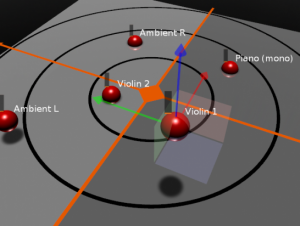
Longcat Audio Technologies has announced the Mac version of H3D VST, a 3D audio binaural plugin for Digital Audio Workstations. The Windows version, which was previously available, has been updated also.
H3D works within your DAW and lets you place and “animate” instruments in a virtual 3D space.
Features:
- 3D object-based mixing: use the 3D interface to visually place and animate sounds.
- Longcat Audio H3D technology: when listening on headphones, H3D allows panning sound in 3D all around the listener’s head.
- Unique HRTF processing: H3D uses Longcat own processed HRTF filters in order to achieve the best spatialization effects.
- H3D Reverb: immerse your tracks with H3D Reverb, a spatialized binaural reverberation.
- Automation: fully automate parameters and 3D animation of audio tracks.
- No tedious settings: Just insert H3D plugins and start moving sounds in 3D.
H3D is available now for 99€ (incl. EU VAT) via Longcat’s online shop.
More DAWs hit the iPad
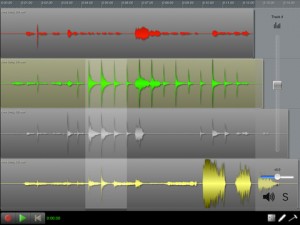
N-Track Studio, a DAW for Mac & Windows PCs, has been released for the iPad.
Here’s what they have to say about it:
n-Track Studio is an audio multitrack recorder that turns your iPhone, iPad or iPod touch into a mobile recording studio.
You can record and playback a virtually unlimited number of audio tracks and mix them during playback. You can also edit, cut, copy and paste, zoom and drag waveforms.
All the audio tracks are saved as standard wave files and mixed “on the fly” during playback.
You can mixdown the recorded song in standard .wav format which you can later open with any 3rd party audio application or use to create CDs or mp3 files, or export the song in multitrack .sng format and open it with the desktop (Mac and Windows) version of n-Track.
Takes advantage of dual-core CPU performace when used on the iPad 2.
N-Track Studio is $3.99 in the App Store.
FL Studio Guru – Introducing Chainer
More information here – http://forum.image-line.com/viewtopic.php?p=514291#514291
Chainer will load as an Instrument or Effect and will allow you to create chains of plugins of unlimited complexity. Useful for saving your favourite instrument/effect chains for use in future projects.
DATAMASKIN

