
How to make your own sounds for Mixtikl
Mixtikl is an app that lets you uniquely combine, tweak, perform & play up to 12 tracks of any combination of top quality generative music & audio or MIDI loops together with live FX. And, with Mixtikl 4, you can also now customise all the core parameters in Noatikl generative content, including note patterns (e.g. arps etc.). You can tweet your mixes* (“mixtikls”) for others to listen to, and they might even remix and/or retweet them!
In this video:
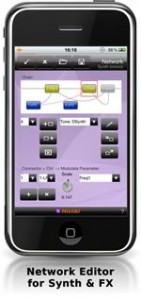
An introduction to Partikl sound editing. How to make your own sounds for Mixtikl. Covers using the Noatikl seed pak, simple subtractive synthesis and using an LFO to do basic waveshaping.
(Apologies for audio the sync problems. Some problem with the encoding process)
Rhythm Studio goes TRON (Daft Punk)
Rhythm Studio demo, a new universal app. Featuring Daft Punk’s Tron Legacy (End Titles) song. Coming soon to the iTunes appstore and available on all iOS devices (including iphone 3G!) with the latest iOS installed.
“Rhythm Studio is a premier universal electronic music making app, boasting richly detailed graphics and incredible sound, with impeccable recreations of classic synths and drum machines such as the 303 and 808 along with other amazing studio hardware.”
Rhythm Studio Demos by PulseCodeInc
Learn more at www.pulsecodeinc.com
Free music creation app for mobile producers
This video shows some of the features of a FREE, new studio.M multitrack music creation app for mobile producers and songwriters. Based on the top-selling studio.HD app, it offers 4 audio tracks, mono or stereo (upgradeable to 8) with recording, editing, an extensive loop library plus automated mixing and effects all controlled by a fast and creative touch interface. Get ideas down fast and work with them anywhere!
Grab a beat and throw down a rap, capture the spark of a song before it’s gone or produce dance tracks on the go. It’s even great for making custom soundtracks for your next YouTube movie!
Features:
– 4-tracks of CD audio quality playback (with recording one-track-at-a-time)
– Streaming recording/playback engine for long recording times limited only by storage
– Automated mixing and effects
– Effects include Compressor, Reverb, Pan and Low Pass Filter
– Loop library spanning popular music styles (including Pop, Funk, Industrial, Hip Hop, Trance, Reggaeton, House, etc.)
PLUS there is an in-app Store that offers:
– The “MX” upgrade for:
— 4-more tracks (8 total)
— More effects (Delay, Flanger, Gate, Stutter, BitCrusher and Glitchy Repeater)
— 130 more loops arranged in loop construction kits called “Loop Sets”
– Loop Store
— Featuring 100’s of loops arranged in Loop Sets by both large 3rd parties (like Beatport, Sonic Reality, etc.) and indie producers
studio.M requires iPhone or iPod touch on iOS 4 or above. It will also run on iPad in 2x mode.
New way to create cool mash-ups
MiniMash, a new iPhone application that allows users to create fun mashups and DJ sets using their favorite songs, is now available for download from the iTunes store.
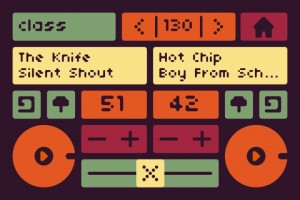
MiniMash syncs with iTunes playlists and uses a highly developed analysis algorithm to scans each track’s beat information. With MiniMash, users play tracks in rhythmic unison with one another, change the overall tempo, set loop points, change the pitch, crossfade, and more. The record function saves and shares users’ mini masterpiece via file sharing, email, or built-in SoundCloud support. In fact, the MiniMash website and blog hosts videos of mashups by MiniMash users from around the world.
Creator Daniel Iglesia makes music and media for humans, computers, and broad interactions of the two. He recently completed his doctorate at Columbia University where he studied at the Computer Music Center (CMC). He is currently a Visiting Instructor at the Pratt Institute, and a Visiting Lecturer at Princeton University, where he co-leads the Princeton Laptop Orchestra (PLOrk). He recently gave a talk on PLOrk at the TEDx conference in Brooklyn.
Experience the magic in Gravitarium2!
Slightly of track, but still a pretty cool app. Gravitarium 2 combines music, art and science in one relaxing experience. Use all your fingers to guide the star flow. You can create 10 different animations depending on the number of fingers touching the screen:
1 – Rocket, 2 – Sparkle, 3 – Energy flow, 4 – Atomic, 5 – 3D freeze, 6 – Circularium, 7 – Fish, 8 – Vortex, 9 – Lasers, 10 – Lightning.
Use different options to create spectacular drawings made of stars. You can load the “Drawing” preset from the “Options” screen.
You can even connect to random user (or a friend) and play together with the stars. You can always send a “Like” message to let the other player know you enjoy your connected game. There’s a leaderboard available that lets you discover the best G2 players.
The soundtrack is amazing! 10 different tracks push you further away into a deep relaxation state. If you’re connected to a remote user, you even share the same music ambiance.
Unleash your creativity and create unique masterpieces!
Features:
* Multitouch (upto 10 touch points in single mode, 20 in multiplayer mode)
* Thousands of particles animated at 60 frames per second
* Changing/manual colors
* Play/pause the animation
* Save snapshots to your Photo Library
* Original soundtrack (includes 10 relaxing tracks by Silent Strike)
* Multiple animation options (ex: speed, tail, size, opacity, etc.)
* Ability to save and load option presets
* Multiple play modes: default, drawing, tranquility and user defined
* Multiplayer over wifi/internet (auto-match or invite-a-friend)
* Ability to send “likes” and GameCenter friend requests
* Leaderboards: “like” count, overall time spent, overall time spent connected
* Syncronized options and soundtrack during multiplayer sessions
Do you want to be a true Wireless DJ ?
The check this iPad app out!
iPad touch controller for DJs, works wirelessly with Traktor Pro or anything else, easy to set up

Multi-touch mixer and decks
Faders, EQ, headphone and playback controls, needle search and pitch bend — it’s all there.
Magic Stripes for pitch bending and direct manipulation
We have a better idea than simulating a jog dial: Magic Stripes. One finger for pitch bending, two for ultra-precise tempo adjustment.
Sneak preview of a new music app called Cascadr
Brief demo of the progress thus far on a new app, Cascadr.
Top set of columns can be slid up and down to control the pitch of each of the 8 notes in the sequence. Bottom set of columns control the volume of each note. The animation signifies the speed of each sequence – note that they don’t sync with the particular note that’s playing – it’s all just for show at the moment!
Fairly complete overview of the SampleWiz
This is an informal but fairly complete overview of SampleWiz. A Universal app for iOS. We plan to submit in the next few days and hopefully it will arrive on the app store by the end of the June 2011. Remember-you can always hit the question mark for onscreen help. For more JR app coverage you can visit:
http://jordanrudess-apps.blogspot.com
The most portable MIDI system ever
…at least Line 6 is claiming this
Learn more about MIDI Mobilizer™ and compatible MIDI Mobilizer apps at at http://line6.com/midimobilizer
The only one of its kind, MIDI Mobilizer™ is the most portable MIDI system ever. Connect it to an Apple® iPhone®, iPad®, or iPod touch® to play, record, and backup MIDI information any time, any place.
Software developers around the world have been producing amazing apps for use with MIDI Mobilizer™. All of these are available now on the App Store™, and more are being added all the time. http://www.apple.com/iphone/apps-for-iphone/
Routes gives a sneak at iBend Pro – demo
iBend Pro is a fantastic XY controller, you can set all midi controller and pitch bend! 4 axis are fully programmable.(min value, max value, action on release, inverse axis…)
Two Mod of play are available: Fix Mod, fixed midi values on the screen. Free mod, interpreter your movement. It’s very easy to use. iBend Pro is a universal app.
DATAMASKIN

