
Nice new little groovebox for Android phones
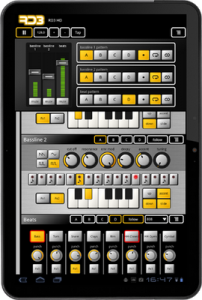
RD3 HD – Groovebox
Use your Android tablet as a groovebox and make your own music tracks!
RD3 HD – Groovebox is an audio application designed for Android tablets that is easy to use. It combines two 303-style synthesizers, a drum machine with different drum kits and three audio effects.
Recreate the sound of early electronic dance music with these legendary machines!
Optimized for Tablets
Take full advantage of your Android tablet with that multi-touch enabled app and use your tablet as a musical instrument.
Use it for live performances in landscape mode or use the additional special rack view on 10-inch tablets in portrait mode. This view is very well suited for editing with the mixer section on top and a scrollable part below for the other panels.
RD3 HD supports both 7-inch and 10-inch tablets and is optimized for Android 3.X (Honeycomb).
Features
Musical Features:
2 virtual analog synthesizers
4 types of waveforms for each synth
Reminiscent of the legendary 303 synthesizer
High-quality or regular filter modes
Drum machine with 10 drum kits: 808, 909, 606, CR-78, Linn, KR55, RX11, RZ1, DMX, DPM48
Real-time step sequencer
3 effects: distortion, phaser and delay
4 bars with 16 steps per instrument
3 play modes: Solo, loop or random
Technical Features:
Designed for 7-inch and 10-inch Android tablets
Special rack view in portrait mode for 10-inch tablets
Optimized for Android 3.x, Honeycomb
Multi-touch control
Audio loop export feature
Session save capability
Cut/copy/paste pattern
OpenSL support
App2SD
System Requirements
Android 2.2 or higher
Screen resolution 800×480 (WVGA) or higher
Screen size 7-inch or higher
800 MHz CPU or faster supporting ARMv7
Tested on: Xoom, Archos 70, Samsung Galaxy Tab, Dell Streak 7
Sampling with the Fairlight App
Sampling is now part of the Fairlight app for iPhone and iPad. In this video Peter Vogel, who pioneered sampling technology in the late seventies, demonstrates sampling with the app with the assistance of some kitchen utensils.
Review: Rhythm Studio for iOS + a sneak peak at their new drum machine
Rhythm Studio is an analog synthesizer studio for iOS
About:
Rhythm Studio balances advanced music making features by using an easy to understand interface resembling real instruments. This means that one button does one thing just like it would with real hardware. Knobs turn, switches slide, and buttons press. You won’t get lost in abstract interfaces, menus, or design.
Imagine having a studio of rare vintage synths and drum machines in the palm of your hand. Beautifully rendered synthesizers make seeing the app as enjoyable as hearing it. Rhythm Studio is the next best thing to having the real hardware.
Rhythm Studio allows you to make music the way you want to by giving you three different ways to create your song.
1. Use the step sequencer like the real hardware.
2. Use the Control Pad to play the synths live.
3. Instantly create a random pattern.
====================
FEATURES
– Dynamic workspace full of awesome audio gear
– Intuitive pinch, double tap navigation
– Robust pattern and song sequencer
– 3 easy methods to making your songs
– Recreation of a classic drum machine
– Recreation of classic synthesizers
– Mixer
– FX
– X/Y style control pad
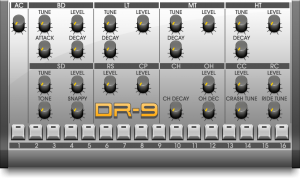
Sneak peak at the DR-9 Drum machine:
TableDrum – iPhone app that turns anything into a drum kit
Can’t afford proper drums? Well in that case this one might be for you:
Ever dreamt of becoming a drummer without having to purchase, carry and assemble a complete drum set? The solution is simple; gear up with some office supplies, a pair of headphones, your favourite Apple iOS device and unleash the power of your pocket-sized drum set.
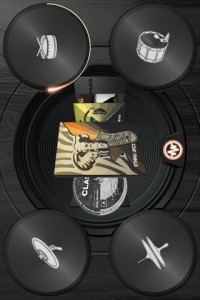
You can now build your own virtual drum set from practically anything. Music applications where users tap the screen are things of the past. Welcome to the future!
More info:
TableDrum is an Augmented Audio application that allows you to sync the sound of any real object and trigger a real time response of high quality drum sounds.
You can now build your own drumset from practically anything. Drum applications where users tap the screen are things of the past. This is the future!
————————————————-
Take it to the streets, show your kitchen table who’s the boss or simply let your stuff feel the rhythm.
With the TableDrum application the world is now your virtual drum set. You can sync the sound of basically any real object to your iPhone, iPad or iPod Touch and link it to high quality drum samples of your choice.
Included in the app is the Classic Rock kit with 8 high quality drum samples. By expanding your sound library with the Ethno & Jazz kit and Electro and Glitch kit you can get access to another 32 high quality sounds to play with.
Some things to get started
Gear up with a couple of pencils and some office supplies, each one with unique acoustic characteristics, to drum on!
Use headphones for best result.
To link a drum to a real physical object
1. Hold down a drum pad until it starts glowing.
2. Release and tap a real physical object several times (4-8) while the light fills the circle.
3. When the linking process is done, the rim of the pad will glow.
The app recognizes sound, so for the app to work at its best, the sounds you link should be different and distinguished. While you are playing, hit the object the same way as when you linked it.
To unlink a drum
1. Hold down the drum pad for one second. The rim stops glowing and is unlinked from the real physical object.
To change a drum sample
1. Press the menu button.
2. Slide through the different sample albums.
3. Click an album and then drag n’ drop the sound icons you want to use onto each drum pad.
Twisted KP has been released – OSC Converter for Konkreet Labs Performer
Twisted Tools has released Twisted KP, an advanced OSC converter for Konkreet Labs Performer application for the iPad. It allows you to easily connect Performer to a variety of devices, both inside and outside of your computer. Twisted KP converts performer messages to MIDI, *Control Voltage and Reaktor IC Sends, and in any combination.
Simply put, Twisted KP is the bridge between Konkreet Labs Performer and your music software and hardware, allowing you to quickly control almost anything, anywhere.Twisted KP is a dedicated OSC converter for Konkreet Labs Performer application for the iPad. It allows you to easily connect Performer to a variety of devices, both inside and outside of your computer. Twisted KP converts performer messages to MIDI, *Control Voltage and Reaktor IC Sends, and in any combination.
How it works:
1) Konkreet Labs Performer sends OSC messages to Twisted KP, which runs in Native Instruments’ Reaktor standalone mode.
2) Twisted KP receives the messages and provides an easy-to-use interface to convert them to MIDI, analogue control voltage or internal Reaktor messages, called IC sends.
3) You can then route MIDI anywhere out of Reaktor using its virtual MIDI out port, send control voltage out a dc-coupled audio interface to analogue modular synths and/or use an IC SEND menu to instantly select a Reaktor parameter as a destination, via a simple drop down menu.
Features:
Converts Performer messages to MIDI, *Control Voltage or Reaktor IC Sends.
Fast, intuitive and powerful interface.
Presets for NI Maschine, Kore, Moog Voyager, Access Virus and more.
Demo versions and presets for Twisted Tools devices.
Musical scales to play KP in key and create chord clusters.
Bypass entire nodes and/or individual messages.
Message range adjustment.
Message value inversion.
Gate mode.
Quantized note lengths.
Quick Start setup guide within Reaktor.
Price:
$9
Technical Requirements:
Reaktor 5.6.0
iPad
Konkreet Labs Performer (http://konkreetlabs.com/)
*Control Voltage requires a dc-coupled audio interface. Consult your interface manufacturer’s guide to find out if it supports sending control voltage using its outputs before attempting use.
Tabletop -new iPad music making app
Retronyms has announced a new iPad music making app called Tabletop, which it describes as a modular audio environment
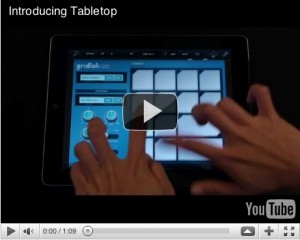
The idea is that you’re given a range of devices – keyboard, sampler, mixer, sequencer, effects etc – that can be connected up to form a complete iPad music making studio. Currently, you get nine of the 15 available devices as standard, with others being available as in-app purchases (more are in development).
Today Retronyms, makers of iOS apps DopplerPad, ReBirth, Recorder and Synth, released Tabletop, a modular audio environment app for iPad. Tabletop is the first app built for iPad featuring audio devices that users can mix and match. These devices emulate hardware found in tabletop DJ and producer setups: instruments, samplers, effects, mixers, sequencers, turntables, and more. One simply drags the desired device to the tabletop surface and wires it up to a mixer as they would with real-world hardware.
Tabletop is built exclusively for the iPad to be expressive, playable and fun. Both professional artists and those with no knowledge of music production can jump right in and start sketching out ideas or composing entire songs. Electronic musician Paul Salva says, “It took no time at all for me to acclimate. I had literally never touched Tabletop before, and within minutes I had some crazy stuff rocking.” To answer any questions about how the app or any of its devices function, Tabletop comes with a built-in user guide.
The full Tabletop press release is below, and the app itself is available now from the App Store for £2.99 (this is the 9-device ‘launch bundle’ price).
AirVox – Gesture Controlled Music App for iOS
Here are the details:
Introducing a REVOLUTION: use gestures to perform music on your iOS device with amazing precision! Simply use your right hand to control the pitch and your left hand to control a selected sound parameter. It may look magical, but AirVox is actually our product of cutting-edge computer vision technology crafted for mobile devices.
Now available in the iTunes store for devices with a front-facing camera: iPhone 4, iPad 2, and iPod Touch 4th Gen.
Features:
- Move right hand up and down to control musical note / pitch
- Move left hand back & forth to control any one of 9 tonal parameters like volume or vibrato (you can turn this feature on or off: it is turned off by us on the first-launch preset to make starting out easier)
- Use other hand motions or gestures for even finer control
- AirVox has 50 musical scales, each with settable root note and octave range.
- AirVox has a complete sound engine, made of dual oscillators, many waveforms, musical filters and audio FX, including vibrato, delay, and tremolo.
- AirVox has 48 built-in presets. Tweak knobs and save any number of your own.
- Record and share your music via email, wifi or SoundCloud (also Twitter & Facebook via SoundCloud)
AirVox is available in the App Store for $2.
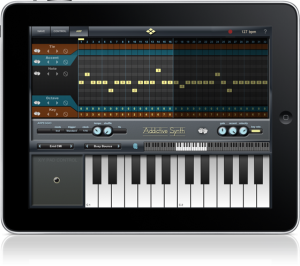
Review of the Addictive Synth for iPad
Addictive Synth is an Additive Synth for the iPad, by VirSyn. The depth of this synthesizer is both taunting and inviting. With so many morph and modulation options there is a lot of fun to be had.
For more information on Additive Synthesis, this guy gives a great tutorial: http://www.youtube.com/watch?v=YsZKvLnf7wU&hd=1
Features:
Dynamic wavetable synthesizer
- Six dynamic wavetable oscillators per voice, up to 48 total.
- Continous morphing between two oscillator sets.
- Realtime editing of up to 128 partials (overtones).
- Realtime editing of filter structure to create arbitrary body resonances.
- Extensive modulation possibilities using up to 4 LFOs and 4 Envelopes.
- Control matrix allows real time control of five parameters using the X/Y touch pad, the modulation wheel and the tilt sensors of the iPad.
- Monophonic or polyphonic with 8 voices.
- 128 factory presets, unlimited user presets can be shared.
- Up to three effects concurrently usable selected from: equalizer, phaser, flanger, chorus and stereo/cross delay.
Live
- Play melodies live with the onscreen keyboard. Drag fingers for slides and vibrato.
- Optionally use CoreMIDI* compatible hardware keyboard.
Full featured programmable Arpeggiator
- Uses programmable sequences with up to 32 steps.
- Can trigger single notes and chords.
- Unique randomizer generates Arpeggios with 100% usability.
- 32 Arpeggios included, unlimited useer arpeggios possible.
- For each step you can program tie, accent, transposition and note order
Two-dimensional loop recording with Donut for iPad
Here is an early preview of Donut – a new iPad app from The Strange Agency that’s currently under development.
They call Donut a ‘phrase looper with a twist’ that’s ‘most pleasantly strange.’ Donut is designed to let you record and play loops in 2d. The app is still under development, but the video shows the app’s current state.
Dark Hum – Korg EMX, Access Virus Snow, iPad Sunrizer Synth App
Played live on Korg EMX, Access Virus Snow, IPad Sunrizer Synth App
Background info:
Sunrizer synth is a virtual analog synthesizer that takes the definition of iOs synthesizer to the next level.
Thanks to carefully designed architecture and heavy usage of coprocessor it blurs the boundaries between iOs and hardware synthesizers.
Sunrizer was built to perform and works perfectly with any MIDI keyboard or sequencer. A lot of research has been done in order to achieve unheard warmth and clarity.
* Introductory price – 50% off for limited time only *
HIGHLIGHTS
· True SuperSaw sound emulation, first found in the legendary Roland JP-8000 synthesizer. SuperSaw is a layered waveform consisting of multiple saw waves which are detuned to create an extremely full and epic sound. It’s possible to use 2 supersaw oscillators per voice * 7 polyphony = 98 saw oscillators playing the same time!
· Two independent filters per voice with configurable routing. You can select between various filter types including classic resonant LP,HP,BP,Notch and less common like Comb and Formant.
· The Morph Group function lets you continuously morph of up to 30 parameters in a sound (including effects), using only the modulation wheel.
OSCILLATORS
· 2 warm-sounding analog modelled oscillators per voice + 2 sub-oscillators (except SuperSaw). Available waveforms: Saw, PWM pulse,Triangle, SuperSaw.
· Oscillator 2 hard-sync and configurable routing
· Osc-mix, ring modulator
· White noise oscillator
FLEXIBLE MULTI FILTERS
· Two independent filters per voice with configurable routing. You can select between various filter types including: resonant LP,HP,BP,Notch, Comb and Formant.
· Configurable routing: serial or parallel with bypass option.
· ADSR envelope, keyboard tracking and full LFO control
MODULATION
· Two LFOs per voice. It’s possible to assign each LFO to almost any parameter. 3 LFO running modes: trigger, 1 shot, global. 6 waveforms, phase and fade-in knobs
· The Morph Group function lets you continuously morph of up to 30 parameters in a sound (including effects), using only the modulation wheel.
· Two Modulation ADSR Envelopes for amplitude and filters cutoff
· Pitch and modulation wheels
EFFECTS
· A number of effects are built in: distortion, chorus, equalizer, stereo delay. All parameters can be modulated using mod-wheel.
ARPEGGIATOR
· Sunrizer incorporates very powerful programmable arpeggiator. You should think of it more like a small step sequencer.
OTHER FEATURES
· Over 200 presets
· 7 voices polyphony
· Playback modes: poly, solo, arp
· Built-in recorder supporting AudioCopy and iTunes file sharing.
· Supports CoreMidi and MidiMobilizer. MIDI key velocity can affect up to 3 parameters.
· Configurable piano keyboard size
· Hold button allows you to to keep notes sustaining until you play new notes.
· With Chord Memory function you can play the chord by only pressing single keys.
· Tube soft saturation on output
DATAMASKIN

