
iPad App – DXi FM Synthesizer Demo
Short demo of some of the sonic features of this FM app by Takashi Mizuhiki. DXi brings FM to your iPad, but it’s closer to the DX27 than the legendary DX7. There are four operators rather than six and polyphony is reduced from 16 to three, from what we can tell. DXi also offers a neat 16-step sequencer and an effective XY performance pad, to mix operators and patterns in real time.
Description
DXi is a FM synthesizer application inspired by 80’s most popular FM synthesizer. You will enjoy creating sounds as well as playing music with this application.
FM synthesizer is still popular among many people by its unique tone. We carefully selected parameters from original synthesizer so you will be enjoy editing tone with them easily. You need to know some technique to tweak the tone, but you will be able to get DXi’s special tone and effects while having some fun!
Creating sound effects is another idea to enjoy DXi.
We loaded 16 step loop sequencer as a bonus feature!
If you remember the days of FM synthesizers, try creating the tone you remember from them.
If you have no experience with any FM synthesizer, we are sure you will be enjoying the unique tone world!
* 4 operators FM synthesizer
* Anti-ailiased oscillator
* 8 algorithms
* Envelope, frequency (Ratio or Fixed) can be set each operators.
* Feedback control on operator number 4.
* 2 master effects (LPF with Resonance and Delay)
* Import/Export function to save the tone you created. (URL schema text string format)
* Audio recording function. And you can transport recorded audio file, .wav, onto Mac/PC via iTunes file sharing.
* Clipboard audio sharing support. You can export recorded waveform to other application via clipboard. It’s compatible with Intua’s clipboard.
* Supports external MIDI keyboards via Core MIDI USB adapters. iPad users can use Camera Connection Kit. And iPhone/iPod touch users can use Yamaha i-MX1.
Funny percussion app for iPhone
Useless I know, but still 
Omeletis an egg shaker for iPhone and iPod touch. Its developers, Pattern & Noise say that, using high-precision motion data from the accelerometer Omelet is able to respond realistically to every movement – from the slightest roll to the quickest shake.
Omelet also comes with two original built-in effects that can be used individually or together.
- Muis a unique resonating effect capable of generating a diverse range of evocative sounds and textures. Its rich yet subtle tones vary from scratchy, wood-like sounds to eerie metallic ringing sounds reminiscent of Tibetan singing bowls.
- Blue Room follows in the tradition of classic 60s echo chamber effects – simulating anything from tight corridors to huge cavernous spaces. Go easy for a softer sound while jamming along with your iPod, or crank it up and be transported to soundscapes from another world.
Omelet Features
- Volume and mute controls
- Automatic locking in portrait orientation to prevent accidental changes while playing
- Multitasking support for jamming with your iPod
- Two tailor-made sample banks
- One to maximize volume while playing through the built-in speakers
- Another with greater dynamic range while playing through the headphone jack
- Optimized for iPhone 4, iPhone 3GS, iPod touch (3rd & 4th generation)
Pricing and Availability:
$1.99 / £1.49
More information:
Small Steps on SynthX 2
http://vimeo.com/30688078
>> One of my very first steps on the awesome SynthX from Wayoutware on my iPad 2. I’ts the first synth I love to play without MIDI keyboard.
Built using Way Out Ware’s award winning virtual analog technology and heavily optimized for the iOS operating system, SynthX delivers a great looking and sounding analog experience to the iPad. A mathematically modeled synthesizer, SynthX contains no samples. As a result, it is very small in size, yet it has an extremely large and professionally design sound library. An effects chain including distortion, flanger, delay and limiter are included. Additionally, a separate identical effects chain is provided to process an external signal connected to the iPad’s audio input. SynthX has been designed from the beginning for the iPad and multi-touch. It has a comprehensive MIDI implementation using CoreMIDI including MIDI Note send and receive and MIDI Beat Clock LFO sync. You can also record your performances within SynthX and use Sonoma Wireworks AudioCopy to share your performance with other iPad apps. It also supports iTunes file sharing which allows you to drag your performances in full quality into your favorite digital audio workstation.
Techno Classic – O-Generator Dance App
Classic techno track made simple. The key ingredients to building a dance track using the O-Generator Dance App.
Available from the App Store. http://itunes.apple.com/gb/app/o-generator-dance-music-maker/id439280418?mt=8
O-Generator Music Maker is an App that can be used as a musical sketchpad to make music, compose, learn, create and develop ideas in different styles whatever your musical level.
O-Generator’s simple interface achieves sophisticated results. You can create and combine chords, choose individual notes and develop unique rhythmic patterns for your music compositions using an array of real instruments from drumkits to guitars. The beauty about O-Generator is that YOU compose it.
Each circle represents a bar of music that has been broken up into 16th’s. Each pad allows the user to put in individual notes, chords, percussion or drum sounds.
There are 6 tracks available to compose with at one time, using our real instruments sounds. We provide a wide range of chords, from major and minor to 7th and 9th, that you can use to compose with in REAL TIME. Then copy, paste and arrange over numerous bars.
O-Generator comes with our Award Winning step-by-step audio tutorials. These lessons are ideas and starting points for those with limited music knowledge and offer tips for more advanced musicians. Lessons guide you in steps explaining song writing techniques for creating drum grooves and guitar riffs. You can also use our numerous loops to enhance your music.
We have a special ‘D-Generate’ feature enabling you to re-work, de-construct or as we like to say, ‘D-Generate’ our sample tune, with more ‘D-Generate’ songs coming soon.
O-Generator Acoustic features:
– Unique O-Generator interface
– 6 instrument tracks
– Real instrument samples
– Export to Mac or PC as AAC/WAV
– In-built music tutor (introduces some basics in music making)
– Selected instruments for your style of music
– Copy and paste
– Instrument volume and tempo control
– Multi-bar compositions
– Large in-built library of chords and notes
Sasha – Classic Dance – O-Generator Dance App
Classic Dance track made simple. Using a Sasha idea to build a dance track using O-Generator Dance App.
A Simple Interface that Generates Sophisticated Results.
Use O-Generator to compose music, sketch out music ideas and create original loops. This is NOT a preset sample loop device. You can choose from a wide range chords, select notes and build the rhythmic patterns for your music compositions.
For those new to making music each app comes with step-by-step song writing tutorials. For more experienced song-writers O-Generator is a superb tool to explore musical ideas.
AVAILABLE ON THE APP STORE
http://itunes.apple.com/gb/app/o-generator-dance-music-maker/id439280418?mt=8
Brian Eno – Remiix International Feel
Here’s a quick demo of the new interactive record for iPad/iPhone from International Feel available from Sept 27 2011. Featuring BPM & key matched tracks from Locussolus (DJ Harvey), Rocha, Hungry Ghost, Bubble Club & Coyote, it gives you the chance to make your own version of these tracks, or make a completely new track out of the component parts of all/any of them.
Buy Remiix International Feel on iTunes:
http://itunes.apple.com/us/app/remiix-international-feel/id463813127
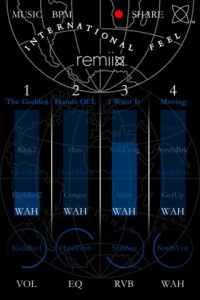
Product description:
To help celebrate their two year anniversary, remix the Balearic sounds of the mysterious label from Uruguay: International Feel. Combine instrumental loops, playful vocals, slo-mo drum & percussion loops and mercury infused basslines, straight from the shores of Vesuvius.
Remiix International Feel is an interactive record, a 2011 version of Brian Eno’s ‘Generative Music’. You mean you’re still listening to the same record over and over again?! It’s also a perfect DJ tool, containing six tracks (and their component parts) from the label’s roster, presented in an interactive format. The songs are all automatically beat-matched and repitched in key.
The range of sounds is tantalising, especially considering you can really isolate and pick out your favorite combinations. Some standouts include the bassline from “Next To You” – a long loop that turns around with syncopated leaps in the melody, the vocals from “Moving” – smooth house/disco loops that could add a sensual flavor to any mix, or the epic guitars from “Illuminations” – sitting comfortably between disco and early prog rock.
Remiix International Feel includes effects specially tailored to suit the sounds from the label. The first, RVB, simulates early analog plate reverb effects. The other is called the WAH and it lets you add subtle or drastic Leslie rotating speaker effects. You’ll recognise the sound as a throwback to the time of 70s disco and electric pianos.
Over the past 12 months International Feel has released tracks and remixes by DJ Harvey, Daniele Baldelli, Still Going, Greg Wilson, Joakim, Quiet Village and many others, as well as breaking new artists like Rocha and Hungry Ghost. This year has also seen acclaimed album releases from Gatto Fritto and DJ Harvey’s Locussolus project (from which two tracks are included on this version of Remiix).
Says label boss Mark B: “International Feel is based in Punta Del Este on Uruguay’s Atlantic Coast. The label came into existence to create a home for open minded music heads driven by 100% passion and perfection in everything we do. Whether it be the music itself or the vinyl cut… the artwork or the remixes, we strive to create pieces of music and artwork that play with expectations, never drop the quality and become desirable and collectable items of timeless beauty.”
Tracklist:
Hungry Ghost – Illuminations
Bubble Club – The Goddess
Rocha – Hands Of Love
Locussolus – Next To You
Coyote – Moving
Locussolus – I Want It
Meta.Dj iPad Dj App Demo
Backgrounf info: “I had the pleasure to contribute content for this app. You’ll find many of my loops, midi files, and a remix called Power by Jah Boogie.”
Track Deck allows you to load MP3s from your iTunes collection and mix them, beat match them, and completely mangle them with the multi effects processor. TrackDeck includes auto BPM detection, four programmable cue points, x/y effects pad, scrolling waveforms, cross faders, an line fader. Features a free song from Jah Boogie called Power Dj Puzzle’s Club mix and Dj Puzzle loops. Music provided by Desha Music Inc.
Looptastic allows you to combine a huge selection of included loops with your own beats to make a masterpiece. Bend the mix into submission with powerful sound manipulation tools. Share your mixes and performances with the world via SoundCloud! Import your own loops or download loop packs from the in app store. Looptastic automatically syncs up to all of the apps loaded within the meta.DJ app’s cells.
SaMPL3R (aka Grüvtron) is an arpeggiator synth/sampler. Choose a Preset and grüvtron selects the right sequences and instrument sounds to create the foundation for your own new instrument parts. It’s the Smart Instrument for Electronic Musicians, DJs and Dance Producers. Grüvtron comes preloaded with performances and sounds created for Techno, Trance, Dubstep and other electronic styles. Gruvtron automatically syncs up to all of the apps loaded within the meta.DJ app’s cells.
Drumtron is a drum sequencer that comes with preset drum patterns that can be customized and synced up to all of the apps loaded within the meta.DJ app’s cells.
OFFICIAL INFO
Are you ½ producer and ½ DJ? Has your style outgrown the abilities of 2 virtual decks, digital wax and a mixer?
meta.DJ is targeted at modern DJ-style performances and lets you blend your iTunes music tracks with drum machine beats, sound fx, synthesized instrument parts, mix effects like delays, stutters, filters and more! Each iTunes track can get it’s own reusable Cue and Loop presets, to let you work the track to the fullest.
All from an easy-to-use touch interface!
meta.DJ gives you:
QUAD DEVICE SUPPORT — TRACKS, LOOPS, INSTRUMENTS AND MORE!
Use of up to 4 virtual devices at any one time. Use any combination of devices during your set including Track Decks (for iTunes tracks) plus Looptastic, SaMPL3R and drumtron instruments based on Sound Trends grüvtron technology.
TRACK DECKS
Load your track into a Track Deck and breath new life into your library.
• iTunes Integration
Easily import tracks from your iTunes library.
• Automatic BPM Detection
Automatic tempo detection plus x2, /2 and Beat Grid adjustment tools let you nail down those tricky tracks.
• Cues/Loop Presets
Use the waveform display to help gets things just right. Playback automatically plays back on the beat.
• Auto Loop for Tracks
Use for creating Loop Presets or to quickly throw in 1/2/4/8/16/32 bar loops as you play the tracks during your Live Set!
LOOPTASTIC
The loop-based remix instrument for playing, mixing and adding effects to audio loops. Every loop’s a fader!
• Scratch Strip interface for scratching and interactive control of loop playback
• 3 FX zones
DRUMTRON
A new take on the drum machine. Mix together Kick, Snare, HiHat and other parts to build the mix how you feel it. You get FIVE pounding kits loaded with parts. All done without using audio loops so the sound stays tight with a cool pitch control for some freaky FX!
SaMPL3R
Based on grüvtron, SaMPL3R lets you easily add instrument parts (arpeggios, chord stabs, basses, leads, etc) to the mix in any key and morph them together. Plus a Control Strip lets you add filter and modulation to the sound. Key Mode can help you find the key of your tracks, and/or play the sound live.
15 MASSIVE EFFECTS WITH XY PAD CONTROL
Each device has it’s own mixer fader and can have up to FOUR (4) FX assigned at once. FX include Low/High Pass Filter, Gate, Stutter Loop, Stutter Stepped, Stutter gate, Bitcrusher, Flanger, Glitchy Repeater, Delay, Reverb, Pan, Compressor and Pump. All are controlled by an XY pad with “Hold” feature for setting an FX setting like a preset.
SETS and SNAPS
Each Set Document includes user-defined combinations of Devices with a collection of Snaps. Each Device Snap includes the content in the Device (music tracks w-Cues/Loops, Instruments Presets, audio loops, etc.) and mix information (effects, volume level),stored as easily recalled snapshots.
Meta.DJ is available for $9.99
Get this app here http://bit.ly/rrLs6k
Generative music performance app now released on Android
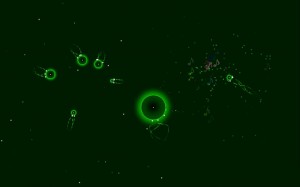
Orbits is an application for generative music performance, based around a gravity-based particle simulation. As a sandbox-type toy, there is no goal or ultimate aim.
Instructions:
Place a finger (or multiple fingers) on the screen to create particles. While you hold a finger down, the particle increases in size. Drag while holding down to set a starting direction for the particle (as if pulling back on a slingshot).Release to make the particle take off in the opposite direction. When two particles collide, they play two notes based on the particles’ sizes. The notes are locked to a scale/chord (which changes automatically), and thus are always in tune. Create particles of different sizes to get something interesting. Particles attract each other with a gravity-like force. Try to put particles in orbit around each other to create some interesting movements! Larger particles exert a more powerful force.
Press the Android menu button to open the option menu, where you can turn off the background chord or set the app into “autoplay” mode. When in autoplay, the particles will generate themselves, and you can sit back and watch what happens (you can still interact).
You can find it at the Android Market here.
Tutorial – MovBeats iPhone app
MovBeats is a funny and a little crazy app which allows you to create video clips easily and quickly, catching them in the surrounding space.
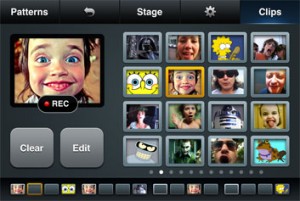
MovBeats app is an easy in use video sequencer for iPhone™.
- Record short clips with the iPhone camera.
- Put the clips on the sequencer line to create video beats.
- Play with the patterns and record a movie.
- Share created movie with your friends on your favorite social networks.
Björk’s Moon App from Biophilia
Here’s some pics and video of Björk’s new experimental music app:
Biophilia is an extraordinary and innovative multimedia exploration of music, nature and technology by the musician Björk. Comprising a suite of original music and interactive, educational artworks and musical artifacts, Biophilia is released as ten in-app experiences that are accessed as you fly through a three-dimensional galaxy that accompanies the album’s theme song Cosmogony. All of the album’s songs gradually become available inside Biophilia as interactive experiences, currently including the first three singles Crystalline, Virus, and Moon.

Björk has collaborated with artists, designers, scientists, instrument makers, writers and software developers to create an extraordinary multimedia exploration of the universe and its physical forces, processes and structures – of which music is a part. Each in-app experience is inspired by and explores the relationships between musical structures and natural phenomena, from the atomic to the cosmic. You can use Biophilia to make and learn about music, to find out about natural phenomena, or to just enjoy Björk’s music.
Biophilia opens into a three-dimensional galaxy with a compass allowing navigation between the 3-dimensional universe and a two-dimensional track list. Take a closer look by tapping on stars within the constellations and you’ll see that each is an in-app purchase that gives access to the inspired combination of artifacts for each new Björk song: interactive art and games, music notation which can be used to sing along karaoke-style, abstract animations, lyrics, and essays that explore Björk’s inspirations for the track. These artifacts bring together conventional and alternative ways of representing and making music to create an environment for entertainment and learning. Biophilia challenges the way we think about music. Here, for the first time, is a music album that exploits the multimedia capabilities of mobile interactive technologies.

Biophilia was created by Björk in collaboration with interactive artist and app developer Scott Snibbe, and Björk’s longtime design collaborators M/M (Paris).
Features:
• Three-dimensional galactic interface with the song Cosmogony
• Access to new songs and apps immediately as they are released
• Music scores with karaoke playback
• Abstract song animation
• Lyrics
• Essay
DATAMASKIN

