
Android Open Accessory demonstration
Phil checks out an Android-powered piano — powered by the Android Open Accessory ADK — at Google IO
Into the experimental world of apples and pads
“I’ve been sneaking around Apple’s garden for a long time, dating back to the Apple II motherboard hacked into my code-munching poly-synth of the early ’80’s. I’ve modded iMacs, towers, endless accessories, and I’ve drastically bent mac-centric code with wonderful result. This movie loosens another brick in Apple’s wall, and opens the iPad’s usability tremendously.
I know I’m not the only individual appreciating the experimental music apps available on the iPad. I’m anxious to support the developers’ fine work. But for musicians, the iPad’s interface can be frustrating. Do you really want to use dongles, mini-jacks and flimsy wire to get in and out of the thing?
This audio breakout solves these problems, is easy to do, and is inexpensive.
No bending here, just a quick, theory-true hack based upon iPad docking charts I found online. Not a superdock. No competition for the Alesis breakout. But if you want a slick, basic and functional DIY audio desk, on the cheap, check this hack out!
The breakout board is available at kineteka.com
Be sure to see the photos and REVISIONS, and pick-up the printable schematic at my iPad Audio Desk flickr gallery:
http://www.flickr.com/photos/moonbear3325/sets/72157626688587705/
This audio desk is really fun to use. Hacking the apple is always a good thing. I hope you’ll enjoy the movie! (Let it download for full-screen 1080).
-Reed Ghazala
Sound 8 is an interactive 8 track sound looper
In this application, each sound is represented by a circle of a different color. You can assign a default sound or any of your own imported sounds* to each circle.
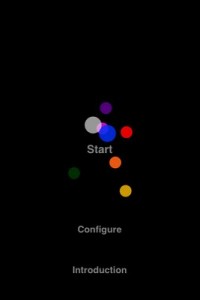
A sound’s pitch and volume is altered through the device’s accelerometer or using touch input and gestures. Swipe gestures control the accelerometers speed and allow for randomization of pitch and volume. In addition, each sound’s panning can individually be set.
It is also possible to stop acceleration completely, or to automatically position sounds in “Automove” mode.
To see an example of how to import your own sound files please visit the sound8 support page.
*supported file format is 16-bit mono WAV or AIFF.
maximum sound file size (per circle) is 5.3MB, or ~1minute @44.1kHz 16-bit mono wav.
Time to get those funky rythms going!
FunkBox was used by Gorillaz when recording their new album “The Fall”, hear it at thefall.gorillaz.com! Also featured in Computer Music Magazine’s “Amazing Music Apps” special issue and Electronic Musician magazine’s “Attack of the Killer Apps” best music tools for the iPad.
Put a little funk in your pocket with the FunkBox vintage drum machine app from Synthetic Bits! FunkBox is designed to look, feel, and sound like a classic beatbox from the 70s and 80s. It uses original audio samples taken directly from our own personal collection of vintage drum machines.
In this video:
In this tutorial, I show you how to lay down beats with Funk Box. I also cover virtual ports and how to route Funk Box beats to other apps in real time like Electribe, Mo Drums, and Music
Polychord 2 is drums, bass and chords all wrapped into one
A quick rundown of different sounds you can achieve with polychord’s synthesizers. We’re using the strum keys and making changes to the envelope, wave, cutoff & resonance, tremolo, and more.
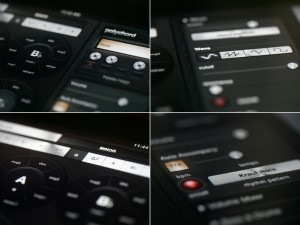
Shoulda Woulda Coulda has released Polychord 2, a music app for the iPad.
Polychord is drums, bass, chords, and accompaniment all wrapped into one.
Simply press one of the chord circles and your on you’re way to writing a song. Drums and bass follow the chords automatically, but the coolest part is probably the strum keys on the right: simply swipe your finger over the yellow keys (or chrome keys in version 2) to strum a chord.
Changes in Polychord 2
- Record and share songs with SoundCloud.
- Sleek new UI made in collaboration with Jonas Eriksson.
- Palettes, so you can save your settings.
- Palette f-keys, for fast switching between palettes.
- Sine, Sawtooth, Triangle and Square Waves for each instrument. (We used an ‘analogue simulation’ technique for generating the synthesizer waves, which warms them up a bit.)
- Bitshift features for drums: full control over the reduction of bits / bitrate, allowing you to completely decimate the sound or just add a touch of noise.
- Basic low-pass filtering, resonance for each instrument.
- Tremolo Depth controls.
- Scale mode for the strum keys: rather than the strum keys playing the notes of the current chord, you can set them to numerous other scales.
- Arpeggiator based on time-signatures. Full control over the speed and count of the arpeggiator — allows you to mix a different time signature over the beat. Arpeggiator now has all of the same synth controls as the other instruments.
- The UI now highlights the last chord you pressed, rather than always highlighting the root-note.
- Octave control for every instrument.
- Precise BPM control, with text input.
- A global on/off switch for Auto Accompany.
- File manager for renaming/deleting/loading palettes, songs, etc.
- Pitch bending on strum keys (sends out MIDI too).
- Skins panel lets you switch back to the classic color scheme.
Polychord 2 is available to purchase for $9.99 USD.
Get an entire orchestra in your iPad
WI Orchestra is a full orchestral library and composition tool for iPhone and iPad. You can now create and record your own orchestral music on the iPhone, layer by layer, using the instruments and built-in recording features of WI Orchestra. Choose between a full range of orchestral strings, brasswinds, woodwinds, saxophones and percussion. When starting WI Orchestra for the first time, press the “play” button to listen to the included demo song, which was made with the WI Orchestra app in only a few hours! WI Orchestra features a velocity sensitive keyboard (requires iOS 4.0 or higher) allowing you to play different dynamics by touching the keyboard harder of softer. The simplest way to use WI Orchestra is to choose one of the dynamics presets (pp, p, mp, mf, f or ff) and play only using the keyboard. You can work on as many as 98 different projects at a time, and export your songs to your computer, as *.wav files, via the “Apps” tab in iTunes (requires iOS 4.0 or higher). iOS devices with less than 256 MB RAM are capable of 1 minute length projects (iPhone 3GS and earlier) while iPhone 4 and iPads are capable of 5 minute length projects. For those who are unfamiliar with orchestral music, each instrument in WI Orchestral comes with a picture and description of the instrument. For the brave, you can also choose to use the microphone as a breath controller!
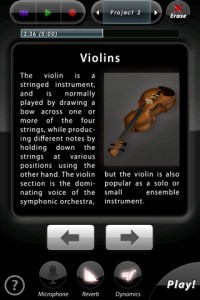
WI Orchestra is a universal iOS app, with a native full-screen iPad version and beautiful high-resolution graphics on iPhone 4 retina displays. Five amazing instruments from the different sections of the orchestra are included for free, Violins, Trumpet, Flute, Tenor Saxophone and Timpani! TIP: For first-time users on iPhone/iPod Touch, in order to access the keyboard you need to press the “Play!” button!
TECHNICAL SPECIFICATIONS
————————————–
All wind instruments in WI Orchestra are based on the WIVI technology, an additive synthesis/behavioral modeling pioneered by Wallander Instruments with the professional music production software WIVI.
Strings and percussion in WI Orchestra uses a new patent-pending filtering technology by Wallander Instruments, that allows seamless dynamic changes of any sampled instrument in real-time.
WIVI technology is used on a daily basis for producing music for movies, TV and writing classical scores, by composers all over the world.
CONTENTS (Instruments marked with * are included for free)
————————————–
STRINGS
– Violins*
– Violas
– Cellos
– Double Basses
– Violins Pizzicato
– Violas Pizzicato
– Cellos Pizzicato
– Double Basses Pizzicato
BRASSWINDS
– Trumpet*
– Piccolo Trumpet
– Trombone
– Bass Trombone
– French Horn
– Wagner Tuba
– Tuba
– Cornet
– Flugelhorn
– Euphonium
WOODWINDS
– Flute*
– Piccolo
– Alto Flute
– Bass Flute
– Recorder
– Clarinet
– Bass Clarinet
– Oboe
– English Horn
– Bassoon
– Contrabassoon
SAXOPHONES
– Sopranino Saxophone
– Soprano Saxophone
– Alto Saxophone
– Tenor Saxophone*
– Baritone Saxophone
– Bass Saxophone
PERCUSSION:
– Timpani*
– Harp
– Mixed percussion (Bass Drum, Toms, Bongos, Castanets, Triangle, Cymbal, Gong, Snare, Tambourine, Wood block, Tam-tam)
– Glockenspiel
– Xylophone
– Marimba
– Vibraphone
– Celesta
– Piano
In this video:
An amazing new app for iPad and iphone! Arne Wallander is some kind of magician in the fact that he squeezes all these amazing dynamic models into an IPAD app!
How to turn your videos into music
Moovmi is a Max For Live Video-to-MIDI device that produces midinote sequences from video data analysis. It works with both video files and webcam as sources.
The video source is reduced to a low-res grid where each cell generates midinotes in a predefined interval and pitch, while the velocity is determined by the luminance of the cell.
The user can influence the midi sequences by processing the source with video parameters such as brightness, contrast, saturation, threshold, colors feedback, etc…
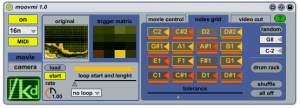
Moovmi can be used for :
- semi-random drum pattern generation
- experimental melodies and chords
- sonification of video installations (using the fullscreen feature)
Moovmi is very easy to use: just select a video source and midinote sequences will start immediately!
Moovmi comes unlocked : owners can open, edit, and re-use parts of this device as they prefer
New version of Jasuto is out
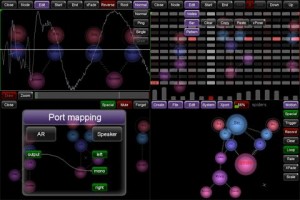
Jasuto allows you to visually construct your own synths/effects, and use them to make sequences all on your device! With the addition of a fully-featured sampler you can now record/resample/edit, and even create entirely new samples by drawing right in the app. Jasuto Modular just got better with version 1.2.2 that adds vocoding and more new features.
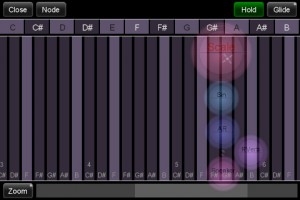
– Zoomable/slidable Scale module, basically lets you define scales and play them with a keyboard.
– The sequencer supports odd loop lengths, independent rates (up to 64x the tempo!), and trigger resets now.
– Transposing of sequencers now scale properly.
– Fixed the .wav case sensitivity issue.
– Fourier transform modules (FFT, iFFT, Band, Bands) for some spectral fun! Check out the new Spectral category which contains a Vocoder example!
– Recording/Resampling now only listens to the selected Speaker modules, if nothing is selected then it records everything (just like the current default behavior).
– Fixed a browser tabbing issue that would popup after saving a scene.
– Much better sounding Noise module.
– Sonoma AudioCopy/Paste 1.1.
– Sequences/Motion now start on the initial note on loading.
– Fixed a bunch of number editor bugs, and yes, you can now enter 0!
– You can now disable motion smoothing on nodes when dragging them around in the scene. The option can be found in the Motion menu under Smooth.
– Replaced the screensaver with something a little less arbitrary, a spectrogram!
– Many other minor bugs that I don’t feel like writing about 😛
Android specific:
– Audio recording from the mic.
– Help and About buttons now work.
– Splash screen should display on all device now.
Check out more information about the Jasuto app on the official product site at http://www.jasuto.com/home/
Sound Cells demo – generative music iPhone app
Sound Cells is an Universal iOS app, that creates generative music, inspired by the “Otomata” web app.
By touching the matrix, cells are created and start interacting with each other. If they collide (or land on the same square) they will change directions. If a cell touches the wall, it will generate a sound.
The rest of the app mechanics are left to the user for experimentation.
The app can be found in here:
http://itunes.apple.com/us/app/sound-cells/id434171433
OscilloScoop for iPad, iPhone, and iPod Touch
Tap, slide, and stretch your fingers over OscilloScoop to create an infinity of electronica, dance, hip hop, and techno tracks. With OscilloScoop you make real musical grooves by simply gliding your fingertips over spinning crowns; then sequence them into a real-time performance with a few taps. As effortless as a toy, OscilloScoop gives you the same tools pro DJs and musicians use to create intricate tracks—but with an intuitive interface inspired by video games and animation. OscilloScoop is an organic, generative way to make music in a process that’s more like dancing than composing: it’s addictive, fun, and original.
OscilloScoop features continuous tone melody; 16- and 32-beat quantizing; low-pass filter; volume control; selection of loopable beats in techno, hip hop, electro, and house; tempo control from 60 to 140 beats per minute; in-app purchase of additional beat sets; preset saves for live performance; and fine-grain editing when you tilt into landscape.
Download on the App store: itunes.apple.com/us/app/oscilloscoop…
OscilloScoop is designed by Lukas Girling, a creator of interactive musical interfaces who has worked with world-renowned musicians and music technologists including Laurie Anderson and Max Mathews. The app was created in collaboration with interactive artist and programmer Scott Snibbe, author of the bestselling apps Bubble Harp and Gravilux; and Graham McDermott, noted video game and app developer.
DATAMASKIN

