
Version 9 of FL Studio to be released in September
ImageLine is pleased to announce that FL Studio 9 will be released in September 2009. FL Studio 9 is a fully featured, open-architecture music creation and production environment for PC. No extra software is required to produce any style of music, as a complete kit of instruments and studio tools is included in the cost of the package. With the included plugins, sounds and tools the user can create complete songs, backing tracks, loops or sizzling beats. Completed songs can be saved to WAV, MP3, OGG, MIDI, ZIP or the native project format (.FLP).
Instruments
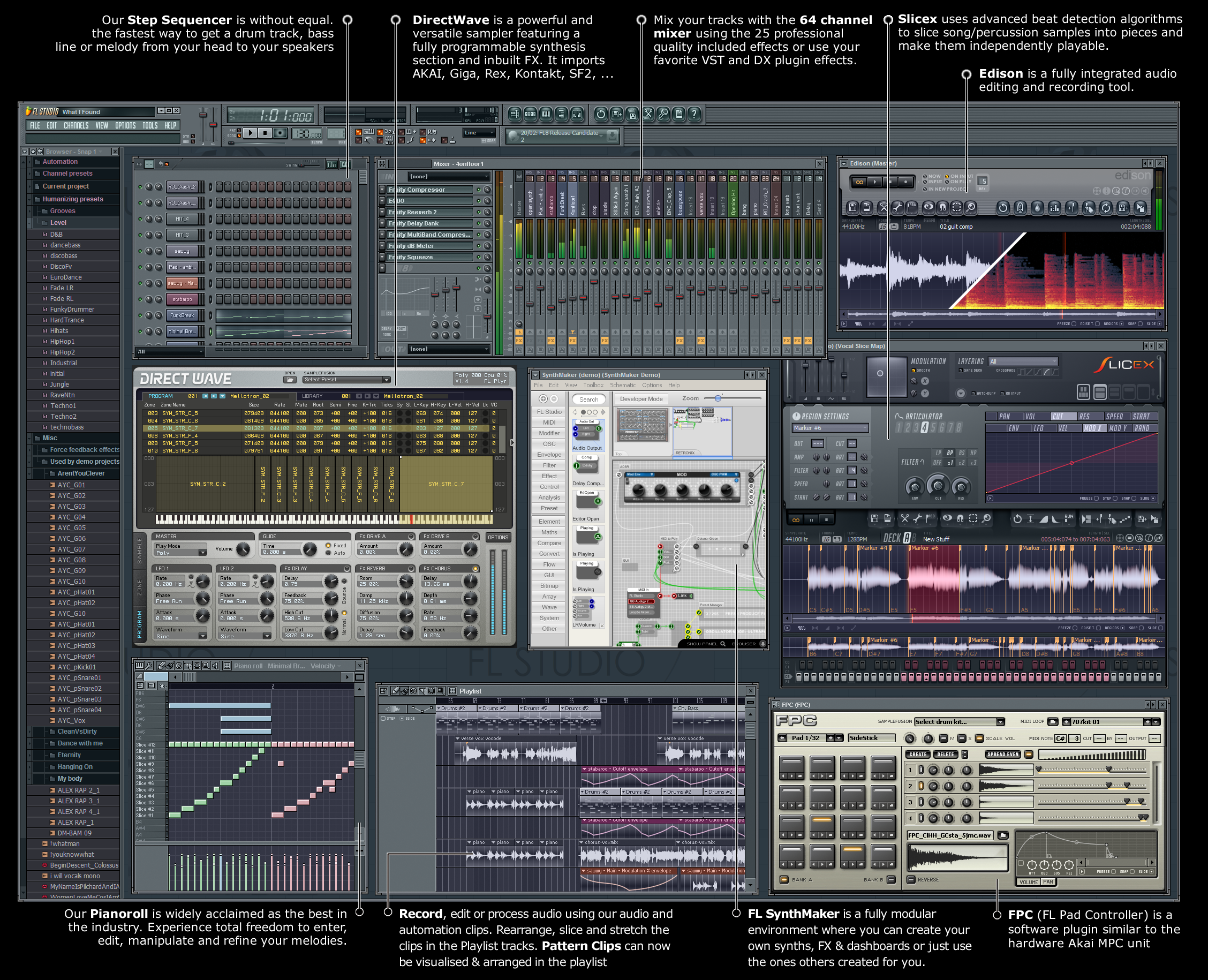
Make virtually any sound. FL9 includes 29 virtual synthesizers covering acoustic/synthetic bass, electric guitar and plucked string simulation, sampler tools including piano, general sample playback, and beat-slicing, and a range of synthesis techniques (subtractive, modelling, FM, granular and additive). With FL Studios newest addition, FL Synthmaker – a fully modular environment, you can now create & share your own FL instruments, effects & dashboards without the need to write basic code.
Audio Recording & Editing
Capture audio from a single vocalist or a full symphony orchestra. FL9 can record up to 99 simultaneous tracks of audio. The Playlist workspace can contain an unlimited number of audio tracks and allows you to arrange discrete audio events in any order or position the creative process dictates with complete flexibility. Audio tools allow the user to time-stretch, pitch-shift, beat-slice, chop, edit and creatively destruct audio. FL9 audio editing is further enhanced with Edison, the recording wave editor. Edison is a fully integrated audio editing and recording tool with spectral analysis, convolution reverb, loop-recording, loop-construction tools and more. FL Studio imports/exports WAV, MP3 and OGG formats.
Sequencing
Record musical performances and ideas in the most logical way. FL9 functions as both a pattern and track based sequencer, depending on user preferences. Tools include an unlimited track Step-sequencer, an industry-leading Piano Roll and Automation Clips. FL Studio supports MIDI and input from all standard Controllers. FL9 is the fastest way from your brain to your speakers.
Arranging
Determine your own project design. In FL9, you decide how your project will be laid out. Unlike the competition, FL9’s Playlist is a totally flexible and virtually unbounded space where Note Pattern, Audio and Automation data can be arranged and edited to suit your creative ideas and preferred workflow.
Mixing/Mastering
The most powerful mixer in its class. FL9 includes an industry-leading 99 stereo track mixer. Each track can hold a stack of 8 effects (VST, DX or FL) and, if desired, be routed to any of the other 99 tracks or one of 4 dedicated ‘send’ channels. The 44 included effects plugins span – Maximization, Limiting, Compression, Delay, Distortion, Equalization (graphic & parametriuc), Filtering, Phasing, Flanging, Chorus, Vocoding and Reverb. These will take you from the creative broad-brush effects like reverb, through to the minutia of the mastering process with multiband compression/limiting and parametric EQ.
Lifetime free updates
Registered FL Studio users who purchase the download edition of the program receive lifetime free updates to the level of the program they buy (Express, Fruity, Producer or XXL edition). For example, all FL Studio 8 customers will be able to download FL Studio 10, 11, … for free. Boxed edition users can purchase lifetime free updates for a nominal fee.
Formats
FL9 will fit easily within your current workflow supporting VST/VSTi/VST2, DXi, DXi2, MP3, WAV, OGG, MIDI, ASIO, ASIO 2. Additionally supported through DirectWave Editor : AKAI AKP (S5/6K,Z4,Z8), Battery (version 1), MPC, Reason, Kurzweil, EXS24, Kontakt (version 1 & 2), Recycle, SFZ+ and SoundFont2.
Do you want to try out FL Studio, the DEMO version can be found here >>
Music production tips and tricks from Sound Libraries
Sound Libraries and Pro Audio developer Prime Loops have announced a new section which contains a large selection of Free Music Production Tutorials, Tips & Tricks that you can download directly from their website. You can watch the videos online, or download them for your PC/Mac/iPhone or MP4 Compatible device. There are also a good selection of step by step PDF Tutorials with helpful screenshots which can be downloaded for free too.
The tutorials span a variety of genres and techniques for programmes such as Logic, Ableton, FL Studio, Reason, MPC and others with around 10 new video tutorials added monthly and future videos in the making for Garageband, Cubase, Pro Tools and many others.
Current Tutorials include ‘The Reverse Vocal Effect’ and ‘Clever Automation’ also ‘Vocoder Vocals’ and ‘The Art of Compression’ plus dozens more.
The tutorials cover basic to advanced techniques, and aside from the programme specific tutorials, there are also tutorials such as ‘EQ Masterclass’ ‘Licensing your music for TV & Film’ and many other tips and tricks that will appeal to all levels of music composers.

|
From basic to advanced, hardware to software, discover new and exiting ways to take advance your production skills to the fullest! This section will be updated every month with new videos! |


|
Exclusive techniques from industry professionals to help enhance your music production, mastering skills & gain exposure. Experience the most up-to-date, inventive methods currently available. |

Precision, step by step tutorials compiled by high profile experts, sound engineers, producers & DJs. Including precise modern software & hardware tutorials to maximize your creative output and technical knowledge.
New updates on Image Line's synths

Image Line just announced a series of minor updates to their core line of virtual synthesizers. To expand your sound palet Image Line offer a complete range of synths and effects like Sytrus, Morphine, Toxic Biohazard, Edison, Poizone, DirectWave, DrumSynth Live, SimSynth Live, DX-10, WASP
– fixed crashes/freezes when closing plugin in OSX
– fixed threading in Windows version
– fixed compatibility with the Toxic Biohazard installer in OSX
– better tablet pc / stylus support
– fixed polyphony issues in FL version
– several small changes
– fixed threading issues
– made it more stable
– better tablet pc / stylus support
– fixed polyphony issues in FL version
– fixed crash when changing presets on PPC macs
– several small changes and fixes
Toxic Biohazard 1.0.2 released
– fixed crashes when closing plugins in OSX
– threading-related fixes
– fixes on PPC macs
– fixed some crashes related to downloader in OSX
– several small changes and fixes
Beware!! The new Toxic Biohazard is here (v4)

Toxic Biohazard is the 4th generation in the line of Toxic synthesizers. Toxic Bio distills the best features from the previous 3 versions to deliver our most concentrated Toxic ever. Beware!
Toxic Biohazard features a hybrid synthesis engine, combining the best of FM and Subtractive synthesis. With the addition of a warm, analog-modeled filter and set of built-in effects, the Toxic concept remains one of convenience, simplicity, and superb sound quality.
What’s new?
- Improved sound quality
- “Physical Envelopes” that allow you to model how sounds in real world decay & resonate etc…
- Integrated effects such as tube-like distortion, to warm stereo delay, reverb, flanger, and phaser.
- A hybrid synth engine combining FM and subtractive synthesis
- A complete rebuilt FM engine adding warmth
- Alias-free oscillators with low CPU consumptom
- An integrated simple sequencer (64 steps, which can be divided into two independent, 32 step modules to allow double-polyphonic patterns. Using our own “Smart Sequencer” technology, when a chord is played, the module defines that chord, and tunes the pattern accordingly.)
Visit http://www.image-line.com/documents/toxicbio.html to learn more, download a free demo, and listen to samples songs created with Toxic Biohazard.
DATAMASKIN

