
Crossfade Loop Synth Demo
A demo of Expert Sleepers plug-in “Crossfade Loop Synth”, a sample playback synth and live resampling effect.
From version 3, Crossfade Loop Synth is actually two plug-ins: Crossfade Loop Synth and Crossfade Loop Synth Effect. The effect version takes the power of Crossfade Loop Synth and turns it into a live sampler, a looper and a very unusual and powerful delay effect. Version 3 is a major upgrade from version 2, adding many powerful means of shaping your sound, whilst maintaining the simplicity and CPU efficiency that made version 2 so popular.
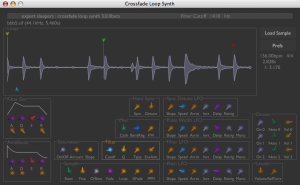
Crossfade Loop Synth
Crossfade Loop Synth is at heart a simple sample playback synth plug-in. It plays samples in the classic sampler manner – by simply altering the playback speed according to the desired note. No fancy timestretching or pitchshifting is applied. You can control how the sample is looped as it is played. An adjustable amount of crossfade can be applied to the loop endpoints to smooth the transitions. This makes it extremely easy to produce glitch-free pad sounds. The loops can also be played backwards and alternately forwards and backwards (pendulum-style).
Further sound processing can be applied in the form of overdrive/saturation, filtering, envelopes (for amplitude and filter), pulse-width modulation, oscillator sync and LFOs (one each for filter, pitch, PWM and sync). The synth is 32 note polyphonic, and all parameters can be controlled by MIDI controllers.
Crossfade Loop Synth Effect
Crossfade Loop Synth Effect is the same as Crossfade Loop Synth except you can record live audio to use as the sample, rather than just loading it from disk. You can record continuously, even while playing back. This allows you to use the plugin as an extremely unusual and creative delay effect. For example you can have the delays played back at double the pitch/speed you played them. Or at double the pitch and backwards. Or as a chord. Or repeat the first beat of every bar… the possibilities are legion. You can save the recorded sample to disk as an AIFF/WAV file for later use.
http://www.expert-sleepers.co.uk/xfadelooper.html
Review of Synth-Werk – Going Kraftwerk all the way, or…
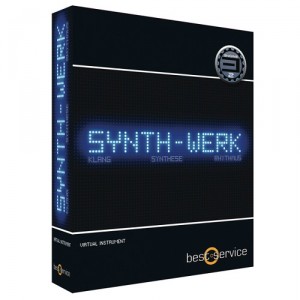
We have had the pleasure of reviewing the recently released sampler studio called Synth-Werk from Best Service, powered by Yellow Tools’ Engine 2. The product was originally released under the name Kraftworker based on the clear fact that with this sample library you get basically all possible sounds inspired by this legendary band.
Our first impression, browsing through this 7,7Gb large sound library, is impressive. Every possible sound we are trying to think of, coming out of the old studio in Düseeldorf, is there in one form or another, everything neatly packed into its respective catalogues; i.e. FX, Bass synths, Vocoders, Lead sounds etc. Although with a slight overweight, in our opinion, on the more recent sounds pertaining to Kraftwerk’s latest release – the “Tour de France soundtrack”. Which in no sense is bad, since a lot of those nice metallic echo based sounds used on that album will easily fit any modern electro, EBM, synth pop, trance type tune.
The favorite section is probably the one containing bass synths since they faithfully reproduce several of those unique and groovy synth bass lines that has made the sound of Kraftwerk so characteristic. This especially true, for several of the sounds using arpeggiator or other types of sequenced rhythms. Forest Kingdom is also something that sounded completely amazing to us. If you compare it with TITAN which we would assume is one of Best Service’s top selling products, and somewhat marketed as a “Kraftwerk-sounding product”, we can easily say that Synth-Werk takes you 10 miles deeper into the realms of the Kling Klang studio. One possible down side is the way all these samples have been named. They are more or less all, in each catalogue, branded as Bass 1, Bass 2, Bass 3 etc, making it very difficult to track which tunes you wanted and, thus, making the built in search function pretty useless.
Synth-Werk comes bundled with Engine 2, a sampler instrument developed in cooperation with Yellow Tools, a product that can either be used as a VST or stand-alone instrument. The use of Engine 2 is something that has generated a lot of debate on various forums (like KVR for example) – stating that they would prefer a more general wav library so that they can use any program they like, e.g. Kontakt, and that they do not need yet another VST or that it makes their systems slow. We loaded Engine 2 onto a MacBook Pro and can at least from a performance perspective say that Engine 2 was easy to install and ran smoothly all through the trial period.
Two-dimensional loop recording with Donut for iPad
Here is an early preview of Donut – a new iPad app from The Strange Agency that’s currently under development.
They call Donut a ‘phrase looper with a twist’ that’s ‘most pleasantly strange.’ Donut is designed to let you record and play loops in 2d. The app is still under development, but the video shows the app’s current state.
Meat Katie Tech Funk Massive Presets
Loopmasters has released Meat Katie Tech Funk Massive Presets, a new title in the Patchworx series of soundsets.
Patchworx 06 – Tech Funk Synths for Massive, is a collection of Bass, FX and Leads exclusively created by Meat Katie, one of the most respected producers in the Tech Funk scene right now.
South-west Londoner Mark Pember (AKA Meat Katie) has had a long history in Dance music. In his time he has recorded for such prestigious labels such as Wall of Sound, R&S Records , Kingsize, Bedrock, Perfecto, Great Stuff, Renaissance, Saw Pember has also remixed for / collaborated with Arthur Baker, U.N.K.L.E, Deep Dish, D.Ramirez, Peace Division, Chicken Lips, Robbie Rivera & James Zabelia, to name but a few.
In detail producers should expect to find here a great selection of patches which are designed to complement Drum & Bass and Dubstep productions, but will of course work well for other styles also.
Meat Katie Tech Funk Massive Presets features
- 64 patches for Native Instruments Massive.
- Sounds: 30 lead basses, 10 FX presets, 24 lead synths.
- Includes 64 MIDI files.
Meat Katie Tech Funk Massive Presets is available to purchase for £14.95 GPB.
Ambient Injection – Evolving Energy

‘Ambient Injection: Evolving Energy’ from Bluezone Corporation gives you among the darkest and unheard sounds in Sci-Fi film scoring. This exceptional sample pack contains intenses soundscapes, unreal atmospheres, deep drones, processed Sci–Fi sound effects, finely crafted transitions, falls, impacts and more. This ultimate sample pack is suited for Ambient, Dubstep, Drum & Bass, Breaks and film’s background music.
With over 400 MB of textured sounds, ‘Ambient Injection: Evolving Energy’ is an incredible selection of 114 pro audio samples thoroughly selected. Some samples go up to 1 minute recording. To add a clear and remarkable panoramic stereo, each sound has been designed with high quality hardware and software effects. This collection has it all.
This sound library delivers a large choice of static and heavy drones, a massive range of analogue soundscapes, layered elements and many more. This expertly processed sample pack is all the audio tools you need to start a new professional production. Just listen to the demo to have an idea of this downloadable pack’s potential. ‘Ambient Injection: Evolving Energy’ is 100% royalty free. You can use it in your music productions without any additional costs.
Suitable for style such as: Breaks, Dubstep, Ambient, Hardstyle, IDM, Drum & Bass, TV, Film & Soundtrack.
Ambient Injection: Evolving Energy Contents:
• Sound FX / Drones / Soundscapes / Textures
Technical Specifications:
• 398 MB Data / 118 Files
• Format : WAV
• Instant Download
• Requires Winzip or similar utility to unpack
• Suitable for use in all major sequencers
• Royalty-Free with no extra cost
• Ready to use in commercial production
Price : 14.95 €
Record sounds, cut and loop them and create rhythms out of them
Jörg Piringer has released RealBeat, a sampler software that enables you to record sounds, cut and loop them and create rhythms out of them.
RealBeat for Mac is not a fully fledged sequencer or sound software it rather offers simple and fast access to sampling and manipulating recorded sounds live or at home. Don’t expect a feature-laden software but lots of fun with your own samples & sounds.
RealBeat features
- Simple interface.
- Sampler (record sounds easily).
- Text to Speech (let your computer speak for you).
- Looping of sounds.
- Modify the sound (pitch, reverse, distortion, reverb, …).
- Sequencer (make rhythms).
- Semi-automatic rhythm creation.
- Patterns (modify the rhythm easily).
- Export sounds.
- Resample sounds.
- Works with internal microphone (or line-in) and external sound interfaces.
RealBeat for Mac is available to purchase for $5.99 USD / 4.99 EUR.
Creating Generative Music with the Mixtikl
This is the first of two tutorials on Mixtikl. In this video, I show you how to use Mixtikl’s library of midi loops, FX, and synthesizers to create generative music. Be sure to check out my website for more tutorials: flamingstylus.blogspot.com or follow me on twitter: @flamingstylus
Simplosive returns with another hit-making construction kit
Simplosive returns with another hit-making construction kit. Dubstep Dimension brings you 5 massive kits influenced by today’s major Dubstep and Dub-Tech producers. Dubstep Dimension consists of 16 bar loops with all tracks separately exported and ready to be re-arranged to create endless combinations. Simply drag and drop, mix and match. In addition, the one-shot drum hits of each kit are included as well.
All loops are key and tempo labelled and provided in each 24-bit WAV and REX2 formats.
Features:
* 5 construction kits with all individual loops all one-shot drum hits of each kit
* 24-bit WAV and REX formats
* 99 loops and sounds in 400+ MB
The sounds of ‘Dubstep Dimension’ are licensed to you as royalty free, meaning you can use them in personal or commercial compositions at no extra cost.
Pimp up your loops !
The multi-band delay machine FDELAY is an exciting tool for sound design and loop manipulation in realtime. In contrast to the delay machines you’re used to FDELAY splits the frequency spectrum of the input signal into 27 bands and applies a separate delay unit to each band. The delay times can be synchronized to the host tempo generating nearly infinite rhythmical and sonic variations of the input signal. For each of the delay bands you can specify the delay time, the level and the feedback amount separately. These parameter changes can even be automized in realtime for glitch free rhythmical morphings.
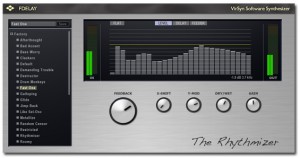
A few high level parameters let you change the delay times and feedbacks of all delays with the turn of a single knob
The Rhythmizer
– 27 band realtime multiband delay.
– Frequency dependant level, delay time and feedback
– Linear phase precision filters for maximal transparency
– Tempo syncable delay times up to 6 seconds.
– Meta parameter for quick access to rhythm variations
– Minimized latency ( 12 ms )
Host compatibility
– VST 3
– VST 2.4
– AudioUnit
– RTAS
Minimal system requirements PC
° Intel Pentium 4 / Intel Core Duo / AMD Athlon 64
° 1GB RAM
° Microsoft Windows XP 32bit or Vista 23/64bit or Windows 7 32/64bit
° USB port required for eLicenser copy protection device
° VST2.4 / VST3 / RTAS compatible host sequencer.
Minimal system requirements Mac
° Intel Core Duo.
° 1 GB RAM
° Mac OS X version 10.5 / 10.6
° USB port required for eLicenser copy protection device
° AudioUnit / VST2.4 / VST3 / RTAS compatible host sequencer.
Reaktor Loupe for TouchOSC on iPad
Perhaps even more interesting then the previous Reaktor post. Coming soon – a new version of Loupe with bidirectional OSC mappings for TouchOSC – the slice / note settings update as you play each note so you see the settings at a glance. Grab all three filter parameters with your fingers and drag them around, navigate the waveform with your ears instead of your eyes.
More here:
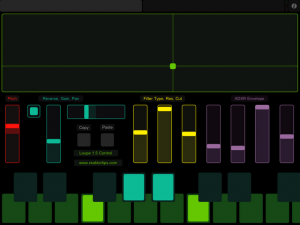
Above is the slice page. Each of the sliders gets updated from Reaktor when you trigger a new slice. This lets you see the loop area, filter settings, envelope settings, etc. of each slice and adjust them. Copy and paste buttons let you copy slice parameters to a different key – handy if you want the same thing on a different key except for panning, or reverse playback.
There’s no way to get the sample waveform to display in TouchOSC, but the large green XY pad works the same way as the Reaktor Loupe GUI – X position sets loop position, Y sets loop length. I actually prefer working with my ears this way instead of looking at the display – it’s a more hardware-y approach.
Changes include:
- Added copy / paste slice (fixed since beta)
- Added duplex OSC mappings for TouchOSC
- Added two page OSC iPad template
- Fixed release envelopes cutting off prematurely
You may download it here. Update is free for owners of Loupe 1.0 – same license info will unlock Loupe 1.5.
DATAMASKIN

