
Using Multi Cues & Loops – Tutorial
http://youtu.be/ktADwlMuDnU
Here’s a brand new tutorial from MixrDJ – Learn how to master the multi cues to quickly produce loops, cuts and remixes with muscle memory exercises and technique. Mixr features 4 hot cues that allow you to instantly go back to a specific point in time. You can tap on multi cue/loop button to activate the panel. To set a cue, simply tap on the “set” button, or the “in” buttons in the multi cue panel to set your markers. Each marker is color coded to help differentiate the multi cues.
You can set up to 3 manual loops by setting “out” points and enabling the “loop” function. You can clear out the in and out points by tapping on the “in” and “out” buttons. Each multi cue is saved and can be used when you reload your tracks. Each deck can save a different set of multi cues per song allowing you to customize your cue sets. Alright, and thats how to use multi cues and loops. Remember, each deck can save a new set of multi cues per song. Don’t forget to follow us on twitter, Facebook and subscribe on youtube, we’ll see you guys in the next video.
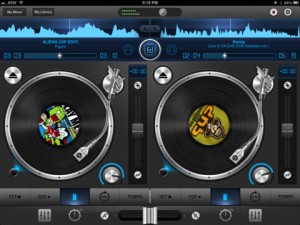
Mixr delivers a rich feature set designed for mobile DJ’s. You can pitch, tap to tempo, scratch, multi-cue and mix with precision. You can manage your iPod library with the revolutionary Crate Manager. Make crates with the touch of your finger in the drag-n-drop interface, you have complete control over your mixes. Featuring high quality DSP effects, you can add Delay and Reverb to your mixes to add that extra punch to your sets. Supporting mono split audio output, you can monitor pre-cueing with your headphones for live performances. Record your mixes and play them back in a sleek player. Recording a mix automatically creates playlists! Turn your iPad into the best mobile DJ Turntable Studio, with Mixr.
Make music with your voice, or any sound!
Background info: Everyday Looper allows you to record 4 musical phrases – 6 on an iPad – and loop them right away. You can then mix and merge them on the fly. Your Adventures Into Sound begin here – Live Looping on any iOS device! Perhaps the easiest introduction into this DIY music style which is taking the world by storm.
New In Version 1.5
STEREO TRACKS
• Pan your tracks. Compatible devices : iPhone 3GS, iPod Touch 3G, iPad and newer.
MIDI CONTROLLERS
• Record, Play/Pause and Stop can be triggered by a MIDI controller through Core MIDI.
2 INPUT CHANNELS
• Record channel 1 or 2, both simultaneously or as a stereo source. Require an audio device that provides 2 input channels such as the Alesis iO Dock.
“Can ANYONE guess what the Mystery Object is, near the end of the video? “
Donut the 2D looper – Loading Files demo
New version of Donut the two-dimensional looper for iPad featuring file loading.
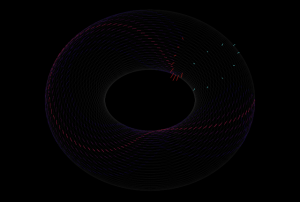
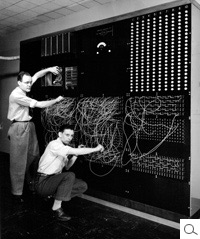
Inspired by the IBM tape loop machine, Donut is the latest release from The Strange Agency. This sound sequencer is a strange one, like the old IBM machine, it makes time two-dimensional by first creating a three dimensional loop and two dimensional sound. It does this by first looping a linear track, then multiplying it into stacks and finally taking the loop stack, and wrapping it itself into a loop, just as the original linear recording is looped.
You use Donut by recording sound into (or through) it, and playing the recorded sound back. You control the playback and recording heads with a 2d vector for each, determining the rate at which the head steps through the loop and loop of loops.
There are still quite a lot of sample points in there and therefore the 2d surface can be very sparse. Imagine if we recorded on the Donut in one direction, but played back in a perpendicular direction. We would only hit one sample of the recording amidst a loop of silence. Thus, Donut can create extremely sparse soundscapes.To make the soundscapes denser, Donut lets your record and play sound with multiple heads (or, using a synthesizer term, voices). These heads can be spread out across the loop surface in both dimensions, creating some awesome temporal effects.
Stylophone Effects
Here is a demonstration of how you can use the Looper in the Eventide TimeFactor, along with the Octaver, Crystals, Harpeggiator, and H910 H949 effects in the Eventide PitchFactor, to create lots of unique sounds from only a few notes. For more info visit
http://Eventide.com/AudioDivision.aspx
Kill Everybody Drum Loop featuring the OP-1
Always nice to here the OP-1 in action:
Decided to try and add 12 seconds from “Scrillex – Kill Everybody” to an drum in the OP-1. Looped one of the sounds in the drum pattern section and that is basically what is playing through the whole beat. Using Spring as effect. I wanted to do some more creative stuff here but … this is just a test.
Loop Music Video for the iPhone
Featured instruments in this video:
Pocket Guitar :
http://podmap.net/pocketguitar/
Funk Box :
http://syntheticbits.com/funkbox.html
iXylophone :
http://www.ipadboardgaming.com/ixylophone/
Virtuoso :
http://www.peterbmusic.com/
Bebot :
http://www.normalware.com/
Relectro – new effect plug-in for Windows and Mac
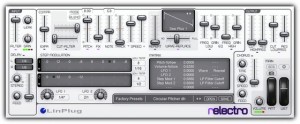
LinPlug has announced the release of Relectro, an effect plug-in for Windows and Mac.
The relectro is some kind of effect not yet existing, its dedicated to transform drum loops into something sounding substantially different, electronic, strange … suitable for almost any kind of electronic music
relectro features
- Main processing section with effects similar to
- – Compressor / expander alike section
- – Cut-filter with infinite edge steepeness
- – Comprehensive pitch sections for
- relative pitch changing of the input
- pitch fixing of the input
- (inverted) pitch following of the input signal
- – Variable wave repeat
- – Variable waveform replacement
- – EQ-alike section with 2 bands
- Main modulation section with
- – Two conventional LFO
- – Two modulation step sequencer
- – Modulation matrix with pitch- and volume-follow
- Output section with HP and LP filters and chorus.
- Two wheels for dry/wet blending and morphing.
- MIDI program change supported.
- MIDI learn. Settings can be saved / restored.
The LinPlug relectro for Windows and Mac (VST/AU/RTAS) is avaialble to purchase for $79 USD / 59 EUR.
Free Ableton Live tutorial videos – percussion, loops and samples
In this video Danny J Lewis (Enzyme Black, Defected) builds the percussion elements of his stripped back deep house track, using congas and bongos as the driving rhythm of the track.
In this video Danny J Lewis (Enzyme Black, Defected) shows you how to manipulate and twist up a percussion loop using the tools in Ableton Live to give them your own unique vibe.
In this video Danny J Lewis (Enzyme Black, Defected) throws together a collection of contrasting samples in Ableton Live. Watch as he begins to develop his idea, moulding the textures and tones together into a cut and paste style house beat similar to the vibe of a Moodymann tune.
Videos from our Deep House in Ableton Live series. It is an exclusive taster of the video content that Point Blank students have access to on the Deep House Pro Producer Course in Ableton Live which launches on 26th September 2011(http://www.pointblankonline.net/make-house-music-ableton.php ).
Experimental looping: Donut™ has an appointment with Thich Nhat Hanh
We reported about the Donut looper a couple of days ago and now the Strange Agency has released a new inspiring video using the Donut:
Donut™ lets you record loops in two dimensions.
You can use it like a phrase looper, by recording horizontally while using the step controls to step through vertical recording position. You can use it as a realtime processor by using ThruRecord mode. You can record and playback at completely differently speeds. You can even record backwards! You can record and playback diagonally across the Donut™ surface, creating glitchy staccato sounds. You can record and playback with multiple heads, recording or playing multiple positions at once. You can spread the heads vertically to access different portions of the Donut™, or you can spread them horizontally to create an echo effect.
Imagine two dimensional time! Now on the App Store.
itunes.apple.com/app/donut/id451057730?mt=8
Donut lets you record loops in two dimensions
Here’s a new interesting concept for those of you who like to manipulate loops – as of course we all do 😉
You can use it like a phrase looper, by recording horizontally while using the step controls to step through vertical recording position. You can use it as a realtime processor by using ThruRecord mode. You can record and playback at completely differently speeds. You can even record backwards! You can record and playback diagonally across the Donut™ surface, creating glitchy staccato sounds. You can record and playback with multiple heads, recording or playing multiple positions at once. You can spread the heads vertically to access different portions of the Donut™, or you can spread them horizontally to create an echo effect.
Imagine two dimensional time!
DATAMASKIN

