
The most portable MIDI system ever
…at least Line 6 is claiming this
Learn more about MIDI Mobilizer™ and compatible MIDI Mobilizer apps at at http://line6.com/midimobilizer
The only one of its kind, MIDI Mobilizer™ is the most portable MIDI system ever. Connect it to an Apple® iPhone®, iPad®, or iPod touch® to play, record, and backup MIDI information any time, any place.
Software developers around the world have been producing amazing apps for use with MIDI Mobilizer™. All of these are available now on the App Store™, and more are being added all the time. http://www.apple.com/iphone/apps-for-iphone/
Creating Generative Music with the Mixtikl
This is the first of two tutorials on Mixtikl. In this video, I show you how to use Mixtikl’s library of midi loops, FX, and synthesizers to create generative music. Be sure to check out my website for more tutorials: flamingstylus.blogspot.com or follow me on twitter: @flamingstylus
MIDI HAT Performance
Well, why not 
MIdi Fighter Pro Controllers in action
The brand new line of Midi Fighter Pro controllers. These hand built instruments are designed to take your controllerism skills to the next level and last a lifetime. Each design is built around a specific work flow of a famous artist with matching mappings for their software of choice. The first two controllers (designed for Traktor Pro by Ean Golden) are intended to tear apart decks and turn your DJ software into a musical instrument.
- Two dedicated controllerism layouts for specifc workflows
- Customizable button colors express personal style or convey functions
- Bus powered + plug and play compliant for both Macs and PCs
- 16, spring loaded arcade buttons play like a dream
- Jaw-dropping mappings come ready to rock
- Bright blue LEDs provide clear feedback form the software
- The 4 X 4 grid is easy to memorize and play like an instrument
If you are looking for a less expensive option, check out our Midi Fighter Classic line.
More info:
Every MIdi-Fighter comes with :
- High-quality USB cable
- Midi-Fighter sticker
- 16 Genuine Sanwa buttons from Japan
- Hand-numbered and assembled in San Francisco
- Signed certificate of authenticity
Some key hardware features
- Steel chasis is built to take a beating
- Center locating hole allows to controller to be placed on a turntable
- Four heavy duty rubber feet grip any surface and strongly resist sliding
- High-quality knobs and faders are waiting to be grabbed and played hard
- Four dedicated bank/preset buttons
- High performance spring-loaded buttons will last a lifetime
- Matte acrylic top sheet is silky smooth, resists finger prints and is a joy to play on
Routes gives a sneak at iBend Pro – demo
iBend Pro is a fantastic XY controller, you can set all midi controller and pitch bend! 4 axis are fully programmable.(min value, max value, action on release, inverse axis…)
Two Mod of play are available: Fix Mod, fixed midi values on the screen. Free mod, interpreter your movement. It’s very easy to use. iBend Pro is a universal app.
Sound Cells app – Midi Clock Sync demo
Sound Cells is an interactive generative music app. Just touch the matrix to create some moving cells and see them interact with each other and generate sound in realtime. If a cell hits the wall, it creates a sound. If a cell ends up in the same location as another one, they change directions. You can remove cells by touching them or by hitting the cell removing button.
The app comes with the 2 different sounds, which can be controlled in realtime for very expressive effects.
Also the app can generate MIDI output, so you can hook up a midi capable instrument for endless possibilities.
On the newest version, it is possible to choose the scale that the app will use, the tempo and the key. This allows the app to be able to become a performance tool, where it can play along different musical settings.
This is a universal app and on the iPad, it will use the full available resolution for a rich visual experience.
This app is inspired by the web app Otomata at http://www.earslap.com/projectslab/otomata, which also has a iOS version in the works, so make sure to keep an eye for it.
In this video:
This is a demo of the new Midi Clock sync feature that I’ll be adding to it soon. In this video, the Drum Machine (Korg ER-1) is sending the clock signal to Sound Cells. In turn, Sound Cell, is sending midi note data to the DSI Tetr4 synth to make sound.
The app can be found in here:
http://ow.ly/5azwj
Teaser: Cableguys MidiShaper Alpha
A quick presentation of our upcoming effect Cableguys MidiShaper, which is currently in public alpha.
Time for some serious Buchla Thunder
Buchla Thunder and 2 PerFourMers (upside up horizontal version) from Katavist on Vimeo.
(audio is the same here as in the original version)
16 improvisations using the Buchla Thunder MIDI-Controller on two Vermona PerFourMers. In the sixth piece (from 7:01) the Thunder plays seven internal sequences (“riffs”) I had recorded beforehand. They can be scaled in real time, which I didn’t do here though.
Teaser: DXi FM synthesizer ver 2.2.0 playing with External MIDI Controller via Camera Connection Kit
DXi is a FM synthesizer application inspired by 80’s most popular FM synthesizer. You will enjoy creating sounds as well as playing music with this application. FM synthesizer is still popular among many people by its unique tone. We carefully selected parameters from original synthesizer so you will be enjoy editing tone with them easily. You need to know some technique to tweak the tone, but you will be able to get DXi’s special tone and effects while having some fun! Creating sound effects is another idea to enjoy DXi. If you remember the days of FM synthesizers, try creating the tone you remember from them.
If you have no experience with any FM synthesizer, we are sure you will be enjoying the unique tone world!
* 4 operators FM synthesizer
* 8 algorithms
* Envelope, frequency (Ratio or Fixed) can be set each operators.
* Feedback control on operator number 4.
* 2 master effects (LPF with Resonance and Delay)
* Import/Export function to save the tone you created. (URL schema text string format)
* Audio recording function. And you can transport recorded audio file, .wav, onto Mac/PC via iTunes file sharing.
* Clipboard audio sharing support. You can export recorded waveform to other application via clipboard. It’s compatible with Intua’s clipboard.
In this video:
DXi is a FM synthesizer application inspired by 80’s most popular synthesizer. Enjoy making music and creating sound by FM synthesis engine easily.
The movie show you the new great features about DXi version 2.2.
The Little MIDI Machine gets upgraded
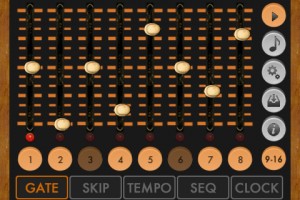
Synthetic Bits has announced a major update to its free MIDI step sequencer for iOS, Little MIDI Machine.
Little MIDI Machine v2 was just submitted to the App Store and is not yet available. Here’s an overview of Little MIDI Machine v2 Features:
- Now a universal app, supports iPad, iPhone, iPod Touch
- CoreMIDI support, including network MIDI
- MIDI clock sync for both Line 6 and CoreMIDI, send and receive
- New random sequence mode
- Updated graphics/UI
- Still free
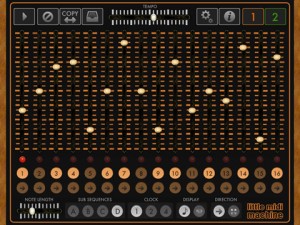
If you’re not familiar with Little MIDI Machine, it’s one of the more wicked freebies available for iOS musicians. It lets you create two independent sequences in classic step sequencing style:
- Sequences can be any length
- Sequences can run forwards or backwards, and can be ‘played’ in realtime
- Sequences can by synced to clock at three different rates
- Note length can be controlled for the entire sequence
- Sequences can control pitch and velocity
- Sequences can be directed to different MIDI channels
The new features should open up a lot of potential for the app, especially the ability to sync to other hardware or apps via CoreMIDI.
DATAMASKIN

