
Beat 707 with Propellerhead Reason Device Kong
Beat707 is an Arduino Shield that adds several neat features to your musical arsenal. You get a 32 step machine, (plus 32 double-steps for a total of 64 steps) with 16 step buttons and leds, LCD screen and navigation keys. It’s like the classic Roland TR707 but with some twists, as it actually has 64 x 1/32 or 32 x 1/64 steps. Plus, the 2 note-step sequence feature allows you to do bass and/or synth grooves — it’s a MIDI groove-box all in one ! The unit doesn’t produce any sound, it’s all MIDI based, so you can use any MIDI compatible device.
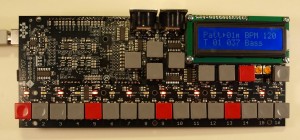
- 14 Drum Tracks + 2 Accent Tracks (a total of 3 MIDI-note velocities can be sent from each step)
- 2 Step-Sequence Tracks (each step has its own Note selection, Velocity is set by the accent tracks)
- Multi Pattern and Song Mode
- Number of Patterns and Songs depends on the total amount of system EEPROM — the base system provision of 32kbytes of EEPROM has enough for 90 patterns and 99 songs positions. The included Flash Nand memory can hold up to 42 songs. (see more below)
- Each pattern has 32 x 1/32 or 32 x 1/64 steps and 14 tracks + 2 accent tracks (V1.2.0 has 64 steps total per pattern)
- Each track has a note-number and MIDI-channel number, so you can also use tracks to output regular notes (one note fixed per track)
- Optional MIDI echo (set during compilation and uploading of the Sketch)
- File Mode for storing up to 20 songs into the internal Flash. With options to Load, Save, Dump to SySex MIDI and Erase
- Special Mirror Pattern Editing – allows you to edit a 64 step pattern in a much easier way
Introducing the Protodeck – first demo
This is the very first demo video of a new MIDI controller for Ableton Live
“this has to be watched fullscreen in HD!
– sorry about some bitrate compression artifacts… all is sync, nice, pretty in the real world!
– sorry for the blinking-like blue leds. they don’t blink anymore, but the DV cam is ugly here so…”
for watching it live, I’ll make workshops + music live perf
for further informations: designthemedia.com/protodeck/
THE PROTODECK controller features:
– 87 potentiometers
– 90 buttons
– 81 rgb leds
– 2×20 LCD
– 2 PIC 18F4620 (20MHz RISC processors)
– fully custom rgb led drivers
– fully custom firmware
– 2 MIDI IN/OUT interface
MoDrum, Bassline, Gruvtron playing in sync on one iPad
Running iOS music apps as “modules” – potential of in-device CoreMIDI communication
“Yesterday I just noticed that Molten Drum Machine support sending MIDI clock sync to other apps on the same iPad. That made me curious and after some surveys, I found some other apps also supporting this feature. So I had some experiments and I recorded what I can do so far this morning.
In this video I demonstrated 3 apps MoDrum, Bassline (from Finger-lab) and Gruvtron (from Sound Trends LLC) running simultaneously on the same iPad. The beats from 3 apps are synced by MIDI clock (MoDrum as the clock source). Since all the 3 apps are universal apps, it should be no problem to do it on iPhone too. This is really an awesome feature and made me feel like the apps as”modules” which can work together with other apps on the same iPad/iPhone, rather than running them as the only app exclusively on the device. Last week I noticed a project Polyonix trying to make multiple apps running simultaneously on the same screen of a jailbroken device. This will make controlling these apps even easier.”
Jitter-free MIDI from the ES-4
This video shows how the Expert Sleepers ES-4 SPDIF/CV module can also be used to send MIDI, via a simple cable adaptor and using features of Expert Sleepers’ Silent Way software.
Because the MIDI is being sent via an audio interface, it is sample-accurate with the audio and free from the timing jitter normally associated with USB MIDI interfaces.
http://expert-sleepers.co.uk/es4.html
BEAT to MIDI – correction of poorly captured or performed drum recordings
Forge Audio Designs has released a free drum replacement tool for Windows, BEAT to MIDI:
BEAT to MIDI will be the first VST release from Forge Audio Designs. BEAT to MIDI is a fast acting, low overhead Beat Detection and Drum Replacement tool which producers and musicians can implement to extract MIDI data from Drum loops.
BEAT to MIDI allows for the correction of poorly captured or performed drum recordings after the recording session has taken place
BEAT to MIDI uses sophisticated algorithms to identify each drum hit (or transient) in the time domain. Once this point is detected, MIDI data can be used to trigger replacement drum samples to alleviate poor quality recordings and/or timing errors
Features:
- Detection of drum strikes and output of detections to a (defined) single MIDI note
- Supervised Pattern Matching system to identify drum instruments
- Detection of drum strikes and drum instruments with output of detections to appropriate (General MIDI defined) MIDI notes
- Automatic ratio settings to allow easy settings of thresholds
Note:
- BEAT to MIDI is a PC Only VST 2.4 Plug-in and must be used in a compatible VST Host.
- BEAT to MIDI has been tested within Cubase 5/6 under Windows 7 but Forge Audio Designs cannot ensure full compatibility with other hosts and Operating Systems at this time.
VMeter MIDI Controller Touch Strip & Display
Control music software with touch and pressure. Also general purpose touch input and LED Meter output. Open source computer software and USB HID interface. VMeter™ (beta) is a USB MIDI touch strip controller & display. Touch location, on/off state and pressure can all be routed to MIDI controllers. The lights can also be controlled by MIDI messages.
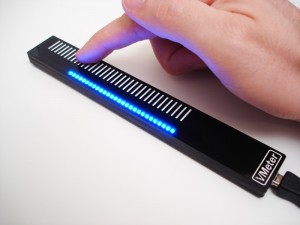
The protocol and computer-side software is open, so it can be re-purposed as any general I/O device you would like. It follows USB HID protocol (like a mouse or keyboard), making the VMeter usable by any USB host controller, even a host shield for arduino.
Features:
Control any music software that accepts MIDI controller messages
Textured touch strip guides finger
Compatible with OS X 10.3+, Windows coming soon
Connects via USB cable
8 inner capacitive sensors mappable for quasi-multi touch
Dimmable blue LEDs (brightness mappable)
USB HID protocol makes it accessible as general purpose I/O device
Upside-down mode reverses LED direction for mounting flexibility
Open-source computer-side software
Can control / display system volume. Nice for full screen video volume adjustments.
Lights mappable to MIDI controllers
New interactive MIDI instrument – OhmRGB
The OhmRGB is a totally customizable, interactive MIDI instrument, designed to give you hands-on control for your performance. High-quality sliders, knobs buttons, expansion jacks, and multicolor LEDs provide the interface for creative expression, whether you’re mixing samples and synths or DJ’ing a cutting-edge set.
“Constructed with anodized aluminum and hand-finished wood, the quality is felt down to your fingertips. All of our controllers are proudly hand crafted and assembled for artists by artists in our Austin, Texas shop.”
This video features Pailo and the OhmPages remote script for Ableton Live
On a journey with the Moon Modular
The M 551 is a module, which transforms an attached Midi signal into a couple of analogue control voltages. Thereby modular synthesizers can be integrated into a Midi-network and controlled by Midi-master-keyboards or Midi-hardware- or software-sequencers/DAWs.
The M 551 derives the following six control voltages from the fed Midi-messages:
– Keyboard CV (from Midi-note-number) Depending on the ‘Priority’ switch, the lowest, highest or last received note-on message is getting transformed. Voltage range: 0-10,53 V
– Gate (from the current Midi note-on/note-off commands)
– Velocity (transforms the key velocity [note-on velocity] of the current note-on message) Voltage range: 0-10 V
– Mod. Wheel (derives a control voltage from Midi-modula- tion messages [Controller 1]. Voltage range: 0-10 V
– Pitch Wheel (control voltage from the Midi pitch bend commands, bipolar) Voltage range: ±5 V (If “Add Bend CV” is active, a pitch bend voltage of ±0,5 V is added internally to the keyboard control voltage).
– Controller (transforms a selectable Midi controller into a control voltage [0-10 V])
Available are: – After touch – Breath controller (CC 2) – Foot pedal (CC 4) – Sustain pedal (CC 64) – Panorama (CC 10) – Main volume (CC 7), – the unspecified parameters CC 20, CC 21, CC 22.
The functions of the three toggle switches are:
– Add Bend CV
In ‘on’-position the Midi Pitch bend voltage (attenuated to ±0.5 V) is added internally to the keyboard voltage to ease pitchbending the oscillator
– Priority
Keyboard control voltage/gate signal/velocity voltage are derived from the hightes/lowest/last received note-on message
– Keyboard Mode
Retrig triggers a new keyboard control voltage/gate signal combination at any struck key
Legato starts a new event not before all keys are released
To select the Midi-Channel: Dial the rotary switch to the„Channel Select” position and initiate a MIDI-channel message (e. g. strike a note on a keyboard); the module sets itself to the most recently received MIDI channel (this setting is saved even if the unit is switched off).
http://www.moonmodular.com
So, how many keys do you need on your MIDI – thousands??
This is a velocity sensitive MIDI isomorphic keyboard. 192 total keys. The project came out of Louisville Soundbuilders, a fortnightly meeting of circuitbenders, synth engineers and experimental musicians. After seeing a couple of my failed variations of a single-bus isomorphic keyboard, Tim was intrigued enough to design one even better. He designed multiple PCBs that sandwich together with multiple switch types for velocity sensitive keypresses.
More development on the way! We’re working on molds/methods for making hexagonal keycaps. And I’m working on an Arduino-based controller as an alternative to the midibox controller Tim has working already.
Watch the progress at http://soundbuilders.lvl1.org
Plug & Play iPad Editors for Vintage & Software synths
http://youtu.be/Cf_Cdbfhtdc
Background:
Leveraging 2 years of experience in designing GUI for control surface and 25+ years of experience in designing synthesizers sounds, we are bringing the best of those experiences to the iPad with iControlMIDI for Moog Memorymoog LAMM, namely iMemorymoog.
iControlMIDI is a UI Friendly and Workflow Efficient Solution that let you control your MIDI machines and software, simply from your iPad.
iControlMIDI is Plug & Play (actually there is nothing to plug!).
In 3-clicks on your Mac or couple of clicks on your PC, you are up and running…
iControlMIDI uses your:
• iPad with WiFi connectivity
• WiFi router (like an AirPort)
• [MAC] MacOS / Utilities / AudioMIDISetup / Network (MIDI Network Sessions)
• [PC] rtpMIDI and Apple Bonjour
iControlMIDI let you control all MIDI controllable parameters.
Parameter Name and Value displayed on iControlMIDI UI are the same as the ones displayed on your synth if you were to program it from its control panel!
iControlMIDI offers 4-Controls per Parameter:
• Slider: full range parameter value adjustment for a ‘coarse’ workflow
• + button: precise +1 parameter value adjustment for a ‘fine’ workflow
• – button: precise -1 parameter value adjustment for a ‘fine’ workflow
• Parameter default value button: default parameter value for a faster workflow
iControlMIDI is a Workflow Efficient Solution as it offers UI Consistent Synth Functions, for example, the VCF functions are grouped on the same iControlMIDI Page.
iControlMIDI integrates with your DAW. Real-time parameters adjustments triggered on iControlMIDI can be recorded and playback on your DAW.
iControlMIDI is a Zero [Mac] and Low [PC] Dependencies Solution; iControlMIDI relies on iOS 4.2 CoreMIDI and MacOS CoreMIDI frameworks is 100% MIDI, 100% iOS and 100% MacOS compatible and:
• Does not require to pay for additional software or have additional software installed on your Mac; requires to download rtpMIDI and Apple Bonjour on your PC
• Does not require to pay for additional hardware
• Does not require to do message mapping
• Does not require to design a UI on your Mac or PC and upload/sync it on your iPad
• Does not require to design a UI on your iPad.
With iControlMIDI, we are offering you to be immediately operational, so you can focus on your music (not on the IT/MIDI part of it!) and unleash your creativity.
iControlMIDI is designed by Electronic Musicians for Electronic Musicians.
In this video:
iControlMIDI. Plug & Play iPad Editors for Vintage & Software synths.
iMemorymoog for Moog Memorymoog LAMM
Site: http://www.icontrolmididesign.com/
App Store: http://itunes.apple.com/app/imemorymoog/id428843212?mt=8
DATAMASKIN

