
SoundPrism Pro Expression Trailer
Here’s a new trailer for Soundprism Pro, an advanced MIDI Controller for iOS
What is SoundPrism Pro?
* a professional composition tool and midi controller
* an interactive generator for harmonic sound textures and epic cinema tracks
* a completely new way to control existing VSTis, synthesizers and sound modules
* an intuitive way to visualize and internalize musical relationships
* an innovative way to interact musically with geometric pitch space visualizations
* a way to define awesome pitch layouts by using the new PitchClassShifter
What can I do with it?
* compose film soundtracks
* find new chord progressions for your pop and rock songs
* create loops with advanced tonality
* compose epic sound textures for your next video game
* provide your media presentations with self made music
In this video:
http://soundprism.com/pro/
SoundPrism Pro 1.4 now supports Accelerometer Input.
Brainwaves in music, kind of :-)
Well this is what you get. This is how to use coreMIDI in Brainwave 1.1. Brainwave is a clip based MIDI sequencer for the IPad. Bring your melodies and drum beats into life with the streamlined and intuitive MIDI clip editor. Assemble and arrange entire songs with the Arrangement editor. Control up to 16 instruments using the built-in sampler. Use the built-in audio samples to quickly get up and running, or use your own samples for even more creative sounds. Then produce and export MIDI files to be imported to your favourite Digital Audio Workstation software. All this inside of an ergonomic and minimalist user interface that will help get your inspiration to fruition.
For more information: http://www.facebook.com/pages/Brainwave/139992022734576
How to turn your videos into music
Moovmi is a Max For Live Video-to-MIDI device that produces midinote sequences from video data analysis. It works with both video files and webcam as sources.
The video source is reduced to a low-res grid where each cell generates midinotes in a predefined interval and pitch, while the velocity is determined by the luminance of the cell.
The user can influence the midi sequences by processing the source with video parameters such as brightness, contrast, saturation, threshold, colors feedback, etc…
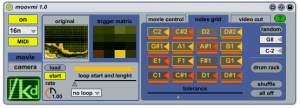
Moovmi can be used for :
- semi-random drum pattern generation
- experimental melodies and chords
- sonification of video installations (using the fullscreen feature)
Moovmi is very easy to use: just select a video source and midinote sequences will start immediately!
Moovmi comes unlocked : owners can open, edit, and re-use parts of this device as they prefer
Robust pad MIDI controller
So what is the Pad-One really: The Vestax PAD-One is a solid robust MIDI pad controller, compatible with various DJ & DAW software and can be used to control any kind of MIDI device, including synthesizers, samplers, drum machines, and electronic drums. The aluminum chassis will never warp or crack, ensuring you long life durability and stability.
The PAD-One can individually assign pads on the fly, and shows you each pads MIDI value on the 7seg indicator. Compact, solid and reliable, the PAD One is the ideal item to your DJ arsenal.
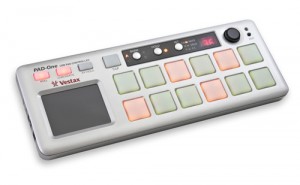
- 12 velocity & pressure sensitive LED backlit pads
- Individual LED color for each bank
- MIDI message for each pad can be selected with the PAD-One
- Real time control XY touch pad
- Solid aluminum die-casted robust chassis
- Full control of ROLL button tempo with the TAP button
- MIDI cable connection for control over various effect and sampler devices
- USB plug & play
- Excellent portability
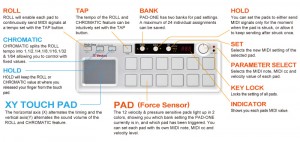
In this video (translated from Japanese via Google):
Vestax Controller Pad “PAD-One” What you know? Today, in charge of Vestax products (Tarama’s) said the appeal could have a direct product (see picture). “PAD-One” is heavier than Zusshiri to see in the picture, who has become a hip-hop products and make a strong awareness of the familiar track pad. And, as has been described in the video input as well as a tool of rhythm, simply because each pad can be assigned to MIDI control information, a strong push pad (called aftertouch) can plug It can also manipulate parameters and bread.
The future of the NES synth
Here is what the author has to say about it:
I am prototyping, designing and assembling a special cartridge called Chip Maestro which can be used in any Nintendo Entertainment System. This cartridge will accept a MIDI input from any instrument, and by passing the MIDI notes through the NES, the cartridge will make the NES synthesize 8-bits of awesome in true NES squarewavey goodness. See the video for more details!
Most chiptune artists today use ‘software synths’ to try and recreate the sound we grew to love. By providing artists with a low-cost and easy to use hardware solution, they can use a real NES to compose their music, and even play it live on stage! And if you don’t have a MIDI instrument, don’t worry; you can use your PC with an inexpensive USB-MIDI converter, or create your own instrument using Arduinos or other microcontrollers that can output MIDI, so you can turn anything into an 8-bit instrument!
Getting this cartridge into the hands of musicians takes a bit of funding. All the money raised will go towards finishing the prototype, a thorough debugging, and beginning production. This entire project will be showcased on Kickstarter as well as my site, and every backer will get backdoor access to my build logs. And, best of all, it will all be open source! Yes, even though there is money involved, I am still putting all my schematics and code on the internet! This way people can improve on my design, and remix it into their works. These remixes come back to me, and I can improve the original product based on those works. It’s an endless cycle of creativity, and I wouldn’t have it any other way.
Background on the NES:
The Nintendo Entertainment System (also called NES or Nintendo) is an 8-bit video game console that was released by Nintendo in North America during 1985, in Europe during 1986 and Australia in 1987. In most of Asia, including Japan (where it was first launched in 1983), China, Vietnam, Singapore, Middle East and Hong Kong, it was released as the Family Computer . In South Korea, it was known as the Hyundai Comboy and was distributed by Hyundai Electronics. In Russia, an unlicensed clone was manufactured called Dendy (Де́нди). A clone that was popular in Eastern Europe in the 1990s was the Super Design Ending-Man BS-500 AS, also known as Terminator. Similarly in India, clones were popular by the names of Little Master and Wiz Kid, in Poland there also was a clone produced, called Pegasus. in Argentina, the clone was called Family Game. It was succeeded by the Super Nintendo Entertainment System.
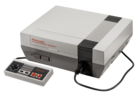
As the best-selling gaming console of its time, the NES helped revitalize the US video game industry following the video game crash of 1983, and set the standard for subsequent consoles of its generation. With the NES, Nintendo introduced a now-standard business model of licensing third-party developers, authorizing them to produce and distribute software for Nintendo’s platform.In 2009, the Nintendo Entertainment System was named the single greatest video game console in history by IGN, out of a field of 25. 2010 marked the system’s 25th anniversary, which was officially celebrated by Nintendo of America’s magazine Nintendo Power in issue #260 (November 2010) with a special 26-page tribute section. Other video game publications also featured articles looking back at 25 years of the NES, and its impact in the video game console market.
Technical details:
I am exploiting the 2a03 chip inside the NES by keeping it in an infinite loop, and injected note addresses and data using opcodes derived from NES note tables. The internal circuitry inside the cartridge translates MIDI note data into NES note opcodes, and sends that to the 2a03 APU, which synthesizes the notes on the appropriate channel. Full technical details will be up in a week, and all backers will receive a link to a secret page with all the details!
Shared by Kickstarter
Mini-tutorial: Connecting Your iPad to Your iPhone with Midi
In this tutorial, I show you how to share a Midi connection between your iPhone and iPad that allows you to send notes from your iPad to your iPhone and vice versa. Be sure to check out my website for more tutorials: flamingstylus.blogspot.com
Shared by flamingstylus
Q-Bert, Ean Golden Jam + Brand New Midi-Fighter!
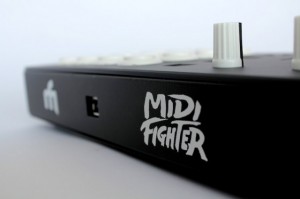
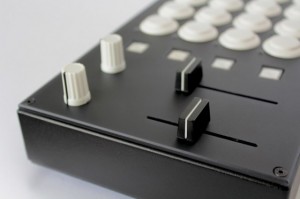
DJ Tech Tools’ Ean Golden plans to announce new versions of the MIDI Fighter DJ controller next week. These are two of four new models we will be announcing in the next week. They are replacing our “custom” midi-fighters with four dedicated layouts we have found to be the most popular. Designed to be high performance instruments, all are paired with mappings for specific controllersim use cases and built in robust metal cases that can survive weekly tours and serious abuse.
I made a visit down to the QSU, Q-Bert’s online scratch university, last weekend to play around a little bit and explore the possibility of playing a show together. We practiced for about an hour, improvising and cutting it up in a much more relaxed setting than our last rendezvous here at DJTT headquarters. The guys hit record on a camera and the clip above is one of the improv gems that emerged from our session.The drumming in the background is from our resident drum teacher Ryan, who covered timing techniques for us a few months back. Continue reading for photos, one more clip and more info on my controllers in the video.
New Korg Monotron / Miditron with the iPad
Beatmaker has published this nice teaser video; its under construction and I’m still Working on it! This is my Korg Monotron AKA Miditron with Beatnic Midi-iF Kit and Midi Mod. This thing is SICK! I’m using bs-16i app for iPad with Line 6 Midi Mobilizer to trigger the Miditron. My next video with it will be much better Audio Quality and the Miditron will be complete. You know how I do! Just giving you a Taste.
MIDI Breakout Box Version 1.5 demo
This is a demo of the MIDI Breakout Box app version 1.5 which allows MIDI channels to be routed and transposed using an iPad. See our website at http://www.vinclaro.com.au/ios/midibreakoutbox/default.html for more info.

The MIDI Breakout Box allows you to:
- Route MIDI input to one or more different channels
- Transpose input up or down in pitch before sending it to the output channels
- Change instrument presets, volume and stereo panning on output channels
Selecting the Input Channel
The input selection panel is at the top of the screen. Touch the channel from which you would like the MIDI input to be received
Tip: For best results set your music keyboard to “Local OFF” mode to prevent the notes on the keyboard from sounding when you play them, so that the only sound is transmitted from the MIDI Breakout Box app. This will allow the full range of 16 channels to be available without interference.
Selecting Output Channels
There are 16 switches down the left side of the screen. Turn a switch to the “ON” position to allow MIDI output to that channel.
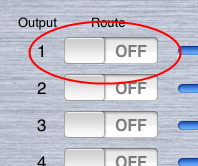
The “All On/Off” button underneath the switch for channel #16 allows all channels to be turned on or off simultaneously.
Setting Output Volume and Pan
Use the Volume and Pan controls for each channel by moving the Slider controls
The sliders below channel #16 can be used to adjust all channels simultaneously.
Setting Instrument Presets
Touch inside the “Bank” and “Preset” text fields to enter numbers. The touch Keyboard will appear to assist in data entry:
The values you enter must be a number from 0 to 127. Instrument presets are generally provided by the MIDI device manufacturer and many devices today confirm to the General MIDI specification.
Touch the green “Update” button at the bottom of the Bank/Prog list to send the new instrument settings to the MIDI device. Settings will not be applied until you touch this button!
Tip: Some MIDI manufacturers label their presets as starting from instrument #1. MIDI Breakout Box uses the raw MIDI value so it may be necessary to subtract 1 so that the preset list is 0-based.
Transpose
MIDI Breakout Box can transpose the MIDI input in real time. Enter a value in the “Transpose” field next to each channel.
This value can be a positive or negative number corresponding to the number of semitones by which to adjust the input. For example, setting the Transpose value to “12” will output a note that is one octave higher than the note value played. Setting Transpose to “-12” will output a note that is one octave lower.
Transposing will happen immediately as you type values into the fields. Use the “INIT” button under channel #16 to reset the Transposition of all channels back to 0:
Other MIDI Controls
Use the buttons at the bottom of the screen to send MIDI control messages to the connected MIDI devices.
These are:
- GM Reset – Performs a “General MIDI Initialization”
- GS Reset – Performs a “GS Initialization”
- Ctrl Reset – Resets all MIDI controllers to their default values.
MidiMe Demo
This is a quick demo of the features of MidiMe, a new midi control app for the iPad. You can see here how the direct, record and bounce modes work and get a feel for the UI.
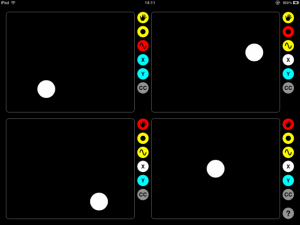
It connects over WiFi so no midi cables are required. It works directly with core midi in OS X and Windows users can connect via the free rtpMIDI driver.

DATAMASKIN

