
Koushion >> Gridsound – controller for iPad
Koushion (literally “grid sound” in Japanese) is a new kind of MIDI controller for your iPad. While it looks deceptively similar to a simple Tone Matrix, this is no toy. This video demonstration was completely improvised. The app will be available in the App Store on March 22.
* Includes a 16-step sequencer with a two-octave range.
* Wirelessly controls MIDI software for both Mac and PC.
* Syncs to any external MIDI clock source available to your computer so that the performance or production always stays synced.
* Plays eight scenes/banks individually, chained in succession, or simultaneously.
* Adjustable quantization.
* Switches easily to any major or minor key with the push of a button.
* Assigns each scene/bank to any MIDI channel to enable control multiple instruments at the same time.
Track Master Demo
http://www.youtube.com/watch?v=_QN5dVTgQgY&tracker=False
This is a short demo of Track Master controlling parameters in Ableton Live.
It shows how you can get set up in merely seconds and get started making music with your fingers.
It’s a very short demo because we are getting ready to release version 1.1 which will have a lot of features that will blow 1.0 out of the water.
LSD Programming has released Track Master, a $.99 app that turns your Mac trackpad into an X/Y MIDI controller:
Track Master can track up to three fingers at the same time and use their X and Y positions and finger taps for assignable MIDI messages. It’s like having three MIDI touch pads in one!
Track Master works with music programs that allow assignable MIDI controls such as Ableton Live, Logic and Traktor. Version 1.0 doesn’t work with GarageBand (it can’t assign MIDI commands manually) but version 1.1 will add GarageBand support.
Introducing The Choppertone – again…
A Live mashup of a classic jazz tune, performed on a custom-built MIDI controlller. Nick Francis is at the controls.
Shared by musicinablender
iXpander
iControlMIDI. Plug & Play iPad Editors for Vintage & Software synths.
iXpander for Oberheim Xpander / Matrix-12
Plug & Play Solution
iControlMIDI let you control your vintage and software synths from your iPad.
iControlMIDI is Plug & Play (actually there is nothing to plug!).
In 3-clicks on your Mac or couple of clicks on your PC, you are up and running…
iControlMIDI uses your:
• iPad with WiFi connectivity
• WiFi router (like an AirPort)
• [MAC] MacOS / Utilities / AudioMIDISetup / Network (MIDI Network Sessions)
• [PC] rtpMIDI and Apple Bonjour
iControlMIDI is designed by Electronic Musicians for Electronic Musicians.
MIDI Sequencer test
I built a cliplead patchbay MIDI sequencer using the HighlyLiquid MIDI CPU kit: highlyliquid.com/midi-controllers/midi-cpu/
The nail and cliplead design is inspired by the work of Talking Computron.
The sequencer is a CMOS 4017 decade counter.
The MIDI notes are running to a MeeBlip synth: meeblip.noisepages.com/
A clock signal is being provided by Ableton Live, which also syncs up the drum track and bassline.
Shared by Michael Una
100% true analog circuitry with subtractive synthesis
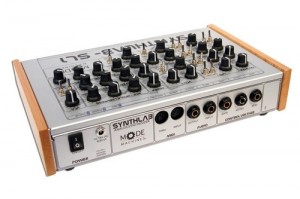
The SYNTHLAB uses a 100% true analog circuitry with subtractive synthesis which is designed in a classic way. This design is not new because it started in the early 70´s with the voltage controlled modular systems. The use of the low pass filter based on the transistor cascade lets the synthlab sound very similar to the well known early Moog synthesizers. Check out the full specs and see some videos inside.
As the SYNTHLAB has a built in MIDI interface you will find it easy to integrate into any MIDI studio setup. The SYNTHLAB also has a built in MIDI-TO-CV/GATE interface which can become very handy, when using vintage equipment. The SYNTHLAB is a hand-made true discrete analogue synthesizer built in Germany. We have used components from the 70s and 80s but also modern technology. There are no DSP´s or such built in, so the sound is true, pure and very experimental like a smal synthesizer laboratory – hence the name: SL-1 SYNTHLAB.
The setup of the SL-1 is very easy-to-use if you have played around with other anlogue synthesizers. Every parameter has its own pot for controlling and playing with the modulation and everything can be controlled manually in real-time. The controls of the modules are diveded into groups on the frontplate so they can be visually seperated for easier use. For basic setup you have 2 VCO´s and an external audioinput. The selected signal can be routed through the VCF and VCA before it reaches the audiooutput. For each VCF and VCA you have an own envelope generator. Additonally you have various modulation routing possibilities through the LFO´s.
Features
* 2 x VCO´s ( 2 waveforms – saw & pulse)
* 1 x VCF (low pass filter 24dB – Moog cascade)
* 1 x VCA
* 1 x Noise
* 1 x Ringmodulator
* 1 x Suboscillator (-2 octaves)
* 2 x LFO (various waveforms and routings)
* 2 x ENV (ADSR for the VCA and AD for the VCF)
* MIDI-CV-Interface with 2 x CV and GATE
* Audio IN
* Audio OUT
* MIDI IN/THRU
* External PSU included
Technical specification
* POWER: 18V AC 1000mA (PSU included)
* Dimensions: 29.8 cm * 16.5 cm * 6 cm (11.73″ * 6.5″ * 2.36″)
(with packaging: 36.5 cm * 23 cm * 10 cm (14.37″ * 9.06″ * 3.94″))
* Weight: 1.5 kg (3.31 lb)
(with packaging: 2.1 kg (4.63 lb))
HexaChrom – Wireless iPad MIDI Controller From Somascape
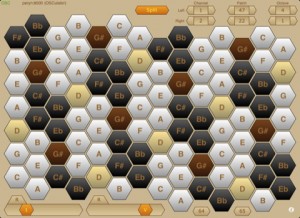
HexaChrom turns your iPad into a musical performance controller, enabling you to wirelessly play your OSC or MIDI electronic musical instruments — virtual instruments running on a laptop/desktop computer, or any hardware instruments attached to your laptop/desktop computer.
HexaChrom takes an alternative approach to the majority of MIDI keyboard controllers in that it uses an isometric note layout, where the notes are presented as a hexagonal matrix of keys. There are many such isometric layouts, though HexaChrom uses the Harmonic Table layout, which is a modern variation of the Tonnetz (tone network), devised by the famous mathematician Euler.
This note layout has particularly useful musical intervals between adjacent keys, ie along the 3 major axes : minor thirds, major thirds and perfect fifths. In the Western musical tradition, the intervals of the major and minor thirds dominate chordal structures. Consequently, this layout offers a number of advantages over the more conventional clavier-style keyboards : consistent chord shapes irrespective of key, the ability to span several octaves with one hand and to play basic major or minor triads with a single finger. Together resulting in an easier learning curve.
It also encourages the user to approach music differently, just as the different note layouts of pianos and guitars engender different playing styles.
HexaChrom sends MIDI data via the OSC protocol, using OSC’s “M” data type. To control MIDI devices (hardware or software) you will need to run an application on a laptop/desktop computer to translate the OSC messages into MIDI messages. For Mac users, OSCulator is the preferred solution.
Features :
* Isometric ‘harmonic table’ note layout keyboard, based on a 52-note matrix (just over 4 octaves).
* Play simple chords with a single finger.
* Consistent chord shapes irrespective of root key.
* Octave transposition provides a total span of just over 7 octaves.
* Dual view : Portrait mode offers a single 52-note matrix (easy play); Landscape mode has a 104-note dual matrix, with optional split channel operation.
* Assignable controllers (sliders and buttons).
* Connects wirelessly using the OSC protocol.
* Automatic connection using bonjour, or manual connection when bonjour is not an option.
* Using OSCulator (on a Mac) control any software or hardware MIDI synthesizer, sampler, drum machine, etc.
* Multitouch interface.
Available now from iTune via the App Store at http://itunes.apple.com/us/a…
MIDI Controller basics tutorial
This week I cover the basic concept of MIDI and Controllers as I sometimes get asked questions like “Will this controller sound good for bass lines” or “Will this (USB) MIDI controller work with X interface”. So I did this episode to point out why they dont effect your sound.
Shared by Rupert Brown
Alkex Instruments custom Minimoog midi controller
http://www.youtube.com/watch?v=WoN34GoTb1c
The Alkex Instruments MMG is a custom midi controller designed to enable the user to “feel” his or her software/hardware emulation of the legendary classic analog synthesizer: The Moog Minimoog.
D-Arp – new dual MIDI arpeggiator

WOK’s latest release is D-Arp, a dual MIDI arpeggiator. Here’s what WOK has to say about it…
Easy to use, D-Arp combines two arps and allows to let them run in parallel or control one by the other. Use it with any synth (-plugin) to create interesting and new sequences.
Special features: host-sync, shuffle, adjustable note length with overlap at max point (for mono glide sounds), velocity adjustable or input pass thru. Clock divider for speed control includes settings for dotted or triol – also there is a manual control for step thru by sending MIDI notes on channel 16 to the plugin (for example from a drum machine !)
D-Arp is the enhanced version of Simparp. You may download Simparp to check compatibility with your system. But D-Arp is more then 2xSimparp because of it’s routing variations and extras like the force to scale function.
Pricing and Availability:
11 €
More information:
DATAMASKIN

