
Root Node – I’m a Synthesizer (feat. Hatsune Miku)
Cover art: http://www.aversionofreality.com/blog…
Vocals: Hatsune Miku V3 English by Crypton Future Media
Website: http://www.RootNodeStudio.com
Orphx :: Cut Through and What Will Burn
Official video for “Cut Through” by Orphx.
Taken from the “Hunger Knows No Law” EP, available NOW through Sonic Groove. sonicgroove.com/
Written and Produced by Richard Oddie and Christina Sealey.
Mastered by Jeremy Greenspan
Recorded in Canada.
Performed by Orphx orphx.com/ orphx.bandcamp.com/
Edited & Directed by Dominic F. Marceau
©2012 Sonic Groove
Legowelt Studio Sound pack for Analog Rytm
Get the sample pack from http://www.elektron.se/accessories/
Listen more examples at https://soundcloud.com/elektron/sets/…
Sample pack by http://www.legowelt.com/
The Legowelt Studio Sound Pack contains a selection of samples, optimized for use on the Analog Rytm. The bundle also includes a custom Analog Rytm project featuring patterns, kits and live-friendly scene and performance macros.
All content has been created by Legowelt and Elektron.
The Sound Pack samples will of course also work on the Machinedrum UW and Octatrack, but the Project, Kits, Patterns and macros will only work on the Analog Rytm.
u-he presents HIVE – official teaser video
u-he presents HIVE: a powerful but CPU-friendly synthesizer.
Available as VST, AU, AAX plug-in.
More information and demo download: http://www.u-he.com/hive
A streamlined single screen UI lets you dive into sound creation immediately. The fluid workflow lets you tweak away until your sound is just right (or wrong in just the right way). HIVE was engineered to be light on CPU – it won’t slow you down while you work. HIVE: A lightweight synth that delivers a heavyweight sound!
Credits: Video by Michael Pettit, music by Michael Dühr, 3D by Sebastian Greger
Features:
- Very low CPU usage
- Switchable audio characteristics (normal, dirty, clean)
- 2 main oscillators, 2 sub-oscillators
- Up to 16x unison for each of the 4 oscillators for “super” sounds
- 2 multimode filters
- Step sequencer and arpeggiator
- 12 slot modulation matrix with 2 targets per slot, 4 envelopes (ADSR), 2 LFOs
- 7 built in effects
- Single screen interface
New video from DEKAD – Poladroid
2015 Dekad single taken from forthcoming album A Perfect Picture [BDMCD26]
Limited edition Poladroid Extended CD available now!
Dekad is back with a new single, “Poladroid”, taken from the forth coming album “A Perfect Picture” due for September 2015. “Poladroid” turned out to be a typical Dekad track like “Dive” or “So sorry”, but with a new twist due to the co-production with Foretaste’s XY. Noticeable track on the single: “Ta Vie” – not to be included on the album – the first Dekad track sung in French.
The single is out in 2 versions, a normal version and an extended version.
“Poladroid”
- Poladroid – remix
- Ta Vie
- Searching – remix
- Poladroid – new beat mix
“Poladroid Extended”
- Poladroid – remix
- Ta Vie
- Searching – remix
- Tied Up – remix
- No Mystery
- Slowmotion – remix
- Poladroid – new beat mix
- Tied Up – retro mix
PreSonus has announced it is shipping Studio One 3
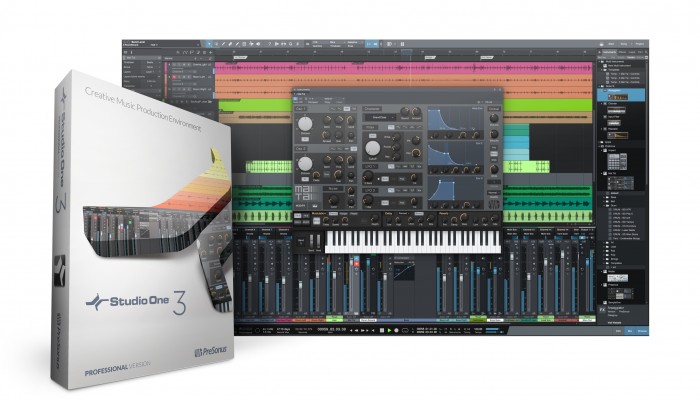
PreSonus has announced it is shipping Studio One 3, the most significant update to its powerful, easy to use digital audio workstation.
Available in Artist and Professional editions, version 3 adds true innovations in song arranging and experimentation, as well as inspiring new ways to craft unique and evocative sounds. In addition, Studio One 3 opens users to new ways to control and mix within the application as the first DAW to offer a dual platform (Mac and Windows), multi-touch interface. Furthermore, Studio One 3 Professional users now have the freedom to create away from the desk through Studio One Remote for iPad. The new Studio One promises to look as good as it feels, with a sleek, modern, configurable UI for high-resolution displays.
Innovations in arranging and experimentation
Studio One 3 Professional introduces the Arranger Track, which makes it easy to build and rearrange songs, letting you copy or move entire song sections with simple drag-and-drop. It has its own Track Inspector that shows all sections of the song, which also doubles as a quick navigation tool for your song.
Unique Scratch Pads, also in Studio One Professional, provide an independent parallel timeline that lets you safely experiment on alternate ideas without jeopardizing arrangements. Simply drag Arranger sections, individual content, or entire songs into the Scratch Pad, make edits, then drag it back to your main song. Unlimited Scratch Pads can be saved with your project, saving you the trouble of numerous alternate song files.
The updated Browser, found in both Artist and Professional, makes it easier than ever to find the content you’re looking for, with tag-based “musical” search. You can now search for loops, samples, and presets by typing keywords like “genre” and “instrument” or by filtering content by selecting tags. The Browser also now has an integrated Cloud tab to access additional content online.
New ways to craft unique sounds
Extended FX Chains, new in the Professional version, provide new ways to build complex, multi-dimensional sounds by chaining and combining effects plug-ins in serial, in parallel by channel, or by frequency with up to five splits.
Also new in Professional, Multi Instruments allow you to combine multiple instruments as layers or splits in a single Instrument Track and play them like one instrument. Further dimensions can be added to a sound by using Note FX on individual Instruments layers within a Multi Instrument.
Note FX is a new plug-in type introduced in Studio One 3 that adds life to Instrument tracks by processing their note data. The four Note FX included with Studio One 3 Professional are Arpeggiator, Chorder, Repeater, and Input Filter.
Each console channel and Multi Instrument in Studio One Professional now offers Macro Controls, which allow individual instrument or plug-in parameters to be assigned to control knobs, switches, and X/Y pads for easy access. Multiple parameters can be assigned to the same control with independent settings for range/polarity/curve.
Inspiring Instruments
Studio One version 3 features a powerful new instrument engine that drives two new instruments.
Mai Tai is a polyphonic analog modeling synth for modern electro and bass sounds. Mai Tai’s sounds can change character and produce drastic morphing changes and unique timbres. Its Multimode filter offers sounds ranging from vintage analog (a la Moog or Oberheim) to state-of-the-art, zero-delay feedback filters. Mai Tai’s oscillators and LFOs have a free-run option, like an analog synth. And you can build enormously complex sounds with modular-synth-style operation through Mai Tai’s 16-stage modulation matrix.
Presence XT is an expandable, full-featured sampler with a comprehensive sample library that covers all the bases. It offers disk streaming for large samples, and many sounds utilize articulation key-switching, scripting, and custom controls for unique sound parameters. Studio One 3 Professional includes a 14 GB sound library for Presence XT and can read popular sampler formats, including EXS, Kontakt, Giga, and SoundFont without conversion.
Much More
There are over 70 new features and updates included in the Studio One version 3 upgrade. Some of the more significant updates include:
- Hands-on editing, mixing, and arranging via Mac and PC multi-touch displays
- Customizable high DPI user interface
- Studio One Remote for iPad® control
- AudioBend time and pitch manipulation updated with élastiquePRO 3 algorithms
- Rotor and Bitcrusher audio effects
- Automation curves
- 1:1 Track view/console sync
- Step recording
- Smart, definable Alternate tool
- Context-sensitive help, documentation, and tool-tips
Studio One 3 is now available in Artist and Professional versions, as both upgrades and full programs. In June, PreSonus will also introduce Studio One Prime, a fully functioning free version, which will provide a great way to get started with Studio One.
Roland SYSTEM-1 – 64 presets – RETRO by Alba Ecstasy
64 presets for Roland System-1 available on: http://www.albaecstasy.ro/roland-syst…
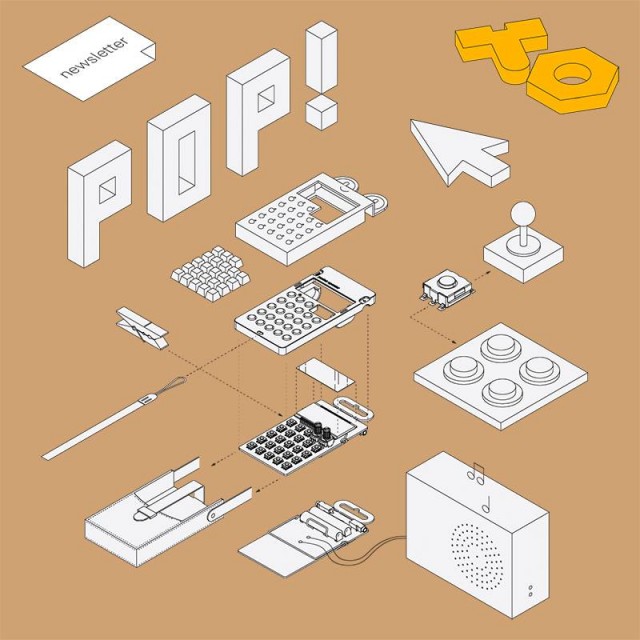
The new Teenage Engineering initiative – pocket operator project competition
Yamaha SY35 Super Synth Card – all 64 presets and 24 multis – supersynth expansion card
Video desciption:
I play all presets from number 1 to 64 without any addition of effects nor dynamics etc .. at the end of the video I also play all 24 multis that are on the expansion card. Enjoy and you are welcome to subscribe to my channel as well as reshare it. Thank you very much for your support.
Best SAL BAN aka Matthias played
Check out my channel and you will find videos where I played following synthesizers:
Moog Sub37
Clavia Nord Lead4
Yamaha SY-35
Yamaha SY35 Super Synth Voice expansion card
Korg Volca
Korg ARP Odyssey
Novation Bass Station 2
Korg SQ1
Roland Aira System 1M
There are more videos to come from my following studio setup. These videos include:
Moog The Rogue
Moog Sub37
Dave Smith Instruments Tetra
Clavia Nord Modular G2 – Expanded
Clavia Nord Lead4
Yamaha SY-35 – aka SY-22 or TG-33 – with extra Super Synth Voice Card and Pop Card
Clavia Nord Wave – in a special edition and bended version – unique I would say
Waldorf Miniworks 4 Pole Filter
Waldorf Blofeld
Roland Aira Series – TR 8 – TB 3 MX-1
Roland JX-8p
Roland Juno 106
Roland JP-8000
Roland V-Synth XT
Roland MKS-50
Roland M-VS1 Vintage Synth
AKAI SG01v
Oberheim Matrix 6R
Oberheim Matrix 1000
Korg MS-20
Korg Poly 800 MK 2
Korg Radias inkl. Keys
Korg Micro X
Korg Volca Bass
Korg Volca Keys
Korg Volca Drums – Beats
Korg Electribes ER-1
Korg Electribes EA-1
Novation Mininova
Acidlab Bassline
Access Virus C
Arturia Minibrute
Arturia Spark LE
Voice Card and Pop Card
Kawai K1 MK II
Doepfer Dark Energy 2
SPL Phonitor 2
SPL Mixdream XL
Lexicon MK300
Korg M1
Roland D-70
Universal Audio LA-610 MK2
Sony GP5
Native Instruments Maschine
Native Instruments S8
….. and always upcoming new Synths
Crystal Synth XT Demo for iPad
You can get Crystal Synth XT here at the App Store.
https://itunes.apple.com/us/app/cryst…
Crystal Synth XT is a full featured semi-modular synthesizer, ideally suited to creating lush evolving soundscapes. Crystal VST has long been a popular synthesizer on the desktop. Crystal XT brings that same powerful synthesis engine to the iPad and iPhone. Crystal XT features MIDI keyboard input via the iPad’s camera adapter or any CoreMIDI-compatible MIDI interface such as the Line 6 MIDI Mobilizer and sharing of sounds with the desktop version of Crystal.
== Features ==
Browse through the included sounds and use the 2 octave keypad to trigger notes to produce evolving, rhythmic, or melodic sounds. Create your own sounds with a single button press using the breed feature. When using an iPad, you can delve into a tweaker’s dream by using the extensive editing features to sculpt sounds to your heart’s content (editing features are only available when used on an iPad).
Crystal features both subtractive synthesis and frequency modulation (FM) synthesis. It offers abundant modulation control with over 90 parameters which may be modulated, multi-stage envelopes with graphical editors, extensive tempo sync of envelopes/lfo rates/delay times, built-in effects for chorus/flanging/comb filtering/echoes, and a band splitter for effects processing by frequency band. Not only that, Crystal has wave sequencing and granular synthesis. The musical applications for Crystal are literally boundless.
== MIDI ==
With MIDI keyboard input, you can connect a MIDI keyboard to your iPad and play Crystal XT like a hardware synth. Or use a CoreMIDI-compatible MIDI interface such as the Line 6 MIDI Mobilizer and connect your MIDI keyboard to Crystal XT on an iPhone.
== Virtual MIDI ==
Use virtual midi to play Crystal from a midi controller app. Use the Settings app to turn on the CrystalSynthXT Background Audio mode to enable Crystal to play audio when in the background. You can then play Crystal from a midi controller app which supports virtual midi.
== Sharing ==
With patch sharing you can create sounds on your iPad or iPhone while away from the studio, then transfer them to the desktop Crystal when you get back to the studio to use in recording projects. Or, create banks of sounds on the desktop Crystal, then transfer them to the iPad/iPhone Crystal to use in a live performance for a truly portable rig. Use Audio copy/paste to record your performance on Crystal and transfer that performance to another app. Or copy your recorded performance to your computer.
== Audiobus ==
To use with Audiobus, use the Settings app to turn on Background Audio for Crystal Synth XT.
== Different Versions ==
If you don’t need all the features of Crystal XT, try the basic version of Crystal, also available in the app store from Green Oak Software. With the basic version you can browse sounds, play notes, and create new sounds, taking advantage of its powerful semimodular synthesis engine. Crystal XT adds MIDI keyboard input via the iPad’s camera adapter and sharing of patches with the desktop version. Choose the app that is best for you!
== Notes ==
Important note for iPhone and iPodTouch users: Crystal XT runs on both the iPad and the iPhone. Because of the limited screen space on the iPhone however, the editing pages, which contain the edit controls, are not available when running on that device. But on the iPhone you can still browse sounds, play notes from the keypad, create new sounds with the Breed feature, modify patches with the Design feature, and share sounds with desktop Crystal VST.
MIDI input via Apple’s camera adapter requires an iPad. Apple’s camera adapter is not supported on the iPhone/iPod Touch. On the iPhone/iPod Touch use CoreMIDI-compatible MIDI interface such as the Line 6 MIDI Mobilizer to connect your MIDI keyboard to Crystal. We recommend www.iosmidi.com as a good place to go to learn whether specific keyboards will work with the camera adapter.
For videos and information about Crystal XT, visit:
http://www.greenoak.com
DATAMASKIN

