
Experimental: Wiimote + Pocket Lighter = Synth Control
A MIDI synthesizer is controlled by a Wiimote. As infrared source, a pocket lighter is used. It works also with a candle, a halogen lamp or most other IR sources. Up/down controlles the pitch of the oscillator, while left/right controlles the cutoff frequency of the
low-pass filter.
—————————————-
https://sites.google.com/site/synthaq…
Ableton Push: Review and First Look with Mad Zach
Mad Zach takes a sit down with Ableton’s new controller, Push.
Push is a new controller from Ableton that features a high-performance 64-button grid, backlit LED screen, and a plethora of function buttons dedicated for total control over Ableton. Although at quick glance Push might look a bit like a Novation Launchpad on steroids, it’s actually much more.
The Good: Great feeling buttons with accurate velocity sensitivity and nice rebound (suitable for clip launching and finger drumming). Impressively bright LED’s with included power supply. Groundbreaking integration with Ableton lets you build grooves and compose songs without ever touching a mouse. Super long throw touch fader with pitch bend resolution.
The Bad: A bit on the heavy side. Although the knobs feel smooth, they are endless rotary and are not optimal for extreme knob twisting and controllerism. Grouped drum racks behave like instruments. Drum rack grid on left side (would have made more sense on the right). Would have liked to see more routing and sound design tools accessible through the hardware.
The Bottom Line: This versatile and thoughtfully-engineered control station makes working with Ableton a much more musical experience. A true “instrument,” Push gives us an intuitive and expressive way to build songs, grooves, melodies, and harmonies. Although it doesn’t do anything we couldn’t technically do before using a mouse, it excels in recontextualizing the Ableton platform and getting you into music world instead of mouse land.
Read his full review and preorder a Push here: http://www.djtechtools.com/2013/03/12…
New Soundplane software!
A quick camera-mic demo showing the new touch sensitivity of new client software v0.99. Strings by Aalto, piano by some Logic factory sample.
Screencast of calibration and other new features in Soundplane client version 0.99.
The Soundplane A is a computer music controller with the sensitivity and feel of an acoustic instrument. It detects a wide range of touches on its walnut playing surface, from a light tickle to a very firm press. Unlike a MIDI keyboard, which typically sends out just one velocity value at the start of a note, the Soundplane communicates three dimensions of information, x, y and pressure, over the entire duration of every touch. As a synthesist, this lets you replace a triggered envelope with an intimate connection and breathe life into each note.
True force sensing
The Soundplane is a true force sensor. When you press on the articulated walnut playing surface, it bends slightly to your touch, and the small change in position is measured very accurately. This offers a playing experience with real physical feedback, and the feel of an instrument worth learning and spending time with.
Very high speed
The Soundplane is incredibly fast. It measures the pressure at each of 512 points on its surface almost 1000 times per second, enough to capture every nuance of a musical gesture. The touch screens in tablet computers typically capture data at 30 to 60 frames per second.
Ableton Push Freestyle Session
First in a series of Ableton Push performance videos. Featuring Brooklyn’s own Derek VanScoten aka D.V.S.*
Gestural Control of Modular Synthesizer via Kinect
Custom software enables gestural control using Kinect and PC. Hand movements in the X and Y axes are translated into MIDI signals which generate control voltages, allowing 2 dimensional morphing of waveforms in a “Morphing Terrarium” module, processed through modular moog. Recorded in the superterranian lair of the Robotmakers.
flight of the bumblebee – ableton push
Ableton Push – more than a controller
CMC Six-Pack – the full CMC line-up of USB controllers in a bundle from Steinberg
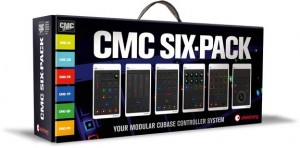
Steinberg has announced the release of the CMC Six-Pack, a new bundle deal comprising the award-winning CMC line-up of USB controllers.
“The CMC Six-Pack is the most flexible controller setup ever made for Cubase: it’s a touch-based mixer; it’s a handy pad controller; it’s a transport control you won’t want to miss after the first try,” comments Stefan Schreiber, product marketing manager at Steinberg.
The CMC Six-Pack is made up of all six controllers designed to offer users a modular controller experience. Arranging the units in a way that best suits the personal needs when using Cubase makes the CMC series a very customizable hardware control system. Each of the six slim-sized USB controllers provides tactile control over Cubase features.
CMC Six-Pack features
- Six unique micro controllers designed to take control of dedicated Cubase areas — faster and more convenient than with any other solution.
- Modular system: combine multiple units to form an eminently powerful Cubase control station that exactly fits your needs; joint plate included for quick and easy connection.
- Fully mirrored Cubase functionality: intuitive operation due to the adoption of the Cubase color scheme and icons.
- Perfect ergonomics guarantee a unique level of handling quality — created to make your recording and live performance workflow more musical than ever.
- Brings innovative technologies to your fingertips: illuminated, high-resolution touch controls and rotary encoders for detailed visual feedback.
- Portable and compact: small enough to fit in your pocket, on a master keyboard or wherever desired
- User-assignable functions for even more flexibility and tweaking options.
- USB-powered: no additional power supply required.
- Cross-platform compatible: OS X and Windows support.
- Cubase AI download version included to start recording your music straight away.
The CMC Six-Pack is available from selected resellers and through the Steinberg Online Shop as long as stocks last, with a suggested retail price of 299 EUR including German VAT.
MCTRL – MIDI Controlled NES Gamepad
A custom MIDI controlled NES Gamepad controller.
We tap into homebrew titles created by stellar NES developers by syncing them with MCTRL. From midi controlled lightshows to cool retro 8 bit sounds all can be used effectively in any music studio or live club setting.
More information is available at www.Ninstrument.com
Take MIDI control of your NES (Nintendo Entertainment System) with the MCTRL (pronounced M-CONTROL) . There are many homebrew audio/video titles for the NES that can’t easily be synced with your traditional DAW or MIDI keyboard/device, until now. MIDI ‘IN’, ‘OUT’ and ‘THRU’ allow you to seamlessly add this to your existing MIDI setup. We have built the MCTRL out of durable ABS plastic, strong enough for the hard rigors of live shows. We use an original NES Gamepad that retains its full functionality and use. We add a full feature MIDI pcb from HighlyLiquid.com that is fully powered from the Gamepad and requires no additional power interface. We insure full NTSC and PAL compatability for all of our MCTRL’s including the free Cartridges we include with every MCTRL sale. You can resell your MCTRL and cartridge to anyone in the world and not have to worry about compatibility problems or issues. The cartridges feature the Ciclone chip from RetroUSB.com.
The LED’s light indicating what your MIDI device has triggered. This makes it very easy to see exactly what is happening. You can still use the Gamepad buttons simultaneously.
QuNexus NAMM Demo
QuNexus was shown in the KMI booth at NAMM 2013. This video contains examples of the QuNexus NAMM demo:
– Channel Rotation (MIDI channel is assigned in the order that keys are pressed, allowing for poly-pitch bend).
– Hold Note function (useful for stacking chords or step sequencing).
– LED Arpeggiator Feedback (Ableton Live’s arpeggiator is used to remotely control each of QuNexus’ LEDs. Each of the 32 LEDs can be controlled by any MIDI device or DAW).
Closer look at Ableton Push
Dennis from Ableton goes over a few of the key features within their new DAW and performance controller, Ableton Push.
Atlanta’s own Tech Beats gives us a live demo using Ableton Push.
“Push is a new instrument that solves an old problem: how to make a song from scratch. With hands-on control of melody and harmony, beats, sounds, and song structure, Push puts the fundamental elements of music making at your fingertips – and it fits in a backpack alongside your laptop. 64 pads give you multiple ways to make beats. Play, step sequence, and navigate your loop – all at the same time.”
DATAMASKIN

