
eyoControl 1.1 is out now
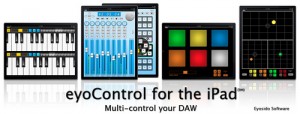
eyoControl 1.1 for the iPad, free update to the MIDI controllers set, adds support for the iPad’s native MIDI wireless connectivity (CoreMIDI), enabling users to connect to their DAW without requiring eyoControl Server. The latter is still being supported and provides advanced connectivity options for Mac users. The CoreMIDI update also brings Windows XP/Vista/7 compatibility through the third-party rtpMIDI software (see details on eyosido.com), which makes eyoControl compatible with most Windows based DAW.
This update adds a fourth entry to the controller library, mXY, a highly configurable multi X/Y controller. mXY has the following features:
– 4 independent X/Y controllers.
– Merge and Split modes: controllers can placed either in a common area (merged) or in individual slots (split).
– 1, 2, 3 or 4 controllers on screen simultaneously.
– controller axis individually assignable to Pitch Bend or any of 56 MIDI continuous controllers.
– enable/disable X and Y axis for each controller with a single tap.
– swap the settings of X and Y axis with a single tap.
– mirror mode: values can be mirrored in each direction around center position.
– reversed mode: min. and max. values can be reversed.
– return to center mode: releasing a controller makes it go back to center position.
– sticky mode: for easy positioning at center position.
– outer grip (Split mode only): enables to move a controller by dragging finger outside of the controller’s button.
– fine mode: choose between high or low resolution values for controllers whose values are larger than 8 bits.
– choose between 2 button sizes per controller.
– support for portrait and landscape orientations.
– controller settings are preserved for later reuse.
eyoControl is a set of MIDI controllers enabling control of your Digital Audio Workstation (DAW) software from your iPad in various ways, such as a control surface or a virtual instrument.
eyoControl includes the following controllers:
– Surface: a control surface supporting the Mackie Control protocol. Surface presents a traditional Mixer view with per-track buttons/knobs/faders, and a Panel View with quick access to the status of 64 tracks. Supports major DAW such as Logic, Cubase… (read details about DAW support at http://eyosido.com/eyocontro…).
– Pad: a 4/6/8/12-pads MIDI controller with tap-location sensitive (controls MIDI note velocity) pads suitable to play drum parts. Each pad has a configurable color/MIDI channel/note. A global velocity slider adds up to the velocity control of each pad.
– Keys: a dual keyboard MIDI controller with separate MIDI channels assignable per keyboard. Choose among three key widths per keyboard, and customize key colors. A global velocity slider controls note velocity.
– mXY: a multi X/Y controller featuring four independent, highly configurable X/Y controllers. Choose among 56 MIDI continuous controllers or pitch bend to assign. Each axis can be swapped, muted, reversed, mirrored etc…
eyoControl communicates with your DAW through the iPad’s WIFI connection using either the native iPad wireless MIDI capabilities (CoreMIDI) or eyoControl Server (Mac only) for advanced connectivity options.
NOTE: eyoControl is a set of MIDI controllers, it does not produce sound by itself!
Requirements:
– iPad running iOS 4.2 or above.
– a local WIFI connection.
– a laptop/desktop computer running MacOS X 10.4 or above, Windows XP/Vista/7 (rtpMIDI required) or any system compatible with the iPad wireless MIDI protocol.
– a Digital Audio Workstation software / audio sequencer with MIDI support.
Optional: if you opt for eyoControl Server instead of native MIDI, a Mac computer running Mac OS X 10.5 or above is required.
Check out http://eyosido.com for more details about eyoControl.
Numark introduced the NDX800 Controller

Numark introduced the NDX800 Controller – a controller designed for DJs who want to use DJ software to perform, without giving up the ability to play other types of media such as CDs, MP3 CDs or music on USB flash drives.
NDX800 Controller comes pre-mapped and complete with Traktor LE in the box.
The NDX800 Controller has a large touch-sensitive platter for controlling, cueing, and scratching. You can connect a USB flash drive for access to MP3s. You can also use it to control MIDI software by connecting NDX800 to a Mac or PC with a USB cable.
NDX800 Controller has an advanced platter that is touch-sensitive for superb accuracy and smooth control of tracks on discs, flash drives, and software. The large, 7.75” platter is surrounded by an illuminated ring that acts as a position display, like putting tape on vinyl. The platter’s touch sensitivity is adjustable.
NDX800 Controller includes beat-synced DSP effects, including chop, echo, filter, flanger, pan, and phaser. NDX800 Controller also has an internal sampler and three sample/hot cue trigger pads. NDX800 Controller has seamless looping on a set of easy-to-understand controls,including adjustable loop-out point.
Five stutter starts and cue point memory storage round out this powerful deck’s remix capabilities.
NAMM: AKAI releases Synthstation49
Introducing the synthstation49 by AKAI
More info below:
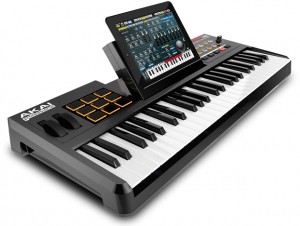
SynthStation49 is the most advanced, intuitive music controller designed specifically for use with the iPad and the first true iPad performance tool for musicians. Working seamlessly with Akai Professional heralded SynthStation software, SynthStation49 provides unparalleled music creation capabilities, including direct in-app MIDI recording from its velocity-sensitive keyboard, nine MPC-style drum pads and array of transport controls.
In addition to its integration with the SynthStation app, SynthStation49 is also completely iOS CoreMIDI compatible, making it instantly compatible with dozens of music apps already in the App Store and hundreds more on the way.
Dock, power and position the iPad perfectly using the adjustable-angled cradle, or establish commanding control over your favorite computer software using SynthStation49‘s USB/MIDI port. Professional ¼” outputs and extreme portability ensure you’ll be able to take your sequences straight to the stage at a moments notice.
SynthStation49 is the only full-featured, professional keyboard controller allowing direct MIDI performance recording onto an iPad. Bridging Akai Professional’s popular MPK controllers with the previously released SynthStation25, SynthStation49 provides immense software control with forty-nine, full-size velocity-sensitive keys, nine backlit MPC-style drum pads and full transport buttons. An adjustable-angled dock for iPad allows the user to easily slide their tablet into the SynthStation49’s cradle and position the screen to their preference.
SynthStation49’s keyboard, pitch/modulation wheels and sustain pedal input provide great feel and the essential controls for musicians and producers to compose, record and perform. The nine drum pads of SynthStation49 give users immediate, intuitive beat-creation capabilities over the 50 classic and modern kits available within the SynthStation software. Program, Sequence, Song select and Transport buttons also provide quick navigation to the SynthStation App’s most used components for a seamless, efficient workflow.
SynthStation49 also contains a stereo pair of professional ¼” TRS outputs with volume knob for easy connecting to other pro audio equipment on stage or in the studio. A headphone output also lets users practice and compose in private. The SynthStation49’s USB port can be connected directly to a Mac or PC computer to receive power in addition to transmitting MIDI to and from music software – a great way to turn the SynthStation App or other CoreMIDI compatible App into a sound module. You can even use SynthStation49 as a traditional USB MIDI controller with your computer – no iPad required!
AkaiConnect SDK allows third-party developers to take advantage of all the professional controls and capabilities of Akai Pro’s SynthStation49 keyboard controller and incorporate support for those controls within their iPad applications. Software developers interested in creating programs compatible with SynthStation49 can submit an application now at SynthStationApp.com.
MIDI controller application for the iPhone
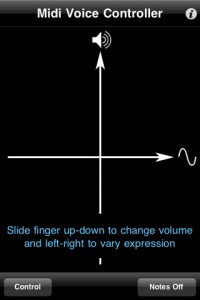
Voice Control is a wireless MIDI controller application for the iPhone that converts the pitch of your voice into signals for controlling MIDI devices networked to your computer.
Features:
- Select your vocal range – from bass to soprano (center picker wheel)
- Shift the pitch of converted MIDI signals up or down (right picker wheel)
- Display the note you are currently singing (left picker wheel)
- Sliders let you change the input audio level and the amount of pitch “smoothing”
- Tap “Set Up” to switch to the “Control” screen
- Control the volume and expression in real time using the x-y control pad while you sing
- Rotate the device to pan the sound left to right
The developer does not mention support for any of the available hardware MIDI adapters that are available for iOS devices as of version 1.1.
Voice Control sells for $1.99.
Quick demo of the eyoControl for the iPad
eyoControl is a set of MIDI controllers for the iPad, including a control surface, a dual keyboard MIDI controller, a pad set, an X/Y controller. It connects to your Mac or Windows Digital Audio Workstation (DAW) through the native iPad MIDI wireless connection, or optionally the dedicated eyoControl Server app (Mac only) for advanced connectivity options. Check out http://eyosido.com for details.”

eyoControl includes the following controllers:
- Surface: a control surface supporting the Mackie Control protocol. Surface presents a traditional Mixer view with per-track buttons/knobs/faders, and a Panel View with quick access to the status of 64 tracks. Supports major DAW such as Logic, Cubase… (read details about DAW support at http://eyosido.com/eyocontrol/surface).
- Pad: a 4/6/8/12-pads MIDI controller with tap-location sensitive (controls MIDI note velocity) pads suitable to play drum parts. Each pad has a configurable color/MIDI channel/note. A global velocity slider adds up to the velocity control of each pad.
- Keys: a dual keyboard MIDI controller with separate MIDI channels assignable per keyboard. Choose among three key widths per keyboard, and customize key colors. A global velocity slider controls note velocity.
- mXY: a multi X/Y controller featuring four independent, highly configurable X/Y controllers. Choose among 55 MIDI continuous controllers or pitch bend to assign. Each axis can be swapped, muted, reversed, mirrored etc…
New MIDI controller for iPad
An interesting new MIDI controller introduced at CES (Consumer Electronics Show).
The iON Piano Master uses an Apple iPad as the “brain” of synthesizer. It integrates a basic MIDI keyboard controller with an iPad doc, using the iPad as a giant multi-touch screen for the workstation.
Ion plans to release the Piano Master in late Spring 2011.
Xbox as a controller for Ableton Live
Interesting demo on using an XBox 360 controller as a music controller for Ableton Live (with Max for Live)
This patch started as an OSC game controller that I decided to port to Max for Live to take advantage of the device parameter control API. It was a pretty painless port, most of the work was trying to fit everything into the narrow UI space and attempting to execute a clever way to tab through the 5 pages of control options. I think it turned out pretty nice, its still got some bugs but is a lot of fun to experiment with.
As in my OSC patch, I’ve made each message range scalable for fine tuning control possibilities. There are 5 nodes for each joystick plus XY values which gave me 7 possible control parameters for each joystick! I also implemented an adjustable sustained noteout message when pushing the sticks down so I could trigger pads and arpeggiators with the same controller.
I again pretty much randomly assigned a bunch of controls to an arpeggiator, percussive synth, drum machine parameters, ambient synth, effects, effects and more effects:) Check the vid if you’re interested to hear some results. Sound starts at 00:18 seconds.
MIDI controller for Network MIDI and USB MIDI
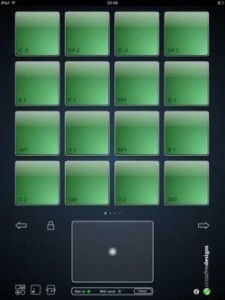
Crossfire Designs has introduced MidiPadz Lite (App Store link) – a simple MIDI controller for Network MIDI and USB MIDI that lets you trigger notes with its drum pads.
An X/Y-pad and a gravity controller, controlled by the iPad’s rotation, allow you to send MIDI slider parameters as well.
Features:
- Supports USB MIDI over iPad Camera Adapter
- Supports network MIDI over WiFi
- Touch sensitive drum pads (depends on vertical position and two-finger tap for full velocity, user-changeable)
- Four pages with 16 drum pads each
- Drum pad notes adjustable (tap on pad note symbol on bottom left, after that drag finger on pad up/down to change its note)
- One X/Y controller (big pad on bottom)
- Gravity controller (rotational axis of the iPad; Tap on rotation symbol on bottom left to activate, MIDI send light blinks every time you change the iPad’s rotation)
- All controllers can change their MIDI controller number
- Rotational- and scoll-lock for drum pad module (tap lock symbol)
MidiPadz Lite is a free download. A commercial version is scheduled to be released in January.
Free. Full version will be released in January.
via Sonic State, Crossfire Designs
Only iPad controller that lets you seamlessly edit Ableton Live MIDI clips
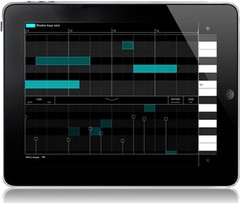
Liine has announced the Cliip module for Gridd, the only iPad controller that lets you seamlessly edit Ableton Live MIDI clips.
A world-first in controllers, Cliip allows you to create and edit MIDI clips with your fingertips using an elegant touch-enabled piano roll.
Cliip makes editing MIDI clips a truly live, musical experience. The piano roll is now an instrument too. Paint notes onto the smooth zoomable grid. Use intuitive multitouch gestures to edit note length and velocity – no need to LEARN it, just FEEL it. Snap/Fine and Percussive/Melodic modes and the powerful Duplicate function will help you unleash your creativity. Use in the studio to effortlessly create that killer hook or get personal with your audience and truly create music in front of them.
The Cliip module is initially available only when running on iPad. Cliip will run on iPhone and iPod Touch too in the next update.
Cliip features
- Piano roll with zoomable keyboard and timeline.
- iPercussive mode for short notes and Melodic mode with two finger note length gesture.
- Snap and fine modes. Snap note position (or note end) to the grid, or use fine mode to add some groove.
- Drag up the velocity lane and add dynamics to your music.
- Copy and paste functions allow you to copy the contents of one clip to another.
- Duplicate function allows you to duplicate and extend the current loop (e.g. to copy a loop 4 times so that you can add a variation on the 4th loop).
- Clear all.
- Remotely create new MIDI clip.
Cliip is included in Griid Pro, currently priced at $16.99 USD / 13.99 EUR until February 28, 2011 (regular $24.99 USD / 19.99 EUR). Cliip is available for Griid users as an “In App Purchase” (requires Griid v1.10).
More information: Liine / Griid
Celine on AudioCubes
A short jam by Celine on AudioCubes, using Ableton Live 8 with the operator synth. Visit the Percussa website at http://www.percussa.com/ to learn more about AudioCubes, the ultimate audiovisual live performance interface for Ableton Live and other MIDI compatible software and hardware. AudioCubes are wireless smart musical building blocks that are able to detect each other’s location and orientation. Colours can be controlled via MIDI from within Live.
DATAMASKIN

