
NanoKontrol As Period Waveform Editor
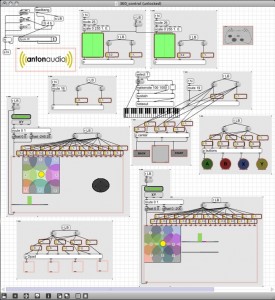
I made a basic Max/MSP patch that allows one to use the Korg NanoKontrol MIDI controller as a periodic waveform editor. Each of the first eight faders controls a point along a periodic waveform. The ninth fader controls the frequency of the waveform.
iPad TouchOSC for Reason/Record
Well I guess it was just a matter of time since this would appear, especially considering the KONG entering the Reason suite of apps
Retouch Control offers TouchOSC templates to control Propellerhead’s Record and Reason.
Sneak peek preview at Retouch’s iPad templates for controlling Propellerhead’s Record and Reason via TouchOSC
Using Xbox 360 as an OSC controller
This demo, by Anton Crnkovic, demonstrates using an XBox 360 controller as an OSC music controller.
I have wanted to do something creative with a game controller ever since I first discovered the [human interface] object in Max. And as soon as the new Nodes object was released I thought a great implementation would be to use it with some sort of joystick.
I’m using MaxMSP to receive all the control data from an XBox 360 controller and converting it to OSC messages to be used with any program that accepts OSC, in this case Reaktor. I’ve made each message range scalable as well, for fine tuning control possibilities.
I added 9 nodes for each joystick which gave me 11 control parameters (including XY) for each joystick! It was a little unpredictable to know what kinds of results that would achieve but that was the fun part
I pretty much randomly assigned all the controls to this ring modulating synth and buffer effect Buffeater. Fun times.Max for Live version in progress as well which will use Abletons device parameter control API. Will post when I have time to finish it.

Details on Maschine 1.6 beta from Native
The revision that will take Native Instruments ultra-controller into new territory for artist to what to break away from the PC with the much anticipated plugin hosting feature that has even this synth geek is eying one.

Native Instruments has announced the details on version 1.6 of Maschine, its groove production studio for PC and Mac.
What’s New In Maschine 1.6:
- Plugin hosting for VST/AU instruments and effects.
- Increased number of effect slots (3 per Sound, 4 per Group, 4 on Master).
- New “Pad Link” function with 8 pad groups and Master/Slave option.
- Individual swing setting per sound.
- Clip naming.
- Sample renaming.
- Improved scene duplication.
- External audio input/output increased to 16 stereo channels.
- Improved Drag&Drop mapping for samples.
- Improved Drag&Drop from OS for Maschine files and audio files.
- Drag&Drop rearrangement of scenes and patterns.
- Snap-to-grid when moving events via mouse.
- VST plugin operation under Mac OS X 64bit.
- Rex import under Mac OS X 64bit.
Maschine 1.6 is available now as a public beta.
The Rhizome groove machine is ready to rock
http://www.youtube.com/watch?v=BZINhGDjh-s
“The Rhizome: the groove machine with and for VST has just been released.
The dream to combine the power of a PC and the ergonomic of a real musical instrument is becoming reality.
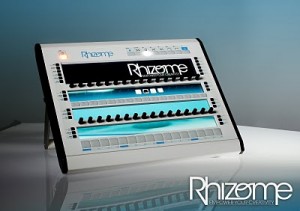
Feeltune announces the release of the Rhizome; one of the highlights of the MusikMesse when it was first presented last March. Many sites and magazines rated it best of the 2010 trade show! The Rhizome is the future of groove machines.
What are the differences with the competition? The Rhizome is a hybrid in which you install virtual instruments and effects in a VST/VSTi format (For Pc). No more limitations in terms of sounds and effects; with the Rhizome you choose the style of sound and instruments you want to play. Once downloaded you can mix your plug-in with the mixing desk; create your sequences, patterns and tracks with the multi modes and multi tracks sequencer which is the brain working behind the scene.
What are the differences with the other hybrids already on the market? The Rhizome is not just a keyboard with a Pc or a Pc Rack; it is a real musical instrument which has been designed for the pleasure to play and compose music and is equipped with software running an innovative interface with numerous displays and controllers.
The Rhizome is a real-time instrument: programming, recording, sampling, adding instruments and effects, tuning; all you do is live! There is no interruption when you play on stage or record in a studio. The objective: to free up your inspiration and creativity.
The development of the Rhizome took several years of R&D; 50 engineers and the validation of around 10 user groups. Today the Rhizome is an aggregate of the best technology and know-how.
For the Audio it is RME that does the job; it has been chosen because of its stability and sound quality which is recognized by everybody.
For the display; forget the small monochrome displays; the Rhizome offers 4 large displays (24 bit colors)
For the controllers; the Rhizome has 102 controllers in which you find 16 dynamic pads and 32 endless knobs
You get the Windows XPE which is a version of Windows XP Pro that has been redesigned and compiled especially for Feeltune. It offers a better stability and a total compatibility with VSTs.
For the effects and instruments; some of them have been developed by Ohm Force, well know key player of the market.
A Design and solid ergonomic; a size and weight that allows bringing the Rhizome with you as hand luggage when you travel by plane.
For its embedded system; you get power and reliability: Intel processor and mother board, server AC, silent fans.
Software, proprietary electronic card and box: build, assemblage and control in France.
Connections: The several in/out allow you to connect and use screens, mousse, midi controllers; hard disk and/or additional audio card.
Communication: The Rhizome is the first instrument to totally implement CopperLan; a new protocol that above the Midi transcription really revolutionize the communication between audio-video machines.
Technical Specifications
Rhizome SE :
– Intel Core 2 Duo 2,93 GHz x 2
– RAM / HD : 2 Go / 250 Go
– Plugs : 1 FireWire, 6 USB, 1 DVI, 1 HDMI, network Gigabit 100/100
– Audio : 1 headset, 2 balanced analog inputs and 2 balanced analog outputs, 1 ADAT, 1 SPDIF/AES, 1 E/S MIDI
– Feeltune software :
o Multitrack sequencer
o Virtual mixing desk
o VST/VSTi Host
o Drum Sampler
o Program Sampler
o Effects: Vocoder, Reverb, EQ, Distorsion, Filter, Flanger, Chorus, Delay, Compressor, Limiter, Bit Crusher, Pitch shifter, Stereolizer, Auto Pan, Enveloper, Multiband distortion, Deeser
o Synths : AcidLiner, SimpleSynth, Napper, TR 8s8, TR 9s9, TR6s6, TR 7s7, TR 7s27, L1nn Drum, DrumLator
– Ohm Force Sympthom synth
– CopperPlug LE (over lan control)
Dimensions : 52,4 x 42,7 x 14,1 cm (20.63 x 16.81 x 5.55 in)
Poids : 12,5 kg (27,55 lb)
Rhizome XE :
The same than SE with :
– Intel Core 2 Duo 2,93 Ghz x 2
– RAM / HD : 2 Go / 250 Go
– 6 balanced analog inputs
– Gforce Oddity
– Gforce Minimonstra
– Tight VNC
– CopperPlug MAX (over lan control)
Rhizome UXE :
The same than XE with :
– Intel Core 2 Quad 2,5 Ghz x 4
– RAM / HD : 4 Go / 500 Go
– Gforce Oddity
– Gforce Minimonstra
– Tight VNC
– CopperPlug MAX (over lan control)
– Other software sequencers or VST host compatible
More informations, medias and customer forum at www.feeltune.com“
96-knobs dedicated MIDI controller for the Rhodes Chroma
The Enabler is a custom made 96-knob dedicated MIDI controller for the CC+ equipped Rhodes Chroma synthesizer.
The Rhodes Chroma is considered by many to be one of the great synthesizers – but it buries a lot of power, because of its limited number of hands-on controls. The Enabler is designed to enhance the Chroma will full-on hardware controls.
The Enabler retails for $2,600.
Features:
- Inspired by the industrial design of the Chroma
- All exposed woodwork is solid cherry
- 2×16 amber LCD display shows parameter name and value when a knob is adjusted
- LED indicator lights to indicate the selected patch type
- Powered by external 9-12v DC supply
via randelosborne:
This is a brief demonstration of the ENABLER, my 97-knob controller for the CC+ equipped Rhodes Chroma.
Turn your iOS device to a custom multitouch controller
Fantastick (App Store link) is a free app that turns your iOS device to a custom multitouch controller. Send multitouch data to the host program and receive drawing commands.
Instead of a limited set of built-in widgets, the interface logic resides in Max/MSP and only drawing commands are sent to the device. This lets you buid interfaces that
- work and look exactly the way you want
- change dynamically to fit the musical context
- are experimental and would not be possible with other apps
Features:
- Minimalistic, fullscreen control area with nothing on it but what you provide.
- Multitouch-events on the device are forwarded to your host via UDP. Information includes the touch state (begin, move, end) and coordinates for all touch points.
- Designed for no-hassle: zero-click startup, the device does not sleep or suspend network, flicker- and lag-free.
- Displaying images (fetched with URLs) and caching them on the device for use on non-networked locations.
- Basic drawing with lines, boxes and text.
- Advanced drawing with OpenGL.
Hybrid Djing configuration
touchAble is a complete dedicated controller for Ableton Live and iPad.
There are many different ways to perform with Ableton Live. Although Ableton Live is not a dedicated DJIING software, it is used by many professionals as a dj tool, exploiting its fantastic flexibility to extend the traditional dj use.
Touchable can become a powerful dj control surface with some preparations…we show you here the basic techniques.
touchAble for iPad is available on itunes store :
http://www.itunes.com/app/touchable
more infos : http://www.touch-able.com
music:
Le K “moody rainbow” (30porumalinha rec)
Kink “bitter sweet” (liebe detail)
Icube “bionic ears” (versatile rec)
Eddie C “dream reality” (Karat rec)
This video was shared by touchAbleapp
NanoStudio – adding support for the Akai SynthStation25 MIDI controller
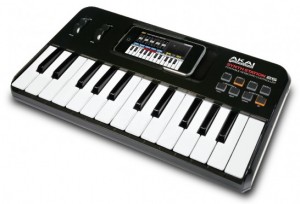
Blip Interactive has updated its iPhone music app NanoStudio, adding support for the Akai SynthStation25 MIDI controller, and the update is now available in iTunes.
Here’s what’s new in the update:
- Support for Akai SynthStation 25 MIDI controller
- Song/metronome monitor during sample record
- Improved sample interpolation quality
NanoStudio Features:
- 4x Eden synths, TRG-16 trigger pads, 6 track sequencer, 7 input mixer with two sends
- Insert Effects – 2 per synth (waveshaper, chorus/flanger/delay)
- Send Effects – 2 (reverb, chorus/flanger/delay)
- Total polyphony – 48 stereo 44.1kHz voices, Buffer latency – 10ms
- Highly optimized code for good battery life and no audio stuttering
- Sampling and resampling
- Transfer samples and final mixes to or from your Mac/PC over WiFi
- Audio copy/paste for sharing audio with other compatible apps (Sonoma/Intua)
- MIDI input with the Line 6 MIDI Mobilizer or Akai SynthStation 25
- Upload your mix directly to SoundCloud (wav or ogg formats)
- Sample editor with 4 levels of undo/redo
- Real-time performance and recording with single or dual keyboards, trigger pads, XY controllers and pitch bend wheel
- 128 global synth presets and 64 per-project synth presets
- 16 trigger pads with configurable loop direction, trigger mode, mute groups, volume envelope and much more
- Realtime record with undo
- 6 track song editor with up to 250 parts/patterns
- Pattern editor with up to 500 events per pattern
- Draw note and controller events
- Editing functions include delete, merge, copy, move, note length, transpose, clean and quantize
- Controller editing and automation
- Time signatures 2/4 – 7/4
- 4 levels of undo/redo on every song/pattern editing operation
- Built in help
Support for Akai Pro’s SynthStation25 keyboard controller is included. SynthStation25 delivers hardware control for improved performance capability and expression.
Keyboard workstations for gigging musicians
Music Computing’s TriggerGrid™, included with each ControlDAW, is a sample player that allows the user to trigger sampled sounds via controllers such as the ControlDAW or ControlPLAY™. Unlimited number of banks each containing sixty four (64) samples can be loaded and played. Per pad controls included: Frequency, Attack and Release, Gain, Pan and Reverse. Per pad wave editor allows for simple drag to trim/truncate samples. 16 — audio outs for use in a DAW. File formats include: wave and mp3. Save feature allows all 64 pads to be saved as a kit. Unlimited number of kits can be saved that can be instantly loaded for playback. Simple drag and drop interface to populate pads.
Music Computing’s GeoMIDI™ MIDI mapping software provides an interface for changing the MIDI assignments of the ControlDAW and ControlPlay’s buttons, knobs, and sliders. Each slider or knob can send out a variety of combinations of control or pitch-bend data. An unlimited number of MIDI map presets can be created, saved and loaded for use.
SonicSource™ by Music Computing is a virtual synth (VSTi) equipped with three sample-playing layers, two multi-effect racks, and a library of multi-sampled instruments. The sample playing layers allow blending of waveforms and instruments into a wall of sound or alternatively, the use of the three multi-timbral layers as a workstation. These layers can then be further processed through SonicSource’s powerful multi-effect racks.
www.MusicComputing.com
DATAMASKIN

