
Tempest – Beat Exercise
Richard Devine explores the Tempest
“Just playing a rhythmic beat exercise on the new Tempest Drum machine by Dave Smith and Roger Linn. Interesting drum synthesis and parameter control allows for some really cool beat manipulation. The sounds featured are from 4 different analogue synthesis kits I created and programmed.”
rogerlinndesign.com/products/tempest/index.html
Cool new beats on the new DSI Tempest drum machine
“This is a demo of some of the things i’ve come up with the past week that i’ve been one of the lucky beta testers for the DSI Tempest. I’m loving it so far.. finding it very inspiring to play and use and create new drum beats and sounds. I’m going to try to tell some of the things about the Tempest that arent talked about too much already.”
“The design of Tempest reflects a rethinking of what a drum machine needs to be in the current era. It’s not so much a drum machine as a new musical performance instrument for the creation, manipulation, and arrangement of beat-oriented music, with an intuitive and efficient use of human gestures.”
Tempest’s 16 velocity- and pressure-sensitive pads are arranged in an 8 x 2 array to facilitate both real-time and step entry of beats. Two pressure- and position-sensitive Note FX slide controllers provide a unique new method of performance and control.
Showing off the Tempest drum machine
A new demo of the much talked about Tempest
Summary of Features
- Each of the 6 analog voices has 2 analog oscillators plus 2 digital oscillators (with a large bank of included samples), Dave’s classic analog low-pass filter with audio-rate modulation, an additional high-pass filter, analog VCA with feedback, 5 envelopes, 2 LFOs, an extraordinary variety of analog modulation routings, and stunning sonic quality, warmth and punch. Although optimized for drum sounds, it excels at tuned sounds as well, and even doubles as a 6-voice analog synth. In addition to the 6 direct voice outputs, there are stereo mix outputs and phones outputs, plus 2 inputs for foot switches or expression pedals, MIDI in/out and USB.
- The performance-oriented operating system, 90 panel controls, and bright 256 x 64 OLED display work together to provide a tightly integrated, non-stop workflow: record a drumbeat in real-time, switch to another drumbeat and use the lit pads to record it using step programming, switch to another drumbeat and record tuned keyboard parts, use the 2 touch controllers to to record real-time note or beat-wide parameter animations, use the generous sound controls to edit any of the drum sounds, tweak the analog effects or drum mix, arrange beats in real time and record the live arrangement into a song, enter/exit Song mode and much more, all without ever stopping play.
- 16 pressure- and velocity-sensitive lit pads are arranged in a 2×8 configuration, providing intuitive access to all your fingers and providing the ideal compromise between the popular 4×4 pad arrangement (popular for real time programming ) and 1×16 arrangement (popular for step programming) because Tempest does both. The pads can be used to play 32 drum sounds (2 banks), mute/unmute the 32 sounds on playback, play and arrange 16 beats in real time, play one sound at 16 tunings (in a variety of scales) or 16 velocities, or as 16 time steps for step programming. The ROLL button permits creating drum rolls or repeated groove patterns by varying pad pressure as the beat records, and doubles as a momemtary “stutter” effect when the pads are assigned to play beats. Use the Sustain button on tuned parts like a keyboard’s Sustain pedal, or to choke drum sounds or drumbeats when the pad is released.
- Two pressure- and position-sensitive Note FX slide controllers permit real-time recording of note or beat-wide sound parameter changes into the drumbeat as you play. For example, record simultaneous filter frequency, tuning, envelope decay and pan changes for each note, or control similar parameters affecting the entire beat.
- A variety of unique effects are provided while maintaining a pure analog signal path: 1) Stereo analog compressor and distortion circuits affect the stereo output mix, 2) beat-synced delay is achieved by generating additional delayed note events within the sequencer, and 3) a beat-synced “stutter” effect is created entirely within the sequencer by looping short portions of the drumbeat on demand.
- The degree of swing timing can be adjusted in real time during playback. Roger used his entire bag of tricks to make the swing sound very human and natural.
Quick Start Guide for Tempest Analog Drum Machine from Dave Smith Instruments, narrated by Roger Linn
Tempest is a collaboration between Smith and longtime friend and fellow instrument designer Roger Linn. Though they’ve consulted with each other on past projects, Tempest marks the first time a product will carry both the Dave Smith Instruments and Roger Linn Design logos. “If you’re going to make a drum machine, who better to have in your corner than Roger Linn?” said Smith, referring to Linn’s legacy as inventor of the digital drum machine.
Though Smith is also responsible for some fine drum machines—most notably Sequential’s DrumTraks and Studio 440—Tempest is his first to utilize analog synthesis to generate the sounds. “We’ve designed a very flexible new synth voice for Tempest,” said Smith. Linn added, “The design of Tempest reflects a rethinking of what a drum machine needs to be in the current era. It’s not so much a drum machine as a new musical performance instrument for the creation, manipulation, and arrangement of beat-oriented music, with an intuitive and efficient use of human gestures.”
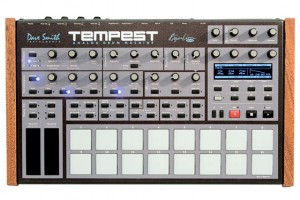
Tempest’s 16 velocity- and pressure-sensitive pads are arranged in an 8 x 2 array to facilitate both real-time and step entry of beats. Two pressure- and position-sensitive Note FX slide controllers provide a unique new method of performance and control.
- Each of the 6 analog voices has 2 analog oscillators plus 2 digital oscillators (with a large bank of included samples), Dave’s classic analog low-pass filter with audio-rate modulation, an additional high-pass filter, analog VCA with feedback, 5 envelopes, 2 LFOs, an extraordinary variety of analog modulation routings, and stunning sonic quality, warmth and punch. Although optimized for drum sounds, it excels at tuned sounds as well, and even doubles as a 6-voice analog synth. In addition to the 6 direct voice outputs, there are stereo mix outputs and phones outputs, plus 2 inputs for foot switches or expression pedals, MIDI in/out and USB.
- The performance-oriented operating system, 90 panel controls, and bright 256 x 64 OLED display work together to provide a tightly integrated, non-stop workflow: record a drumbeat in real-time, switch to another drumbeat and use the lit pads to record it using step programming, switch to another drumbeat and record tuned keyboard parts, use the 2 touch controllers to to record real-time note or beat-wide parameter animations, use the generous sound controls to edit any of the drum sounds, tweak the analog effects or drum mix, arrange beats in real time and record the live arrangement into a song, enter/exit Song mode and much more, all without ever stopping play.
- 16 pressure- and velocity-sensitive lit pads are arranged in a 2×8 configuration, providing intuitive access to all your fingers and providing the ideal compromise between the popular 4×4 pad arrangement (popular for real time programming ) and 1×16 arrangement (popular for step programming) because Tempest does both. The pads can be used to play 32 drum sounds (2 banks), mute/unmute the 32 sounds on playback, play and arrange 16 beats in real time, play one sound at 16 tunings (in a variety of scales) or 16 velocities, or as 16 time steps for step programming. The ROLL button permits creating drum rolls or repeated groove patterns by varying pad pressure as the beat records, and doubles as a momemtary “stutter” effect when the pads are assigned to play beats. Use the Sustain button on tuned parts like a keyboard’s Sustain pedal, or to choke drum sounds or drumbeats when the pad is released.
- Two pressure- and position-sensitive Note FX slide controllers permit real-time recording of note or beat-wide sound parameter changes into the drumbeat as you play. For example, record simultaneous filter frequency, tuning, envelope decay and pan changes for each note, or control similar parameters affecting the entire beat.
Eowave Ribbon Controller in the Dark
“We wanted to show the striking visual beauty of the Eowave Ribbon in a darkened environment, which makes it a drop dead show stopper!
In this video we are using the Eowave Ribbon to control a Dave Smith Instruments Evolver whose output is being processed by an Eventide Space.”
Live modular performance – Muon Dependency
Would love to spend some time in this dude’s studio 
A live performance. A 137 space modular synthesizer, Waldorf MicroWaveXT, Dave Smith Prophet 08, Nord Lead 2X, Yamaha TX816, DX7II, and Oberheim Matrix 6.
All synthesizers are controlled either with Numerology 3 Pro or from the modular synth on-board sequencers. Recorded in Cubase 4 from Steinberg.
I played a single line at various times on the DX7II. Everything else is fully automated including a pseudo-random sequence generated by a Catgirl Synth Suboscillator/Harmonic Sequencer module by Ken Stone.
The baseline is the Prophet 08 controlled by a midi output from the synthesizers.com Q172 midi output of a Q960 8 step sequencer pattern.
Background info on the Numerology 3 Pro:
Numerology 3 is a music sequencing and audio plugin environment which uses an innovative approach to electronic music composition based on modular step sequencing. With version 3 Numerology now comes in two flavors: a Standard Edition for anyone that wants an economical step sequencing addition to their studio, and a Pro version with advanced features for users looking to make Numerology a cornerstone of their compositional workflow. Another major addition is an AudioUnit version of Numerology that allows users of supported hosts to add advanced step sequencing to their DAW-based workflow. The Numerology AU is the first Audio Unit plugin to offer sample-accurate MIDI scheduling and built-in latency control.
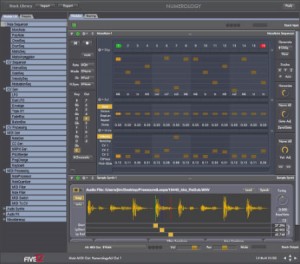
Other highlights of Numerology 3 include new generative sequencing options, a completely revised user interface, a preset playlist, a humanize function, Audio and MIDI recording for every part, and several new and updated modules. These features expand and complement the capabilities provided by Numerology’s extensive list of sequencing and signal processing modules. With version 3, Numerology’s library of modules now numbers more than 50, not including hosted Audio Units.
The Generate and Evolve features in Numerology 3 allow users to explore new compositional territory by using generative algorithms both to create new patters, and to make transformations to existing patterns. The Generate feature includes 18 algorithms for generating new patterns, and is setup to allow users to easily control the musical context in which the pattern is generated. Evolve goes a step further by allowing users to program specific algorithmic changes to a sequence. These changes can be triggered directly, or setup to automatically repeat for regularized pattern modulation.
Features specific to the Pro version of Numerology include multi-output support for hosted AudioUnits, monophonic audio routing support, OSC support, custom scale quantization, and several new modules specifically oriented for building advanced sequencer setups. Included in that set are gate generator and clock offset modules, a CV To Audio module for driving an analog synthesizer directly from Numerology (with a DC-capable audio interface), and a pair of operator modules supporting a total of 61 functions.
Both the Pro and SE versions of Numerology 3 come with much improved synthesis options for the built-in sample-based SampleSynth and DrumKit modules. These modules now include a multi-mode filter, 2 AHDSR envelopes, a beat-synchronized LFO and a modulation matrix. Complementing these additions are a new set of built-in audio effects, including tempo-synchronized delays, multi-mode filtering, and a ring modulator.
Two new features in Numerology 3 greatly expand user options for storing and sharing presets and patterns, the Stack Library and Module Presets. The Stack Library is a new centralized location for storing part-oriented sequencing and synthesis setups. The Numerology 3 download comes with a library of stacks that include a variety of demo tracks, examples and core sequencing templates. In addition, the new module preset function in Numerology 3 allows users to easily store and load settings for any module. This feature is particularly handy for keeping track of sequencer patterns as well as building preset libraries for the SampleSynth and DrumKit modules.
Roger Linn Jams on Dave Smith Tempest
The Tempest from Dave Smith in full action at NAMM last week
DATAMASKIN

