
Make sure you have an insurance on your iPhone if you go this DJ route
I have to admit, I never thought of this one — and it’s pretty, pretty slick. Instead of using time-coded vinyl to interface your turntable with your computer as with Final Scratch Pro or Serato Scratch, Nicholas J. Bryan’s Mopho DJ uses an iPhone.
A novel method of digital scratching is presented as an alternative to currently available digital hardware interfaces and time-coded vinyl (TCV). Similar to TCV, the proposed method leverages existing analog turntables as a physical interface to manipulate the playback of digital audio. To do so, however, an accelerometer/gyroscope–equipped smart phone is firmly attached to a modified record, placed on a turntable, and used to sense a performers movement, resulting in a wireless sensing-based scratching method. The accelerometer and gyroscope data is wirelessly transmitted to a computer to manipulate the digital audio playback in real-time. The method provides the benefit of digital audio and storage, requires minimal additional hardware, accommodates familiar proprioceptive feedback, and allows a single interface to control both digital and analog audio. In addition, the proposed method provides numerous additional benefits including real-time graphical display, multi-touch interaction, and untethered performance (e.g “air-scratching”). Such a method turns a vinyl record into an interactive surface and enhances traditional scratching performance, while affording new and creative musical interactions. Informal testing show this approach to be viable, responsive, and robust.
To be presented at NIME 2011 (http://www.nime2011.org/) in Oslo, Norway May 31-June 1.
For more info, please see https://ccrma.stanford.edu/~njb/research/turntable/
Have you seen Aeroplane using the new Pioneer DJ controller – impressive stuff
http://youtu.be/KDW_pL52Y-Y
In this video:
The perfect home or mobile DJ set-up, the DDJ-S1 features balanced XLR input/output for connection direct to professional PA equipment, and a microphone talk-over feature to make MC’ing a breeze.
Add to this the simple Plug and Play connection, amazing software features and superior hardware control, and the Pioneer DDJ-S1 is a major force to be reckoned with.
The Pioneer DDJS1 has been designed in conjunction with Serato to empower users of Serato ITCH DJ software.The DDJ S1 offers a high level of familiarity, innovation and controllerism to maximize the performance potential with Serato software.
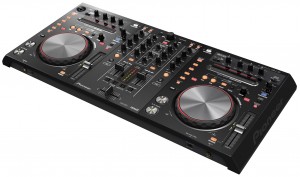
Pioneer DDJ-S1 Overview:
The DDJ S1 layout inherits the familiar Pioneer layout,this tried and tested Pioneer funtionality offers unrivalled operability. With Needle Search the user can skip through tracks and perform a quick alphabetic search through the entire music library.The effect control area allows DJs to add Serato ITCH effects to their mixes, while the master and channel level meters are located centrally on the unit, allowing DJs to monitor the level of the master and each channel while adjusting the volume.
Unlike most controllers on the market, the DDJS-1 controller is equipped with various inputs and outputs, including a balanced XLR inout/output (1 of each) for connecting direct to professional PA equipment.Both microphone inputs are equipped with a talk-over function to lower the music volume when receiving input from the microphone.
Pioneer have once again innovated with the unique design of the S1 with a space for the laptop keyboard underneath the unit,keeping the laptop screen in full view of the DJ whilst saving precious space within the DJ booth.
The Pioneer DDJ-S1 Controller Main Features:
- Designed specifically for Serato ITCH software
- Controls: Alphabetic search function for quick song selection, Hot Cue Fader Start, and a slip mode for looping, reversing and scratching without changing the song tempo.
- Various inputs and outputs, including a balanced XLR inout/output (1 of each) for connecting direct to professional PA equipment.
- Optimized audio circuitry in the master output area
- Audio characteristics optimized for Serato ITCH software, ensure superior sound delivery.
- A Playing Address feature displays track progression on an LED display
- All buttons are pre-assigned to the software functions, and the controller can be connected to the computer via USB cable, meaning DJs can truly “Plug and Play”.
- The industry’s first lock mechanism, “P-LOCK Fader Cap”, is equipped on the cross-fader and each channel fader to prevent fader caps from slipping during performance.
- Built-in audio interface
- Included software: Serato ITCH
- Input terminals: MIC x 2 (top XLR / 1/4 inch PHONE x 1, front 1/4 inch PHONE x 1) AUX x 1 (RCA)
- Output terminals: MASTER OUT x 2 (XLR x 1, RCA x 1) HEADPHONE MONITOR OUT x 2 (front 1/4 inch PHONE, Mini Pin)
- Other terminals: USB B connector x 1
- Frequency range: 20 Hz to 20 kHz
- Total harmonic distortion: 0.01% or less
- Included AC adapter: Power 220-240v, rated output 5 V DC
- External dimensions: 680 mm (W) x 95.2 mm (H) x 317.7 mm (D)
- Weight: 5.0 kg
DJ / Performance – Creating A Unique Setup (Dorian Concept)
New Ableton Live tutorial uploaded by DubSpot. In this tutorial, we’ll explore some techniques inspired by two incredible conversations I had this past week. We will look at the creative possibilities of using the Simpler, some portamento, LFO, and delays, and we’ll also explore a great technique for crafting 8 bar drum patterns.
First up, I had the great pleasure of catching Dorian Concept’s insanely inspiring set at Low End Theory last week. Dorian Concept is a Vienna-based producer who has developed his own completely original style of keyboard playing. He’s been tearing it up at Festivals around the world since bursting on to everyone’s radar with the massive tune “Vertical Output” a few years back. His latest release on Ninja Tune is called Her Tears Taste Like Pears, full of funky, synth driven club heaters. He often sits in live improv style with his friend Flying Lotus when they cross paths internationally, and his series of YouTube videos ‘Fooling Around With The MicroKorg, Alesis Micron, etc’ are straight jaw droppers.
So I had the honor of chatting with him at length at Low End, and I thought I’d share some tidbits from our inspiring conversation. He shared some serious wisdom that would be helpful for any aspiring producer. Turns out he is not classically trained, and he’s actually completely self-taught. The great thing about what he has done, is that he has kept it simple and really mastered his instrument, developing his own unique style. With all the tools we have available in our toolbox these days, it is easy to get overwhelmed and the reality is that sometimes it is better to simplify and limit yourself. That is what he has done, truly mastering his Microkorg and Micron and developing his own very distinct style of playing these instruments. We talked about our shared admiration of Squarepusher, as he had a very similar approach, mainly he used one particular sampler for all of his pre-year 2000 productions. He also developed his own very recognizable style of bass playing.
Applying these concepts to working in Ableton Live, I strongly recommend finding a compositional process that works best for you. These tutorial videos are about sharing various production techniques, find the ones that give you the best results and develop them further. Put a few of these techniques together into your bag of tricks, and then work at becoming the master of them. Identify a few elements that will become your signature sound, and then create a body of work with them. Develop your meat grinder, and then crank out the jams.
Stay tuned for the next tutorial, in which Professor Nalepa shares some great tips and techniques for drum programming and sequencing he picked up from Dutty Artz co-founder and Dubspot Instructor Matt Shadetek. The track used at the end of this video is “Wonton Garden” from Matt Shadetek’s Dutty House EP, out now on Dutty Artz.
Q-Bert, Ean Golden Jam + Brand New Midi-Fighter!
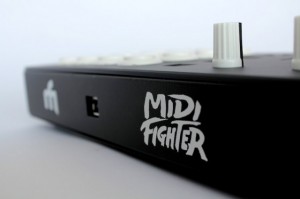
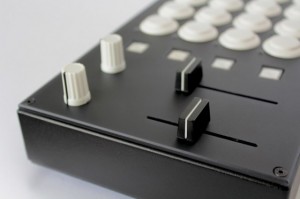
DJ Tech Tools’ Ean Golden plans to announce new versions of the MIDI Fighter DJ controller next week. These are two of four new models we will be announcing in the next week. They are replacing our “custom” midi-fighters with four dedicated layouts we have found to be the most popular. Designed to be high performance instruments, all are paired with mappings for specific controllersim use cases and built in robust metal cases that can survive weekly tours and serious abuse.
I made a visit down to the QSU, Q-Bert’s online scratch university, last weekend to play around a little bit and explore the possibility of playing a show together. We practiced for about an hour, improvising and cutting it up in a much more relaxed setting than our last rendezvous here at DJTT headquarters. The guys hit record on a camera and the clip above is one of the improv gems that emerged from our session.The drumming in the background is from our resident drum teacher Ryan, who covered timing techniques for us a few months back. Continue reading for photos, one more clip and more info on my controllers in the video.
Dj Tips: HowTo Create Amazing Build Ups
Today we kick off a two part series on creating amazing build-ups with effects. In the video above I cover four different ways to use the beat roll function – a common effect in most DJ software, for various creative results. Next week we’ll move over to the common echo and explore several ways to introduce it for big build-ups and drama. As with all effects, this one can be seriously overused, but when tastefully applied, well timed beat rolls can add a lot of spice to your live sets.
TrakProDJ – iPad/iPhone Controller for Traktor
TrakProDj is a pioneering touch control surface to control Traktor DJ Software using you iPad, iPhone or iPod Touch. Connecting with CoreMidi wifi networking technology, the app offers almost zero latency operation and control of Traktor.
How do you use the app? Once your track is loaded into memory, the TrakProDJ Deck provides you with all the tools you need to work with Traktor. Iximix writes, “Quickly move from one end of the track to the other with ease using the seek position control. Then, fine tune the position of the cue with the high-resolution jogwheel just like the old vinyl days. Feel free to scratch in beats or vocals. The TrakProDJ deck has been designed for maximum usability. All the necessary Pitch / Tempo, Play, Cue, CUP, and Sync controls are within range for quick decisions. We have also included four assignable hotkeys (only available in the iPad version) for each deck, which can be used for loops or any other assignable control in Traktor.”
The TrakProDJ Mixer panel makes the most of the touch screen’s space and puts the most necessary controls front and center. Track faders are said to be fat, easy to grasp, and ultra responsive for even the most hardy scratch mixer. The crossfader is located just below the track faders.
On the iPhone version, the crossfader can also be found on the FX page for hot swapping FX mixes. The app also features monitor volume, mix, and selection controls, as well as EQ with killswitches.
TrakProDJ features:
- High-resolution jogwheels
- Full mixer controls, including crossfader
- Full EQ, including kill switches
- Filters
- Full pitch control
- 2 Decks (upgrade to 4 decks in version 1.1)
- Seek position
- Full FX Control, with kill switches and rotary knobs
- Monitor Control
- Play, Cue, CUP, and Sync
- 8 Assignable hotkeys for any extra services you wish to apply
The TrakProDJ app ($9.99) is now available for iPads and iPhones running iOS 4.2 or higher.
For more details, visit iximix.com.
Free Weekly Ableton Live Rack #4 – “AfroDJMac Michael Jackson Synth”
This weeks Ableton Live Rack was created by sampling tiny vocal phrases from the King of Pop himself, Michael Jackson. The sound ranges anywhere from string section/choir synth to a super-distorted shoegazing electric guitar sound. This video will show you how it works and how to manipulate it into something new.
Also, there is an effect rack included, as a little bonus. Enjoy!
Download the rack here: http://bitly.com/hGvTND
Every week I put out a free Ableton Rack, so subscribe and Social Network me.
http://www.afrodjmac.com
http://www.facebook.com/afrodjmac
http://www.twitter.com/afrodjmac
Novation Twitch Overview – ultimate DJ experience, maybe
Overview of Novation TWITCH with Serato ITCH DJ software.
The Novation Twitch DJ controller comes with Serato ITCH and it has unique Touchstrip controls that are designed to work with ITCH’s new performance tools. It can also be MIDI-mapped to other DJ software such as Traktor or Ableton Live.
Key Features:
- Comes With Serato ITCH Professional, comprehensive DJ software.
- Touchstrips – Tactile, multi-function control.
- Slicer Mode – Chop up beats and create new grooves on the fly.
- 1-to-1 Control In ITCH – Dedicated controls for all ITCH performance functions.
- Solid case with Aluminium top plate.
- 2-in 4-out Audio Interface
- High-quality, loud headphones output.
- Balanced master connections.
- High-quality Cross-fader – Hard-wearing, sensitive and replaceable.
- Software Effect Control – Blend per-channel Fader FX with assignable master effects.
- Bus-powered USB connection provides all the power needed.
- Mic/Aux Input – Route a mic and an external audio device through the effects and master outputs.
- Switchable Booth Outputs – Choose between master and cue feeds.
- MIDI Compatible – To control any DJ software, such as Traktor or Ableton Live.
Novation Slicer DJ Controller
Novation Slicer http://www.delamar.de/news/musikmesse/
Musikmesse 2011 will be published this new DJ controller. Probably this will be called Novation slicer and work for Serato, Traktor and Itch.
Optimize Your Windows PC for DJing & Music Production
Article by DJ Endo the Dubspot blog – http://bit.ly/htCV0b
Native Instruments product specialist and Dubspot Instructor Mike Henderson aka DJ Endo dispels a common myth about PC’s and Windows in this article and two-part video tutorial on how to optimize your Windows PC for DJing and music production. In part one, Endo takes you through a step by step process on how to turn your Windows PC from an average computer to a music production and performance machine, offering you optimization tips from updating your BIOS and downloading updates to selecting ASIO drivers and preventing CPU spikes.
DATAMASKIN

