
SmartDrums automation with GarageBand for iPad
Description below:
Maybe it is not new for you but I think that is a really nice tip for recording drums with GarageBand for iPad using the SmartDrums. That Smart Instrument can record your gestures over the pad while recording.
More about MusicApps and Mobile Music at MusicApps.com.br
APPLE GarageBand for iPad – demo
GarageBand turns your iPad into a collection of Touch Instruments and a full-featured recording studio — so you can make music anywhere you go. Use Multi-Touch gestures to play pianos, organs, guitars, drums, and basses on your iPad. They sound and play like their counterparts, but let you do things you could never do on a real instrument.
New and improved gbTouch 2 GarageBand controller for iPad
http://www.youtube.com/watch?v=DidA17LOAH8
Harmony Systems has released Delora gbTouch 2, a free update to their $7.99 iPad application that functions as a remote controller for Apple’s GarageBand.
gbTouch 2 includes the most requested new features by gbTouch 1.0 users: track names and color-coded track type.
Tracks now have individual volume faders that adjust and show each track’s current volume setting. A “sound generator” edit panel has been added to tweak software instrument details, and all edit panels now show the corresponding track name.
gbTouch 2 also has “skins” – the look of the app can be changed to one of four styles from the iPad Settings application.
Features:
- Select current track with one touch
- Access more than eight tracks with the arrow keys
- Control transport functions (Backward, Forward, Beginning, Play, Record, Cycle)
- Enable/disable record, mute, and solo for each track
- Adjust volume per track and with Master Volume
- Disable all volume during playback with Volume Mute
- Move the playhead and designate new start and end points
- Turn off all track record, mute and solo attributes
- Show/hide the Arrange View or Master Track
- Enable/disable Metronome and Count-In
- Create a new track, duplicate or delete a track
- Undo or Redo an action, Save a GarageBand file
- Adjust Master Echo and Reverb effects
- Manipulate Compressor and Visual EQ parameters
- Enable/disable effects
- Supports installations of gbLink on multiple computers
Garageband on iPad 2
Will the other tablet manufacturer’s be able to catch up, at least when it comes to music production environments, check the release below and the comparison matrix delivered by Engadget:
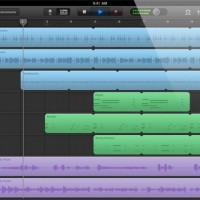
Apple today introduced GarageBand for the iPad – a version of the company’s entry-level digital audio workstation, optimized for multi-touch mobile music making.
Features:
- Musical instruments designed for Multi-Touch.
- 70 synth presets
- Arpeggiator
- “Smart instrument” features
- 8-track recording
- Guitar amp simulator
- Stomp box effects
- Track sharing via email or iTunes
- Tracks can be opened in GarageBand on the Mac
GarageBand for the iPad will sell for $4.99, a price that promises to radically expand the audience for music-making apps on the iPad. The iPad version of GarageBand will be available starting March 11th.
Here’s a comparison of some of the current tablet computers:
| Platform | iPad 2 | Motorola Xoom | HP TouchPad | BlackBerry Playbook |
| Display | 9.7-inch LED-backlit IPS LCD |
10.1-inch | 9.7-inch | 7-inch LCD |
| Resolution | 1024 x 768 | 1280 x 800 | 1024 x 768 | 1024 x 600 |
| Processor | 1GHz dual-core Apple A5 |
1GHz dual-core NVIDIA Tegra 2 |
1.2GHz dual-core Qualcomm Snapdragon | 1GHz dual-core TI OMAP4430 |
| Memory | ? | 1GB RAM | 1GB RAM | 1GB RAM |
| Storage | 16GB / 32GB / 64GB | 32GB | 16GB / 32GB | 16GB / 32GB / 64GB |
| Front camera | VGA | 2 megapixel | 1.3 megapixel | 3 megapixel |
| Rear camera | 720 / 30p video | 5 megapixel AF with dual-LED flash, 720 / 30p video |
none | 5 megapixel, 1080p video |
| Cellular radio | Quadband HSPA or CDMA / EV-DO Rev. A |
3G with free upgrade to 4G LTE | 3G and 4G | 3G and 4G |
| WiFi | 802.11a/b/g/n | 802.11a/b/g/n | 802.11b/g/n | 802.11a/b/g/n |
| Bluetooth | 2.1 + EDR | 2.1 + EDR | 2.1 + EDR | 2.1 + EDR |
| Accelerometer | 3-axis | 3-axis | Yes | Yes |
| Gyroscope | Yes | Yes | Yes | – |
| Battery | 25Wh | 6,500mAh | 6,300 mAh | 5,300 mAh |
| Thickness | 8.8mm | 12.7mm | 13.7mm | 10mm |
| Weight | 601g (WiFi), 607g (Verizon), 613g (AT&T) |
725g | 740g | 425g |
What´s new in Garage Band 11
Wanted to share some of the new features in GarageBand 11, if you are a frequent user leave your thoughts on the new update:
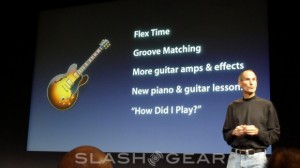
– Flex Time and Groove Matching
Flex Time and Groove Matching are powerful tools that help you improve the rhythm and feel of your recordings. You can fix the timing of a note. Tighten the groove of your tracks. And easily create a great-sounding song.
– New Guitar Amps and Stompbox Effects
GarageBand brings you seven new guitar amps for a total of 12. They’re modeled after the most revered gear in the world — from clean sounds to heavy distortion and everything in between. You can also reproduce the sound of classic foot pedals with five new stompbox effects, making 15 to choose from. Mix amps with stompboxes and find thousands of ways to rock. And with the Apogee GiO (sold separately), you can control GarageBand hands-free, so you don’t ever have to stop playing. The GiO lets you control stompbox effects, recording, and transport controls with your feet. Plug an electric guitar into your Mac, crank it up, and let it rip.
– “How Did I Play?”
First GarageBand taught you how to play. Now it tests your chops. As you play along with any lesson, record yourself. GarageBand listens in real time and tells you how you’re doing. You’ll see how well you played with colored notes, a progress bar, and a performance meter. You can check your rhythm and note accuracy, keep track of your progress, and beat your best score — all while perfecting your skills.
– New Lessons for Piano and Guitar
With 22 new genre-based lessons (40 in all), you can pick up the basics of piano, guitar, or even both. Video demonstrations, synchronized notation, and instrument animations make lessons fun and easy to follow. And you can learn at your own pace. You’ll jam with the Blues Guitar and Rock Guitar series. You’ll master classical piano pieces by Bach, Beethoven, Mozart, or Chopin. And you’ll play Top 40-style piano with the Pop Piano series. The new built-in glossary is a great reference for tuning your guitar, changing strings, reading music, finding basic chords and scales, and more. With the Chord Trainer, you’ll master the most important guitar chords by shape, which makes it easier to keep them straight.
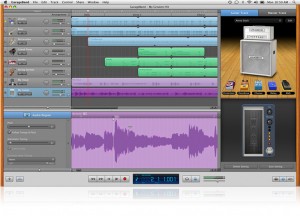
So what is sonic by the way?
SonicBirth is a free Mac OS X app for for creating AU plug-in instruments and sound processors for use in applications like Logic, GarageBand and others with Audio Unit support.
This tutorial will show you how to create a simple reverb unit.
Download SonicBirth at Sourceforge.net.
Augmented reality DJ
How to set up your midi with the ardj system and ableton live, or any other DAW like logic, garageband, etc…
download for free at http://www.lipert.net/ardj Mac only.
MusicRadar's good review on Garageband 09
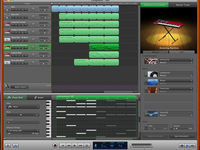
GarageBand now has a more Logic-like look.
As of yesterday, Apple’s iLife ’09 software suite was available to buy, which means that you can now get your hands on the latest version of GarageBand.
To mark the occasion, MusicRadar was invited along to a press briefing at Apple’s London headquarters, and we came away with a copy of the new software. So, what are our first impressions?
One thing to point out from the outset is that you’ll need OS X 10.5 (Leopard) if you want to run GarageBand ’09. In fact, that goes for all the other applications in the bundle, too (iPhoto, iMovie and iWeb).
This means that, if your operating system isn’t already up to date, you’ll have to shell out £83/$129 (the cost of Leopard) on top of the £69/$79 that you’ll have to pay for iLife ’09.
We should mention here that Apple is currently offering Leopard, iLife ’09 and iWork ’09 in a £149/$169 bundle, but there’s no discount available if you just want to buy the former two products.
While we’re on the subject of system requirements, it should also be made clear that if you want to use GarageBand’s new Learn to Play features – we’ll be covering these in a separate article, by the way – you’ll need to be running an Intel-based Mac with a dual-core processor. As far as Apple is concerned, non guitar- or keyboard-playing PowerPC users will have to remain so.
DATAMASKIN

