
A new version of GarageBand has seen the light of day
Apart from the launch of the new iPad, Apple has also released GarageBand 1.2, a significant update that adds MIDI note editing – a feature that’s been on most users’ wish list from the start.
Previously, the only way you could fix a mis-timed recording was to use GarageBand’s quantise features, but note-by-note editing is now confirmed.
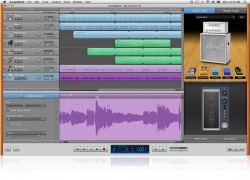
This isn’t the only new feature, we also have a new Touch Instrument in the shape of Smart Strings, while Jam Sesssion enables you to play with up to three other GarageBand for iOS users wirelessly.
Here are the highlights:
- GarageBand 1.2 introduces Jam Session, a feature that lets groups of people wirelessly connect their iOS devices to play instruments and record live music together. Jam Session automatically synchronizes the tempo, key and chords of your Touch Instruments. After jamming, everyone’s tracks are automatically collected on your iOS device for you to edit and mix.
- GarageBand also introduces Smart Strings, a new Touch Instrument that allows you to ‘play’ a string orchestra with one finger.
- The new Note Editor is probably the most welcome addition. It allows you to fine tune a Touch Instrument recording instead of replaying it from scratch.
- Integration with iCloud keeps your GarageBand songs up to date across your iOS devices, and you can share your finished songs directly to Facebook, YouTube and SoundCloud.
GarageBand 1.2 will be released today for $4.99. Updates are available for free to existing customers.
iOS GarageBand Tips – Smart Drums
Well although it is in Japanese I think the message is clear
GarageBand Smart Instruments Tips for iPhone / iPod touch / iPad Part1. Today I introduce to you “Smart Drums”. That is great tool for generating drum patterns. No need to tap any drum pad. Only put these icons. お待たせしました、以前より要望の高かった誰でもできるガレージバンド講座(iOS向け)でございます。全5回のうちの第一回目となる今回は、スマートド ラムスを使って楽
アプリのダウンロードは以下のリンクよりどうぞ。
http://bit.ly/vbMT3R
詳細ブログ記事:簡単ガレージバンド講座その1 スマートドラムスで打て!
http://gajetdaisuke.com/archives/111203_154737.php
Full Music Production with iPad
Music Production with iPad and iPod Touch
Featured SW:
IRig Midi Garage Band Multitrack DAW Geo Synth Boss gt 8 ipad2
More info here:
http://soundcloud.com/giuliano-soares/demo-song
http://musicapps.com.br/forum/viewtopic.php?f=21&t=79&p=227#p227
iRig MIDI in action with SampleTank and GarageBand
iRig MIDI is a compact standard Core MIDI interface for iOS that connects any MIDI compatible device to the iPhone, iPod touch and iPad. iRig MIDI connects MIDI keyboards, drum machines, drum pads, pedal boards and more to an iOS device to control not only the included SampleTank FREE* but also a world of MIDI-compatible apps such as GarageBand. You can also use iOS apps to control external MIDI equipment such as sound modules, DAWs or lighting systems right from the mobile device. iRig MIDI is the only compact iOS MIDI interface sporting 3 MIDI ports: IN/OUT/THRU. These connect to any standard MIDI jacks using the included 2 x 1.6m/5.2′ cables. iRig MIDI also has 2 LEDs for displaying the MIDI activity on the IN and OUT ports.
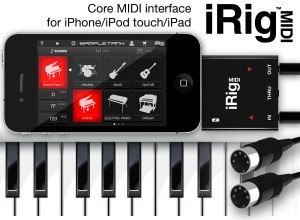
iRig MIDI also exclusively provides a micro USB port — with included cable — that connects to any standard USB power supply source so that the iOS device can stay fully powered during long sessions.
Features:
- Standard Core MIDI interface connects any MIDI hardware device to Core MIDI-compatible apps like SampleTank FREE and GarageBand®
- Directly connect MIDI keyboards, synthesizers, drum machines, drum pads, pedal boards and more using the included 2 x 5.2’ (1.6 m) MIDI 5-pin DIN cables
- 3 MIDI ports: IN/OUT/THRU
- 2 LEDs for MIDI IN/OUT activity display
- Micro USB port can charge the iOS device while in use
- Free apps included*: SampleTank FREE* the powerful sample-based sound module app and iRig MIDI Recorder FREE*
Logic Pro X moves to the the App Store
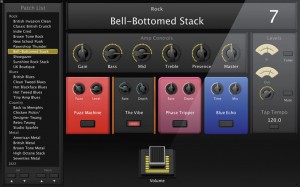
So far no apparent plans to turn Logic into Garage Band, as many have feared
Apple is reportedly finishing an update to Logic Pro 9, its professional digital audio and music sequencing program, taking care not to rile existing users with significant changes.
The new update is reportedly called Logic Pro X to maintain the same branding as Apple’s recent Final Cut X. However, according to a report by Japanese blog Macotakara, Apple’s Logic team is making great efforts to stress that it will not shift toward a GarageBand interface, heading off fears that Logic Pro might lose its professional edge.
Like Aperture and Final Cut Pro X, the new Logic Pro X package will be released via the App Store. In the move, the Logic Pro accessory app MainStage (used to manage virtual instruments during live performances) will reportedly spin off into a separate app, while WaveBurner (a standalone app used to master audio CDs) will have its functionality incorporated into Logic Pro X itself.
SoundTrack Pro 3, formerly included in both Final Cut Studio and Logic Studio as a tool for synching background audio to video, is reported to have a replacement but the report has not filled in any details regarding that program. The new app will likely be added to the Mac App Store alongside Final Cut Pro X, Logic Pro X, MainStage and the existing Aperture.
Via Apple Insider
Transform your iPad into a touch screen controller for GarageBand
http://youtu.be/pvJrXgovIN0
If you liked Delora gbTouch, wait until you get your hands on gbTouch 3. New from Harmony Systems, Inc., gbTouch 3 is a significant upgrade to the Delora gbTouch iPad music application, which turns an iPad into a touch screen controller for GarageBand.
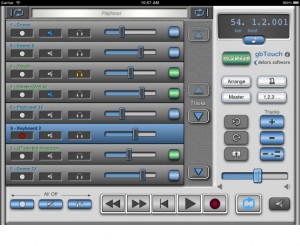
With this release, the controller app offers a number of new features and benefits, including extra capabilities that allow you to know and control exactly where you’re at in your composition. The dynamically adjusting “LCD” display shows a user selectable choice of playhead location or project information, including song tempo, and playhead position and tempo can be changed easily to specific numeric values. On the Track Details screen, individual track volume and pan are now controlled with faders, and their values are displayed. According to the maker of gbTouch 3, graphics have been enhanced and the increased use of icons makes gbTouch more language independent.
You can use gbTouch in the studio, onstage, or anywhere really. In addition to supplementing the use of mouse and keyboard to control GarageBand, gbTouch 3 also serves as a control surface of sorts for GarageBand, making music creation more productive and efficient from anywhere in your studio or music environment. This flexibility is particularly useful in recording situations, Harmony Systems says. The individual track controls — record, mute, solo, and volume — and transport buttons on gbTouch allow you to adjust and evaluate tracks before heading into the mixing session.
What you can do with gbTouch 3:
- Control transport functions (Backward, Forward, Beginning, Play, Record, Cycle)
- Enable / disable record, mute, and solo for each track
- Track names and numbers shown on each track
- Tracks color coded for real and software instruments
- Select current track with one touch
- Access more than eight tracks with the arrow keys
- Adjust volume of individual tracks, and overall with Master Volume
- Adjust pan level for an individual track
- View values for track volume and track pan
- Disable all volume during playback with Volume Mute
- Move the playhead quickly using jog channel strip
- Designate Cycle start and end points
- View LCD display, which dynamically shows playhead location — user selectable measure or time format — or project info (tempo, time signature)
- Change tempo
- Adjust the playhead to a specific bar-beat location
- Adjust the playhead to a specific time based location
- Turn off all track record, mute, and solo attributes
- Show / hide the Arrange View or Master Track
- Enable / disable Metronome and Count-In
- Create a new track, duplicate, or delete a track
- Undo or Redo an action
- Save a GarageBand file
- Adjust Master Echo and Reverb effects
- Manipulate Compressor, Visual EQ, and software instruments’ sound Generator parameters
- Enable / disable effects
- Name of the currently selected track shown on the Track Edit screens
- Set preferences for faders to “jump” on touch
- Select one of three themes (four including GarageBand ’09) at any time to change the look of your app
GbTouch 3 requires the installation of gbLink 3.0, a Mac OS X application (Lion compatible) that provides the ability for gbTouch to communicate with GarageBand using a Wi-Fi network. GbLink is available as a free download at the Delora Web site.
Harmony Systems’ gbTouch 3 is now available for $9.99 from the App Store. Existing gbTouch users may upgrade to gbTouch 3 for free. For more information, visit delora.com.
Starcraft Terran Theme Music made with iOS MusicApps
Here’s an inspiring video:
Starcraft Terran theme song made with iOS music apps.
Had some arrangement on original song.
All of this song’s sounds are come from iPhone and iPad.
Featured music apps : GarageBand for iPad, ThumbJam, iShred, Guitar Studio
Nice video featuring an iPad and PureData mini jam
Here’s what the maker has to say about it:
i didn’t know Garage Band for ipad receives Midi over Wi-fi, so i made this little experiment..
How to control your GarageBand set up from afar
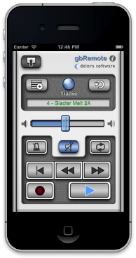
Control Apple GarageBand from afar with the Delora gbRemote app from Harmony Systems. Available for iPhone and iPod Touch, gbRemote functions as a remote controller for the GarageBand music-creation program for Mac.
GbRemote emulates GarageBand’s most frequently used transport functions — Play, Record, Back, Forward, Beginning, and Loop — plus other important functions like Master Volume control and Mute. You can view all tracks in a song, select a new current track, and change individual mute and solo track attributes, all while away from the confines of your computer, mouse, and keyboard. All controls are sized for easy touch accuracy and visibility. What’s more, gbRemote automatically adjusts its layout for best viewing and functionality in both landscape and portrait orientations. In Portrait mode, all controls can be accessed with one hand.
In addition to supplementing the use of mouse and keyboard to control GarageBand, gbRemote also serves as a control surface for GarageBand. According to Harmony Systems, the app makes music creation more productive and allows you to control GarageBand from anywhere in the studio within Wi-Fi coverage.
GbRemote requires the installation of gbLink 2.0.1, a free OS X application that allows gbRemote to communicate with GarageBand using a Wi-Fi network.
What you can do with Delora gbRemote:
- Control transport functions (Backward, Forward, Beginning, Play, Record, Cycle)
- View all tracks in your song
- Enable / disable mute and solo for each track
- Adjust overall Master Volume
- Disable all volume during playback with Mute
- Current track’s name is displayed and color coded by type
- Select a new current track
- Enable / disable Metronome
- Create a new track
- Undo an action
- Save a GarageBand file
- Supports installations of gbLink on multiple computers
Requirements:
- iPhone or iPod Touch running iOS 4.2 or greater
- Apple GarageBand ’11 or ’09 application installed on your Mac
- gbLink 2.0.1, Delora Software’s free OS X application
- Wi-Fi access to same computer where gbLink is installed
- iPhone / iPod Touch Bluetooth must be set to Off during a gbRemote session to ensure reliable communications with GarageBand
The gbRemote app is available for $2.99 from the App Store. For more details, visit delora.com.
Garage Band for iPad gets a make over
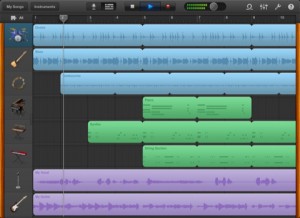
Perhaps the newly released FL Studio for the iPad has made Apple release an upgrade 
Apple has updated Garage Band for iPad to version 1.0.1. GarageBand turns your iPad into a collection of Touch Instruments and a full-featured recording studio. Use Multi-Touch gestures to play pianos, organs, guitars, drums, and basses on your iPad. They sound and play like their counterparts, but let you do things you could never do on a real instrument.
Version 1.0.1 brings the following features and fixes:
• Support for audio output over AirPlay, Bluetooth devices and HDMI with the Apple Digital AV Adapter.
• Import of AIFF, WAV, CAF audio files and Apple Loops (16 bit, 44.1 kHz).
• Allows copy and paste of audio from supported apps into GarageBand.
• Addresses occurrences of GarageBand freezing while playing Smart Instruments.
• Improves overall stability and addresses a number of minor issues.
Garage Band for iPad’s original features offer:
Play your iPad like a musical instrument.
• Perform on dozens of musical instruments on the innovative Multi-Touch keyboard.
• Tap out beats from the seat of acoustic and electronic drum kits.
• Recreate legendary guitar rigs on your iPad with 9 amps and 10 stompbox effects.
• Record your voice using the built-in microphone, and apply fun sound effects.
• Use the Sampler to create an instrument from sounds you record, then play them on a keyboard.
Sound like a virtuoso with Smart Instruments.
• Tap chords to instantly create keyboard grooves with the Smart Keyboard.
• Strum chords on acoustic and electric Smart Guitars, or trigger fingerpicking patterns for popular chords.
• Groove with an onscreen electric or upright Smart Bass by tapping on chords.
• Drag drum instruments onto a grid to create your own beats with the Smart Drums.
Create a song anywhere you go.
• Arrange and mix your song with up to eight tracks using Touch Instruments, audio recordings, and loops.
• Trim and place musical regions exactly where you want them to play.
• Use the Mixer to fine-tune each track’s volume – solo or mute any track, or adjust pan, reverb, and echo.
• Use over 250 professionally prerecorded loops as a backing band to your song.
Share your songs.
• Email songs right from your iPad (AAC).
• Export your song and add it to the iTunes library on your Mac or PC.
• Send a project to your Mac and open it in GarageBand to continue refining your song.
Available through iTunes at http://itunes.apple.com/us/a…
DATAMASKIN

