
Haplome demo teaser
Here,s a short teaser of Haplome, now in version 1.5 – an open source multimedia interface for the iPhone, iPod touch and iPad.
Haplome is based on the monome and is compatible with applications designed to be used with a monome.
Haplome is currently under review, and will be available for free worldwide on the iOS app store once it is approved. The source of haplome is also available for download and modification on GitHub.
Ellatron – virtual Mellotron for iOS
This is a quick demo of Ellatron – an iOS virtual Mellotron – being controlled via MIDI.
Here at the details:
A small group of people will remember our first MIDI video about 10 months ago that needed a jailbroken iPhone. Well here is the real thing.
Filmed by iPod Touch, here are a few of the features of the Ella MIDI implementation – 3 voices at once (upper, lower and pads), all can be played concurrently if you have enough hands or somebody else around/on stage who can hit the pads. Programmable keyboard split for upper and lower, programmable chord pads if your keyboard supports it (and the Axiom 49 has 8 of them – mighty useful). Ella can be seen responding to controllers on the keyboard with on-screen information keeping you up to date, and controllers are used to change voices, volume, pitch, tone, reverb parameters, and level/pan for each of the upper, lower and pad instruments.
Ellatron and the Lite Trons now all feature the same rich reverb unit first seen in M3000, and the MIDI Ellatron is going to hit the shops with a handful of the real Tron voices from M3000, albeit with the usual limitations – shorter loop times, major third sampling intervals etc. Mellotron purists, or indeed anyone who wants a real Tron will still want the M3000, but people who just want a handful of Tron sounds for occasionally spicing up a song will love the new Ella.
Plus the MIDI implementation is ultra-responsive, despite this being a debug build and having a dozen printfs per played note – printfs going over WiFi to the Mac, because you can’t really printf with an attached dock accessory…
A bit more work to do on the user interface to de-stupid it (e.g. “What is” … “This For?” on the left!), an upgrade to the saved/restored preferences file, and we will be ready to roll out for testing. If all goes well we should be good to go by early December.
Commodore 64 acid jam
MSSIAH has posted this really cool 8bit video, enjoy
A test of the 8bit ventures Mssiah on the Commodore64
2 Tracks with the MSSIAH Bassline
1 iPad for controlling the Bassline Parameters
1 iPhone for un-/muting the Audiotracks
1 BCR-2000 for Reverb- and Delay-Control
1 MFB 503 (Kick)
1 MFB 522 (all the rest)
3 takes (1 for Beat and first Bassline / 1 for the second Bassline / 1 for the FX-Controllings)
Videorecording on iPhone4
SoundPrism synchronization
Short demo featuring the SoundPrism app for the iOS and how to do some tweaking and syncing
“SoundPrism is available now http://audanika.com/download/ (right now for iPad, soon as a free update for iPod and iPhone – we’re waiting for Apple to approve it)
How to create a soundtrack for the game you’re playing while you’re playing it. =]
Friend us at http://www.facebook.com/audanika and follow us on http://twitter.com/audanika for news about SoundPrism.”
iVoxel has been released – the singing vocoder
VirSyn announced today that iVoxel 1.3 is available now. iVoxel is not only an amazingly sounding vocoder for iPhone/iPod and iPad – the unique concept of iVoxel turns this vocoder into a singing machine going far beyond the capabilities of traditional and software vocoders on any platform.
iVoxel lets you: Speak or sing into your head set mic transforming your voice in a wide variety of ways. Record words, syllables or other sounds into the voxel dictionary for later reuse. Play different voxels live on the keyboard with ingenious pitch bending. Arrange and play melodies with the built in sequencer and add the lyrics from a user expandable dictionary of voxels.
iVoxel is a combination of a voice optimized synthesizer and a vocoder with an unprecedented intelligibility. The vocoder part is based on the Matrix vocoder from VirSyn used by many famous artists – one of them the well known german group Kraftwerk. The channel filters used by iVoxel are based on the Sennheiser Vocoder VSM201 resulting in a rich and fat analogue sound characteristic.
Akai SynthStation25 compatible:
Compatible with Akai SynthStation25
Improved GUI workflow
Uses Modwheel to modulate Gender/Vibrato
Modulate Gender/Vibrato with finger movement up/down
Hold parameter – holds Voxel at defined moment
Edit voxel – hear the sound while editing the hold position
Volume increased for about 12dB
Many bugs fixed.
The product is available in the App store.
TaylorEQ – free app for iOS
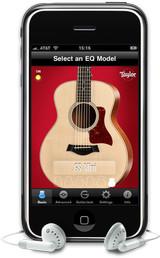
Sonoma Wire Works has released Taylor EQ, a free app for iOS.
Sonoma Wire Works has teamed up with Taylor Guitars to create the free Taylor EQ app: an input EQ for enhancing the sound of a Taylor guitar when played through GuitarJack on an iOS device. Select from a range of EQ presets that complement Taylor’s signature guitar body shapes, including the Grand Auditorium, Grand Symphony, Grand Concert, Dreadnought, T5, or the new GS Mini.
Each EQ preset was custom designed by Taylor Guitars’ engineers to optimize the tone of each body shape for use with the GuitarJack. Customize your own presets and play along with songs from your iTunes library, making the Taylor EQ the perfect practice tool for any guitar owner. Taylor EQ is the first free app to include the GuitarJack control panel, which allows users to configure the GuitarJack settings.
Taylor EQ features
- Six Taylor Guitar EQ Presets: Select from a range of EQ presets that complement Taylor’s signature guitar body shapes, including the Grand Auditorium, Grand Symphony, Grand Concert, Dreadnought, T5, or the GS Mini.
- Advanced Mode: Use the 6 band Parametric EQ with frequency, gain and pinch-for-Q gesture control to create a custom tone for your Taylor Guitar or any guitar. Then save the settings for later use. Toggle between basic and advanced to hear the difference.
- iPod Playthrough: Play along with your iPod songs on your iPhone or iPod touch while in the Taylor EQ app.
- Compressor/Limiter: A factory configured compressor-limiter sweetens the sound and keeps the output from clipping, or turn it off to hear the unprocessed output.
- Monitor Level: Balance the level when playing along with iPod songs. Turn it up to push the compressor harder.
- GuitarJack Control Panel: GuitarJack connects instruments, stereo line inputs and mics to the iPhone 3G, 3GS and iPod Touch (2nd and 3rd gen.) via 1/4 inch instrument and 1/8 inch stereo mic/line inputs. GuitarJack features a 1/4 inch instrument with configurable pad, Lo-Z and Hi-Z modes, a 1/8 inch stereo mic/line input that includes pad, normal and boost modes, and a 1/8 inch stereo output with increased drive for headphones. Each input has 60dB of continuous gain/level control. Configure GuitarJack’s levels in Taylor EQ for the best possible sound, and what you’ll hear through the improved headphone jack sounds better than through the iOS device headphone jack. Levels set using Taylor EQ’s GuitarJack Control Panel settings can remain set when you switch to compatible audio apps, even if they do not include the GuitarJack Control Panel.
The Taylor EQ app for iOS is available as a free download from the iTunes App Store.
More information: Sonoma Wire Works / Taylor EQ
Game Boy style music sequencer
Oliver Wittchow has released Nanoloop Lite (App Store link) – a free version of his Game Boy style music sequencer.
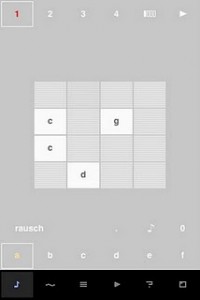
Nanoloop was originally developed for Game Boy (first release in 1999) and is a popular platform for mobile music creation. The new iPhone version presented here follows the same basic structure and design concept but otherwise it is an entirely new program. It does not simulate the Game Boy’s sound or other functions but has been fully optimised for the iPhone’s capabilities.
Lite Version Limitations:
- Projects can not be saved or sent, only the current status is kept in memory. The current project can be exported to the full version (if installed on the same device).
- Sample memory is limited to five files.
Otherwise, the lite version is fully functional and shares all features of the full version:
- Straight, minimalistic graphical interface
- Pattern-based stepsequencer
- 6 channels, each can be synth or sampler
- Song editor with loop function
- Synth with envelope, filter, lfo etc
- Sample on the fly
- Re-sampling
Synth
The simple but powerful synthesizer allows to create a great bandwidth of sounds, including beats, noises, basses and pads. Available synthesis types are:
- rectangular wave with filter
- FM
- LFSR noise generator
Each synth channel is two-voice polyphonic and an additional stereo effect can be applied.
Sampler
- Samples of 1 sec length (44 kHz, mono) can not just be used in a drum-machine style, but also be pitched and played as notes.
- Samples can be recorded via microphone (iPhone only), headset microphone (iPhone, iPod touch 2nd gen only) and from nanoloop’s own sound output.
Spatial realisation of aleatoric or randomly generated music

Sonus (One)” is a spatial realisation of aleatoric or randomly generated music. Although not all of the music is left to chance, the player can intervene albeit in a seemingly haphazard manner. Use the blocks either to block the flow of the balls or to trap them removing them from play.
The software is in part inspired by the work and teachings of John Cage, with “Sonus (One)” adding the dimension of space to the music of chance. Not only letting “sounds be themselves” but giving them room to do so.

“Sonus (One)” is part of the “Otherwise Autonomous” collection of digital instruments designed and programmed by Pixelh8.
Logic 9 with iOS control surface
Apple has released an update to Logic 9, version 9.1.2, that supports iOS control surface apps that utilize the OSC protocol.
The video, above, demos how you can now use TouchOSC to turn an iPad into a custom Logic 9 touchscreen control surface.
here’s a quick demo of the new OSC feature with Logic 9.1.2 and TouchOSC on an iPad.
This is really coool! Finally a nice remote on the iPad.
Moog is working on an iOS app

Moog Music is working on a new iOS app, the Moog Filtatron, that combines filtering, effects and sampling.
Moog Filtatron features include:
- Filter + LFO
- Amp (drive) + feedback for distortion
- Adjustable, time-syncable delay
- Sampler with adjustable playback speed, loop points, and live recording
- X/Y pads for tweaking and performance, plus preset sharing.
The Moog Filtatron lets you combine several sound sources and apply effects to them in realtime. Sound sources include line or mic input, looping sample playback, and an internal oscillator. Audio input should work via any adapter.
It’s Moog, it sounds good and it’s on the iPhone.
Via CDM
Audio input will work via any adapter. You can use the headphone/mic jack directly (though to get audio out, you’ll need to use a 3-prong minijack – more on that as I test my camcorder cable with this and other apps). You can also use third-party devices like the Blue Mikey (good if you need a mic) or IK Multimedia iRIG (good for mono instrument/guitar input). I’m also testing the iRIG.
Via an internal design documentation, I’ve got the details on the internal specs for the app. The goal, says the document: “filtatron allows you to combine several sound sources and apply effects to them in realtime. Sound sources include line or mic input, looping sample playback, and an internal oscillator.”
Audio engine: 16-bit, 44.1 kHz. (Some apps, like RjDj, actually use less, so that’s worth noting.)
Filter: modeled 4-pole resonant filter, which Moog intended to be matched to their analog filters. Lowpass, highpass, cutoff, resonance, self-oscillation at high resonance – you know, the usual.
LFO, Envelope Filter: Routed to filter cutoff. LFO: sine, ramp, sawtooth, square, sample&hold. Crossfade/morph between LFO shapes. Bipolar LFO (sweep up or down). Free-tuned LFOs, sync to tap tempo.
Envelope Follower: Route sound inputs to sweep the filter, with adjustable reaction speed.
Tap tempo, separation, mix.
Amp (overdrive) effect with feedback. Also can self-oscillate.
Delay effect. Delay with its own LFO. Adjustable from a short flange to longer delays.
Pads. X-Y pads controlled by multi-touch control parameters for live performance/tweaking. Assignments:
VCF pad controls filter cutoff and resonance, LFO pad controls LFO Rate and Amount, Delay pad controls delay time and feedback. VCO pad controls oscillator frequency and level (amplitude) – if the VCO “Release” parameter is engaged (ENABLE button on VCO panel, main page), then the VCO x-y pad also controls the VCO volume gate — the VCO is silent when you are not touching the pad and sounds a note on each touch. ENV pad controls envelope follower amount and speed, and AMP pad controls amp drive and feedback.
Sampler: Play included loops, record your own samples, or bring in your own loops using either the AudioCopy/AudioPaste API or an FTP connection. Sampler includes play controls, playback speed (-2x to +2x), and tap-and-drag controls for loop start and stop on the waveform.
Record audio into the sampler dry, or record with effects for resampling capability. Recording is limited only by available storage, but playback is limited to 10MB each (ca. 2 minutes).
Preset recall and storage. Includes a number of presets, allows you to save your own, and provides onboard email sharing of presets.”
DATAMASKIN

