
CME Xkey Demo – All you need to know
This is a demo video for the CME X-key USB MIDI controller keyboard.
The MIDI controller works natively on Windows, OSX and iOS and doesn’t require external power. It features pitch bend, modulation, sustain and octave up & down keys as well as 25 velocity sensitive full-size keys, which transmit polyphonic aftertouch. You can configure it via a free software application for Win, Mac OS and iPad.
CME Xkey Website:
http://www.cme-pro.com/xkey.html
MidiBlop for Blofeld Arp
Maurizio De Cecco has released MidiBlob i- a performance oriented multi touch controller for the Waldorf Blofeld synthesizer.
This video is a demo of the MidiBlob for the Blofeld App on a nice arpeggiator based Blofeld patch. Right hand play the keyboard, not visible in the video, left hand use MidiBlob on the iPad to “play” the sound.
MidiBlob is a plug and play performance oriented multi touch controller for your Blofeld synthesizer. By manipulating a 3D scene (the Blob) with a set of very intuitive interaction MidiBlob can modify and control your synth sound to a depth that cannot be reached with traditional controllers. Filters, envelopes, modulations, wave characteristics are under direct control of your fingers, the iPad become an extension of your instrument. No configuration needed.
This video is a demo of the MidiBlob for the Blofeld App, used on a nice Blofeld Lead.
Right hand play the keyboard, not visible in the video, left hand use MidiBlob on the iPad to “play” the sound.
The Bleep Drum + Electribe
The Bleep Drum + MIDI controlled by an Electribe EMX-1
Get your own MIDI controllable rad-fi drum machine at bleeplabs.com
Available fully built or as a kit.
Video by Thomas Fang and Cordey Lopez
Korg Taktile MIDI controllers at NAMM 2014
Korg’s new Taktile controllers include lots of, well, tactile control such as a KAOSS touchpad. There’s even a model with built-in sounds from the classic Triton workstations.
Korg Electribe ER-1 Drum Machine as a MIDI Sequencer
This machine, normally associated with beats, can transmit MIDI notes from each of the drum triggers. I tuned the first seven triggers to the Eb scale, with the further three notes on the lower octave.
The accent control functions in the same way, allowing you to vary it`s relative level.
Second half of the video has the synth output going into the ER-1, allowing the use of `Motion Sequence` and `Tempo Delay` effects.
AeroMIDI – track your hand in space controller
Acoustica has released AeroMIDI 3D MIDI controller software for Mac & WIndows.
AeroMIDI uses 3D input devices, like the Leap Motion, to track your hand in space, allowing you to control any MIDI software or MIDI hardware. AeroMIDI lets you use your hands in 3D space to trigger notes and MIDI continuous controller messages.
AeroMIDI works with any MIDI software or hardware, and lets you control synthesizers, lighting rigs, DAWs, effects, virtual instruments, and any other MIDI-capable hardware or software.
We’ve added gestures and the new action cards that allow you much more flexibility. Control your music in 3D style today. Move or rotate your hands in 3D space to control parameters. Downloads are limited so download while you can. Download a copy at http://www.aeromidi.net/ . Note that this currently requires a Leap Motion Controller. (Other 3D controllers will be supported soon.)
AeroMIDI – A little taste test between 3D control and normal expression
This short video shows the difference between normal synthesis and expression control using AeroMIDI, our 3D MIDI controller.
DIY MIDI CONTROLLERS
Just a quick rundown of some MIDI controllers ‘otemrellik’ has built recently for ios music making fun.
Here are some helpful links:
https://github.com/unsymbol/teensy-mi…
http://little-scale.blogspot.com/2012…
I use the 2.0 Teensy board for all my projects:
http://www.pjrc.com/teensy/
umidi – a new fully customizable MIDI controller
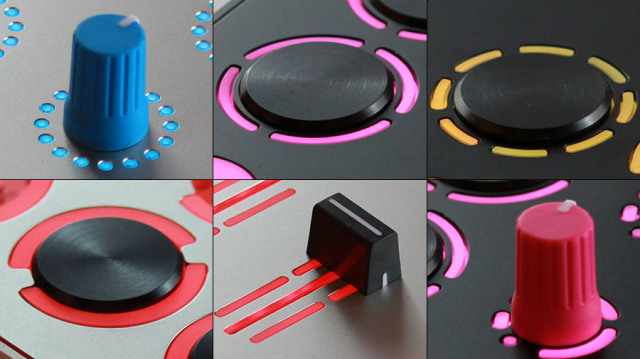
umidi – a new MIDI controller that’s completely customizable.
Using a web-based interface, you can change the types of knobs, lights, switches and sliders on the controller, customize the colors and add designs. The components are high-end, and the case is CNC’d from a solid block of aluminum, which is then bead blasted and anodized. You can even customize the shapes and colors of the lighting around your controls.
Our goal is not to compete with mass produced products, We designed the umidi with no compromises on quality, structure of materials and components. That’s why each controller is made from a single block of aluminum, less than 1 inch thick and uses only the best components. Each controller is unique, and hand built/tested by us.
Each umidi can have the up to 36 components, which include:
- Knobs
- Faders
- Encoders
- Jog Wheels
- Aluminum Push Buttons
- Drum Pads
- Silicon Buttons
At the heart of umidi are 288 RGB LED’s, which can be controlled to do whatever you want. This allows for music-driven lighting, button effects, visualizing mixing, millions of colors and other lighting effects.
When you’ve created your ideal layout, you can get your custom controller built to order.
Apollo – MIDI over Bluetooth for iOS and OSX
Apollo MIDI over Bluetooth provides MIDI connections for controllers, synthesizers, and sequencers, connecting a pair of iOS devices, or an iOS device and a Mac.
https://itunes.apple.com/us/app/apoll…
http://www.secretbasedesign.com/apps/…
The Mac version of Apollo should be available shortly.
We are waiting for approval from Apple for the OSX version (which will be free). In the mean time, you can download this version. Once the OSX version is released, we would encourage you to download the one from the Mac app store (this will make updating the app much easier).
Connecting synthesizers and sequencers across multiple iOS devices has been challenging, and there have been few options. For wired connections, you need multiple MIDI adapters (either dedicated iOS devices, or a Camera Connection Kit and generic USB MIDI). WiFi MIDI can have too much latency and jitter, making it unusable for music applications.
With Apollo MIDI over Bluetooth, you can easily connect a pair of iOS devices, or an iOS device and a Mac, using Bluetooth LE. Bluetooth LE is designed for low latency — ideal for music applications.
Simply start the app on each device, select an “A” endpoint for one, and a “B” endpoint for the other, and then press search on both devices. They should detect each other, and connect quickly. Once they are connected, MIDI from one device will be sent to the other — the connection is bi-directional. On each device, you can select the MIDI destinations that you wish to forward messages to.
When connecting to a Mac, select the “A” endpoint for the iOS device; the Mac will be a “B” endpoint. Just as with the iOS set-up, press search on both devices, and they should connect quickly. With MIDI routing on a Mac, there is a danger of creating a loop in the routing (where MIDI messages get sent and relayed repeatedly). To avoid this problem, Apollo on the Mac either sends MIDI from iOS to the Mac, or vice versa — make sure that you toggle on the direction you need.
The apps require Bluetooth LE — this is available on the iPad3, iPad4, iPad Air, and iPad Mini. iPhones starting with the iPhone4S support Bluetooth LE. Newer Macs also support Bluetooth LE; older Macs may require a USB Bluetooth LE adapter (we have had good luck with the adapters from IO Gear and Ciraco).
Apollo has been designed to be simple to install and configure, and it should expand your MIDI capabilities easily.
DATAMASKIN

