
The Resonator by Synth Anatomy – 26 Preset Library for Laplace IOS Synthesizer
New preset collection of 26 presets for IOS Synth Laplace
Available for donation
2 USD = Preset collection
3 USD + = Preset Collection + FB-01 Sample Library with Kontakt 5 Mapped and other samplers also (46 instruments) (6.99 Pounds)
Payment here http://www.patreon.com/synthanatomy and than sending a confirmation to synthanatomynews@gmail.com
Xils-lab PolyKB II Analog Morphing Synthesizer Plugin Review
Checking out PolyKB II from Xils-lab, it’s a plugin based on the vintage Poly Kobol analog synth from RSF syntheszers. It has a classic interface with morphable oscillators and a bunch of other modulation options. Most importantly, it has a very warm and vintage tone to it, I was definitely sleeping on this one. Excuse the extra blank space at the end of the video, forgot to remove it lol.
Read the full review: http://soundsandgear.com/xils-lab-pol…
Product page: https://www.xils-lab.com/pages/PolyKB…
Available at Sweetwater also for $149: http://fave.co/1xv5kwF
Learn Maschine: http://MaschineTutorials.com
FM4 – a new FM synthesizer for iPad, modeled on classic 1980s Yamaha DX
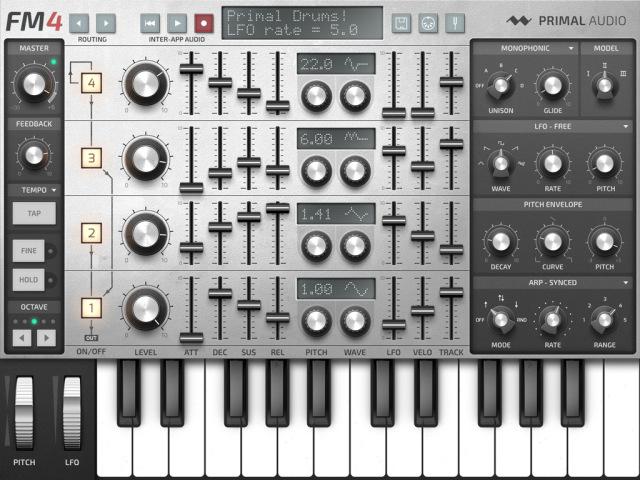
Primal Audio has announced FM4 – a new FM synthesizer for iPad, modeled on classic 1980s Yamaha DX series keyboards.
According to the developers, “Great care has been put into analyzing and replicating inherent sonic characteristics of the original hardware, such as internal quantization errors and digital-to-analogue conversion.”
Features:
- Four operators configurable via eight different routings
- Three sound engines modelled on 1980s hardware units
- Eight waveforms derived from classic FM synths
- 2x, 3x, and 4x polyphonic unison
- Tempo-syncable arpeggiator with up, down, up-down, and random patterns
- Microtuning with eight different temperaments
- Supports Inter-App Audio, background audio, and MIDI (support for Audiobus is planned)
- Up to 24 voices of polyphony
- Import/export presets through iTunes
- Works on all iPads supporting iOS 7.0 and up
FM4 will be available in the App Store in December 2014, with an introductory price of $0.99. See the Primal Audio site for details.
Let’s Play with Laplace (Patch Design & Commentary)
Laplace is a new Resonator Synthesizer, from iceGear the developer of Cassini.
“I explain what “Resonator Synthesizer” actually means as I poke around at it to create an ensemble of bells and strings in a single patch. If you enjoyed this please consider supporting this series by sponsoring them on Patreon: http://www.patreon.com/user?u=107612
Be sure to visit http://discchord.com for the latest music app news!”
Laplace is a physical-modeling synthesizer based on resonator synthesis that makes it easy to create bowed string, plucked string, blown pipe and metallic sounds.
Specifications:
* Inter-App Audio
* MIDI
* CoreMIDI / Virtual MIDI Input
* MIDI Controller Mapping with MIDI Learn mode
* External Midi sync
* Arpeggiator
* 16 step sequencer – On/Off, Glide, Octave, Accent, Staccato
* Exciter
* Click – Stiffness, Color, Decay, Damper Noise
* Noise – LPF, HPF, ENV
*Resonator
*Flavor, LPF, ENV, Pitch ENV
*Sine – Pitch, FM, ENV
*HPF
*Effectors
*Chorus
*Delay
*Reverb
Drzewo Cedr – a free 2 oscillator subtractive synthesizer for Windows
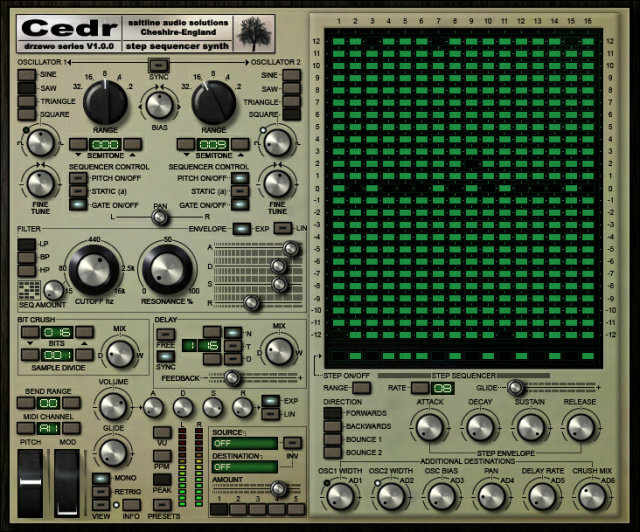
Saltline has released Drzewo Cedr – a free 2 oscillator subtractive synthesizer for Windows. with a 16-step pitch sequencer. Cedr was created with chip tunes in mind.
Features:
- The sequencer can also be fed to several other of the synthesizer’s controls.
- The pitch sequencer can be turned on or off for each oscillator allowing for greater flexibility in sound creation
- Bit crush and delay effects also add to the degraded yesteryear quality of Cedr.
- Other controls include a step sequencer ‘step envelope’ giving the user the ability to create a range of sounds from choppy arps to strange pads and textures.
- 5 modulation slots also allow midi control routing, such as, key follow, velocity and aftertouch.
Roland introduces the SH-2 Plug-Out Software Synthesizer
The SH-2 PLUG-OUT Software Synthesizer is a total reproduction of the classic SH-2 synthesizer from 1979. Renowned for its raw vintage tone, the SH-2’s dual VCO plus sub oscillator configuration dishes out devastatingly fat basses, edgy leads and wild effects. With or without a SYSTEM-1, this VST3 and AU plug-in support multiple instances and can be used in any compatible DAW. SYSTEM-1 owners get a dedicated controller and can take advantage of the SH-2’s PLUG-OUT capability and turn their SYSTEM-1 into a stand-alone, hardware SH-2 that can go anywhere and doesn’t require a computer. And this is just the beginning. More synthesizers based on Roland’s acclaimed Analog Circuit Behavior are on the way.
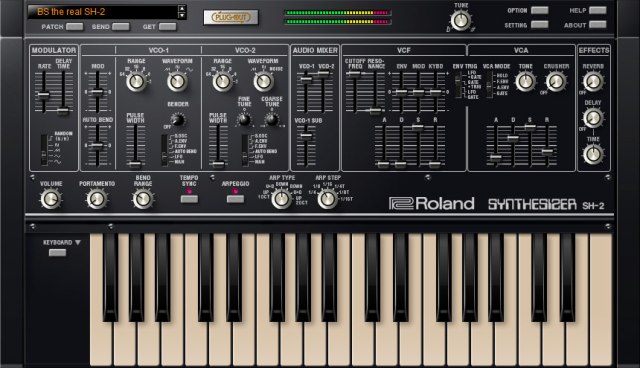
Everything has been reproduced exactly, from the VCF which is capable of self-oscillation to the attack and long decay characteristics of the steep envelope. The unique harmonic makeup and pitch wavering are present as are the complex interactions between parameters that result from the original analog circuit design.
Even behaviors that occur only in analog circuitry are accurately reproduced, like the subtle effect on tonality when the user tweaks parameters unrelated to the actual tone being produced.
There are even some new features that were not available on the original. This new SH-2 has a VCO range that is expandable to 64′, two envelopes, reverb, delay and crusher effects, Autobend with support for reverse actions, and a tempo-syncable arpeggiator.
Audio Damage has introduced Basic mono synth
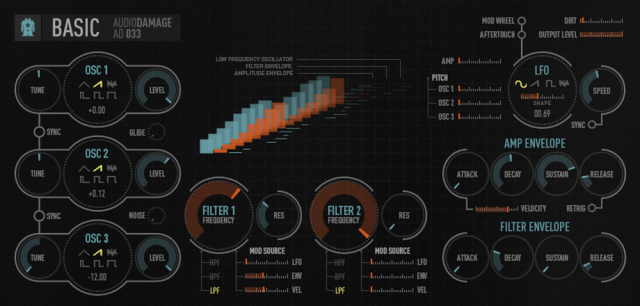
Audio Damage has introduced Basic – a three-oscillator monophonic software synthesizer for Mac & Windows.
According to Audio Damage, Basic is designed with ease-of-use, low cost, and simplicity in mind, and offers ‘an aggressive tone and self-resonating filters that ‘scream’ when pushed’.
Features:
- Three alias-free wavetable oscillators with six waveforms each, and oscillator sync.
- A pair of cascaded filters featuring MS20-style lowpass and highpass, and a bandpass of our own design.
- A four-waveform tempo-syncable LFO with waveshaper.
- ADSR envelopes for amplitude and filter frequency.
- User-definable soft-saturation.
- A simple and easy-to-understand workflow, inspired by the classic topology of vintage analog synths like the Minimoog, SEM, and MS20, but with modern usability.
- Touchscreen-friendly and highly visible user interface.
- DRM-free, for easy installation and updating.
Audio Damage Basic is available now. It is priced at US $39 through Sept 4, 2014. After that, $49.00. See the AD site for an audio demo.
Mormox Imitate – free synthesizer instrument plug-in for Windows
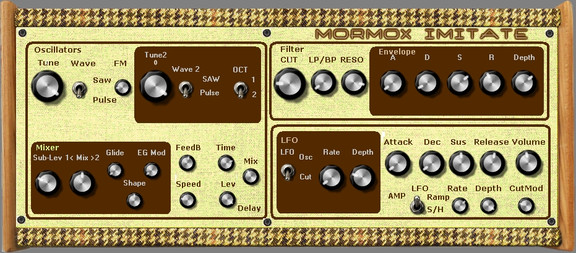
easy#toolz has released Mormox Imitate, a free synthesizer instrument plug-in for Windows.
Its an „Emulation“ of a very new Hardware-synth from Greece, called „Murmux Initate“
And it has a very „simple“ Structure at Original: 2 Oscillators with Subosc, 2 waves (Saw and Pulse)
Lowpass-Filter, simple LFO, 2 Envelopes (one AD, one ADSR)… thats allMy „Emu“ has some extra Features, indeed, i have tried to receive the brilliantly easy structure.
Mormox Imitate is available to download for Windows (VST) as freeware as part of the KVR Developer Challenge 2014.
Mitosynth 201 — Automation
The latest session at Mitosynth U explains how to automate synth settings to add motion to a sound.
Predator-PL Introduction with Rob Papen
Rob Papen demoing his Predator-PL software synthesizer.
Features:
- A powerful software synthesizer that covers the bases of a wide range of electronic musical styles
- Loaded with 4,400 presets arranged logically into banks to make finding the right sound easy
- A simple set of subtractive synthesis elements let you tweak sounds and come up with your own presets
- Three lush effects engines let you get even more out of your sounds
- 32/64-bit compatibility provides full support for the latest AAX, VST, and AU plug-in hosts on Mac and PC computers
- No dongle required but supports eLicencer key/Syncrosoft/Steinberg Key
- License allows 2 simultaneous activations at once
Predator-PL is a basic version of Papen’s Predator virtual analog synthesizer, available via Sweetwater and MusicStore Koeln:
DATAMASKIN

