
KORG releases the SQ-1 step sequencer
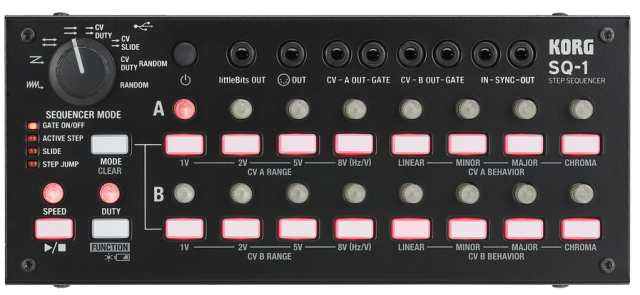
Korg has introduced the SQ-1 step sequencer, an updated take on the classic Korg SQ-10 step sequencer.
The Korg SQ-1 is a compact step sequencer with 2 x 8 steps. Its wealth of connection jacks allows it to be connected to the MS-20 and a variety of other synthesizers.
Both vintage analog synths and the latest compact synths can be controlled from the SQ-1.
Specifications:
- Sequencer Mode – ALTERNATE, ORDER, PARALLEL TURN, PARALLEL ORDER, CV/DUTY, CV/SLIDE, CV/DUTY RADOM, RANDOM
- Step Mode – GATE ON/OFF, ACTIVE STEP, SLIDE, STEP JUMP
- Sequence Step Resolution – quarter notes, eighth notes, sixteenth notes
- CV OUT Pitch – Linear, Minor, Major, Chromatic
- CV OUT Voltage – 1V, 2V, 5V (Oct) 8V (Hz/V)
- GATE OUT Polarity: + (positive polarity), – (negative polarity)
- SYNC IN/OUT Polarity + (rise), – (fall)
- Connectors
- littleBits OUT jack (mini monaural phone jack)
- OUT (MIDI OUT) jack (mini stereo phone jack)
- CV – A OUT – GATE jack (mini monaural phone jack, CV OUT : Output Level 1V, 2V, 5V, 8[Hz/V], GATE OUT: output level 10V)
- CV – BOUT – GATE jack (mini monaural phone jack, CV OUT : Output Level 1V, 2V, 5V, 8[Hz/V], GATE OUT: Output Level 10V)
- – IN – SYNC – OUT jack (mini monaural phone jack, SYNC IN: Max Input Level 20V,
- SYNC OUT: Output Level 5V)
- USB jack (type B, USB MIDI)
- Power Supply – Two AA batteries (alkaline batteries recommended), or USB power
- Battery Life – approximately 5 hours (when using alkaline batteries)
- Dimension (W x D x H) – 93 x 84 x 63 mm/7.60″ x 3.31″ × 2.48″
- Weight – 641 g/1.41 lbs.
- Included Items – Two AA batteries for checking operation, mini plug – DIN cable
- Options – Patch cable MS-CABLE-18
Pricing and availability for the Korg SQ-1 are to be announced.
Stepper Acid– a digitally-controlled 16-step sequencer for Eurorack modular
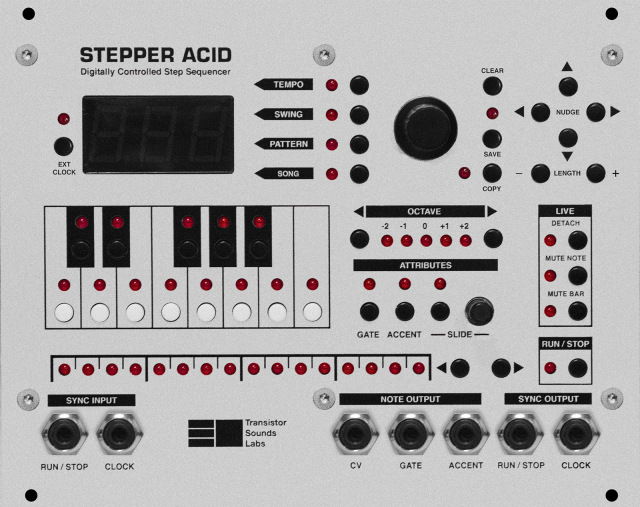
Nina Richards & Zoë Blade of Transistor Sounds Labs have introduced Stepper Acid– a digitally-controlled 16-step sequencer for Eurorack modular synthesizers.
They say it is “Designed by and for musicians, Stepper Acid was born out of our need for a modern step-sequencer.”
Features:
- 16-step sequencer, with adjustable pattern length
- Adjustable analogue slide
- Song mode for pattern chaining
- Stores up to 40 patterns
- Detach mode for playing one pattern while entering another
- 0-5V range CV (5 octaves)
- Gate and accent output. 5V or 12V selectable
- Variable swing function
- Dual microcontroller design
- Adjustable clock sync input and output. Includes: 24PPQN (Sync24), 48PPQN, 96PPQN and 4PPQN (one note per pulse
Stepper Acid is available for £295.00. See the Transistor Sounds Lab site for details.
A guide to the various features of Stepper Acid.
We were making some demos of Stepper Acid’s features, and Nina got carried away making a track. Enjoy!
B-Step Sequencer – How to use B2 in a live performance
Just a few suggestions how you can use B-Step Sequencer in a live performance.
Free trial version you can find here: http://B-Step.Monoplugs.com
Testing 16 step sequencer
This is the MFOS 16 step analog sequencer. 1 channel, 3 cv outs (with portamento control), 2 gates, 2 triggers out, clock input, clock out, coarse/fine control voltage, multi-gate, step/reverse and randome mode.
The case is made of wooden with white finish and is powered with AC100-260V.
In this video the sequencer is controlling the selfoscillation of a VCF with a envelope generator.
More information at hardmod dot tumblr dot com
MiniStepper – free MIDI Step Sequencer Plug-in for Windows
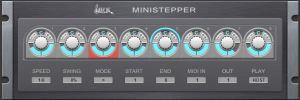
WOK has released MiniStepper, a free MIDI Step Sequencer Plug-in for Windows. Ministepper is designed to be easy to use.
There are 8 steps, each with velocity, gate length and mute. Several play directions, start- and end-step selectable on the fly. Sequence can be transposed by incoming MIDI notes (polyphonic). Host sync with dottet and triplet speed selection, swing, run on key press, MIDI-channels selectable for combined use, clear layout, free.
Price: Free.
Sequencer Preview – B-Step 2 – iPad, Linux, Windows and Mac
Monoplugs has announced B-Step Sequencer 2 – a new version of their MIDI step sequencer.
The new version of the sequencer will be available as VST and Standalone for Windows, Mac, Linux, iPad, Raspberry Pi – later Android and as AudioUnit – VST3 is also on the list.
Subscribe to keep up to date!
More info: http://b-step.monoplugs.com
And: https://www.facebook.com/pages/B-Step…
Happy B-Stepping!
Soundtrack by http://box-cat.com/ – Thanks!
Happy Birthday Greetings! Analogue Synthesizer Tune
Happy Birthday Analogue Style!
Here’s an all-analogue Happy Birthday tune featuring various analogue synthesizers and the Oberkorn step sequencer by Analogue Solutions (x 3).
http://www.analoguesolutions.com
http://www.soundofscience.org
Analogue Solutions
B-Step Sequencer for iPad has been released
Monoplugs has announced the release of B-Step Sequencer for iPad, a melodic, chord based step sequencer inspired by a bass guitar.
The sequencer comes with native support for one or two Novation Launchpads. B-Step supports CoreMIDI, Virtual MIDI ports, Network MIDI and a lot of MIDI hardware devices. It also supports MIDI Learn, so you can control B-Step’s user interface with any MIDI controller you like.
B-Step can work as MIDI clock master or you can sync it to another clock master.
B-Step Sequencer for iPad features
- Native Novation Launchpad support.
- Advanced MIDI learn.
- Drag’N’drop.
- 3 color profiles.
- Clean and simple user interface.
- Run in background.
B-Step Sequencer for iPad is available for purchase at the introductory price of $16.99 USD until May 15th, 2014.
B-Step on iPad controlled with a Novation Launchpad MINI and the black Micro Kork produces the sound. This is a blues chord progression and I’m just edit one bar that i copy every loop to the others and playing around with some octave shifts. You can get B-Step Sequencer for Linux, Windows, Mac and iPad as VST plugin or standalone.
8 step sequencer module with reverse, random, and offset — Sagittronics
This is a sequencer that Charlie Slick built with an Atmega arduino chip.
The chip basically replaces the CD4017-or the like-but adds a few features like gate controlled reverse and random. The modules also has an offset input so you can use it like an arpeggio. There is no gate output but it does have an externally trigger reset.
The Story Behind Arturia BeatStep
BeatStep co-creator Glen Darcey chats to Source about the inspiration behind the design, his first experiences with synthesizers and also how he’ll be using BeatStep in his own analogue-heavy synth studio.
BeatStep is also a 16-step analog sequencer for creating all kinds of musical phrases to be sent to analog synthesizers, MIDI drum machines, MIDI keyboard devices, or computer programs. Its connectivity options let you interface BeatStep with a computer or iPAD using USB, a drum module using MIDI or an analog synthesizer equipped with CV/GATE.
It’s priced at US $129 / EURO 99, and is expected to be available in March.
DATAMASKIN

