
Manikin Schrittmacher DEMO track
Second attempt on using the Manikin Schrittmacher step sequencer.
I created (very easy, without reading the user manual lol) 4 sequences and assigned to each one a MIDI channel to send it to Virus Ti2 2 in multi mode. Easy to remove or to silent the steps.
Many thanks to Dragos Manea (owner of the Schrittmacher).
More on http://www.albaecstasy.ro
On The Way Back From The Factory
An electronic music piece representing the mindset of a humanoid on the way home from work. This is live performance / improvisation with sequencers. No computer involved.
This is also a prelude to “Are We There?” – his journey back to work.
Equipment:
Music From Outer Space 16-step sequencer
Doepfer MAQ 16/3 sequencer
Club of the Knobs C951 Arpeggiator
Club of the Knobs C1680 Analog Delay
Happy Nerding Super Sawtor
Kristp 1 S-VCO
Dotcom Q106 Oscillator
Dotcom Q109 Envelope Generator
Dotcom Q108 Amplifier
Dotcom Q112 4 Channel Mixer
Dotcom Q118 Instrument Interface
Korg EMX-1 Drum Machine
Arturia Microbrute and Electro-Harmonix 8 Step Sequencer
Controlling the CV inputs of the Arturia Microbrute using the Electro-Harmonix 8 Step sequencer. Free running and synced to Midi Clock from Logic Pro X
Jam session using four Digital Warrior step sequencers
Jam session using four Digital Warrior step sequencers.
A quick overview of my latest MIDI controller’s basic features.
Traktor performance using two Digital Warriors. The one on the right is running a step sequencer with drum samples, and on the left a melodic sequencer.
“built in 16 voice 32-step sequencer. 64 uneque patterns permanently stored on the device”
“traktor remix decks mapping for on the fly dynamic loops. optimized for ableton live drum racks”
“4 smooth potentiometers, 16 banked RGB button pads and 2 endless tri-color encoders”
“164 uniquely mapable elements for total control. customizable midi behavior”
Turn your iPad in to a classic step-sequencer
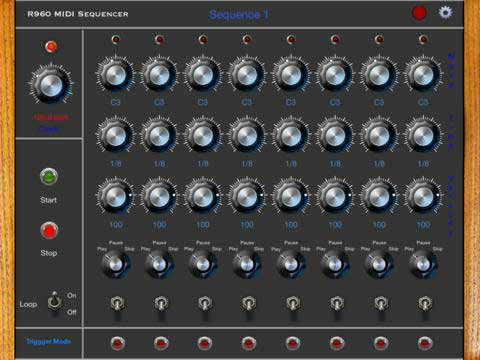
Roger Mann says that his new R960BSeq app turns your iPad into a classic step-sequencer. It does not generate audio, but sends MIDI to Synthesizers
Features:
- Supports Core MIDI
- Can control any background MIDI enabled App
- Runs in the background
- MIDI input for External Clock and MIDI Sync
- Compatible with iOS MIDI interfaces
- Supports MIDI clock and Transport
Pricing and Availability:
$4.99
Novation – Bass Station II Acid Filter / Step sequencer capabilities
Short demonstration of Novation – Bass Station II focused on capabilities of Acid filter. Legendary Fatboy Slim pattern was programed using the built in step sequencer (no extrenal midi)…enjoy
ALESIS ANDROMEDA A6 – Step sequencer
Alesis Andromeda A6 analog synthesizer step sequencer keyboard demo. Performing live ambient space music on Alesis A6 Andromeda analogue synth keyboard using the built-in step sequencer. Created using 2 oscillators, LFOs, filter / envelope adjustments, portamento, unison detune, delay effects on vintage Alesis A6 Andromeda analog synthesizer keyboard. Performed live, no external processing. Excerpt from a longer session.
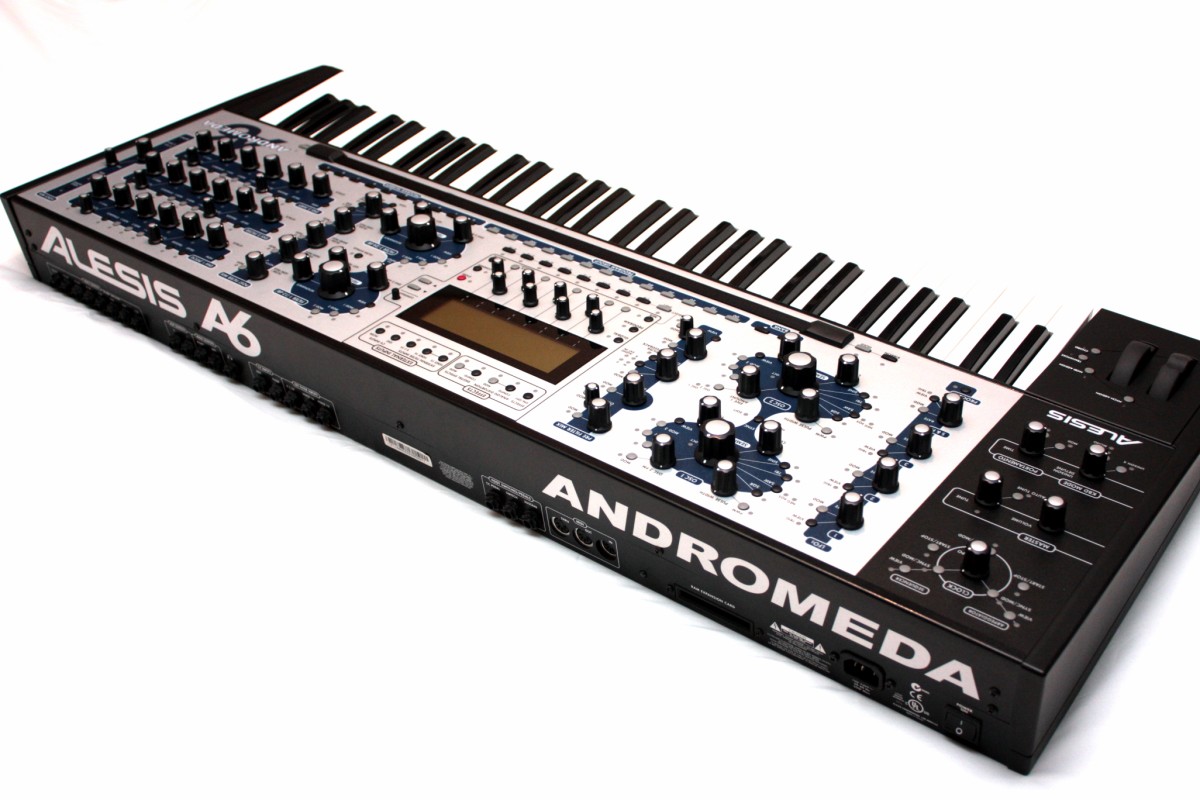
The Andromeda A6 is a true analog synthesizer using two analog oscillators per voice, sub-oscillators, hard and soft sync and more! It features 16-voice polyphony. With the Andromeda, you’ll find a huge range of tonal possibilities: searing leads, warm pads, fat bass lines, extreme sound effects and more. And of course there are plenty of knobs (72) and buttons (144), even an assignable ribbon controller for addictive hands-on real-time control! The large high-resolution LCD display is excellent and shows you actual rather than relative values of parameters. Andromeda will integrate seamlessly into any studio with its total MIDI control and sync, individual voice outputs, stereo outputs and several audio inputs.
Andromeda is completely analog – no emulation! It features two analog filters per voice that sound great! They are a multimode 2-pole and a 4-pole lowpass. External audio can be routed through these filters too (three 1/4″ jacks)! As for modulation, Andromeda has three LFOs, each with six waveforms and they can be synced to MIDI clock. And there are three 7-stage envelopes with very creative and flexible functions. Also onboard is an extensive mod matrix for enormous freedom in configuring Andromeda’s sounds!
No analog synth would be complete without a set of classic effects and features. Andromeda also offers Portamento with nine slopes and legato functions. A built-in arpeggiator and analog-style sequencer are available, with MIDI sync! There are also some high quality digital effects such as reverbs, chorus, echo, distortion and more! Andromeda comes with 256 breathtaking preset patches plus 128 user. A PCMCIA-format memory card slot allows for additional programs and mixes. Andromeda is pure analog bliss, with all the features, stability and widgets of modern digital synths.
Moog Voyager Filter Step Sequencing
A quick inspirational video showing a nice result from step sequencing the Moog Voyager’s filter cutoff.
Tick Tick Step Sequencer – new pattern sequencer Rack Extension for Reason
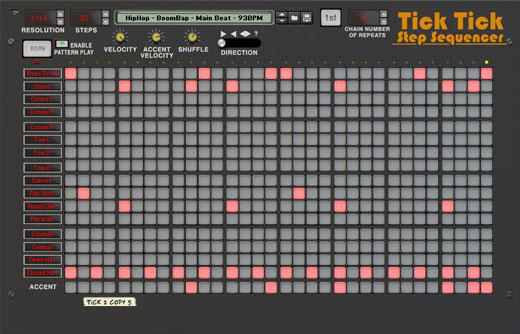
Josh Levy has released the Tick Tick Step Sequencer, a pattern sequencer Rack Extension for Reason.
Tick Tick is a polyphonic button-style step sequencer designed to control your BOOM 808 Percussion Synth as well as other Reason drum machines, and monophonically send notes to other Reason synthesizers and devices.
Chain multiple Tick Tick units together, each with its own pattern, to create complex combinations, and even entire songs.
Tick Tick includes a full beat pack by Reason Refill maker -008′. Also included are contributed demo beats, combis, and over 1,500 scales and modes.
Tick Tick Step Sequencer features
- 16 note polyphonic step sequencer, with editable names and assignable midi notes.
- Up to 32 steps per pattern, from whole notes to 1/128th notes.
- Shuffle control.
- Forward, reverse, pendulum and random repeat modes.
- Two velocity levels.
- Chain multiple units together to create whole songs or complex patterns.
- Automation and cv control for starting and stopping.
- Individual cv outs for each instrument.
- Massive beat pack by -oo8’.
- More than 1,500 scale and mode patches for use as a note sequencer or arpeggiator.
- Run and stop controls for previewing Tick Tick patterns.
The Tick Tick Step Sequencer is available to purchase at the Propellerhead Shop for 32 EUR.
Groovesizer Alpha & Doepfer Dark Energy: random patterns
The Groovesizer (http://groovesizer.com) with Alpha firmware is a DIY 32-step sequencer and synth. In this video, it’s controlling a Doepfer Dark Energy via MIDI. The video shows off the random pattern generation of the Groovesizer Alpha (major, minor, pentatonic, chromatic).
The Groovesizer (pronounced groove-a-sizer) is a DIY 8-bit audio platform. It’s a musical chameleon that can take on a number of different roles from sequencer to synth, drum machine, or midi controller. Exactly what the Groovesizer is at a given moment depends on the firmware it’s running. Existing firmware can be freely hacked, or new firmware developed using the beginner friendly Arduino IDE. Firmware is loaded to the board directly from the Arduino IDE, either via an AVR ISP programmer, or by flashing the Atmega chip on an Arduino board and swapping it out.
The Groovesizer is based around a custom PCB that features 6 potentiometers and 5 rows of 8 tactile switches and leds (4 rows for the sequencer / trigger buttons and 1 row dedicated to control functions). It features an integrated Arduino clone, an 8-bit DAC option, an LM386 amp output, MIDI in/out/sync and is configurable to work with some of the most popular existing Arduino audio projects.
Furthest along in its development is the Alpha firmware which features a 3 oscillator monosynth attached to a 32-step sequencer with 112 memory locations to store patches and patterns.
DATAMASKIN

