
The Zebralette synth becomes freeware
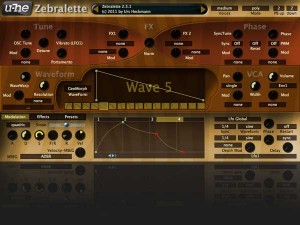
German software developers u-he have decided to make Zebralette, a stripped-down version of their popular Zebra 2 synth freeware. Here’s what they have to say:
Zebralette has two LFOs (one per voice, one global), a multi-stage envelope and three on-board effects (chorus, EQ, delay). Not forgetting Zebra2’s famous dual spectral effects, which include several squelchy filter algorithms.
Megasaw? Zebralette also goes to eleven.
So: Because the Zebra2 oscillators are so powerful, Zebralette is actually a great little synth in its own right, and it has the same pristine audio quality as the mighty Zebra2… try out the new presets and see for yourself!”
Teaser: Second Generation Waveshaping Synth from Cakewalk
Cakewalk has announced plans for Z3TA+ 2, an update to their waveshaping software synth:
With a redesigned user interface, deeper editing controls, new effects, and superior sound quality, Z3TA+ 2 builds on the legendary reputation of its predecessor.
Of course Z3TA+ 2 would not be complete without a new collection of sounds so we retained many of the same sound designers of the original Z3TA+ to create exciting new programs that are sure to spark your creativity. If you already own Z3TA+, then the upgrade to Z3TA+ 2 is a must-have and will be available for a special price. Z3TA+ 1.5 is included with SONAR X1 Studio and Producer and those customers will also be eligible for this special upgrade pricing.
Z3TA+ 2 is expected to be available later in July.
Analog Synth Control Review
We’re looking at the Expert Sleepers Silent Way software for controlling analog gear and the ES-1 and ES-3 audio interfaces . The Silent Way consists of 10 plugins in AU/Vst for Mac or VST for Windows. Its a download from the Expert Sleepers site and requires installation of a license manager – it was a pretty simple process for me on Mac 10.5.8 – once the license key was provided, the plug-ins showed up in Logic and Live no problem. The best place to start is with the SW Voice Controller- this is a fully featured Gate/CV with 3 envelopes and a velocity output and can use up to 6 outputs, though its pretty simple to use just CV and Gate to control the basic pitch and trigger of a synth.Full review text here: http://bit.ly/iqWSGY
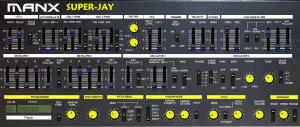
Introducing the Manx Super-Jay VSTi synth for Windows
Musing about with some of the factory presets of the Manx Super-Jay VSTi. Some external reverb & delay have been applied. Manx syntherizers aren’t created using the same methods as other analog emulations.
The Super-Jay is certainly feature laden, but this is NOT why you should be interested in this VST instrument! There are thousands of all singing all dancing virtual instruments available already, but to our knowledge, none of them generate audio using the same principles as the ‘Manx Engine’ – the DSP code that lies at the heart of all Manx Synthesizers. The Manx range has been created specifically to push the boundaries of warmth and character much closer to the standard set by analog hardware which is now decades old.
iPod Touch – Pythagoras synth in action
Fielding is using Pythagoras, a new microtonal iOS synth instrument, still in development.
Riffing on classic orchestral tune from The Conan The Barbarian Sound Track “The Orgy” to demonstrate that the iPod touch version of this thing is actually playable. About as playable as Mugician.
This module is amazing!
4ms new Eurorack synth module, the VCA Matrix – a playable 4×4 matrix of 16 VCAs.
Four CV or audio inputs can be routed in any amount/combination to four outputs, using the 16 CV control jacks, Level knobs, and Mute buttons. Here we are trying out the brand new 4ms VCA Matrix module. This module can do you so many things its hard to know where to start! This patch is a fairly basic voltage router. Various LFO’s, slow, fast, and pitch-tracking are coming in on the left, the row labeled inputs, A B C D. The outputs, 1 2 3 4, are routed to different CV inputs on modules in our sequencer patch.
Output 1 goes to a filter cutoff, output 2 to delay time, output 3 to an oscillator pitch input, and output 4 to another filter’s cutoff. Then you can “play” your different routings! Slot 1C has a slow, squarewave LFO applied to it’s control input, and you can see the light flash when the square goes high.
This is only one example of what the MatrixVCA can do. You could use it as a patch storage/recall device enabling you to make modular presets. You could send fixed voltages into the inputs, creating playable sequences, The MatrixVCA also passes audio like a normal VCA. This can allow you to make some really complex patches. Kinda’ like a guitar pedalboard on steroids;) This is just the beginning…. This module is amazing!
Features:
- 4 CV/audio inputs and 4 outputs (buffered and dc-coupled)
- 16 VCA’s using high quality SSM chips
- Playable surface with 16 latching Mute LED buttons, to mute each VCA individually (mute button disconnects Control jack and Level knob, and silences the VCA)
- LED button brightness indicates sum of Control jack, Level knob, and Mute button
- 16 Control jacks for VCA level control
- 16 Level knobs attenuate the incoming Control signals. The control jacks are normalled to +5v, so if no control is plugged in, the knobs act as manual level (boost/cut) controls
- Matrix Expandability: VCA Matrices can be connected to form a larger matrix using headers on the back (4×8, 8×8, 12×4, etc)
- Control Expandability: 16-pin header on back side of PCB allows an external device to control all VCAs: e.g. patch recall, patch sequencing, preset patterns such as quadrature panning, etc.
- Suitable as a 4×4 mixer, splitter, as well as dynamic signal router/processor
Dewan Cousins Build Synths for Trent Reznor From Scratch
Cousins Leon and Brian Dewan build every piece of their solid-state analog synthesizers. All the way down to the circuit boards. Motherboard stopped by their lab for a visit.
Teaser: Reason Refill optimized for tablet synths
This is preview of “XYZ- Tablet Synth” combinator device from Navi Retlav – Missing Pieces Refill.
If you have tablet, or any device with multi axis controls like kinect and software for transforming it in to midi controller, this combinator will help you to play music and fx-es with your favorite synth sound. Audio Samples from this video are not included in this refill.
New Reason Refill Coming Soon !
Subscribe for more videos and feel free to give comments.
Does the world really need another drum synth?
If we’re talking about Rob Papen’s Punch, then the answer is YES. Check out this video to see how to divide up your drum parts in Punch and process each individually.
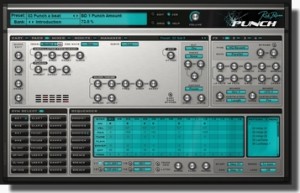
With Punch, Rob Papen delivers a brand new speaker busting, body rattling software instrument. Punch delivers synthesized drums in the finest audio quality and with breathtaking features for the contemporary producer.
You can can use synthesis and the build in samples to build your own unique sounding drum-kit, but also your own samples can be loaded into Punch to complete your kit. Your sounds can then be crafted using the stunning features, filters and huge synth power we all know from other RP synthesizers.
Punch has a unique sound but also built in sequencers, allowing you the user to have multiple patterns at your finger tips. These grooves can be triggered in a live environment to build a song, but are also great for just improvisation and jamming!
Also featured are a growing amount of drum-kits built by 3rd party designers and famous DJ’s which complete the arsenal of power that is Punch…
REVIEW: PUNCH Drum Synth VSTi by ROB PAPEN with Ableton Live
Like to Make Beats? You’re in for a treat. With Rob Papen’s Punch, you can can use synthesis to build your own unique sounding drum-kit, but you can also load your own samples into Punch to complete your kit. Your sounds can then be shaped using the filters and synth features.
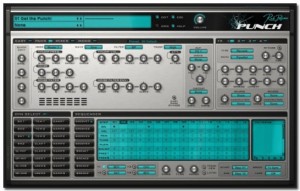
Drums Synthesis
- 2 Bass Drum with 4 different models and 18 built in samples
- 2 Snare Drum with 2 models and 33 built in samples
- 2 Open Hihat and 2 Closed Hihat, with 3 models and 12 built in samples
- 3 Toms with 2 models and 8 built in samples
- 2 Claps with 3 models, and 13 built in samples
- 3 User Drum , with 5 models and 37 samples
- 8 Dual Sample slot, each with there own amp / pitch envelopes & filter and filter envelope.
- Each drum has it’s own ‘easy controls’, distortion (20 different models) , output destination (to dry or any of the 4 fx / output channels) , and choke groups.
- Each drum can be preview and selected by clicking in the Drum Preview Pad.
Sequencer
Punch has it’s own internal sequencer which can play 8 different patterns of up to 16 steps long (4 Grooves & 4 Break patterns) , these having a swing and humanization controls.
Each pattern is composed of 4 tracks, each track having it’s own drum output.
Each step in each track can have different velocity, panning, pitch , envelope speed & flaming, and each pattern also has two free step values which can be used to modulate controls.
Modulators
Punch has 2 envelopes, 2 LFOs and 8 modulation slots , which allow you to use a wide variety of modulation sources to control Punch’s parameters.
Mixer
The Mixer screen shows the volume & panning of all the controls, plus the fx mix & panning, allows you to easily mix the drum sounds.
Easy Screen
Easy to use sliders let you alter the main controls on the fly during use.
FX 1 to 4
4 FXs, each with 25 different type of fx (delays, reverbs, chorus , distortions etc), which can arrange in 5 different ways. In the multi-channel version of Punch, these fx are output to the different output channels.
Manager Screen
Full Manager screen, which show you all the presets, banks & presets, allow you to load, save, copy & paste etc them, including the powerful find function.
DATAMASKIN

